LS Staging

Tag: Search Engine Optimization

  • This ONE Thing Will Change The Way You Approach SEO

    This ONE Thing Will Change The Way You Approach SEO

    “How much time will it take to rank this keyword?”

    It is the most annoying ‘million dollar question,’ every client throws at the SEO guy.

    And the typical response is..

    “Ummm.. 3–6 months”

    “Well,6–9 months give or take”

    And my favourite..

    “It depends”

    It doesn’t matter, which part of earth they are from, businesses that  need SEO services will ask this question.

    I have been on the receiving end too many times 🙂

    I am not against asking this question. But,one should get the entire picture before taking up any activity. And in this case, one might not be familiar with how SEO works.

    But the problem comes afterwards, when people have set unrealistic expectations while answering such questions. You just end up inviting trouble.

    How should we address this issue with all parties coming to a mutual agreement?

    Well, there is an critical factor to consider when approaching SEO activities. You need to constantly remind yourself of this one thing, and this is PATIENCE

    Patience is the number one investment you need to do when dealing with SEO activities. (this applies to both the client and the SEO guys)

    Patience is one virtue that you must swear by while you are dealing with SEO activities. What?! Hold on, you’re telling me with technology advancement, evolution in tactics and numerous data points at disposal, SEO still requires us to be patient?

    YES, that’s true. And I get it, the core pain point lies here.

    Why pay a digital marketing agency  that is potentially sitting on the other side of the planet and I can’t even know what I am getting for it? I need to be patient?

    Again, YES! You need to have patience.

    Here’s the thing-

    Long-term strategies are always better than short-term fixes.

    And there is no better way to resonate this with SEO. You have to be in it for the longhaul.

    SEO is not a sprint race; it is a never-ending marathon. Even if you cross the finish line, YOU HAVE TO KEEP RUNNING.

    We live in a world where..
    Love is found on a right swipe,
    Smartphones are delivered within the same day,
    “Advanced” courses are completed in six hours.

    So trying to convey someone (who is not SEO savvy) that it will take 6 to 12 months or even more to rank keywords in the top positions, and they will happily accept it- It’s not going to happen.

    Nobody ever thinks that the smartphone that got delivered the same day went through a journey of research and engineering. And that journey wasn’t completed in a few days.

    But no, we want everything NOW!

    Unfortunately, with this ‘instant gratification’ mindset, people end up taking the unethical route or ‘Blackhat’ technique to implement SEO tactics. This includes publishing duplicate content, buying links or creating irrelevant and low-quality backlinks.

    You may see quick results, but the party won’t last long. Search engines will eventually figure this out and penalize your website for manipulative practices.

    You have also seen YouTube videos or read articles about the ‘hacks’ of SEO, how implementing A-B-C steps will get your website ranking on the first page of Google, some plugins which can push your keyword rankings, and so on. These suggestions can be good for someone who has just started the SEO journey. But there’s no additional information which can be helpful. Many of these suggestions are like those chocolate bars, the same flavour wrapped in a new cover.

    We keep exploring the web, hoping to find better answers. Why?
    Because it is hard to accept that things will take time. Simply put, we become impatient.

    The fact is, each business is unique. And there are multiple factors deciding how much effort and time it will take to rank your website. Sure, many of those factors are in our control and can be executed by the book, but a lot also depends on what the client’s goals are.

    How competitive is the business?

    What location are you targeting?

    Who are you targeting?

    Do you have the budget to implement the strategy?

    Is the product even ready for sales?

    And many more..

    There are factors like these that need to be properly addressed, as it can prevent us from executing activities as planned.

    SEO is beautiful. When done right, it will give you the desired fruits, but it demands some respect.

    Some of us who are already familiar with SEO, have experienced undesirable delays. For example

    • Indexing — Getting a new Title tag indexed could take more than 24 hours when you expect it within 5 minutes. You keep submitting the URL in Google Search Console, but nothing. Frustration.
    • The Google dance — Keyword which was ranking on the 2nd page till yesterday, suddenly started ranking on the 9th page.

    You do your diagnosis, come across errors and quickly fix them. But Google doesn’t show you the results immediately. You need to take into account such uncertain events and deal with them patiently.
    There are several examples where I can go on talking about unexpected delays in SEO activities, but that’s for some other day.

    While these are technical issues we face during the SEO process, there are a couple of things we should address before the process starts

    Managing expectations

    Before any SEO project starts, it is vital to have a detailed discussion about the project. Educating each other about what goes behind the scenes will give you more clarity about the process. The understanding of being patient gets more receptive. Let’s not have short-term greed, which will lead to long-term resentment.

    Expectations need to be managed throughout the funnel.

    Response Time

    Sometimes getting approvals for a very rudimentary purpose goes through the organisation’s hierarchy. For example, getting access to Google Search Console.

    I have faced such issues many times, especially with Fortune 500 clients. The key here is to have a SPOC who gets these things out of the way, so everyone focuses on important matters ats hand.

    I agree that it can be difficult to convince higher management that making changes takes time, and search engines can be slow to react. But,as we have discussed, it is important to be clear and set the expectations right from the word go.

    SEO is a complex process. It takes time for search engines to trust your website. After all, Google is made to help users get the right information and that should come from a trustworthy source.

    Have patience and build trust, it will be worth it.

    So the next time someone asks you, “How much time will it take to rank this keyword?”

    Send them this article 🙂

  • SEO Technical Audit Checklist 2021: How to make your website crawler friendly

    SEO Technical Audit Checklist 2021: How to make your website crawler friendly

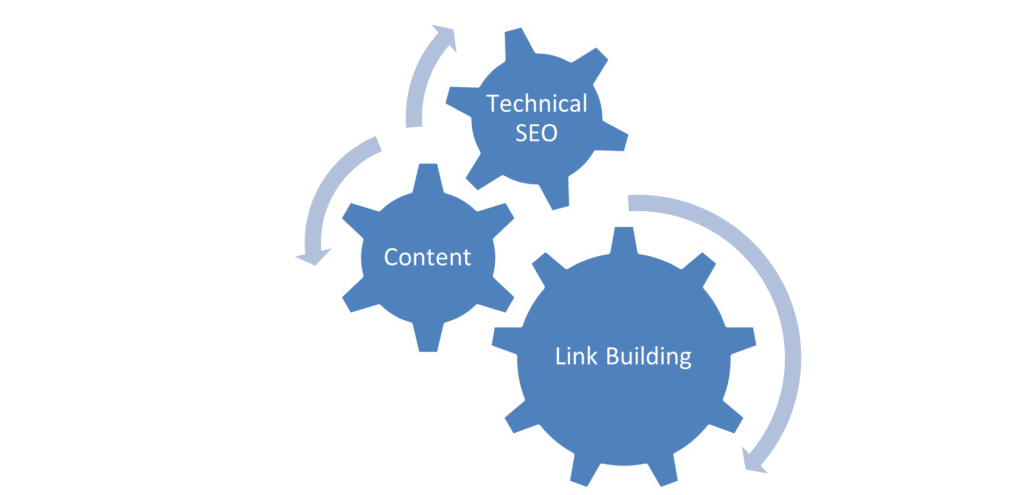
    SEO, as a process, basically consists of 3 important parts; Technical SEO, Content and Link Building.

    What is a Technical Audit?

    A technical audit is a process to check the crucial technical aspects of your website. Understanding and maintaining your website by identifying these technical aspects can help you rank prominently, drive organic traffic, and help achieve your goals.

    1. Content Visibility 

    Since content plays a huge role in targeting our keywords and providing relevant information for our product offering, it is imperative to ensure that the content is visible and available to the user and the web crawlers. This makes it a good first step for a technical audit.

    Ensure that the homepage, category pages, product pages, and all other high priority pages are visible to the user and available to the crawler.

    Given below are a few methods to check if the content is readable to the crawlers

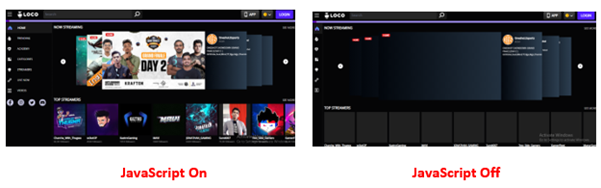
    • Disabling JavaScript

    JavaScript can be disabled in Chrome to see if any critical elements of the webpage are not rendered. Unrenderable content, links or navigation elements could indicate that the crawler cannot view the webpage present. 

    Since Google has stated that it can render JavaScript websites now, a few additional checks need to be performed to ensure that the website’s content is renderable.

    • Cached version of the website

    A cached version of the website

    One way to check how the Googlebot views your page is to check the cached version. Checking the cached version of the webpage can help you identify if any essential content elements of the website are missing or not being rendered correctly.

    Given below are methods to check the same

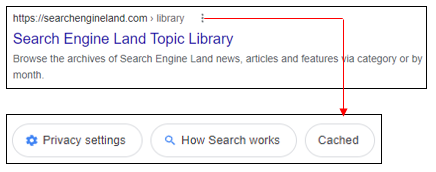
    • Use the “site:” search operator in Google to find your page in the index (e.g., Site: example.com/abc)
    • Click on the three dots next to the page’s URL and click on ‘Cached

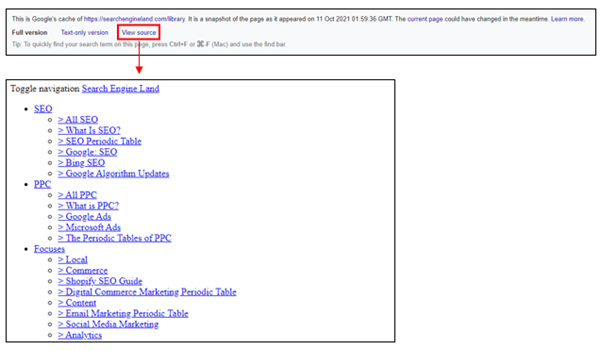
    This will show you the cached version of Google’s page in their index from the last time it was crawled.

    • The text-only version will help you understand if the content present in a webpage is rendered properly. 

    Alternatively, you can check the cached version of a specific page using the “cache:” operator (cache: example.com/example-url)

    Content Rendering

    To analyse if the content on the webpage is visible, we also need to understand how content is rendered. Rendering is the process where Googlebot retrieves your pages, runs your code, and assesses your content to understand the layout or structure of your site.

    There are three different types of rendering for web pages that can be leveraged to present content to the user and bot

    • Client-Side Rendering
    • Server-Side Rendering
    • Dynamic Rendering

    The debate between client-side rendering, server-side rendering, or dynamic rendering is only relevant for websites that utilise JavaScript. If your website is purely HTML, there’s nothing that human users or search engine bots need to render.

    Refer to the below-mentioned link for more information about Content Rendering

    (Reference Link)

    2. Indexation Checks

    To rank for relevant terms, increase visibility, and improve organic traffic, one must ensure that all website’s important pages are indexed in Google. 

    Given below are a few checks that you must do to check indexation

    • Google site: query

    In the Google search field or browser Chrome search bar, you would type in the following:

    site:www.abc.com

    This, in turn, will give you a list of all the indexed pages of your website, thereby helping you understand any indexation issues if present.

    The site: query can also be filtered using different options for specific indexation checks

    site:www.abc.com/subdirectory/

    Only displays the indexed pages in the directory /subdirectory/

    site:www.abc.com Phrase of choice

    Only displays those indexed pages which contain the phrase of your choice

    site:www.abc.com inurl:phrase

    Only displays those indexed pages which contain the word “phrase” in the URL

    site:www.abc.com intitle:phrase

    Only displays those indexed pages which contain the word “phrase” in the title

    site:www.abc.com filetype:pdf

    Only displays those indexed files with the chosen filetype

    • Google Search Console

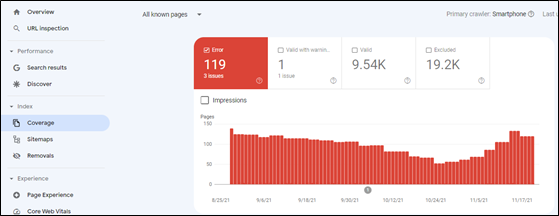
    Google Search Console provides an overview of the indexed pages. Indexation can be checked by clicking on the option ‘Coverage’ under the ‘Index’ section.

    As seen from the above illustration, Google Search Console also provides valuable insights concerning indexed pages, including the presence of ‘no index’ tags, 404 pages, and server errors.

    3. Duplicate Content Checks

    Duplicate content confuses Google in choosing the identical pages that it should rank in the top results. This, in turn, harms website ranking, thereby leading to a drop in organic traffic in the process.

    Given below are a few checks that you must do to prevent content duplication

    • On-Page Elements

    Make sure that all the pages have a unique page title and meta description in the HTML code of the pages. Also, headings (H1, H2, H3 etc.) should be unique for every page. 

    • Use of Proper Canonical URLs

    The canonical tag is an integral part of letting Google know which site is original and should be ranked and which pages should not be ranked. If there are multiple similar pages, Google will be confused concerning ranking. As a result, it is vital to ensure that a proper canonical tag is defined pointing towards the master page.

    • HTTP vs HTTPS or WWW vs non-WWW pages

    If your site has separate versions for abc.com and www.abc.com (non- WWW and WWW versions of the website), Google will identify both the versions as duplicate content, thereby negatively affecting indexation and rankings. Similarly, different versions for HTTP and HTTPS can also create duplicate content issues. Proper 301 redirect (Permanent Redirect) should be employed to prevent duplication issues.

    • Use of Hreflang tags

    Hreflang tags are code snippets that tell search engines what language the content on a page of your site is written in, what geographical region it’s intended for and its relation to other pages of the website.

    Example

    <link rel=”alternate” hreflang=”en-in” href=”http://www.abc.com/in/” />

    With respect to multilingual websites, it is highly imperative to implement hreflang tags correctly.

    Refer to the below-mentioned link for more information on Hreflang Tags

    (Reference Link)

    4. Secure Protocols (HTTPS)

    As per Google, HTTPS is a ranking signal. To capitalise on the same, one needs to ensure that non-secure versions (HTTP) are changed to HTTPS.

    Given below are a few checks you must do to get a sense of the overall security protocol of the website.

    • Check the website’s homepage, category pages and product pages for HTTPS. Try accessing the website using the Non-Secure Protocol (HTTP) and check if it is getting redirected to the relevant HTTPS version of the website. The presence of the HTTP version of the websites can create mixed content issues like content duplication.
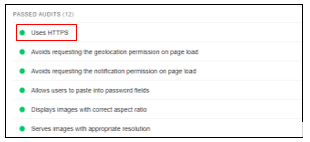
    • You can use Google’s Lighthouse browser plugin to verify if HTTPS has been used across the website. With the plugin installed, click ‘Generate Report’. Once the report id is generated, check under Best Practices > Passed Audits

    Source – Lighthouse

    Refer the below mentioned link for more information about HTTPS

    (Reference Link)

    5. Scanning for Broken Links

    To ensure that we cater relevant pages to the crawler and user, we need to check for pages displaying a 404-error status code (Page Not Found). Broken links on indexation can lead the users to an error page, thereby having a negative impact on user experience. 

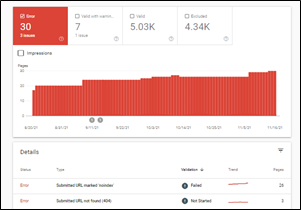
    The Search Console ‘Coverage’ report can help you identify any error pages present on the website. On selecting ‘Errors’, one can scroll down and check for pages displaying a 404-status code.

    Source – Google Search Console

    These pages can be redirected to other relevant pages within the website to ensure that we do not lose out on potential traffic.

    6. Auditing Robots.txt file

    A robots.txt file tells search engine crawlers which URLs the crawler can access on your site. It is mainly a directive to ensure that only relevant pages are presented to the crawler to ensure maximum coverage and avoid irrelevant indexing pages.

    The robots.txt file can be accessed by typing in the below-mentioned URL

    (Reference Link)

    The most common directive to ensure that all the pages are accessible to the crawler is as given below.

    User-Agent: *

    Disallow:

    Sitemaphttps://abc.com/sitemap.xml

    The asterisk symbol (*) denotes all user agents. Pages that need to be blocked can be added in the disallow directive. In contrast, the XML sitemap will present the crawler with all the website’s relevant pages, facilitating smooth crawling.

    Refer to the below-mentioned link for more information about how robots.txt works

    (Reference Link)

    7. Auditing XML Sitemap

    An XML Sitemap is a file that contains a list of all the crucial pages of the website to help Google find and index the same. The XML Sitemap can be accessed by typing in the below-mentioned URL

    (Reference Link)

    The exact URL of the XML sitemap can also be located in the robots.txt file.

    One must ensure that the XML Sitemap only contains relevant URLs that you want to get indexed.

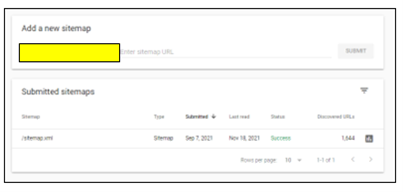
    The XML Sitemap can also be added to Google Search Console by choosing the ‘Sitemap’ option under the ‘Index’ section to analyse if all the URLs present are valid and improve discoverability.

    Refer the below mentioned link for more information about XML Sitemaps

    (Reference Link)

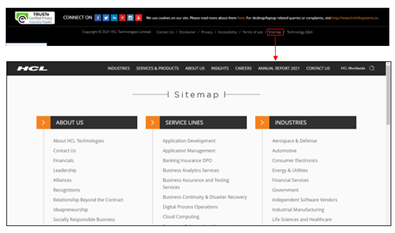
    8. Auditing HTML Sitemap

    HTML Sitemap is an HTML file that contains all the website’s important pages and creates a general picture of the entire website. In simpler terms, XML Sitemap is for crawlers to understand the site structure, whereas an HTML Sitemap serves users with relevant pages of the website.

    The HTML Sitemap is usually located at the website’s footer section, helping users understand the site hierarchy in detail, thereby facilitating smooth navigation.

    Like XML Sitemap, one must ensure that only relevant pages are added in the HTML Sitemap.

    9. Page Speed Checks

    Page speed is a measurement of how fast the content on your page loads.

    Page speed is often confused with “site speed,” which is the page speed for a sample of page views on a site. Page speed can be described in either “page load time” (the time it takes to display the content on a specific page fully) or “time to first byte” (how long it takes for your browser to receive the first byte of information from the webserver).

    For both desktop and mobile search rankings, Google has announced that page speed is a ranking factor. Page speed also can poorly affect user experience, increase exits, and increase bounce rate.

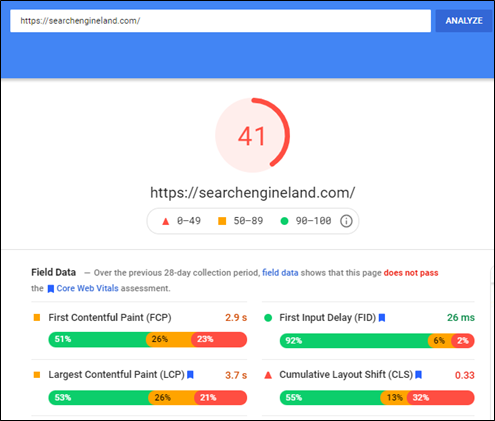
    Go to the Google PageSpeed Insights tool and enter your site’s URL

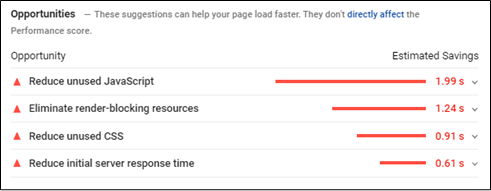
    The tool, in turn, will provide a score for your desktop and mobile version with specific recommendations to help improve the page score and eventually improve the website experience as well.

    Core Web Vitals

    Core Web Vitals are a set of specific factors that Google considers important in a webpage’s overall user experience. Core Web Vitals are made up of three specific page speed and user interaction measurements: LCP (Largest Contentful Paint), FID (First Input Delay), and CLS (Cumulative Layout Shift)

    Since Google has made Core Web Vitals an important ranking factor, ensuring that the scores meet the guidelines set is vital.

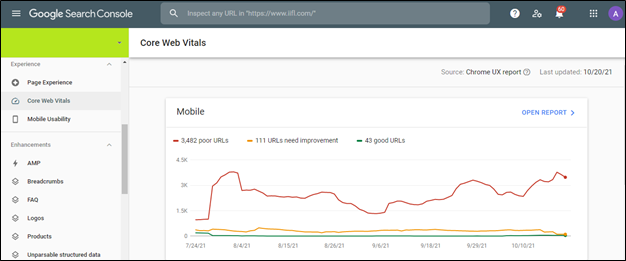
    Core Web Vitals can be checked using Google Search Console in the ‘Experience’ section.

    Core Web Vital scores for all URLs on Mobile and Desktop is given in the above dashboard. This makes it easier to identify and optimise the pages based on three vital parameters.

    Refer to the below-mentioned link for more information about Google Search Console

    (Reference Link)

    1. Mobile Checks

    With the advent of mobile-first indexing and the increasing number of mobile phone users, it is imperative to ensure that the website is mobile-friendly for user experience, indexation and ranking purpose.

    Mobile Optimization ensures that mobile visitors have an experience optimised for their device and considers factors such as website design, site structure, page speed and more to ensure a seamless and quality mobile experience.

    Given below are a few vital mobile checks that you must do

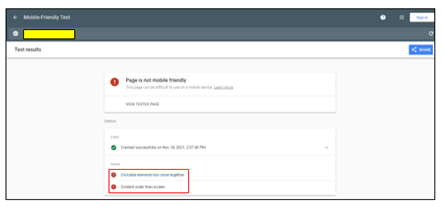
    • Use the Mobile-Friendly Test Tool

    The Google Mobile-Friendly Test is a free tool that allows you to type in the website URL and find out how mobile-friendly Google thinks their site is. It also gives specific recommendations concerning mobile checks, helping identify any issues (if any).

    Content Mismatch

    It is vital to ensure that the content present on the mobile device and desktop is the same. Keeping in mind the mobile-first approach taken by Google, if your mobile site has less content than your desktop version, Google might not get additional information about your website, thereby hampering the indexation and ranking of the website.

    Although different designs can be adopted for the mobile version to maximise user experience (Creation of accordions and tabs to show content), the content present should be exactly like that of the desktop version

    • Use Large Buttons

    Mobile-friendly websites need to have call to action buttons that are large enough to induce users to tap them rather than zoom. This, in turn, makes it easier for the user to navigate and increases user-friendliness in the process.

    Additionally, there needs to be spacing between hyperlinks. If links are placed too close to each other, users might attempt to click on a link and accidentally click on a different one, thereby hampering user experience in the process.

    • Make the text large enough to read

    The text on the website needs to be legible and large enough, thereby making it comfortable to read. Users should not have to zoom in and scroll left or right to read something as this might negatively affect user experience.

    • Navigation Mismatch

    The options present under the navigation in the mobile version should be similar to the desktop version to ensure accessibility. Missing options in the navigation menu can affect the website’s visibility, affect ranking, and hurt user-friendliness.

    • Simplification of Navigation Menus

    Since desktop website menus have a lot of space, they can take up the entire bar at the top of the screen with additional drop-down options without negatively impacting the user experience.

    There isn’t much space to incorporate the menu like the desktop version with respect to mobile devices.

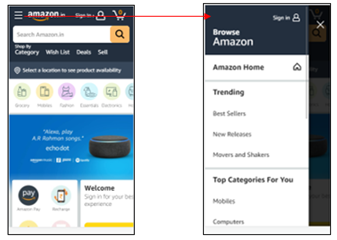
    Mobile-friendly websites must use simple menus that are easy to use and present an accurate overview of the website. Users can then use categories, filters, or the search functionality to navigate further.

    Most mobile-friendly websites use the hamburger menu. A hamburger menu, when clicked, opens to reveal a navigation menu, thereby not utilising a large amount of space.

    • Avoid Pop-Ups and Intrusive Interstitials

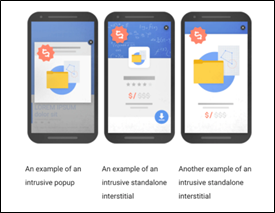
    In 2017, Google rolled out an algorithm change that penalizes websites that include specific types of pop-ups on mobile devices.

    As stated by Google, the below mentioned pop-ups can have a negative effect on the website by making content less accessible.

    Source – (Reference Link)

    As seen from the image, any pop-up or interstitial that makes it difficult to access the content is termed as intrusive and can lead to further penalties.

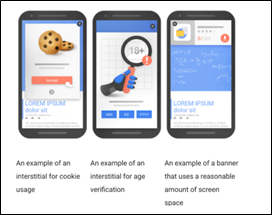
    Given below are the pop-ups that are not deemed as intrusive thereby having no negative effect on the website

    Source – (Reference Link)

    As seen from the above image, pop-ups that do not take much space, add value to the user journey and cookie usage settings are not deemed as intrusive.

    11. Auditing Backlinks

    Backlink Audit is the process of analyzing links pointing your website. The process involves identifying good and bad backlinks and developing a robust strategy.

    Backlinks for your website can be downloaded from Google Search Console by choosing the ‘Links’ option.

    Backlinks can also be extracted by third party tools like Ahrefs and Majestic SEO.

    Given below are few steps to understand how backlinks need to be audited

    • Benchmark Your Backlink Profile Against Competitors

    With the help of third-party tools, we can analyze the backlinks for our competitors to understand the quality for the same. This can help you create a robust link building strategy for your website.

    • Find and Evaluate Each Backlink You Have

    Backlink portfolio of the website needs to be analyzed in order to identify and remove irrelevant and spammy links pointing to your website.

    Since, Google can penalize you for disavowing sites for no apparent reason, it is highly important to ensure that only spammy links are disavowed.

    Irrelevant backlinks can be divided into two separate categories: Low Quality Links and Spammy Links.

    In case of low-quality links, one can reach out to the site owner to get the link removed from their end. Whereas in case of Spammy links (Porn Sites, Casino Sites etc.) , they can be removed by submitting a list of URLs in Disavow Links (Reference Link)

    • Domain Authority (DA) Bifurcation of website

    Domain Authority of a website describes its relevance for a specific subject area or industry. The domain authority score helps us understand the authority of the website for that industry.

    Getting backlinks from high domain authority will not only help solidify our backlink portfolio but also help increase our domain authority in the process.

    • Anchor text diversification

    Anchor texts are the visible, clickable words used to link one page to another. Anchor texts can have a major influence on rankings in the search engine result pages since the crawler gets more information about your brand and product offering through the anchor text. As a result of which, it is highly important to ensure that we do not overuse terms like click here, learn more etc. Anchor texts should have a healthy mix of brand terms and relevant non brand terms to ensure relevancy and visibility.

    12. Analytics Set Up

    If Google Analytics is already set up, ensure that it is set up and working properly to get accurate data.

    Checks that can be done to ensure proper set up

    • Source Code

    Check your source code (Ctrl+U) of the Home Page, main category pages, and product pages for the presence of the tracking code associated with your Analytics account and property. Since some Content Management Systems handle page templates differently, it’s a good idea to check each kind to make sure tracking is consistent.

    The code should be installed in the head tags (between <head> and </head>) and usually includes an ID that you can match with your Analytics property/view.

    • Google Tag Assistant

    Google’s Tag Assistant browser plugin can help verify if the tracking code is installed correctly.

    • Analyze the Google Analytics Traffic

    If you see extreme shifts in data, then it could be an indication that the tracking code present is not firing properly when loaded.

    In your Google Analytics data, look for periods with no sessions, sudden change in traffic and very high/low bounce rate. These can be symptoms of potential tracking code issues

    13. Accessing Google Search Console

    Search Console is a free tool from Google that helps developers, website owners, and SEO professionals understand how their site is performing on Google Search.

    Search Console allows you to check indexing status and optimize visibility for the website. It also allows you to check for pages displaying server error, manual actions, page experience, core web vitals to help identify issues within the website.

    Refer the below mentioned link for more information about Google Search Console

    (Reference Link)

  • 3 SEO Trends Marketers Should Watch Out For in 2021

    3 SEO Trends Marketers Should Watch Out For in 2021

    No matter how small or extensive your digital goals are, Search Engine Optimization or SEO is one aspect that cannot be ignored. It is worth noting that according to a report on Search Engine Land, 70%-80% of the search engine users completely ignore paid ads. SEO thus becomes the only way to land a spot in top organic search results.

    But the dynamic SEO landscape requires marketers to effectively track every new trend for helping their employers and clients stay competitive and further improve their search rankings. Every new year introduces some significant changes in the world of SEO. 2021 is expected to be no different. Here are 3 SEO trends that marketers should watch out for in 2021-

    1. AI Gains Prominence

    RankBrain, Google’s AI algorithm, is expected to influence search results in the future significantly. Unlike other ranking metrics that are based on insights and discoveries, RankBrain has the unique ability to learn and improve itself.

    While Google has not provided any information with regard to how websites can be optimized for their AI algorithm, experts believe that signals related to user experience will be vital. Factors like clickthrough rate, engaging content, and time spent on the page are the metrics marketers should focus on more in 2021.

    2. Mobile Optimization Becomes More Vital

    According to a Hitwise study, almost 60% of Google searches are now done from mobile. As smartphone users are rapidly rising across the world, it can be expected that this percentage will only increase in the future. If you’ve avoided mobile optimization until now, 2021 can be the right time to begin.

    As Google now uses mobile-first indexing, the website’s mobile version is given priority over the desktop version when someone uses the search engine from a smartphone. If your website is not optimized for mobile, you’ll end up losing a lot of traffic and revenue. Google has also launched a free Mobile-Friendly Test to help you check how mobile-friendly your website is.

    3. Growing Importance of Voice Search

    According to a Voicebit.ai report, voice retail will be a $40 billion industry by 2022 in the US alone. The growing popularity of smart speakers, like Amazon Echo, Google Home, Apple HomePod, etc., will further contribute to making voice search the go-to method to use search engines in the future. In 2021, marketers should start optimizing their websites for voice search. 

    One of the most effective ways to do so is to make your content more conversational and target long-tail keywords. Improving the load time of your website, local listing, and mobile optimization are some other ways to optimize a website for voice search.

    Making the Best Use of SEO in 2021

    No matter if you’re starting with SEO or want to improve an existing strategy further, these are some trends that cannot be avoided in 2021. The best way to take advantage of these trends and rank better is to work with a reputable digital marketing company.

    Professional marketers are at the top of such SEO trends and have the expertise to take advantage of such changes. By teaming up with SEO experts, your website will be better equipped to keep up with the changing trends and rank higher in SERPs.

  • Why is SEO More Relevant Than Ever in 2020?

    Why is SEO More Relevant Than Ever in 2020?

    As a marketer who is concerned about the digital footprint of your business, you might regularly come across technologies, strategies, and tools that claim to be the next best thing. This often makes it challenging for you to stick to a strategy or decide what is right for your digital growth.

    If such modern strategies or tools are unable to deliver results, or at least lasting results, would you be better off with traditional digital strategies like SEO (Search Engine Optimization)?

    But is SEO still relevant in 2020? If professional marketers are to be believed, SEO is not only relevant but more important than ever.

    Why SEO in 2020?

    According to a recent post on SearchEngineLand, 51% of the people who visit B2B and B2C websites are driven by organic search. This means that you are missing out on a significant chunk of traffic by not optimizing your website for the search engines.

    Here are some other reasons why SEO is important for business in 2020-

    1. Optimizing Websites of Locally Focused Businesses

    If you are running a locally focused business, SEO continues to be the best way for client/customer acquisition. If done correctly, it can help you outrank the local competitors and reach more prospective customers.

    Search results on Google are customized as per the geographic location of the user. Your local business website can be optimized in a manner to dominate local search results with the help of SEO.

    1. Search Engines Are the Gateway for Browsing the Internet

    Most people find what they are looking for on the internet with the help of search engines. According to a study posted on SearchEngineJournal, 93% of the online experiences begin with a search engine.

    Considering this fact, a business could lose a lot of potential clients/customers by not getting listed in the search results. Understanding SEO importance and implementing it correctly is one of the most effective ways not just to get listed on SERPs (Search Engine Results Pages) but to land at one of the top spots on the first page.

    1. Implementing a Multi-Channel Marketing Approach

    Just like most things related to marketing, you cannot rely on any particular source for bringing in all the traffic. If you are already using other digital channels like social media and paid ads, SEO can be an excellent addition to your marketing strategy.

    While SEO is ever-evolving and you have to spend a lot of time and resources to get it right, it has a lot of potential to bring in highly targeted traffic.

    Consult a Reputed Digital Marketing Company to Harness the Power of SEO in 2020

    While there is no denying that a lot of traditional methods for online marketing are now obsolete, SEO is here to stay for good. The website optimize process, if done correctly, can help you reach potential clients and customers and bring in a lot of organic traffic.

    The best way to harness the power of SEO in 2020 is to work with a reputed digital marketing company. Marketing professionals better understand the ins and outs of SEO and have the skills and experience that can help your business reach newer heights in the digital world.

  • Are Keywords Still Relevant to SEO in 2020?

    Are Keywords Still Relevant to SEO in 2020?

    Around 2010 when SEO was still in its infancy, keywords were thought to be the Holy Grail for acing search rankings. Spreading keywords across the articles, including meta description, title tags, and H1, was considered to be an effective strategy by most marketers. And it did deliver results, albeit for a short while.

    When Google introduced Panda, the update focused on promoting pages and sites that offered real value to the users. Ones stuffed with keywords or low on quality were demoted.

    So, have keywords lost their relevancy over the years? In 2020, how should a digital marketer or content creator deal with keywords? Getting back to the basics and understanding what SEO content is could offer a big piece of this keywords puzzle.

    How has the Definition of Search Engine Optimized Content Evolved?

    Just like the search algorithms, the definition of many of the SEO-related terms has changed over the years.

    For instance, around 2010-2012, SEO content used to be defined as content that is optimized for search engines. But with Google focusing more and more on helping users find relevant answers to their queries, this definition is not applicable anymore.

    Now, a more relevant definition of SEO content is one that best answers the query of the users. If your content is able to answer user queries, Google will automatically rank it higher.

    So, rather than creating content that best satisfies the search algorithms, a better strategy now is to create content that offers real value and answers to the users.

    Are Keywords Not Useful Then?

    No, keywords are still crucial. After all, they lie right at the foundation of how search engines work. But the manner in which they should be used has evolved.

    As compared to a piece of content that is stuffed with keywords in the best possible manner, content that answers user query and also has keywords will mostly rank higher. The focus should be on answering user query and using keywords, in full or in parts, as naturally as possible.

    For instance, let us consider a query “How many different types of bones in a human body?”

    The top result for this query could be something like, “There are five different types of bones in the human body.”

    So, the top result here is not just stuffed with a keyword but features keyword along with providing the correct answer to the query. While creating content, it is essential to remember that the search engine is only a medium to reach the audience.

    The final goal is always reaching the audience and not how to best impress the search engine algorithms.

    The Way Ahead for Keywords in SEO

    Keywords always were and probably will always be an important component in SEO. But the good old practice of stuffing content with keywords doesn’t work anymore.

    Google has always wanted to answer user queries in the best way possible. But rather than only focusing on the keywords to rank pages, it now also considers the quality and end-goal of the content that it is ranking.

    In 2020, only the content that is able to answer the intent of the user question most comprehensively, and features relevant keywords, could now be considered SEO content that is eligible for higher rankings.

  • Optimise Content for Voice Search and Virtual Assistants to Stay Ahead of Your Competitors

    Optimise Content for Voice Search and Virtual Assistants to Stay Ahead of Your Competitors

    Voice search is the next big thing in web search. According to ComScore, more than 50% of all searches will happen via voice by 2020, and a vast majority of these searches will occur even without using a screen.

    With increasing usage of smart home speakers and virtual assistants like Alexa, Ok Google, Cortana, and Siri, the trend has already started. Nearly a billion voice searches are done every month, and this number is only going to increase in the coming months and years. As a digital marketer and business owner, it’s time you start optimising your content for voice search and virtual assistants.

    Before, you take a look at SEO strategies for voice search, you need to understand user behaviour behind voice search.

    Why and How do People Use Voice Search?

    The why is obvious – voice search is more convenient and easy, rather than typing on a keypad or keyboard. When it comes to ‘the how’, there are significant differences between how people search using a keypad and search using their voice. The structure and phrasing are entirely different.

    For instance:

    Voice Search: Where is the nearest hair salon?

    Text Search: Hair Salon near me.

    Voice search tends to be conversational, thereby providing an increase in long-tail keywords. Apart from optimising for question-based search, you also have to focus on semantic searches. Semantic search phrases refer to a series of inquiries on a particular topic.

    Where is the nearest hair salon?

    What are the ratings for hair salons near me?

    What is the trending hair cut style, right now?

    In voice search, you have to focus not just on providing the answer to a particular query, but also on the intent behind the search phrases.

    Another major distinguishing factor of voice searches is that it’s highly local. Users using voice search are 3x more likely to search for local information, compared to text searchers.

    Now, that you’ve got a clear understanding of how voice search intent and usage is different from conventional text-based search, let’s take a look at some SEO strategies to optimise your content for voice search and virtual assistants.

    1. Focus on Long-Tail Question Keyword Phrases

    One of the most effective and impactful ways to optimise for voice search is to include question keyword phrases in your website copy and blog posts. Try to provide answers to the commonly asked questions about your business.

    This is a great strategy to get featured in the coveted Google paragraph answer snippet. This not only boosts your overall page ranking, but voice assistants are likely to pull up information from Google’s snippets for user queries.

    Answers featured in Google snippets are short, precise and concise. Use headings to indicate to the search engine that you are answering a question.

    2. Lay Extra Emphasis on Local Content

    Voice search and local SEO are intricately linked together. Searching for info on local businesses is one of the main reasons why users use voice search or seek the help of virtual assistants. Start by making full use of the free Google My Business listing. Ensure that your GMB profile is complete and updated. Try adding seasonal and local content to your GMB page regularly.

    3. Go Mobile-friendly

    There’s no doubt that the majority of voice searches happen on a mobile device. Ensure that your webpage design is responsive. Use Google’s mobile-friendly test tool to see how your website ranks on the mobile-friendly index.

    Next, ensure that your site has a fast loading time. Use PageSpeed Insights to find out your site loading speed. Next, optimise your content for mobile devices. Leave a lot of white space, make use of short sentences and easy to understand words, small paragraphs and make use of sub-headings that hook in the attention of the audience.  

    4. Create Blog Posts that Address User Questions

    People use several phrases and structures in voice search. For instance, one user may ask, “What is the nearest salon near me?” while another user may ask, “Show salons near me.”

    Apart from FAQ pages, create blog posts that address the common queries your target audience are likely to have.

    5. Keep an Eye on Voice Search and Virtual Assistant Trends

    Voice search is just getting started, and there is plenty to be explored. Make sure to monitor the behaviour of users and keep an eye on voice search trends. This will help you adopt new practices and stay ahead of your competitors.

    Voice Search isn’t a Fad. It’s here to Stay.

    Alter your SEO practices to include voice search and to get noticed by virtual personal assistants. By being an early adopter of voice search SEO, you can stay ahead of the competition and pull in your target audience from multiple channels.

  • Google Plus Officially Shutting Down: Here’s how to Download, Save and Retrieve Your Data

    Google Plus Officially Shutting Down: Here’s how to Download, Save and Retrieve Your Data

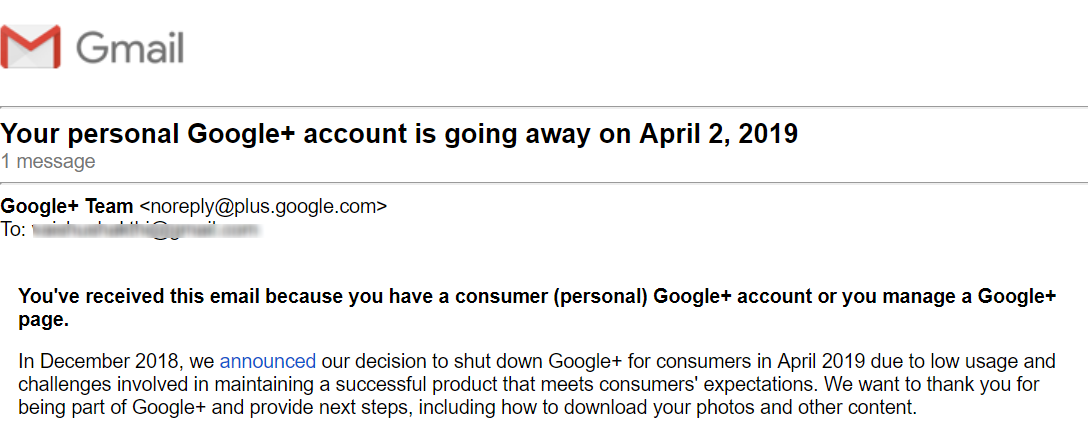
    Google recently sent an email to all users of Google+ (the social media platform of Google) announcing that the platform is officially shutting down on 2nd April 2019. Google announced the company’s decision to shut down the failed social media network in December 2018 via a blog post.

    Why is Google Shutting down Google+?

    In the recent email sent out to customers, Google states that there were several challenges in maintaining a platform that exceeds user expectations and due to low usage, the company has arrived at this decision to retire the social network from Google.

    While that may be the official reason, digital media experts believe that the platform is closing because of a data breach that occurred on it. In March 2018, more than 500,000 accounts on the platform had their personal data illegally shared to third-party developers. This data breach occurred around the same time as the notorious Cambridge Analytica data breach that brought Facebook under intense scrutiny.

    The worst part about this data breach on Google+ is that Google didn’t inform users about it for several months. Though Google claims that none of the data that was leaked was mishandled, it could result in investigations for Google both in the US and Europe.

    Another reason for the closing of the platform is poor usage. Google+ was introduced in 2011 when both Twitter and Facebook were at the top of the social media game. Despite some initial buzz, Google+ never caught on. Though Google+ never went mainstream, it has a niche community of users who prefer an alternative platform that is less crowded.

    How to Retrieve Data from Google+ before it’s Gone Forever?

    If you have saved photos or videos in your Google+ album archive, you won’t be able to access it after April 2nd. However, if you have taken a backup of these photos to your Google Photos, then you need not worry. As the photos from Google+ backed on Google photos won’t be lost.

    If you are a Community Owner or Moderator on Google+ you can download and save your data. From March 2019, you can also download additional data about your community like – photos, body and author details for all community posts.

    If you use Google+ to sign into other apps and sites, the G+ sign in button option will be removed in the coming weeks.

    If you use Google+ to post comments on sites, then you will no longer be able to do so. The option to post comments using Google+ will be removed from Blogger on 4th Feb and from other sites by 7th March. All the comments you posted using Google+ from all sites will be deleted from 2nd April.

    If you are a G Suite customer, your Google+ account for G Suite will remain open. However, Google states that G Suite will be updated soon with a new look and several new features.

    If you are a developer using Google+ sign in or APIs, check out this post from Google to find out how this shutdown will impact you.

    Key Dates to Remember:

    April 2, 2019 – Consumer Google+ accounts and Google+ pages will be closed, and Google will start the process of deleting content from individual Google+ accounts. The process of deletion of customer data will take a while, so you may be able to access some of your data after this deadline, but there’s no guarantee.

    From Feb 4th, 2019 – Users will no longer be able to create new Google+ pages, user profiles, events or communities.

    For more details about the closure of Google+ check out this FAQ section from Google.

  • Search Engine Optimization – Strategic Marketing of Today & Tomorrow

    The advent of Internet and the World Wide Web has rather revolutionized the marketing strategy. New vistas and ever expanding markets are easy to access and capture all at the click of a mouse. What is required at this juncture is the best online marketing strategy to take your campaign forward.

    A company website which is attractive and informative not only serves the purpose but at the same time you also need to optimize the site for the search engines. A well versed search engine optimization will ensure your site you appear on the top in most of the search engines such as Yahoo, MSN and Google.

    As search engine optimization gets more and more technical, additional exposure to the company products or services can be provided through press releases, blogs and articles.
    These press releases and articles are submitted on special press release sites and article sites designed specifically for that purpose ensuring wider viewership and visibility.

    Mind you, the entire campaign of online marketing and search engine optimization has led to the evolution of certain specialized techniques on the basis of search algorithms and the end user requirement. So an online marketing campaign will take into account the following criteria:

    • Keyword research
    • Site evaluation and optimization
    • Design, structure and technology recommendations
    • Content and meta-tag optimization
    • Link building
    • Directory Submissions
    • Analytics and tracking

    Here, the role of a well versed search engine optimizer or a search engine marketing company becomes extremely essential in order to carry out the task in a structured and uniform manner.

    The best part of a search engine optimization and an online marketing campaign is that each and every move or happening can be closely monitored and studied in detail. This enables you to take the right action at the right time and thus ensure a high rate of success of the campaign

  • Is There Any Difference Between SEM and SEO?

    Yes, of course there is a difference between the two techniques. People often get confused by search engine optimisation (SEO) and search engine marketing (SEM) as, these terms are frequently used interchangeably. In this article, you will find out how each method is different?

    SEM is a form of Internet marketing technique that is employed to promote web sites by increasing their visibility in search engine result pages. On the other hand, SEO is the first step in SEM that allows for broad reaching site promotion. SEM not only includes SEO strategies, but also various other methods to increase the web site’s targeted traffic and exposure. Some other SEM methods consist of: paid inclusion, paid advertising, and pay-per-click.

    SEM refers mainly to the text advertisements that are published at the top or on the right hand side of the search engine results pages. These ad links are purchased mainly from the major search engines like Google and Yahoo.

    SEM also includes any banner ads or ad placement advertising at authority related sites. With SEM, you can have full control over your budget, keywords, and web sites you wish to target.

    As above mentioned SEO is the foremost step in SEM and is aimed to increase a site’s organic and natural ranking in the search engine results pages. Furthermore, SEO involves On-page optimisation and Off-page optimisation.

    On-page optimisation elements are: keyword density, keywords in the content, title tag optimisation, keywords in hyperlinks and URL, meta tags, sitemap, and link structure. And Off-page optimisation elements include: back links, link exchanges, traffic, keywords in the anchor text, and much more.

    Therefore, SEO focuses on increasing the volume as well as quality of the traffic to your web site from the search engines. As the Internet marketing method, SEO considers how the search engines work and what people look for.

    Optimising your web site would involve editing its content and HTML coding to improve its relevance to definite keywords and to remove barriers to the indexing activities of the search engines.

    Thus, both the techniques-SEM and SEO are important to help you promote your web site through better visibility in the search engine results pages.

  • Internet Marketing

    Internet Marketing


    Business new ones and old ones are adopting new business strategies in order to expand their market base and also earn more profits…. Internet marketing is the new and latest business strategy which is widening its roots all over the world.

    Internet marketing has redefined the boundaries of marketing a particular product or service and made the entire globe a potential client or customer. Surprisingly, this market never sleeps or never shuts down but is always open 24×7 and 365 days of the year.

    A lot goes into Internet marketing, in fact the entire product and its marketing strategy is designed to meet the requirements of an Internet campaign, in fact, your corporate identity rests on this, you could say. The sales goal, business model and its entire operation and functioning of a company is structured to comply with the Internet Marketing strategy.

    Within the Internet Marketing model, your product could be phased out in a step by step manner by including search engine optimization, search engine marketing, email marketing, lead generation, banner advertisements and so on.

    The best part of any internet marketing campaign is that each move and each hit is monitored closely and you stand to earn money depending upon the clicks, pay, action and impression too whichever is the option chosen by you.

    Similarly you can get accurate knowledge regarding the area or the geographic location from where the maximum hits have been recorded can be known which comes very handy in modifying the internet marketing campaign in time so as the maximize your returns.

    Apart from e-commerce sites which are doing quite well at present in selling good online, you could also opt for affiliate marketing, lead generation and other online marketing tools which are pretty for your successful internet marketing.

    Internet Marketing has changed working patterns of many companies and sectors. Be it banking, tourism, hospitality, pharmaceuticals, music and even entertainment – the entire scene in each one of this has undergone a sea of change. Now the companies can provide the companies with enhanced customer support and after service care making after sales care even more effective and worthwhile.