LS Staging

Tag: Pay Per Click

  • Expanded Text Ads: What has changed and how it helps

    Expanded Text Ads: What has changed and how it helps

    expanded-text-ads @LogicserveDigi

    The long awaited expanded text ads have finally arrived, but are we ready? Google has designed these ads considering both, the advertisers and the mobile-first world users in mind. So, what exactly has changed and how can it help us? Before, we answer this question let’s first understand what are expanded text ads.

    What are expanded text ads?

    Consider yourself as an artist who is painting on 1”x1” canvas for 15 years. Suddenly, someone hands over twice the size of the canvas. Would you fill up the extra space with more clouds and land? An ingenious artist would use up the space to bring up a stunning and all comprehensive landscape. Likewise, the expanded text ads gives you the freedom to flex your creative PPC muscles by exceeding the character limit.

    Here’s is what has changed –
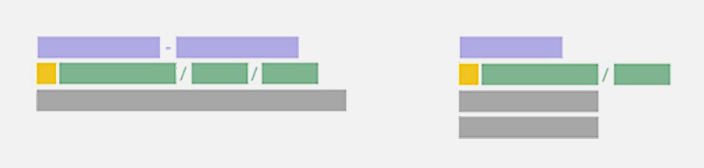
    Expanded Text Ads: Exceeding character limit @LogicserveDigi

    Image Courtesy: Google user content

    • Two headlines and more characters

     Instead of 25-character headline, we now have two headlines with 30 characters each i.e., 60 characters!  It is a wonderful opportunity to have a desired call-to-action. Both headlines will appear on the single line (as shown on the left hand side of the image). However, the second one might come after a line break or Google might even truncate the second line, if required. Languages such as Japanese, Korean and Chinese having double-width characters are allowed to have 15 characters. This addition is sure to add up to the effectiveness of the ad.

    • Expanded description

    Remember the canvas; its size has increased by 14%! The 70-character limit for the description has been extended to 80-character. Often we find it impossible to utilize the 35 character in description line 1, and forced to move the long phrase or word to the next description line. This extension in character limit for description comes as boon for us, isn’t it?

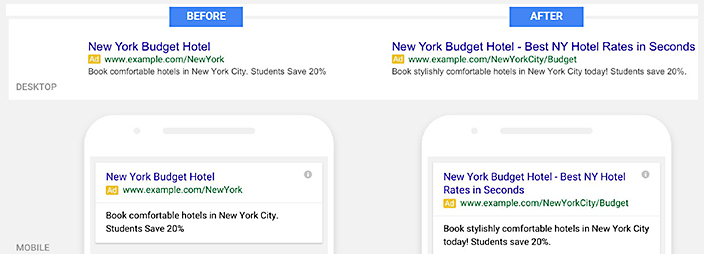
    Check out the below given image for more clarity. In the standard text, we have less character limit for description line, however in the expanded text ad we have much better call to action due to extended character limit on a single line.
    Expanded Text Ads Description:Character Limit @LogicserveDigi

    Image Courtesy: Wordstream

    • URL customization

    No need to enter a display URL to match the final URL domain. Adwords will pick the domain from your final URL and show it as your display URL.

    For instance,

    Your final URL is www(dot)example(dot)com/megastore/all-inclusive/deals, your display URL will be, www(dot)example(dot)com

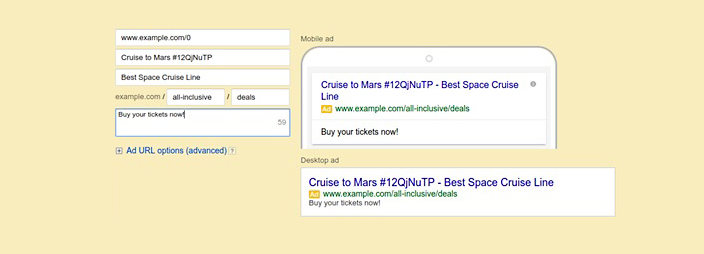
    Well, you have another option of having path fields with 15-character limit. It will be a part of your ad’s display URL, positioned after the website’s domain.

    For instance,

    Your final URL is www(dot)example(dot)com/megastore/all-inclusive/deals, and you might like to have path text to be all-inclusive and deals. So, your display URL will be www(dot)example(dot)com/all-inclusive/deals

    This is how the ads will look in Adwords interface.
    Expanded Text Ads Present and Former Text Ads @LogicserveDigi

    Image Courtesy: Google Developers

    Google recommends using path text, as it will give the users a better idea of where they will land on your website.

    Learnings:

    The major benefit of expanded text ads is the increase in CTR (Click-Through-Rate).  It makes sense, as your ad will have more space in search engine results with detailed information and call to action.
  • How To Improve Ad Rank

    How To Improve Ad Rank

    AdRank @LogicserveDigi

    When you realize and accept the fact that Google is here to serve both its users as well maximize advertising revenue for itself, the logic used by Google to target its ads becomes clear and so does the reasoning behind why it’s making the changes to Ad Rank.

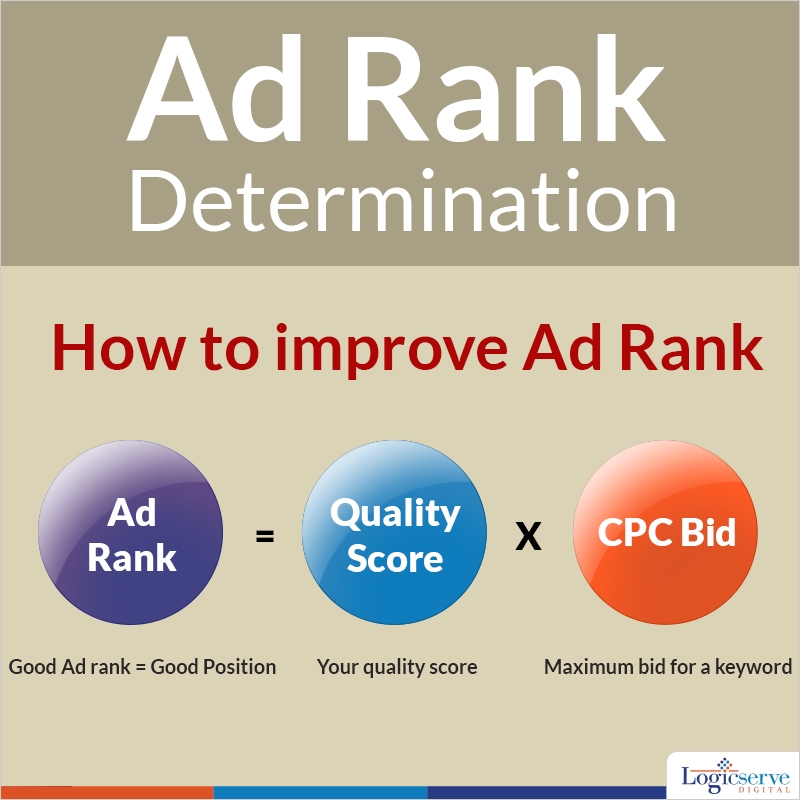
    Ad Rank is of course, the system Google uses to order competing ads on the search result pages. Over the past few months, Google has implemented significant updates to its AdWords program. Whereas till now Google was taking into account the max CPC bid and Quality Score to calculate the Ad Rank, henceforth ad extensions and formats will also a play a role in where your ads end up on the search results page. As Google puts it, they’ve “increased the importance of Ad Rank in determining whether your ad is eligible to be displayed with extensions and formats.”

    Use Ad Extensions for Your Own Benefit

    Google justifies ad extensions as being beneficial to your ads since they improve the ad’s visibility. “If two competing ads have the same bid and quality,” according to Google, “the ad with greater expected impact from extensions will generally appear in a higher ad position than the other.”

    As ad extensions lead to higher click through rates (CTR) for your ads, they represent a better return on investment. This makes sense — even though Google is saying this.

    Look at some of the types of ad extensions Google is offering — app extensions that show links to the app store or call extensions that let people click a button to give your business a call (especially relevant for mobile devices).

    According to research, 70% of mobile searchers are known to call a business from the search results page. Other extensions include consumer ratings annotations or location extensions, offer extensions and review extensions. Social annotations such as showing the number of Google+ followers for your Google+ business page are meaning social indicators since Google is supposed to use social indicators even in determining organic search rankings.

    Clearly an ad which displays average ratings (say for restaurants), location/map/directions (for any brick and mortal business — be it a restaurant or a store), or ongoing offers (a physical retailer with a time-constrained 50% clearance sale discount) will be more useful to searchers and will accomplish higher CTRs.

    Use Ad Extensions or Suffer

    Using ad extensions is not really an option — not when not using them will lead to direct penalties for your ads.

    Consider a scenario where your competitors have wised up to the changes and benefits and have incorporated the changes and extensions but you have not. Remember that use of ad extensions leads to better CTR and Quality Score for you; hence effectively reducing your CPC. Suppose your competitor uses all the beneficial ad extensions improving their Ad Rank; then, if you have the same CPC bid and Quality Score as your competitor, your ad position will go down and your CPC will go up since the formula Google uses to calculate your actual CPC factors in the Ad Rank of your competitors.

    On the other hand, for those with the relevant ad extensions leading to improvements in CTR, they’ll be rewarded with a decrease in average CPC.

    Likely Effects of Ad Rank Changes

    Since this is clearly not an optional change, the effects of Ad Rank changes are inevitable. Some of these changes include:

    • A likely increase in average CPCs. As more advertisers implement ad extensions, they’ll get better ad ranks, increasing the overall average ad rank. Since your CPC is proportional to the ad rank of your nearest competitor, obviously CPCs will go up.
    • Less room for organic results in the SERPs. It seems Google wants to push searchers towards clicking on more of those ads. As ads with extensions in them occupy more search real estate at the top, the organic results will obviously get pushed down, sometimes even below the fold. So, paid advertising will occupy more space leaving less space for organic results.
    • Adoption will increase. Now that Google has cracked the whip, so to say, everyone will hurry to implement ad extensions so that they do not suffer.

    Conclusion

    Marketers have to be smart enough to figure out what are the ad extensions that are relevant for them. Once they’ve figured that out and implemented the extensions, they can expect better impact from their PPC ads. Clearly, Google sees a strong correlation between ad extensions and CTR and how their use leads to searchers interacting more with the ads as well as taking desired actions. So make sure you implement ad extensions with great copy and SEO-optimized landing pages to get the best out of your PPC campaign.

    Previous Post: Understanding YouTube Remarketing

  • Why should you pay attention to your Quality Score?

    Why should you pay attention to your Quality Score?

    Quality Score is an integral part of any PPC Campaign. This makes it imperative to work upon enhancing the quality score of the keywords within the campaign. I would like to share with a few tips and pointers which could guide in improving the Quality score and of course, your revenue and ROI

    What is Quality Score?

    In Google Pay Per Click advertising (PPC), quality score is Google’s algorithm for the Adwords ad auction. An Ad words ad auction takes place if there is more than one bidder for the keyword with respect to the relevant search query. The beauty of quality score and PPC is that the better it is, the less you pay. That’s right.

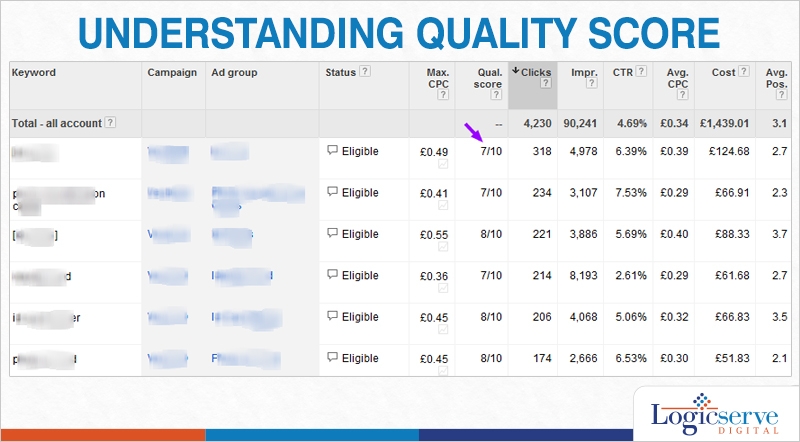
    Quality score is inversely related to cost, so the higher your quality score is, the less you will pay for every click.The other great thing about a good quality score is that the higher it is, the better you rank in the ad auction. Quality score works on a scale of 0-10, 10 being the best.

    Below is the formula for Ad rank – the system that ranks ads in the Adwords auction.

    Ad Rank = Maximum Cost per Click x Quality Score

    In simple terms, your position and eligibility to enter into an ad auction is based on the maximum you’re willing to pay for a click, multiplied by the Quality Score that Google have assigned to you. This score is recalculated every time your keywords are eligible to enter an auction, so that users receive the most relevant adverts possible.

    Six Key Factors that Impact Quality Score.

    • Expected click through rate (CTR = Clicks/Impression x 100%)
    • Your Keywords relevance to ad copy
    • Your Landing page relevance, quality and user experience ( e.g. : ease of navigation, quick-load times, and minimum pop-ups)
    • The Keyword relevance to search query
    • Account history: the overall CTR of all ads and keywords in your account
    • Geographic, Site and Device Performance


    Understanding quality score @LogicserveDigi


    Microsoft’s Bing also assigns keywords with a ‘quality score’ using similar criteria but at the same time, it is not taken into consideration when determining how much you will pay, or where your ad will show. Rather, it is more of a tool that can be used to optimize your paid search campaigns.

    A high quality score enjoyed for a given keyword means that the advertiser could receive

    • Higher Avg. Position
    • Higher Impression Share
    • Lower Cost per Click

    This occurs in comparison to keywords of other competitors with lower quality scores.

    On the overall, High Quality Score keywords can be relied upon to drive in relevant traffic at lower CPC for enhancing revenue and ROIs too.

    Now, that we know why quality score is important, we can move on to Click-Through Rate which is the most important variable in this entire campaign. Beginning with, we have two important points to remember –

    • The Click-Through Rate influences the Quality Score to a great extent. The Click-Through rate is determined by dividing the number of times the ad was clicked on by the number of impressions, or times your ad is seen.
    • Paid search ads need to be highly relevant to the query searched. If your click-through rate is higher than other ads on the page, Google can deduce that your ad is good, and will give it a higher quality score. Alternately, if your ads have a low click-through rate, Google will assign it a lower Quality Score.

    Deducing the above, search is based on maintaining relevancy in the Ad copies and hence Google rewards advertisers with high Click-Through rate by offering them better rates on the relevant keywords as these ads keep consumers happy with the search results.

    To improve CTR:

    Have a good account build with short and tightly themed ad groups containing highly relevant keywords

    • Optimise Adcopy Text – Ensure that your ad copy is closely related to your keywords will further drive relevance by increasing your click through rate. The best way to do this is by having a mention of your keywords in your headline of the ad text, in addition to the description lines 1 or 2.
    • Remember – To include a call to action that relates to your business.
      • Example – Buy now! Or Call today!
    • Carefully consider the keyword match types.
    • Use negative keywords to improve the relevancy of your broad match traffic.
    • Analyze the Search Terms Report periodically for negative keyword ideas.
    • Be smart enough to recognize the high volume keywords and analyse their performance on important parameters such as Bids, Avg. Position, Conversion, Revenue metrics, Quality Score, Impression Share and others.

    LogicSpeak:

    In summary, it is necessary to pay more attention to CTR and Quality score as and when possible. The keyword bidding so undertaken is directly responsible for increase in revenue and thereby ROI

    Previous Post:Ways to optimise Social Media Channels


  • Tips for writing winning PPC ads

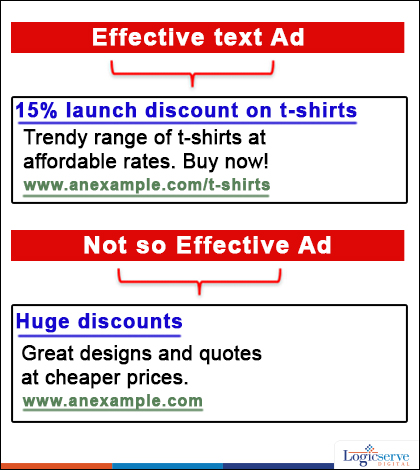
    Tips for writing winning PPC ads

    Pay per click Ad @LogicserveDigi

    Wondering how to write winning PPC ads which enhance your conversion rate and lead to better ROIs? With no dearth of tips on effective PPC ads available across the Internet, the most crucial ones have been listed out for better understanding.

    Use of clear language

    Keep ads as clear as possible. Even if you are a great fan of subtext and irony, people who see the PPC ads don’t have time to go through those. Hence, whenever you are thinking of a PPC ad make sure that things are put in succinct language.

    Personalized and expressive language

    Ads are meant to introduce your product and services to the people. There may be scores of other providers for the same thing. If you are trying to sell a product ‘A’, make it sound like product ‘A’ from you is better than others. Focusing on your USP in the PPC ad is a high impact strategy. People are more likely to click through if your ad suggests a niche feature offered by your product.

    Make an offer that they can’t refuse

    Make the offer right in the beginning. People want to see what’s on the offer the moment they lay their eyes upon the ad. More importantly they want to know what they can do with the offer. A very clear ‘Call to Action‘ in the ad is very important and this is what makes the ad click. Try to minimize the use of words while conveying the offer.

    Focus on Keywords, but keep intentions honest

    PPC ads should have the keywords that they are looking to target. While doing so, you should be honest about why you are using the keyword. The keyword should not look out of place or forced into the ad. The more natural the usage, the better will be the impact.

    Keep the jargons away

    If you are one of those who think that using jargons make you sound legit, don’t apply it to PPC ads. Jargons don’t attract a large class of audience and cannot be considered to add value to your ad.

    Writing a winning PPC ad takes a lot of effort and many tries before you get it right. Keep the message clear, and keep jargons away. People have a very short attention span.

    LogicSpeak:

    If you want to increase your success, make the ads succinct and at the same time accurate. PPC ads can return a lot of profit, provided they are done the proper way.

    Previous Post: How to Use Customer Service for Increasing Website Ranking

  • Buzz your Emails with Live Trends for Enhancing your Campaigns

    Buzz your Emails with Live Trends for Enhancing your Campaigns

    Email campaign @LogicserveDigi

    Email marketing is one of the oldest and reliable form of marketing. It has delivered exceptional results over a period of time especially if you have a well strategised email marketing plan in place. Email marketing has proved to be cost effective, accurate and very much regulated. In fact, it is extremely dynamic and can be customized as per requirement. We present a few quick to follow tips which bring in the hype and excitement to shop around.

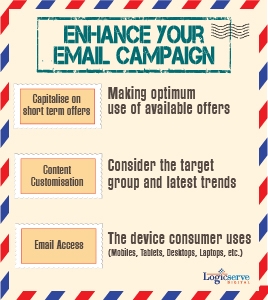
    1. Capitalise on the short term offer – As you send your email stating details of short term offer, add in a digital clock which keeps ticking and displays the time left for the offer to expire urging the buyer to shop and take advantage of the offer before it is gone. Do remember to add in the eligible coupon codes and deals which can be clicked right way for shopping.
    1. Customization – Customizing an email goes a long way in making the reader feel very special. Apart from a personal address to the reader, informing him/her about the products, services, their availability at location nearest to them and how to get there, goes a long way in helping them to decide upon shopping for the same. This means you are offering all the relevant information at the same time for easy and quick referencing. This feature comes most handy when approaching old customers who are already aware of your brand and have enjoyed their experience with you.
    2. Email Access – As you track and monitor your email campaigns, pay attention to the device through which they access. These help you in designing an effective email which is visible across the device without much fuzz. Hassle free and easily viewable email implies more engagement rather than an email which opens after a couple of glitches. These days, you need to pay attention to smart phone devices and tablets which operate more on Android and iOS for better engagement.
    3. Incorporate Current Trends and Trivia – Well, your readers are your consumers whose demand various with the season and its trends. If you can incorporate seasonal trends within your email you very much likely to hit the bull’s eye. For eg, stating forecast of rainy weather conditions and heavy discounts on wind cheaters, while weather forecast of snow fall and shopping deals on winter apparel etc or heaters could be quite engaging and effective too!

    Always, stay updated with real-time trends and zero down upon what the consumers really want or would be ready to spend on.

    LogicSpeak:

    Customised emails with an effective headline means a click and a higher chance of engagement which you definitely would not like to lose upon. After all, through a well planned email marketing strategy, you are approaching potential customers who know you and your brand quite well so you have to deliver to engage. Click here to check out email marketing services.

    Previous Post: Advantages of Custom URL for Google Plus

  • Google AdWords Review Extension moves out of Beta Phase

    Google AdWords Review Extension moves out of Beta Phase

    Back in late June this year, Google had introduced AdWords Review Extension designed to allow the AdWord account holders to add the reviews from a third-party, right into the advertisements. It was initially rolled out in a beta testing phase with signing up possible only through contact to an AdWord rep. In a recent announcement, though a Google+ post in the AdWords page, Google stated that it had extended the AdWords Review Extension all the users.

    What is the AdWords Review Extension?

    The review extension is meant to exactly what book publishers have been doing for ages– Showcase positive reviews. The AdWords Review extension will let you quote or paraphrase reviews, rankings etc. from a third-party. These reviews would be visible along with your advertisements along with a link to the review publisher’s website.

    Adding a Review to your Campaign

    The Review Extension is enabled by a simplistic UI. You start with the Ad extensions tab and then go to Review Extensions. Click +Extension will lead you the question of to which campaign you want to add the review extension to. Google makes it categorically clear, that you are solely responsible to acquire the rights to publish the reviews of the concerned third-party.

    The review text is understandably succinct with a 67 character limit including the name of the publisher. As stated by Google, the authenticity of the reviews is verified using automated and human-based methods. So, after you save a review it takes a few days to get approved. Google has obviously found a way to ensure that fraudulent reviews don’t get pass the filter.

    The Effects of the extension

    Showcasing reviews is a time-tested strategy. It has worked almost everywhere. These reviews can be helpful especially to small scale local businesses which cannot use the Seller Extension. You don’t have to pay neither for the clicks on the publisher’s landing page links nor for inclusion of the review. No hindrances on your side, except maybe for the review publishing rights. The upshot from would be a visible increase in the click-through rate. The searcher will enter your site, with the reviews in mind, making a sale more probable. As a user, you get to have an extra marker on whether to waste a click on some advertisement or not.

    This Review Extension has obviously seen positive response otherwise Google wouldn’t have rolled it out within 4 months. This will improve both the veracity and efficacy of AdWords. So, if you run a campaign, make sure you start collecting your accolades!

    LogicSpeak:

    The extension will add the necessary credibility to your Ads. This will increase the trust of the consumer. In the longer run it will uplift the brand popularity with a reviewed source, subsequently working as a word of mouth  for your products.

    Previous Post: Optimise your Google Plus Page for More Interactions

  • How to understand the ‘Not Provided’ Traffic

    How to understand the ‘Not Provided’ Traffic

    Not Provided Traffic

    In Oct 2011, Google took a decision, which displeased many webmasters. It decided to encrypt the search queries of the users who use Google in the logged in status. So, even if you would see that there’s traffic being directed from Google to your website, you wouldn’t be able to find the search queries they had used. ‘Not provided’ has become the top query that directs traffic to your website. Instead of whining about this, how can one make the most out of this?

    Information on Personalized Search Results

    One of the key information which you can directly get from ‘Not provided’ keywords is the percentage of users who find your page in their personalized searches. Google personalizes the search results based on the past activities of the users. While it can do the same for logged in and nor-logged in users, the level of personalization is more for logged in users. So, if you are seeing that larger proportion of your traffic is coming from users with ‘Not Provided’ keywords, then chances are high that you are appearing at the top of the personalized results of many users.

    The information extraction

    What are the things you expect from the analytics of your website? The most important piece of information that one can derive from the analytics is whether the traffic is coming from branded keywords or non-branded keyword. Branded keywords would be queries which have the name of your website/company in them. Non-branded are keywords in which people were searching for getting your services and they accessed your site. Larger proportion of branded data is important since it means that you are becoming popular. In the initial stages of the development of the website, you would need the non-branded traffic working out well for you.

    With ‘not provided’ keywords, how would you get this information?

    Separating the branded traffic from Non-branded

    You can use the Google Analytics to separate between the branded and non-branded queries by doing the following:

    • Go to the ‘Traffic Sources’ tab.
    • For the keywords, go to the advanced settings and change settings to include only your brand keyword.
    • Record the number of visits, time spent on each visit, and pages seen per visit.

    In order to see the non-branded traffic, all you have to do is change the ‘include’ to ‘exclude’.

    Using on-site analytics

    In order to get more information, you can use the on-site information from the analytics. Though this will be way lesser in content than Google Analytics, but something’s better than nothing. You can know what people are searching in your site, so that you can get a hint of ‘not provided’ keyword which visitors used to get to your site.

    Google tries hard to make users login when they are using Google searches. So, the proportion of ‘not specified’ keywords would keep on increasing. It’s best to adjust your sails against them now, rather than working through the debris later.

    LogicSpeak:

    This was always needed by marketers who have relied on keywords to guide their content strategies. This will work as a value addition for enhancing and focusing on need based content strategy.

    From an SEO perspective, the optimiser will not know the product for which the visitor was surfing the website. Additionally, he/she will not be able to know if the consumer has received the relevant information for which they have been surfing.

    Previous Post: Using videos and images for better marketing

  • The need of Call Tracking for Local PPC

    The need of Call Tracking for Local PPC

    local ppc marketing

    For service based businesses, Pay Per Click Advertising is one of the most cost effective forms of marketing. However, it is very difficult to track certain functions. Most businesses are forced to focus on web forms with CRM integration to track their leads and follow up with potential customers. When leads come in from paid search, they can track them from an analytics platform and goal setup. An additional tool that is often not utilised is call tracking.

    Call tracking is not a new concept which helps to differentiate your search campaigns from other website traffic. Typically, this works by placing a snippet of code onto the website that can alter the phone number when someone enters the site through a paid advertisement. The new phone number is forwarded to an existing phone of the business’s choosing (no additional lines to manage).

    When someone calls in through the call tracking number, there is a lot of data that can be provided for analysis. Some of these features would include phone number of caller, call duration, if phone was answered, time of call, and location of caller (if available). This data can then be used to analyse the effectiveness of paid search efforts and the quality of the phone calls that come in through different marketing campaigns.

    Additionally, a company could have multiple call tracking numbers based on the different search engine campaigns they run. For instances; separate tracking numbers for Google and Bing. This would allow to see which engine delivers more calls and which drives more quality traffic to the website. In addition, call tracking can help you better understand aspects of campaign performance that web analytics alone cannot. Given below are few pointers.

    • Preferred method of communication — Depending on the industry, audience and product or service, leads may be more inclined to call than fill out a form. Understanding your audience’s preferred communication method is key to adjusting calls to action on PPC landing pages, and other marketing initiatives, to improve conversion rates.
    • Landing pages — If your landing page is designed to generate web form submissions, but instead drives more calls, it may be an indication that the page content is confusing, the main call to action is not obvious or the web form is too involved. Making adjustments and tracking the number and type of conversions over time can help maximise performance.
    • Call recording — Most call tracking solutions offer the option to record phone conversations. From a PPC campaign perspective, these recordings can be used to better understand the type of questions leads are consistently asking, so you can adjust the content on your landing pages accordingly. Lead volume generated by your PPC campaign is often the most important metric for evaluating success. By simply tracking online conversions through web analytics, you may be missing a significant portion of lead data.
    • Tracking online conversions is easy with PPC and web analytics programmes, such as Google Analytics. This tool associates online conversions directly with a campaign, ad group, ad and keyword. Unfortunately, as soon as someone picks up a phone, this useful lead intelligence is lost.
    • To effectively gauge PPC campaign success you need to see all pieces of the lead-conversion puzzle, whether activity occurs online or off. Without a complete understanding of conversion rates and cost per conversion no matter where they take place, making edits to a campaign may do more harm than good.
    • To track offline conversions, you may want to consider a call tracking solution. Call tracking captures lead information for all phone calls received from PPC and associates them with the appropriate campaigns, ad groups, ads and keywords.
    • Call tracking involves more than simply recording the number of calls received. It’s part of a sophisticated marketing methodology that gives users accurate, real-time campaign effectiveness figures.
    • Call tracking allocates a distinct phone number, local or toll-free, for each unique source you want to track. Reports can be as general as calls from all search engines or as specific as calls from one unique paid search term.
    • When a visitor arrives on your site, the software conducts a search to determine which phone number is associated with the visitor’s origin. That phone number is then dynamically added throughout the site and cookied within their browser, so even if they return at a later time, they will continue to see the same number until the cookie is deleted.
    • As soon as a visitor makes a call to this tracking number, the program logs call time, PPC campaign information, available ID information, geographic location and the last web page visited, among other things.
    • A complete lead picture shows how each campaign, ad group, ad and keyword is performing, helping advertisers more effectively identify best- and worst-performing elements to efficiently shift budgets and update or delete under- performers.

    LogicSpeak:

    For effective improvement of your campaign performance and maximising your ROI, you need to track both online and offline conversions. This requires the integration of both web analytic and call tracking. Call tracking for local Pay Per Click ads enable you to understand your consumer base better along with the overall effectiveness of your campaign.

    Previous Post: The ultimate Pinterest guide to grow in your business

  • Google AdWords Dynamic Search Ads are worth the effort!! They do deliver exceptional results!!

    Google AdWords Dynamic Search Ads are worth the effort!! They do deliver exceptional results!!

    Google AdWords Dynamic Search Ads

    Launched in 2011 – 12, the Google’s Dynamic Search Ads (DSA) program has yet to click off amongst advertisers. Nevertheless, reports of its successful implementation are slowly pouring in which could signal its increasing usage in the coming times.

    Though the term Google AdWords Dynamic Search Ads is quite self explanatory, for more clarity you could consider these ads to target keywords when searched through the search engine and perfectly matching the website inventory. Here, Google creates an ad using the website content and displays it on the screen attracting the buyer to visit its landing page.  From your end, you will have mentioned the product description and display URL while you using the programme.

    Wondering why to opt for the DSA programme? The Google’s DSA programme comes very handy if you are managing a relatively large sized online shopping portal wherein constant keyword updates seem tough to do. By signing up for this programme and inserting the keyword targeted ad into your account, the dynamic ads will automatically be displayed which eases a great deal of burden off your shoulders.

    Setting the keywords is equally easy, you just need to add the keywords in the already present ad group and remember to choose the Dynamic Search Ad from the drop down menu. The choice is yours whether you wish to continue using your existing campaign or opt for a new one.

    While setting up your dynamic search ads account with Google, remember to define

    • Language
    • Location
    • Device
    • Budget
    • URLs on the website on which the traffic should be diverted to.

    ( try using the Auto Targets tab or the URL Filter option)

    Post which the Google AdWords Dynamic Search Ads campaigns do require adequate attention and modifications as and when seemed fit.  If at all, you are planning to run one for your website, these pointers could prove useful –

    • Do observe, monitor and make slight modifications as per the trends and results on a regular basis.  You could even test new ads, product areas and even proceed to update new keywords, negative keywords and so on.
    • Once again, use of negative keywords help in saving a great deal of campaign money. Make sure you study your campaign reports and trends in great depth and update them accordingly.  Also, remember that in case of matching keywords with respect to a search query, the non DSA ads will be displayed. In order to combat this, you could always add negative exact match keywords within your DSA campaign.
    • Simplifying your task, Google DSA campaigns can be sent against all web pages which could seem tempting to you but is not advisable has this leads to not so impressive CTR and irrelevant traffic as well. Slightly more effort on defining exact URLs could go a long way in not only saving your campaign money but ensuring relevant traffic coming your way.
    • Since the DSA programme is entrenched within the Google AdWords module, you can always monitor its trends with relation to bounce rate, pages/visit, visit durations and many other options and modify your campaign accordingly.
    • Instant success with DSA could be your deepest desire but to achieve that you need to keep trying alternates, testing and monitoring your DSA campaign to get the best out of them.

    Find the Google AdWords Dynamic Search Ads interesting to check out then do give it a try. But in case, you are quite busy running the business or managing the portal approaching a professional digital marketing agency could quite serve the purpose.  To begin with you could always check Logicserve Digital as a PPC company which has considerable experience in handling PPC account across various portals.

    Previous Post: Avoid these back links to stay away from Google’s Penalties!!

  • Targeting the Right Kind of Customers

    Targeting the Right Kind of Customers

    Targeting the Right Kind of Customers

    “You finally have your website up and running. All you need to do now is to wait for the customers to pour in and buy your products.” Hold on. That’s not the way it all works. No doubt, you might have the best looking website up on the web, but that’s not bringing in customers. There is a lot more you need to do. Also, note that not every visitor turns into a potential customer.

    You are most likely to come across 4 different types of customers:

    • Those who visit your website just to stay updated with what’s new.

    • Those who just want to have a little bit of fun while they have nothing else to deal with.

    • Those intending to learn more and might later opt for your product

    • Those visiting your website with a sole intention of adding something to the shopping cart.

    You would most likely be interested in the third and the fourth category. But, how do you target a specific type of a customer. No doubt, you might probably walk up to an SEO expert to get it all done for you. That’s obviously bringing in the desired amount of traffic. What about the conversions? There is a bit more you need to do. Listed below are a few simple but highly effective tips that will get you the desired number of potential customers.

    More than just keyword research

    The visibility of your website largely depends on the inclusion of the necessary keywords in your content. No doubt, there are tons of online applications both paid and free that help you select the right keywords for your content. But, there is still something missing.

    Keep aside the keyword research for a minute. You need to get into the minds of the users. How do you do that? By researching various blogs and forums for this is where people often discuss their personal experiences, and there is a lot you can pull out of it. Once you have done that, you can then decide on the keywords you would want to incorporate into your content.

    Target the devices too

    Don’t expect your website to look the same across all types of devices. A website that looks decent on a desktop screen may not have a user-friendly layout when viewed on a tablet or a smartphone. As a result, you need to have a responsible website, one that attains a layout depending on the type of gadget it is being viewed on.

    But, why go through all of this? What are you losing? Well, you are losing out on a large bunch of users who often prefer surfing the internet through a portable device. If your website is not responsive, there are chances they might simply bounce off. You obviously don’t want that to happen. So, make sure your website is rightly visible on devices of all sizes.

    Remarketing

    In case you didn’t know, remarketing means targeting those who have already visited your website in the past. Why remarketing? A few who bounce off might want to return back and purchase your product. You obviously would not want to lose any of these. These visitors are most likely to come across your ads when visiting other website. If not all, some might possibly return to your website through one of these ads through the “Click Here” button and there are your conversions.

    Previous Post: How Can Pinterest help you promote your business?