LS Staging

Tag: Pay Per Click Management

  • How to Improve Display Ad Campaign Targeting?

    How to Improve Display Ad Campaign Targeting?

    Be it remarketing, product-specific display, membership programs, or discount offers, these key types of display advertising can be an excellent way to bring your business to a new set of eyeballs and increase brand awareness. Display advertising is similar in processes and outcome as other forms of digital marketing. Get it in front of the right set of people at the right time, and see the miracle of high CTRs. However, many marketers fall short on this crucial goal.

    In this post, we look at some practical ways that can improve your brand visibility with a better level of targeting:

    1. Adding a personal touch

    Nothing works better than having a greater degree of personalisation attached to your marketing messages. If your headline and caption resonate with the current and relevant pain points of the customer viewing the ad, there will likely be a better conversion.

    Along with personalised captions, also make sure to use clear and sharp images that do not turn pixelated irrespective of the device or screen size in which the user is viewing the ad.

    2. Get your KRA right

    Google’s business objective (earnings by impressions) will be far different from your own internal marketing KRA (earnings by conversions). Make sure that you realise this and set up ad campaigns that are targeted the right way. For instance, if you have a mobile app development ad to be shown, you need to factor in uncommon sites like Inc.com, Entrepreneur, Forbes, TechCrunch, TED, or Mashable. These sites are where your key audience (business owners, CxO, CTOs) will be likely to follow and this is where you can reach out to them.

    So, targeting by interest as well as by topics will be the right way to go.

    3. Keep checking placements

    Even after setting up the campaign and running it for 3-4 months, you need to keep looking at the ‘Placement’ section (Google AdWords -> Display Network -> Placements). This portion shows where your ads were displayed in the chosen timeframe. It also comes with a lot of stats like clicks, impressions, and conversions.

    Such on-going review and assessment will uncover interesting stats like –

    • Sites with lots of impressions but lower number of clicks (you can exclude these as they aren’t worth your time or dollars)
    • Sites with good number of clicks but high bounce rate (this means there is some anomaly – wrong audience or wrong ad placement. Solving the underlying issue will help a lot)

    4. Introduce rich media at the right time

    Many clients seek to introduce rich media right from the start of the campaign. Our point is that while it is important, it takes a lower priority than setting up the right ads with the right topics for the right kind of visibility. It will be a cost-effective move to start with static images initially and get other aspects fine-tuned for success. Post this, you can add rich elements like hover effects or videos.

    As evident, the judicious use of data presented by tools like Google Analytics and AdWords can be a critical differentiator to ensure the success of your display ad campaign targeting. By tiling these pointers, you can improve the efficacy of the display ads and help you with your brand awareness goals.

  • How to tackle programmatic ad fraud?

    How to tackle programmatic ad fraud?

    Marketers are increasingly relying on programmatic ads to push targeted marketing messages to an intended audience. These are proven to generate better results with better precision. However, its increasing popularity also means that the industry is now grappling with the massive losses that have arisen due to manipulation of the marketing metrics to track the efficacy of the ad campaigns. This is exactly what programmatic ad fraud denotes.

    As per a Pixelate study, over one-third (35%) of programmatically driven ad impressions in the United States in first quarter 2017 were fraud. This shows how acute the problem has become, and not just in the US but across the globe.

    What can be done?

    Instead of being a mute spectator to ad frauds, smart marketers can ramp up their anti-fraud initiatives with these counter measures:

    1. Choose your success metrics better

    Basic metrics like CTR are very easy to track and analyse. Also, they are very easy to manipulate negatively. This issue is prevalent across devices like laptops, connected TVs, smartphones, and tablets. Instead, you need to rely on other metrics that are less prone to frauds. Some of these include:

    – Site navigation

    – Time spent on the site

    – Sign up rate for a particular product or service

    These measures show the level of engagement with the customers. And digital advertisers can be assured that it is not a bot that your site is interacting with.

    2. Single out the main culprits

    In today’s age, the advertiser relies on third-party paid sites to grow the user base, fulfil advertising minimums, and drive more impressions. You need to conduct routine checks on your vendors to ensure that the quality is as per what is stated in their report. These controls are crucial in eliminating frauds and cleaning up your campaign in an effective manner. One way to ensure that you are dealing with good quality vendors is to check if they are accredited by Media Rating Council.

    3. Maintain, share, and assess from a blacklist    

    Marketers today have the opportunity to know if the impressions they are tracking for programmatic ads are blacklisted or no. The underlying principle is that only a handful of sites deliver a majority of the fraudulent ad traffic.

    See anything problematic with the URL www.huffigntonpost.com? If not, have a closer look as it is designed by fraudsters such that it is tough to unravel the fraud (the spelling is incorrect in the above URL). The good news is that today’s fraud tracking programs and tools analyse user behaviour to uncover fraudsters. So, while they may continue evolving their fraud strategies, they may leave behind a fingerprint. When you flag these, the blacklist will block these sites and thus provide you with a much cleaner inventory list to purchase.

    With these steps, concrete actions can be taken to ensure that the occurrences of ad fraud and losses come down significantly. Do let us know if any other measure forms a part of your anti-fraud arsenal? We would love to hear from you.

  • Weekend Digital Media Round-up: Google’s enhancements for ads, Facebook’s new in-app 360 photos, LinkedIn’s native videos for all users and more..

    Weekend Digital Media Round-up: Google’s enhancements for ads, Facebook’s new in-app 360 photos, LinkedIn’s native videos for all users and more..

    1. Google announces AMP speed and viewability enhancements for ads

    Google’s AMP (Accelerated Mobile Pages) group announced enhancements to ads served in AMP. Specifically, the project has entered phase two of its three-phase plan for supporting comprehensive advertising functionality in AMP. [Source: Search Engine Land]

    1. Facebook’s Adding Publisher Logos to News Links to Reduce the Reach of Misleading Content

    As part of their ongoing efforts to combat fake and misleading content on their platform, Facebook has announced the latest option to better inform users – the addition of publisher logos next to links in Trending and Search. [Source: Social Media Today]

    1. IAB releases its first ‘Podcast Playbook’ guide for marketers

    The podcast has taken another step toward becoming just another marketing channel, with the release today of the Interactive Advertising Bureau (IAB)’s first buyer’s guide for podcast advertising. [Source: MARTECH TODAY]

    1. LinkedIn’s Rolling Out Native Video to All Users

    LinkedIn has now announced that all users will soon be able to post video to the platform, moving in-line with the broader video content shift. [Source: Social Media Today]

    1. Facebook now lets you take 360 photos in-app, use them as Cover Photos

    Facebook has been a big supporter of 360-degree photos and video, adding support for the immersive media formats early on Facebook itself. Now, the social tech company is adding support for capturing 360-degree photos right within the Facebook app itself. [Source: TechCrunch]

    1. Walmart offering voice shopping via Google Assistant and Home

    Google and Walmart have announced a partnership to bring Walmart voice shopping to the Google Assistant and Google Home. Free delivery will also be available through Google Express, which is changing its pricing structure. [Source: Search Engine Land]

    1. Google making renewed effort to help news publishers drive more subscriptions

    Google has always been treated by the news industry as a kind of frenemy. Many news organizations have a tortured history with Google, including some who’ve successfully lobbied against Google in Europe. Yet for roughly a decade Google has been trying to help publishers make more money while continuing to try and serve users and its own commercial interests. [Source: Search Engine Land]

    1. WhatsApp adds new coloured text-based Status, brings it to desktop as well

    WhatsApp has announced the coloured text-based Status updates for its users. The feature is similar to how it works on Facebook, where users can add a coloured background when uploading a text based status update. [Source: Indian Express]

    1. Google auto-playing video previews in search results carousel on Android

    Google announced they have added video previews to the video carousel that shows up in the search results. Currently, this only occurs when you are using the Google app for Android or using Chrome on Android. [Source: Search Engine Land]

    1. Google May Lose Trademark Rights to Its Own Name, Here’s Why

    A trademark lawsuit before the Supreme Court alleges the word “Google” has become too generic, and is therefore no longer eligible for trademark protection. [Source: Search Engine Journal]

    Expert Opinion:

    1. Data driven Personalization is the key to effective digital marketing campaigns

    Personalization in marketing has been the most talked about topic recently and is quickly gaining popularity as an effective marketing tool for brands. Technology has enabled consumption of content at a personal level. The consumer preference is often revealed voluntarily and sometime with incentives. And the same technology has enabled recording & analyzing those preferences, quirks, behaviours, moods, mood swings, for most touch points. With new technologies and advances in the digital marketing field, the possibilities of personalizing marketing communication and campaigns are also expanding. According to a recent study conducted by PWC’s Digital Services group, 94% of senior-level executives believe delivering personalization is critical or important to reaching customers.

    Amongst the clutter of each touch point, if we believe that personalized communication is the only way to gain that fleeting moment of attention, then data driven personalization is the only medium which can help achieve that objective and thereby make Marketing dollar more effective.

    Personalization helps you understand your consumers well which enables you to assist them in providing a seamless customer journey, and helps you differentiate yourself from your competitors. Having said that Every data point recorded doesn’t and will never create a ‘conversion’ or a result that has a monetary value attached to it. But every data point is a building block in the path to the holy grail of personalization where we have true one to one communication and continuous optimization basis behaviour or preferences that are revealed

    Some of the benefits you can reap from data driven personalized digital marketing campaigns are:

    – Drive conversions and increase sales

    – Build long-term and stronger relationships with customers

    – Significant boost in customer engagement

    – Improved customer experience

    – Better customer retention

    – Increased customer loyalty

    Brands need to cautiously use customer data and understand their preferences. This will assist the brand in designing effective marketing strategies that can promote positive communication with their consumers. This, in turn, can help them with improved conversions.

    In a landscape where customer touch points are competing with each other to get customer attention, it is imperative for a marketer to measure the success of each such points of contact Quantifying results of a marketing intervention & then connecting it to business levers is hence a necessity for the marketer to function effectively

    With the rising popularity of digital media and the customers’ inclination towards using multiple devices, the scope of data driven personalization is not limited to selection of the Target Audience or the point of contact or the relevance of the communication – it has to cover the entire life-cycle of a marketing intervention to provide a flawless experience across multiple devices/ touch points.

    Econsultancy’s Internet Statistics Compendium suggests that programmatic and personalization experiences which emphasize on customers could provide anywhere from 2x to 14x more incremental revenue per visitor (RPV) compared to traditional optimization efforts that focus mainly on cosmetic changes.

    In the rapidly growing digital age, brands who thrive on user insights and data to drive customer engagement and sales for the businesses are sure to stand out in the future.

    Manish Dureja, Managing Director, JetPrivilege
  • Top 3 Strategies for Paid Ads you should implement for the upcoming Holiday Season

    Top 3 Strategies for Paid Ads you should implement for the upcoming Holiday Season

    The last few years have seen a humongous traction in holiday shopping on e-commerce sites. Talk about Cyber Monday, and e-retailers point to a peak summit in reporting GMV and revenues. Americans spent an average of $935.58 during 2016 holiday shopping season. No wonder that 20% of the retail industry’s annual sales happen on 22nd, 23rd & 24th December.

    This also means that the level of competition for visibility in this will be unbelievably cut-throat. If you are an e-retailer, you need to employ more than one paid marketing strategy to gain shopper attention in a crowded supply space. Here are the top 3 strategies that we have compiled for you to target holiday shopping better:

    1. Google Product Listing Ads

    Google PLAs are undoubtedly the biggest revenue generators for holiday e-commerce. You need to check for enablers like long-tail keyword optimization, and crafting compelling product description with detailed product attributes. This way your product should show up irrespective of whether the searcher types in “white running shoes” “size 13 shoes” or “Men’s Adidas Size 13 Running Shoes Adi Pacer 1.0 Low Shoes.”

    2. Amazon Search 

    The Return on Ad Spend (ROAS) has been one of the highest through Amazon, and there is no reason why you should not try out this online channel. Amazon PPC is an excellent way to get listed especially considering that shoppers use it as a search engine within site to discover newer and more products. Imagine if your Amazon PPC lands your products on top of the listing? That is the power of Amazon search. Use it judiciously after factoring in drivers like how much margin you can put on advertising, and how the paid traffic converts to sales.

    3. Retargeting 

    When you focus on paid ads, make sure to target customers that were almost about to make a sale, but didn’t convert at the last minute. With retargeting you get reduced cost per impression, better ROI, higher conversion rates, and laser- sharp targeting (because they had taken the efforts to come to the e-commerce site to buy products earlier).

    The road leading to holiday e-commerce will be successful only if you start today. Hurry up and utilize these tactics to a great 2017 holiday shopping season.

  • Understanding the Customers’ Device Graphs is the key for Targeted Marketing

    Understanding the Customers’ Device Graphs is the key for Targeted Marketing

    In the purview of the growing usage of the different mobile devices among the consumers globally, cross-device identity matching has gained a huge significance among the marketers. The modern day marketers are taking the device graph serious since it provides them a solid foundation for profiling the different users based on their mobile device usage for different purposes. Today, it is nearly impossible for a business owner to get a complete picture of their existing or potential customer unless and until they track their daily activities across all devices.

    There are two major players specializing in the Device Graph, vis-à-vis Tapad and Drawbridge. There are also other companies like Criteo, which specializes in retargeting that develops Device Graphs as essential marketing tools. The big cloud companies like Adobe, Salesforce and Adobe have either developed their own tools or they have a partnership deal with vendors who develop device graphics as an integral part of their platforms.

    Mike Murphy, the Senior Marketing Manager at Drawbridge suggests that all the Device Graphs are built on a single fundamental idea, however, each developer has a different formula in terms of providing weightage to a certain attribute. Typically, there are to major techniques, which are probabilistic and deterministic and most Device Graphs use both techniques in some way or the other.

    The Deterministic technique are considered to be a gold standard since they  provide definitive results on which device the customer uses the most. This data is usually collected through the logins of the users. For instance, if the customer regularly uses his smart phone or the tablet device to log onto a particular website or portal, the brands can easily conclude that the user is most associated with that particular device. The Probabilistic technique on the other hand user the most common probable data points such as the time of the day when the device is used the most by the customer, the physical location of the device, which is derived by the IP address and the browsing patterns of the user. Murphy stated that Drawbridge has the potential to identify the device usage of an individual even if the same device is shared by other members in a household for different purposes.

    In the video below, Tapad shows the Device Graph process which are largely derived using the probabilistic technique:

    https://youtu.be/M-0P-_lFVq0

    More often than not, Device Graphs are made using both deterministic and probabilistic techniques. For example, the user’s multiple device usage can be determined with a high degree of accuracy only if one the devices was used to log into the brand’s site. That one particular device, which is used by the customer becomes the definitive association and the other devices, which are placed at the same location may be used for visiting the same website on a daily basis. This and other attributes of the device usage pattern can give the Graph-maker sufficient data to conclude that the devices belong to the same users even though he/she has used only one device to login.

    Whilst it is known that the deterministic-based approach yields more accurate results, there are many vendors who claim that the probabilistic approach has provided results that are 80 to 90% accurate. Retargeter Criteo has claimed that it considers Device Graphs to be a vital tool for its businesses and it has built the largest global scale mapping of email addresses to Cookies.

    Murphy considers the usage of Device Graphs will continue to rise in the near future and it will continue to use a combination of both deterministic and probabilistic techniques. However, one of the possible exceptions would be the usage of biometric identification for logging into the aps or the website.

  • 10 Simple Ways to Improve the Accuracy of Google Analytics Data

    10 Simple Ways to Improve the Accuracy of Google Analytics Data

    Often, business owners find themselves staring at the Google analytics data and are sceptic about its accuracy. The objective of this post is to help you identify the most common errors of the Google analytics data and provide you ways to fix the errors.

    No view filters

    View filters are of great use to segment the vast data into different relevant buckets for easy analysis. However, the amateur users do not use the filters to its fullest potential. The search and replace filters functionality greatly help in making the page requests URI easily readable. The upper and lower case filters help in making sure that the report rows do not split because of their case sensitivity. It is advisable for all the business owners and marketers to use the various filters while using the Google analytics; it will help you clean up the data and not just segment it. The view filters offer a perfect solution for cleaning up all your data.

    Filters

    While using filters is a great way to clean the data, on the flip side, the filters, if used incorrectly can be destructive. The irrevocably alter the data as it comes into the Google Analytics reporting database. The best solution to avoid losing data is always to have a single view that is not filtered by any destructive options in the configuration. You can create a quick and dirty testing view and throw all your filters there first and filter the data. Deploying the filters incorrectly can be detrimental, especially if you are dealing with historical data.

    Self-referring

    If you check the referral report and see your domain as a referral, then you would have a self-referring issue. This problem occurs because you would have no idea of the source of the traffic, which literally translates to not being able to attribute the traffic to your marketing endeavours. It would be worse if you have spent money on online marketing and you have no idea about what percentage of traffic makes up for the self-referrals.

    There is literally a sea of information available on the internet on how to fix this issue. However, experts suggest that the most common reason why this happens is that one or more than one page on your website lacks the GATC or the Google Analytics Tracking Code. The problem with not having GATC is that, if a user over the course of the time they spend on the website, visits a certain page that does not have the tracking code, then the GA would consider the previous page as exit and the next page would be considered as the entrance with your domain as the referral. GA experts have corroborated that the most common page that lacks tags is the 404 error page.

    No stripped query parameters

    The query parameters are simple, the values that are added to the URL in the format of ?key=value&key2=value2. You can strip out the view-by-view query parameters through the view setting page on the admin menu. These values mean many things and it is very common for the content management systems to use the values and the external tracking applications. The query parameters, not necessarily always dictate the content on the page; sometimes it is just the session or the user data the CMS needs to shuffle the page around. An important note – as an analyst, they hold no significance for you.

    You must know that every reporting row in your content report is unique and every combination of query parameter will have its own row, which will split the data for a page into different rows. It is quite possible that you would only look at the row for a particular page that is utilised the most and it surfaced by column sorting.

    Not having default view page

    Another effective and easy technique to clean up the day is to set the default page in the view settings. What this essentially does is, it aggregates the root domain “/” with any page that you set as the default page. For example, if you set “index.php” as the default page, the “/index.php” in the content report will be combined in with “/” into one clean row. All the query parameters that you have added will break into their own separate rows.

    A bad architecture

    Apart from the bad data, the odds are quite high that you might be looking at the wrong place. While setting up the account make sure that you name the account so that, is easily identifiable; you must know which web property or account you are referring to within 10 seconds. Setting up an account can be very basic or complex; you need to figure out a way to know how everything ties together.

    No annotations

    One of the major benefits of having annotations is that it compensates for the changes you have made to the account while viewing the historical data. You may probably remember the last couple of changes that you have made to the GA account. However, it is not possible for you to remember the changes made over the course of one year. It is literally not possible to remember all the filters that you have applied. This is where the annotation plays a vital role. While you are building historical data, the annotation will give a clear log of what the data means so that you get the right insights.

    Case sensitive campaign fumbles

    One of the best features in GA is the campaign tracking feature. However, you must know that the campaign tagging is always case-sensitive, which means that if you are launching three different campaign and you list the medium as EMAIL, Email and email, these will show as completely different mediums. It is therefore highly advisable that you have some kind of reference document that the marketing professionals can access and collaborate while creating campaign tags.

    Adding the code at the wrong place

    The best way to place the GATC on the website is quite dynamic and it keeps changing. While you are creating a web property or within your GA admin panel where the tracking code is located there is always a brief description where it exactly needs to be placed.

    Using GATC that is outdated

    This is another very common reason why the data is messed up. The javascript tracking code that you place on the page calls the Google mothership and references, which can be best described as a little web program. This program, just like any other computer program is constantly improved and on some occasions, you would need to update the GATC and take advantage of the new features of GA. Make sure that the GA code is up to date.

  • Four significant points to consider when using AdRoll

    Four significant points to consider when using AdRoll @LogicserveDigi

    AdRoll uses excellent features to attract new prospects and convert them into customers. While not limiting their services to these two steps alone, they look into ways to maximize customer value further. However, we need to understand how to use this platform resourcefully that can help us at creating larger impressions and an increased ROIs while concurrently reducing CPCs and CPAs.

    1) Periodic Ad-Revision

    It is in our basic human tendency to parade attention towards evolvement. What does not change for a long time loses interest radically. Constant modernization and creative content addition is a requisite which can perk up the CTR, lowering costs significantly. More so, AdRoll algorithm is developed in a way to favour during their auction, the ads that were updated recently.

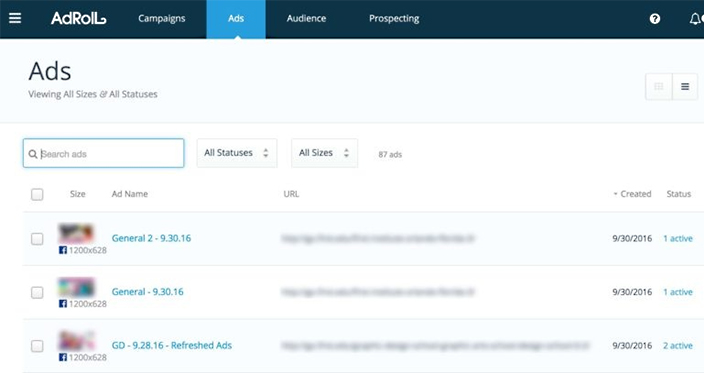
    As seen in the below diagram, on the AdRoll interface, under Ads, the proportion between impressions and CPCs can help identify ads that are in a need for new content.


    adroll campaign@LogicserveDigi

    Source: ppchero.com

    2) Limit Over-Segmentation

    Segmentation is required to attract potential customers, however; over-segmenting in campaigns can cause limitation in your reach. It needs to be understood that when dealing with campaigns that generously target mass audiences, the algorithm will work better. In harmony with the company policy, it is imperative that advertisers distinguishably create product groups/programs targeting different set of campaigns.

    3) Appropriate CPA-Creation

    On account creation with AdRoll, advertisers provide a targeted CPA which acts as the goal for AdRoll’s algorithm influencing performance drastically. It is necessary that the CPA is in line with your campaign and secondly if you run several campaigns it is important that you keep a constant track on the CPA goals you provided earlier on during account creation.

    adroll cpa objectives @LogicserveDigi

    Source: ppchero.com

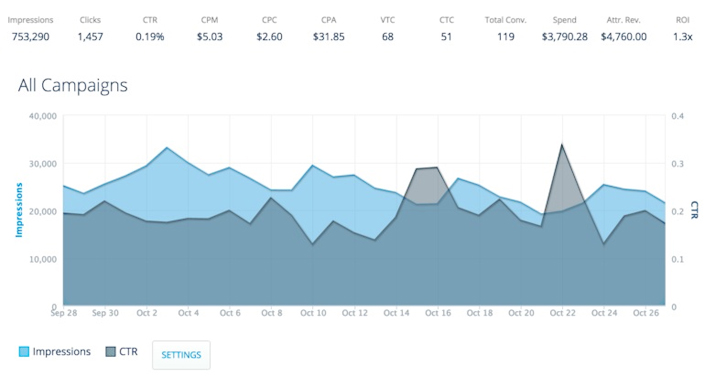
    As an ideal example below, CPA predefined at $45, is seen lower than this value for the past one month.

    adroll multiple campaigns @LogicserveDigi

    Source: ppchero.com

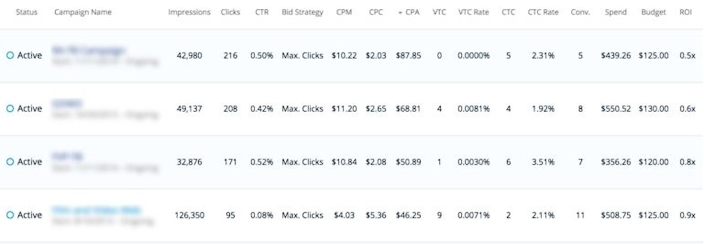
    In the below account, there are multiple campaigns listed with their specific set conversion volume goals. In the first campaign, it is noted that CPA is far greater than the $45 goal, which means that it needs to be revisited to set a more realistic number. After increasing it to $70, it is expected that the impressions will increase which will lead to better metric calculations.

    adroll conversions @LogicserveDigi

    Source: ppchero.com

    AdRoll uses View-through Conversions (VTC) and Click-through Conversions (CTC) for CPA calculations. If you credit AdRoll with CTC alone, ensure that the goal CPA is low enough so that it can align well with your targets.

    4) Revisit Your Visitor Segments

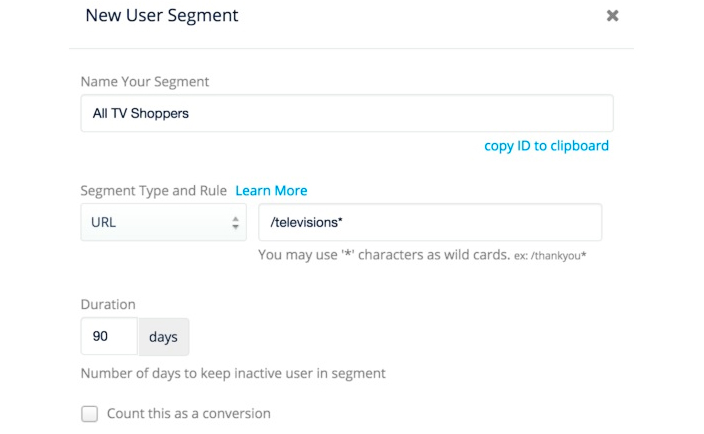
    You need to ensure that you segment visitors based on their behaviour and while creating visitor segments, you are as general as possible. This approach helps the AdRoll algorithm to work efficiently and saves advertisers a lot of time.

    The picture beneath shows a good example of little but clear segmentation (here, the highest level URL is used):

    adroll user segment @LogicserveDigi

    Source: ppchero.com

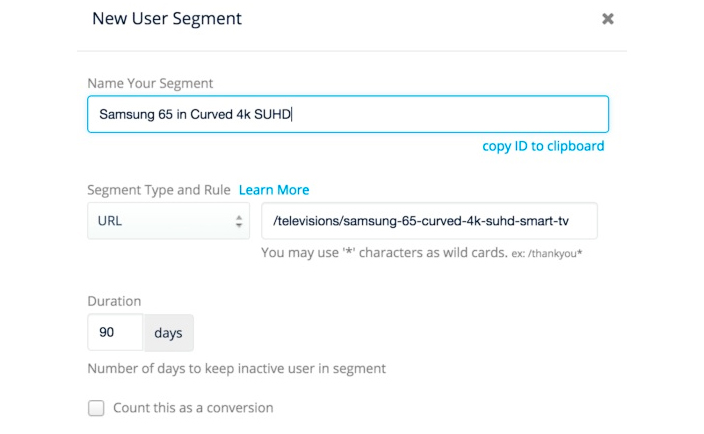
    The picture below exhibits a bad example of segmentation given that this will require the advertiser to specify each page that the target audience could be viewing:

    adroll new user segment @LogicserveDigi

    Source: ppchero.com

    The above mentioned recommendations are beneficial for new AdRoll users and will help them use their features better effectively.

  • Google announces better evaluation tools for your Adwords Account

    Google announces better evaluation tools for your Adwords Account

    evaluation-tools-for-your-adwords-account_cover-image @LogicserveDigi

    There is a new feature waiting for you in your Adwords account. Google made an announcement recently about the new additions and features in your Adwords account. Campaign groups and performance targets are envisioned keeping in the mind the futuristic path of digital advertisement. These features make it easier to track and estimate the growth of your marketing campaigns.

    They made this announcement on their AdWords blog mentioning that these two unique features help to track the performance, performance targets and record the campaign groups. Jon Diorio (Google Team) on Google+, excitedly informed at the launch that if users want to reduce the time and energy they use, to monitor and track performance by the campaign goals, then this feature is the best suitable for them.

    Everything you need to know about a Campaign Group

    • The Campaign Group Feature allows users to group up all Google ad campaigns together.
    • This can be set for all types of ad campaigns including search, shopping, display and YouTube.
    • This feature makes it easier to track and improve your ad campaigns time to time by the progress it shows.
    • The vision of Google by implementing this feature is to help all marketers to track marketing arenas across the network of ad prospects by the medium of grouping.
    • An example provided by Google included the ‘Holiday Launch’ campaign in which you could easily link the YouTube campaign statistics to the e-commerce and other search ads.
    • The Campaign Groups is a strictly monitoring feature and at this point, it does not include any management feature.


    google_adwords_introduction @LogicserveDigi

    Campaign Groups are accessible and situated on the left sidebar of the AdWords. The setup of campaign groups are quite simple, and it is possible to set several groups with distinctive targets.  After users add various campaigns to a particular group, they can monitor the performance on clicks, conversions, goals and other specific targets set like total expenditure, total conversions, total clicks and average CPA or CPC.

    Campaign Groups are accessible and situated on the left sidebar of the AdWords. The setup of campaign groups are quite simple, and it is possible to set several groups with distinctive targets.  After users add various campaigns to a particular group, they can monitor the performance on clicks, conversions, goals and other specific targets set like total expenditure, total conversions, total clicks and average CPA or CPC.

    Everything you need to know about Performance Targets

    • This new feature of performance targets provides a push to your ability and performance of the AdWord campaign
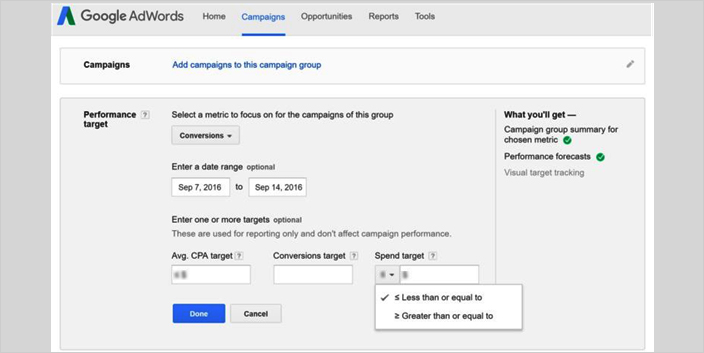
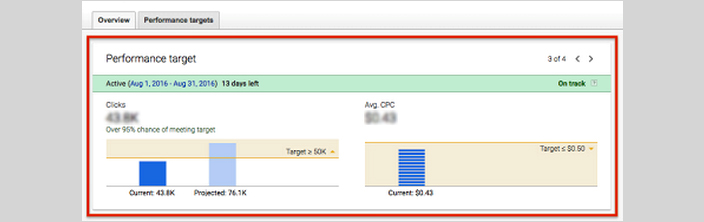
    • This new feature sets goals for the campaign and tracks all the clicks and conversions for the campaign group.
    • After combining performance targets with campaign groups, you set targets, clicks and conversions for Google’s network of market platforms.
    • The Product Manager of Google Adwords, Jon Diorio mentioned in his interview that with this new feature you can get to know the clicks or conversions along with the budget and the CPA or CPC you want to maintain.
    • With this, you can get to know how your campaign group is performing automatically in a single view.
    • Will be shown against the goals and performance that will be achieved at the end of the campaign period.

    performance_target @LogicserveDigi

    LogicSpeak: However, this feature won’t hamper the way Google serves ads to various users but will help to optimise campaigns by providing better evaluation tools.

  • Pay per Click Management Services

    Pay per Click is a fast growing Online Marketing tool used by several enterprise including small business establishments. Due to rising competition, the cost of keywords has increased resulting in the increase in cost per click (CPC). In such swiftly evolving and challenging market it becomes necessary to efficiently manage your pay per click advertisements. A Pay Per Click management company helps in optimizing these services for a profitable campaign and better returns.

    A PPC advertisement management service program includes the following task:

    1. Keyword Selection: Extensive market research and selection of appropriate keywords.
    2. Creative titles and adverts: Properly coined titles and well conceptualized adverts help to maximize click-through and conversion rates.
    3. Setting destination URL: Landing page of any searched keyword is the mirror of your website and product/service. Choosing the appropriate URL increases the prospect of increasing the conversion rate.
    4. Campaign Tracking: Outcome of a PPC advertisement can be measured. This service aids to the process of tracking codes to measure the conversion rate. These in turn help to analyze the ROI.
    5. Bid Management: Bid performance monitoring, bid price changes etc.
    6. Regular Performance Analysis: Analysis of various aspect of the campaign like keyword costs, conversions, text ads etc…and providing a performance report
  • Two Important PPC Abbreviations

    Pay per click is a form of Internet Marketing where the sponsor has to pay a set amount for every click on his listing/ad campaign. There are a number of different abbreviations associated with PPC. Two important acronyms are listed below:

    • CPC: Cost per click defines the charge you pay to the search engine for each click on your adverts. If your ad is displayed for a search query but the visitor doesn’t click it, you don’t incur any cost.
    • CTR: Click-through rate is a measure of your account performance. Usually the higher the CTR the better is the account performance. CTR is calculates as number of ad clicks/number of impressions x 100