LS Staging

Tag: mobile marketing

  • The Future of Email Marketing is not Just Mobile-First but Interactive too

    The Future of Email Marketing is not Just Mobile-First but Interactive too

    It’s no surprise that in 2019, the time spent on mobile devices has increased significantly as compared to desktops and laptops. As a business owner, if you aren’t convinced yet of mobile-friendly email design, here are some compelling statistics to persuade you.

    • The global Email Benchmark Report of 2018 reveals that nearly 56% of all emails are now accessed through the mobile device.
    • A study by Deloitte states that an average mobile user checks his/her phone 47 times in a single day. The number jumps even higher to 75, for people between the ages 18 to 24.
    • Another study by Dscout reveals that smartphone users interact (clicks, swipes, taps, type, etc.) with their mobile devices 2617 times a day! That’s a massive amount of screen time.

    It’s no surprise that mobile-first is no longer an option but a mandatory choice. What more, businesses that don’t adopt a mobile-friendly design don’t just miss out on sales, but lose out on valuable customers. A market study conducted by Litmus and Fluent revealed that nearly 45% of customers unsubscribe from promotional emails if the emails don’t display properly on their smartphone. And, once a user is gone, it’s a huge challenge to get them to re-subscribe.

    Now, that you’ve understood the critical importance of keeping your emails mobile-friendly, here are some best practices to follow.

    1. Keep the Mails Short

    102 – This number should be engraved in your mind. If an email is more than 102kb, then Gmail will clip it and ask users to download the rest. Users are unlikely to read a message that isn’t downloaded in full. They would consider it as spam, broken or simply delete it.

    Mobile browsing is all about convenience and speed. When you make users take an extra step, they are likely to feel annoyed. Thus, keep your emails light and crisp.

    2. Single Column Triumphs

    Single column layouts are the best ways to present content for mobile devices. When you use more than a single column, users will have to adjust their screen settings to read the mail completely. As mentioned above, this needs users to put in extra efforts.

    Also, remember that most readers browse emails on the go – while commuting to work, walking to lunch, etc. When you use single columns, it’s easy for readers to browse emails single-handedly using their thumbs alone, thereby increasing potential engagement.

    3. Remember you are Aiming for Taps and Not Clicks

    While this is obvious, most email designers miss out on this crucial element. While designing CTA buttons, make sure that it has sufficient space to make it easy for users to tap on it. Avoid placing several options right next to each other. Provide some breathing room for users to avoid frustration, and avoid tapping on wrong links.

    4. Time your Emails Right

    A general rule of thumb to follow here is – make sure your emails follow the sun. Instead of sending your emails at the same time to all your recipients, schedule emails according to varying time zones.

    You don’t want your users to be woken up by the annoying buzz of an incoming email. Also, you don’t want your emails to get lost in inboxes, by the time your user checks their mail. Track data to find the best time to send emails and schedule emails accordingly.

    5. Enlarge Fonts and Make CTA Prominent

    Small text that can be read on desktops is not easily read on tiny mobile screens. Hence, ensure that you use fonts larger than that you use for traditional fonts. Another trick here is to highlight the key parts of the message with larger fonts to help capture user attention.

    Finally, you want your readers to take certain action after reading your emails. So, make sure to keep CTAs prominent. Use large, thumb-tappable buttons that are easy to spot and easy to tap on.

    The Future is Mobile

    The recent announcement of  AMP for emails from Google has got digital marketers excited. The AMP offers rich features and enriching experiences for the inbox. Right now, Gmail is the only inbox where users can receive AMP messages, with interactive experiences. However, it’s sure to come to other inboxes in the next few months.

    The future is mobile, and it’s getting interactive. Mobile email designers should up their game to stand out.

  • Why Retention Is Better Than Acquisition As A Mobile Marketing Tactic?

    Why Retention Is Better Than Acquisition As A Mobile Marketing Tactic?

    Businesses across the globe are fast re-engineering the metrics they monitor to target mobile marketing efficacy. Gone are the days when app installs were considered a truly transparent metric of an app’s performance on the app store. With reports stating that 1/4th of the app downloaders use the app only once, there is little to no value in going after app downloads as a performance metric for mobile apps.

    If you are looking to score high on the user retention strategies, then here are some ways in which you can achieve it:

    1. In-app messaging made effective

    In-app messaging makes it easier to notify the user of an action carried out. With such helpful notifications, the overall user experience will not dip. In fact, it is proven to elevate retention by as much as 300%. Useful in-app messages like sure price alert on taxi apps can provide a lot of value to the users.

    2. Focus on 1st three days

    Research shows that most of the app users abandon an app within the first few days of downloading it. On average, an app loses a whopping 77% of users in the first three days of install. For a marketer, the focus should be on crafting a stellar user experience from the minute a user downloads an app. From guided tutorial and app tours to tips to use the app better, these small steps go a long way in keeping the interest high around your mobile app.

    3. Reward usage

    By integrating rewards, mobile app users are enticed to visit the app again and again. With some smart thinking, rewards and loyalty points can be incorporated into a mobile app for better engagement and a higher number of visits.

    Take the Zynga Poker app for example. It not only has a weekly leaderboard, but also every hand played allows the user to progress to the next level and go up on the leaderboard based on the money won. In parallel, it also allows users to collect more points and win chips. Such measures provide an impetus for users to visit daily just to progress ahead.

    4. Target lapsed users with remarketing

    Many lapsed users do not have any activity on a mobile app. A good way for marketers is to target such lapsed users with the help of remarketing. This way, they can employ other forms of marketing interactions outside the mobile app – emails, social media, or search engine ads. One key thing here is to avoid going generic and leverage insights into past behaviour and preferences, to make it personalised.

    Evidently, going after retaining existing user base is proving to be far better than getting new users on-board, at least from a revenue point of view. This is why we need to shift focus and get mobile engagement performance metrics monitoring right on track, by concentrating our energy on providing a highly personalised, timely, and meaningful experience to the existing mobile users.

  • Google’s new AMP testing tool: What you need to know.

    On 13th October, Google announced the launch of a new testing tool for accelerated mobile pages (AMP). The tool works on mobile devices with the help of Google’s ‘live web search infrastructure’ and analyses the AMP pages real-time using Googlebot. The tool helps with testing the validity of structured data and markup on the page.

    It also has links that show a live preview of how the page appears in Google’s search results, and if you find any issues, you can click on them to see the source code and understand where the errors lie. You can check your site here: https://search.google.com/search-console/amp

    Source:

    https://goo.gl/1fhaKw

    https://goo.gl/xYa7wa

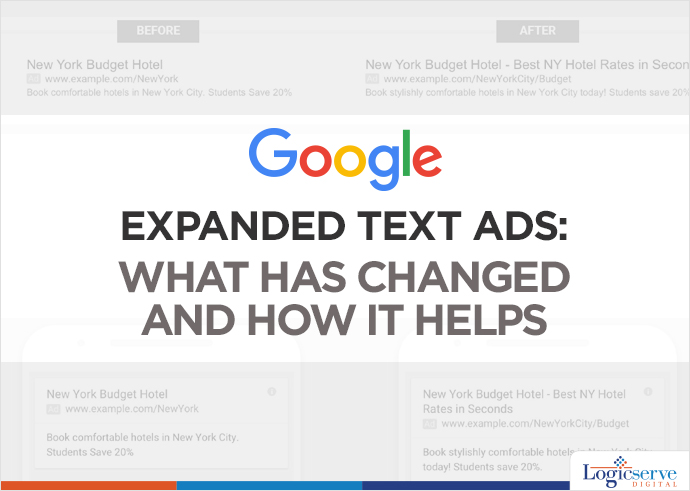
  • Expanded Text Ads: What has changed and how it helps

    Expanded Text Ads: What has changed and how it helps

    expanded-text-ads @LogicserveDigi

    The long awaited expanded text ads have finally arrived, but are we ready? Google has designed these ads considering both, the advertisers and the mobile-first world users in mind. So, what exactly has changed and how can it help us? Before, we answer this question let’s first understand what are expanded text ads.

    What are expanded text ads?

    Consider yourself as an artist who is painting on 1”x1” canvas for 15 years. Suddenly, someone hands over twice the size of the canvas. Would you fill up the extra space with more clouds and land? An ingenious artist would use up the space to bring up a stunning and all comprehensive landscape. Likewise, the expanded text ads gives you the freedom to flex your creative PPC muscles by exceeding the character limit.

    Here’s is what has changed –

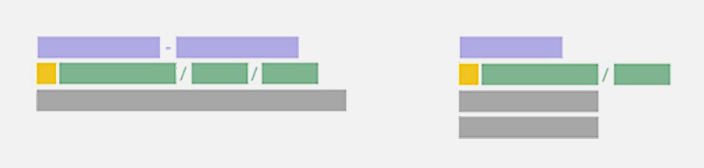
    Expanded Text Ads: Exceeding character limit @LogicserveDigi

    Image Courtesy: Google user content

    • Two headlines and more characters

     Instead of 25-character headline, we now have two headlines with 30 characters each i.e., 60 characters!  It is a wonderful opportunity to have a desired call-to-action. Both headlines will appear on the single line (as shown on the left hand side of the image). However, the second one might come after a line break or Google might even truncate the second line, if required. Languages such as Japanese, Korean and Chinese having double-width characters are allowed to have 15 characters. This addition is sure to add up to the effectiveness of the ad.

    • Expanded description

    Remember the canvas; its size has increased by 14%! The 70-character limit for the description has been extended to 80-character. Often we find it impossible to utilize the 35 character in description line 1, and forced to move the long phrase or word to the next description line. This extension in character limit for description comes as boon for us, isn’t it?

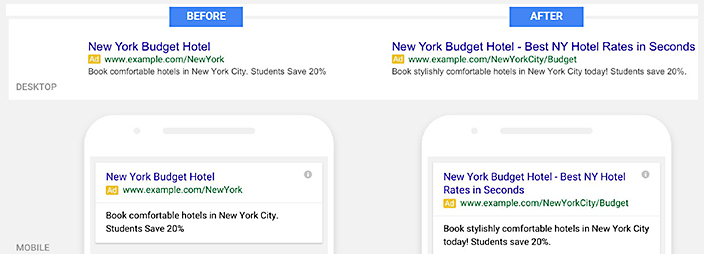
    Check out the below given image for more clarity. In the standard text, we have less character limit for description line, however in the expanded text ad we have much better call to action due to extended character limit on a single line.

    Expanded Text Ads Description:Character Limit @LogicserveDigi

    Image Courtesy: Wordstream

    • URL customization

    No need to enter a display URL to match the final URL domain. Adwords will pick the domain from your final URL and show it as your display URL.

    For instance,

    Your final URL is www(dot)example(dot)com/megastore/all-inclusive/deals, your display URL will be, www(dot)example(dot)com

    Well, you have another option of having path fields with 15-character limit. It will be a part of your ad’s display URL, positioned after the website’s domain.

    For instance,

    Your final URL is www(dot)example(dot)com/megastore/all-inclusive/deals, and you might like to have path text to be all-inclusive and deals. So, your display URL will be www(dot)example(dot)com/all-inclusive/deals

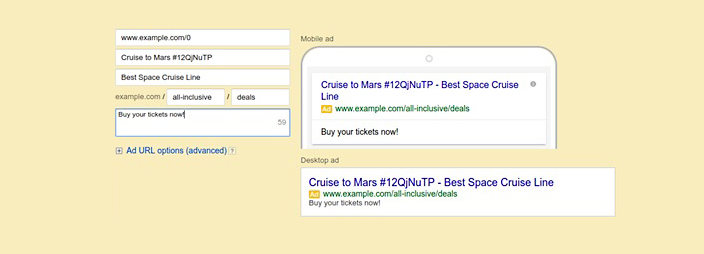
    This is how the ads will look in Adwords interface.

    Expanded Text Ads Present and Former Text Ads @LogicserveDigi

    Image Courtesy: Google Developers

    Google recommends using path text, as it will give the users a better idea of where they will land on your website.

    Learnings:

    The major benefit of expanded text ads is the increase in CTR (Click-Through-Rate).  It makes sense, as your ad will have more space in search engine results with detailed information and call to action.

  • Going mobile with Ecommerce

    Going mobile with Ecommerce

    If you have been overwhelmed by the business success of online shopping, here is another dose of adrenalin that will make you excited—its mobile ecommerce. In the age of the smartphone and tablets, you will find that mobile online shopping has gone to a very high level. You can now shop for your favourite things from almost anywhere in the world—provided you have an internet connection.

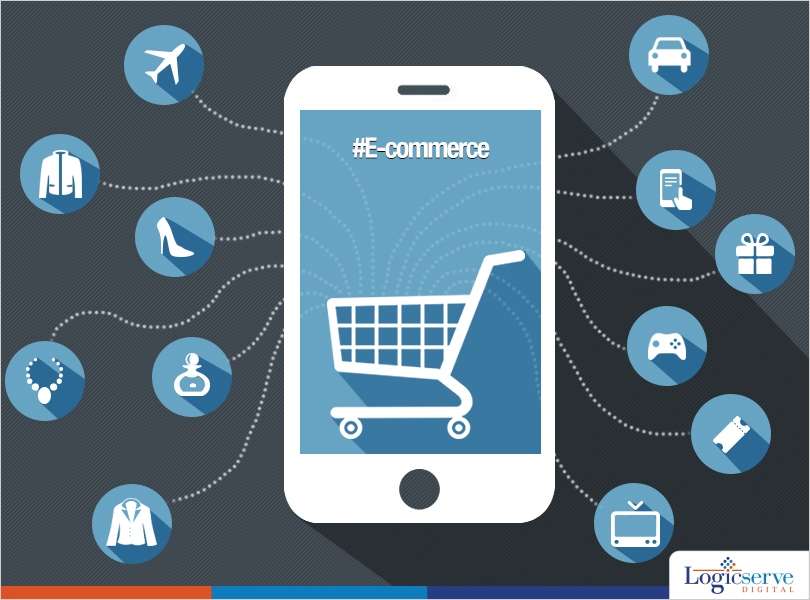
    Going mobile with ecommerce @LogicserveDigi

    If you do some research on the internet for the scope of mobile ecommerce, you will be startled at the statistics that will throw up on you. Global mobile devices and connections grew to 7 billion from up to 6.5 billion in 2012. The smartphones accounted for 74% of that growth and there were overall 406 million net additions in the year 2013. With such a huge growth, online shopping companies have seen a lot of potential in the business of ecommerce on mobile.

    So, what do the companies need to make customers use their mobile phones? Well, the answer is very simple—they need to provide a free mobile application. By using this free mobile application, the online shoppers don’t need the desktop or laptop to make online shopping requests. Security is also something that most online shopping companies need to take care of. In the US, the number of shoppers using their smartphone for online shopping has gone to 79 percent. This means that there is an alarming demand for a robust online shopping app for smartphones.

    Creating a mobile application for ecommerce is not as easy as it appears. There are several complications that designers and developers are facing in creating ecommerce applications these days. Just creating a mobile app for product display is very easy, but to create an app that will take requests for payments of the selected goods is not easy at all. Customization or resizing of website pages is something that most online shopping websites have to give additional emphasis on. When you view a web page on a laptop or desktop, you can get to see several things, including images and videos. On the mobile phone or smartphone, there is very limited space and making adjustments can sometimes compromise the quality.

    When the aforementioned obstacles of mobile shopping or ecommerce on mobile are overcome, the potential benefits are substantial. In addition to the aforementioned obstacles, marketing for online shopping is also in focus these days. There is a huge revolution happening on the world of shopping and this revolution is happening right at the tips of our fingers. With the latest smartphone, you don’t need to worry about online shopping anymore.

    LogicSpeak:

    If you are planning to buy a mobile phone, it is always recommended that you buy a smartphone that can connect to the internet. Since, this is the prerequisite for mobile ecommerce. Technology is evolving at a very fast pace and we have to stay abreast with the current trends or we will be blown away to oblivion. Mobile ecommerce will be there for quite some time—so be prepared for this revolution.

    Previous Post: Content marketing and SEO: What you need to know

  • How to Choose Between Mobile Apps and Mobile Website

    How to Choose Between Mobile Apps and Mobile Website

    Mobile app versus mobile website @LogicserveDigi

    More than half of visitors to the Web access it via a mobile device. Smartphones are outselling desktop PCs six-to-one. This underscores the need for businesses to cater to the vast mobile-wielding audience.

    Mobile Websites

    To make sure that potential and existing customers have a great browsing (and indeed, online shopping) experience, businesses must have a dedicated mobile website. You can either develop a different website entirely and host it at a different URL (think of the two New York Times websites: nytimes.com and mobile.nytimes.com) or you can go for responsive design which refers to a website design technology that results in websites that look good on different screen sizes by presenting their website content differently depending on the screen size or device on which you access the site.

    Mobile websites certainly make far more sense than mobile apps.

    Here are a few reasons that show why mobile websites make more sense than mobile apps:

    • One Website Versus Multiple Apps

    A single mobile website is all you need to cater to a variety of users browsing with their iPhones, iPads and Android-powered devices. On the other hand, you would need to design and develop (write code) separate apps for the separate mobile operating system platforms from Apple, Google, and Microsoft.

    • Easy to Upgrade

    How easy is it to upgrade a website versus upgrading apps whose code must be modified separately and after modification and testing, the ‘new versions’ of the apps will have to be pushed to the users who’ll need to download or ‘upgrade’ their apps? There is obviously no competition between the two. The mobile website is the clear winner here compared to the mobile app option.

    • Easy to Locate and Share

    With a mobile website, you can make it search engine friendly and customers will discover your website from search engine query results. It will be difficult to stand out in the clutter of a million apps which are there on both the Apple App Store and Google Play.

    Not only are mobile websites easy to locate via search engines, they can be shared easily via social media as well. Like normal websites, you can integrate social media buttons (Facebook, Twitter, Google+, etc.) into your mobile websites that will let users tweet the pages they like or share on Facebook.

    • A Mobile Website Is Also A Mobile App

    If you want App-like functionality in your mobile website, it is possible to have some of that on the mobile website itself. Of course, you cannot get full-fledged App-like experience from a mobile website.

    • Cheap

    Perhaps quite as important for businesses, mobile website development is far cheaper than mobile app development. This is obvious as you only need one mobile website to cater to all mobile visitors whereas you will need at least two apps to cater to the Android and iPhone audience.

    Mobile Apps

    There are a small number of situations where mobile apps do make sense though. If you want to charge users money, then you should come up with an app as it’s easy to charge money for downloading apps.

    Similarly, if you want to give offline functionality, then obviously you will need apps which will work offline once downloaded and installed on a mobile device.

    If you need mobile gaming-like features which require a lot of processing or even access to the phone’s camera, gyros, or accelerometers and so on, then also dedicated apps make sense.

    LogicSpeak:

    The bottom-line is that for most needs and most businesses, a mobile website will do perfectly fine. It will be cost-effective and user-friendly too.

    Previous Post: What every Affiliate marketer should know?

  • News : Introducing Local languages can Increase Mobile Usage by 24pc States IMAI

    News : Introducing Local languages can Increase Mobile Usage by 24pc States IMAI

    LogicNews - Logicserve Digital

    Introducing local languages can increase mobile usage by 24pc states IMAI

    A study undertaken by the organisation shows that mobile usage penetration has risen to 169mn in 2013 from 122mn in 2012. The study was undertaken with support of IMRB International. Some major findings

    43% non-users from rural areas have stated they will like to use internet if available in local language

    13.5% of non-internet users from the urban area will use internet, if available in their local languages

    In rural India, 27%of the users use Hindi followed by Marathi and Tamil.

    Majority of the users across urban and rural sphere access internet through mobiles for emails, search and social networking.

    LogicSpeak :

    As shared earlier, mobile is the next big platform for every digital marketer. With everything going Glocal(Global+Local) mobile marketing will lead the way.

    Link : https://bit.ly/1hr2zmZ