LS Staging

Tag: google analytics

  • 4 Reasons Why Marketers Should Consider Switching to Google Analytics 4

    4 Reasons Why Marketers Should Consider Switching to Google Analytics 4

    With Google Analytics 4 (GA4), Google has replaced Universal Analytics (UA) property type that marketers have been using forever. With significant upgrades to user tracking, reporting, and set-up, GA4 is more streamlined, powerful, flexible, and user-focused. 

    GA4 is a lot more than just an updated version of UA and will mostly involve a steep learning curve for marketers who want to make the switch. It will require them to un-learn and re-learn a tool they have been using for a long time. But even with all of these challenges, the switch from UA to GA4 is definitely worth considering.

    Here are 4 reasons that make GA4 a smarter alternative to UA-

    1. Flexibility Like Never Before

    GA4 allows and encourages custom reporting. Users can make custom reports with data of their choice. It also offers a wide range of visual representation options, including interactive graphs, pie charts, and more. The availability of custom reports significantly reduces the need to use pre-made reports that are often irrelevant. It also helps in making the dashboard less cluttered.

    With GA4, all the essential data you need can be accessed faster so that you can make informed decisions on the go to improve the effectiveness of your website or app.

    2. Smarter Insights

    Google’s advanced machine learning models enable GA4 properties to track all the latest trends in real-time. It can also automatically generate detailed insights, including unusual spikes, changes, or differences in data trends. Moreover, the self-learning algorithms continue to learn and evolve to further boost the quality of the generated insights based on which you can make informed decisions.

    While the automated insights feature of GA4 is similar to the intelligence analytics feature of UA, it is more advanced and significantly more powerful.

    3. Automated Event Tracking

    As event tracking has gained prominence in the last few years, Google has equipped GA4 with automated event tracking. With UA, users have to manually set up event tracking with Google Tag Manager (GTM) to track events such as video plays, scroll depth, link clicks, etc. GA4 can do this automatically.

    Events can also send valuable insights regarding website info, actions, and website visitors to the tool for generating visual reports. This also means that you can now collect custom information which is not possible with UA as it uses the pre-defined hit model.

    4. GA4 is the Future

    Google has already mentioned that GA4 is the future of analytics. All the new features and upgrades will only be rolled out for GA4 in the future. It is also the default property type for creating a new GA property. However, users still have the option to continue using the existing UA properties without switching to GA4.

    When it comes to analytics, it is always wise to switch to upgrades as significant as GA4 as quickly as possible as it can provide you a head start over others. With time, marketers and brands will bid farewell to UA, and GA4 will be the only option left. Rather than waiting for a few months before switching, this could be an excellent time to jump the bandwagon and start mastering GA4.

    Upgrade to the Future of Analytics with adveGA4

    Google Analytics 4 is a significant upgrade to Universal Analytics. While its launch received a lukewarm response from the marketing community, most people have started realizing its potential and how it can boost their analytical capabilities.

    If you’ve been using UA for a very long time and struggling with the GA4 switch, a reputable digital marketing company can help. Experts who are already well-versed with GA4 can ensure that the changeover is hassle-free and time-efficient.


  • 3 Google Analytics 4 Features Every Marketer Should Know

    3 Google Analytics 4 Features Every Marketer Should Know

    Google Analytics is used by millions of website owners and businesses across the world. Over the years, Google has consistently upgraded this platform to help marketers better analyze their website data. On 14th October 2020, Google released a blog post to introduce an updated version of the platform, known as Google Analytics 4 or GA4.  

    The update made the previous “App+Web Property,” introduced in 2019, the default property type for the analytics account. A host of new features were also introduced with the upgrade to keep up with the changing consumer behaviour, stringent data privacy regulations, and the rising need for efficient use of website analytics.

    3 features of GA4 every marketer should know about are discussed below-

    1. ML-Powered Marketing Insights

    Google Analytics has been using Machine Learning (ML) for a long time now. But it has been made far more valuable and useful in GA4. The tool can now use your data to find trends and also send you notifications about the same. Its ability to predict consumer behaviour and action has been improved significantly to make it easier for marketers to plan in advance.

    For instance, GA4 is capable of predicting revenue from a specific user group. This will allow marketers to build groups and analyze why a particular group of users have a higher probability of conversion compared to others.

    2. Improved Google Ads Integration

    Businesses and marketers who use Google Ads will appreciate the deeper integration of analytics and ads in GA4. Data from the analytics account can be used for building custom audience from users who visit your website and app. Moreover, it will also add or remove users to and from the new lists based on the actions they perform on the website automatically.

    Advertisers have also been requesting a feature for tracking YouTube conversions for some time now. With GA4, marketers can view YouTube conversions (web+app), along with a host of other channels like organic search, paid search, email, social, and more.

    3. Customer-Focused Measurements

    Unlike Universal Analytics, which still measures fragmented data based on platform or device, GA4 has a more customer-focused measurement approach. This enables marketers and businesses to better understand how audiences engage and interact with the website.

    For this, GA4 uses an extensive range of identity spaces, including Google signals from people who have opted for personalized ads and user IDs provided by marketers. To give you an example, let us assume that a customer purchased a product from your website or app. With GA4, you can check their entire journey or the steps they took before completing the purchase.

    For instance, they might have seen your ad in Google search or YouTube before landing on your website/app and making the purchase. With this information, you can focus more on the channels that are bringing in the customers.  

    Boost Your Marketing Efforts with GA4

    Google will continue adding more features to GA4 to provide marketers and businesses more opportunities to improve their marketing initiatives. As Google has already mentioned that GA4 will be the future of analytics, this can be an excellent time for marketers to switch from Universal Analytics to GA4 and experience all of these great features.

    Businesses can consider working with reputed digital marketing companies to make the best use of this upgrade and boost their digital growth. 

  • Google Analytics Updated with 4 New Powerful Features for Marketers

    Google Analytics Updated with 4 New Powerful Features for Marketers

    Google introduced the App + Web property for its analytics platform in 2019. This property combined the app and web data to provide unified reporting and analysis. The reports generated by this property uses a common set of metrics and dimensions for seamless integration of app and web data.

    While the App + Web property made it easier for the marketers to track their app and web data from a single dashboard, accessing detailed customer information and insights continued to be a hassle. The recent October 2020 Google Analytics update has introduced four new features to help marketers get detailed insights for making smarter decisions.

    Take a look at what these four new features are-

    1. Smarter Insights Using ML

    The machine learning models of Google can now alert marketers about the changing data trends. In other words, Google Analytics can now make use of the website data for identifying products that are in high demand as per the customer needs. With this feature, it will be easier for marketers to take measures and predict future actions of the consumers proactively.

    For instance, the new feature can calculate Churn Probability. This can help marketers by enabling them to focus on customers with a higher purchase probability. In the current scenario where businesses are cutting their marketing budgets, investing in customers who are more likely to make a purchase can help generate more sales even with a limited budget.

    2. Deep Google Ads Integration

    Google Analytics now has improved integration with Google Ads for more efficient cross-platform decision-making. For instance, marketers can now create custom audiences and deliver more helpful and relevant experiences to them every time they engage with their business.

    The improved integration provides marketers a better overall view of their marketing efforts, including Google Search, YouTube video views, email, social media, and other paid Google and non-Google channels.

    3. Customer-Centric Data Measurement

    The majority of the data measurements done by Google Analytics are based on the devices and platforms used by the customers. The recent update has a more customer-centric data measurement approach. It uses unique Google signals and multiple identity spaces for improved ad personalization.

    With this update, it is now possible for the marketers to know if a particular customer discovered their business through a web ad and then completed the purchase through their mobile app. In the longer run, this will provide marketers a holistic view of the entire customer journey and how the customers interact with their business.

    4. Improved Data Controls

    Even the data controls have been considerably changed to make them more granular. This is done to enable marketers to have improved control over how they want to manage and retain the collected customer data. This flexibility can be valuable for advertising as marketers can now decide whether or not they want to use customer data for optimizing ads.

    The current internet trend suggests that cookies or identifiers might get severely limited in the future. With improved data controls, it will be easier for the marketer to adapt to such changes in the future.

    Using the New Google Analytics Features

    The App + Web property, which is now known as Google Analytics 4 property, is already updated with these new features by default.

    Along with the existing properties, marketers can create a Google Analytics 4 property to access these four new features and future updates.

  • Everything That You Need to Know About Google Analytics Data Privacy Update

    Everything That You Need to Know About Google Analytics Data Privacy Update

    Google analytics has been a revolutionary tool to gain insights about user interaction with your website. The insights offered by Google analytics has motivated countless websites to revamp their content and layout, to form a better connection with the visitors.

    However, the analytics service has found itself in one or another controversy over the years, as the data privacy movement gains ground. This has found Google many times, failing to comply with data protection regulations like the General Data Protection Regulation (GDPR) or the California Consumer Privacy Act (CCPA). In a bid to comply with such regulations, Google introduced new updates to meet the regulations at par with the regulations in their latest announcement. This announcement is especially useful to businesses getting traffic from European countries and California.

    With this new update, marketers can now do the following to become more compliant with the GDPR or CCPA regulations;

    1. Disable Analytics Data Collection (from Web or App)
    2. Disable collection of Advertising Data (from Web or App)
    3. Disable Advertising Personalisation (from App and Web)

    Let’s examine the impact of these updates closely.

    Existing Compliant Features and Tools

    Google analytics reminded their users about settings available in their tools that make them GDPR compliant. The users were reminded to make optimal use of facilities like anonymizing IP, privacy controls, data sharing settings, and other features already available with them.

    More Authority Over Data

    The users now have much more authority on what to do with the data generated. The new data retention feature empowers you to decide for how long the individual Google Analytics data is stored until it is automatically deleted. By default, the data will get deleted after a period of 26 months.

    Also, Google Analytics now lets you delete the data of a user if they explicitly ask to delete their information.

    Updated Data Processing Terms

    Data processing terms provide you insights about how the data will be processed and with whom the data will be shared. Google has made considerable changes in its data processing terms to better accommodate European users as per GDPR standards. The updated document secures data privacy and highlights the responsibility of the users to intimate and seek consent from the visitors about the sharing of their data.

    GDPR-compliant Privacy Policy

    Google has made newer additions in its standard contract representing Google Analytics and Google Analytics Firebase as a ‘data processor’. This move is compliant to new norms established by the GDPR. However, the service becomes a ‘shared controller of data’ if you authorize Google Analytics to share your user data with Google Ads.

    While some of these updates make the data collection system a little simpler, some make it a bit more complex for the users to execute. The data deletion mechanism, although empowers the visitors, turns the matter more complex for marketers. Since you can not delete the data for a single user, you need to deploy Google Analytics User Deletion API in your code to delete the data of an individual visitor.

    Long Way to Go

    The introduction of a newer update takes Google Analytics a few steps forward towards compliances set up by GDPR. However, the analytics service still has a long road to cover. Google uses visitor’s data from Google Analytics to make their services better. This can be seen as a privacy breach by many. Also, the agreement between IAB Europe and Google takes the data consent system in the right direction. However, it still misses establishing any reliable framework for handling analytics data.

  • Why Marketers must look beyond Buyer Personas and use Data-Driven Insights to Identify their True Audience

    Why Marketers must look beyond Buyer Personas and use Data-Driven Insights to Identify their True Audience

    It’s a half-full, half-empty scenario. You could be seriously undermining the potential audiences outside your buyer personas by boxing your online marketing strategy around a fixated customer demographics.

    Let us explain the above statement with an example. Consider the case of a fitness wear brand whose target audience is women in their 20s and 30s. However, an in-depth look at web analytics for the brand’s e-commerce website reveals that they attract significant traffic from other women who lie outside this age group.

    By leveraging this data, the brand can convert these outliers (casual visitors beyond their target demographics) into paying customers. The brand can alter their marketing strategies or increase product categories to appeal to women of all ages, thereby boosting sales and revenues through these insights.

    On the other hand, if the brand doesn’t focus on web analytics, it’s likely to lose out on crucial conversion opportunities – as they would not have looked beyond their standard buyer personas.

    Brands should avoid getting trapped by a Limited Tunnel Vision of their Audience

    As this example illustrates, it is crucial for businesses to look beyond typical customer personas and consider the demographics of all current site visitors. Having a clear picture of the entire web audience helps businesses convert casual onlookers into paying customers.

    Once they accurately understand and segregate traffic categories, businesses can better channelize their marketing efforts, allocating the right budgets for various marketing campaigns, thereby enjoying higher conversions.

    How to perfect Web Audience Intelligence?

    To get an accurate picture of the current web audience, marketers must monitor both web analytics profiles and social advertising platforms. Here are a few guidelines on how marketers can learn about their true audience on different platforms:

    • Google Analytics

    By using various segmentation features and lists on Google Analytics, brands can get a clear picture of customer conversions based on age and gender. Additionally, it’s also possible to find out how age and gender are related to other user behaviour metrics like time spent per session, bounce rates and pages per visit.

    This gives a clear picture of who is visiting the site, as well as who is converting, thereby helping brands get better insights into their web audience.

    • PPC Ads

    PPC ad analytics help brands understand searcher intent, thereby moving visitors from down the funnel into upper levels. With that said, marketers have a hard time trying to understand why, despite high click-through-rates, the conversion rates remain low.

    By using audience demographics (like age, gender, household income, etc.) from Google AdWords/Bing Ads, marketers can compare how different factors contribute to CTR, CPC, Cost per conversion and other key metrics.

    Let’s take the above example of the fitness wear brand. If they find that they get plenty of ad clicks from women aged 40 and above, but poor conversion rates, then the brand can understand that they have to restrict ad clicks from certain demographics or alter the content to suit this demographic. If they take the second approach, they can come up with new product sizes and styles to appeal to this audience category and get them to convert into paying customers.

    • Facebook Ads

    Marketers can compare data like the age and gender of the followers obtained from Facebook Insights with the data from Google Analytics to find out if there is any difference between the general followers on FB and the visitors on the site.

    • LinkedIn Ads 

    LinkedIn doesn’t offer ad insights based on age and gender. Instead, it shows audience segmentation based on levels. Using the insights offered, marketers can find out if their ad clicks on the platform are coming from senior-level employees or entry-level employees.

    • Twitter Ads

    Twitter doesn’t offer detailed insights into followers, like Facebook. However, the platform provides gender and marital status insights. Marketers can use this data to compare it with insights from other platforms.

    The Key Takeaway

    While it’s healthy for brands to develop buyer personas to channelize their marketing efforts, it’s crucial not to miss out on sales opportunities beyond the pre-defined personas.

    By using data derived from all the platforms mentioned above, brands can gain a clearer understanding of website visitors, converters and how it varies from pre-defined buyer persona, thereby strategizing their marketing efforts to appeal to their entire web audience.

  • The Starter’s Guide to Using Google Data Studio

    The Starter’s Guide to Using Google Data Studio

    What is the Google Data Studio?

    It’s a free data visualization tool from Google. Launched in beta mode in 2016, it came out of the beta stage in October 2018. The simple drag-and-drop interface makes it easy to create complex charts and reports, without the need for any technical know-how.

    Using the Google Data Studio, you can create interactive and engaging data reports. The most significant benefit of Google Data Studio is that it lets you pull in data for reports from various sources like Google Ads, Google Sheets, Google Analytics, Google Search Console, MySQL, YouTube and more.

    The Google Data Studio lets you visualize your data in various forms – graphs, charts, pivot tables, bar graphs, pie charts, heat maps, scatter charts, scorecards, geo maps, and more. Additionally, you can customize the report in several ways. Change shapes, background colours, fonts, add logos/images, object properties and more.

    In simple words, the Google Data Studio is a powerful business intelligence tool that connects all your separate business data sources to create beautiful, interactive reports.

    Why use it?

    • It’s free
    • It is intuitive and easy to use
    • Easy to create customized reports
    • A great visual tool for data analytics
    • Easy to connect with other Google suite products
    • Easy to share and collaborate
    • Reliability, trust, and scalability of Google

    A Quick Tutorial to Getting Started with Google Data Studio

    Step 1: Login to Google Data Studio

    Start by clicking on datastudio.google.com. Login using the Google account you use for Google Analytics. The interface of Google Data Studio is similar to other Google tools like Google Drive. The data studio will store only documents created using it. The data is divided into two formats:

    • Reports and
    • Data sources

    Step 2: Create a Report

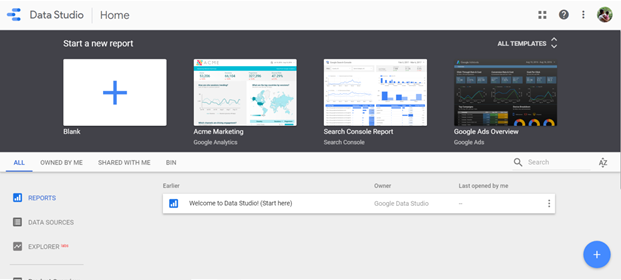
    In the reports tab, click on the “+” button at the top left or bottom right. This opens a blank report. You can also make use of the various available templates that pull in data from the Search Console, Google Analytics, Google Sheets, Google Ads, or Google BigQuery.

    Image via Google Data Studio

    Step 3: Connect Data

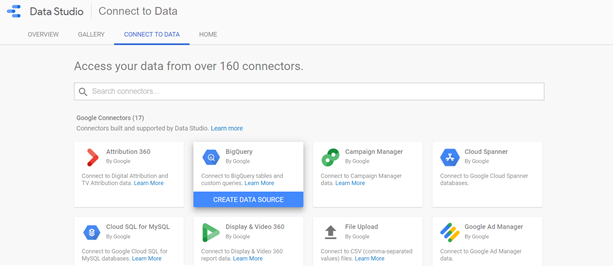
    To load data from a source, click on the Data Sources tab, and choose, “Create New Data Source,” or click on “Connect to Data,” option at the bottom. You can pull in data from over 160 connectors – 17 Google Connectors and over 135 Partner Connectors.

    Image via Google Data Studio

    Once you have chosen the preferred data source, you need to connect the Data Studio to the Google Analytics account. Next, select account ?Property ? View. This opens a spreadsheet of metrics or fields. Click on the “Add to Report” button at the top-right corner of the screen, to integrate data from your chosen data source to report. You can also add data from multiple data sources.

    Step 4 – Customize the Report

    The report is a blank grid that you can add several types of visualizations. Google Data Studio lets you customize the theme and layout of the report.

    You can visualize data in various forms – bar charts, pie charts, combo charts, bullet charts, scatter charts and more. Additionally, you can also add images, shapes, and text to the report. Once you have chosen the visualization, drag it to its preferred size and release it on your report. Your data visualization appears on the chart immediately.

    Use the right-hand sidebar of the report to edit your visualization. You can change the date range, metrics, dimensions, data source, sort data, filter and more.

    Data Analysis and Presentation Made Easy with Google Data Studio

    With Google Data Studio, it’s quite easy to configure and present your data in various ways. It makes it easy to analyze and extract insights from your data, thereby helping you enhance the efficiency and usage of your data.

    Here’s a recap of all that you can do with Google Data Studio:

    • Visualize data using customized charts and tables
    • Make reports using data from a variety of sources
    • Share your insights with your team, your clients and others
    • Collaborate on report creation with the rest of your team
    • Speed up the report creation process using in-built templates
  • Google Signals – The New Cross Device Reporting Feature on Google Analytics

    Google Signals – The New Cross Device Reporting Feature on Google Analytics

    Google has rolled out a new analytics feature called as Google Signals. When you activate this feature, your Google analytics is further powered to display ads in cross device- eligible remarketing campaigns to audiences created on Google Analytics. Users who have turned on ads personalisation get to view these targeted ad messaging for better efficacy and outreach. This helps advertisers to better understand customer behaviour and preferences across multiple browsers and multiple devices.

    What are the changes you can expect on Google Analytics as an advertiser?

    Google Signals enhances the current advertising functionalities on Google Analytics to drive the following additional features too:

    • Remarketing with Google Analytics: Advertisers can now serve ads in Cross Device-eligible remarketing campaigns to Google users. It is important to note that this is available only for those users who have activated Ads Personalisation.
    • Demographics and Interests report: Google Analytics will also analyse extra data about users who have turned on Ads Personalisation to generate the demographics and interests reports.
    • Advertising Reporting Features: In addition to the different metrics tracked by the analytics platform, Google Analytics will now also analyse information about users who have activated Ads Personalisation. This will enable a better insight generation on ad performance.
    • Includes all existing Advertising Features: The update covers all present Advertising Features like Google Display Network impression reporting and remarketing, Remarketing Lists for Search Ads, and Display & Video 360 impression reporting and remarketing.

    How to turn on the Google Signals feature?

    The below steps allow you to activate the new feature

    • Login in using your Google Analytics credentials.
    • Tap on “GET STARTED” in the blue notification strip at the top of the page. Alternatively, you can traverse to Property column > Tracking info > Data Collection and follow the prompt in the blue dialog.
    • Click through the information and activation panels.
    • Read the information given on Google Signals, then tap “CONTINUE

    That’s it! These simple steps will help you turn on Google Signals.

    Why is this change needed?

    Google is already collecting a lot of data about user behaviour on an online property on multiple browsers and devices. As per the company announcement, the vast volume of data generated about users who have activated Ads Personalisation will come in handy in Google Signals. This data will help to look at the cross-device behaviour of the entire user base of an advertiser. This is enabled by the beta version of a new Cross-Device report that takes aggregated data on users who have turned on ads personalisation and generate behaviour models for an entire user base across multiple devices or browsers.

    The new Google Signals feature will undoubtedly ramp up the efficacy of cross-device advertising with helpful insights from Google Analytics. Advertisers will get aggregated data that can be used to predict behaviour for the entire user base and thus serve highly targeted ads.

    Interested to check out the new feature and activate Google Signals on your campaigns? Then read more about it on the official Google announcement page.

  • How to Get True Google Analytics Insights On Single Page Visits?

    How to Get True Google Analytics Insights On Single Page Visits?

    Content has immense power as far as engagement is concerned. With compelling content, the target readers stay hooked on the site for longer. They read through the entire article and act upon the call to action. However, there is a strange contradiction that your Google Analytics ends up reporting. Yes, the search engine analytics reports this as a bounced page with 0-second session duration.

    Here’s how:

    1 – Bounce rate is when there is a ‘back’ button click, a browser window is closed, manual URL feeding, or a click to an external link.

    So every single type of visit is classified as a bounce if the user doesn’t click to another page on the site (which is what usually happens when a reader reads a blog or article)

    2 –Time on page is computed only when the entry and exit pages are different. If the reader reads through the article and exits from the same page, the time is calculated as zero seconds, even if he took (suppose) 3:25 minutes to read a content.

    This is because it needs the initiation time of the 2nd page to compute time on page (which will not exist in case of single-page sessions)

    Why is this important?

    Google Analytics is the Holy Grail for digital marketers all over the world. Their success and performance is determined by the numbers thrown up by the GA site. The GA site tracks awareness, which leads to engagement, which in turn, leads to conversion. However, the fact remains that its in-built ranking signal determiners itself cannot be taken at face value every single time. As smart digital marketers, we need to know this limitation about Google Analytics. Otherwise, we would end up making terrible strategy decisions.

    How to overcome this limitation?

    1 – To rectify the Bounce Rate metric

    It is easy to update the Universal GA parameters with the below line of code

    setTimeout(“ga(‘send’, ‘event’, ‘nobounce’,’45_sec’)”,40000);

    So for your content, an engaged user will be anyone who is on the page for more than 45 seconds. Some bugger organisations may set the benchmark higher and use 60 second or more to classify a page as a non-bounced visit.

    2 – To rectify time-on-page metric

    Using Google Tag Manager, we can set up a trigger to improve the reporting on this particular metric. The trigger will be the timer type. Here set the interval as either 15000 (15 seconds) or 30000 (30 seconds). Then by using the code below, you can set the trigger to go off on every page of the site.

    Page URL

    Matches RegEx

    .*

    Then create a ‘timing event’ tag by populating the fields – ‘Category’, ‘Action’, and ‘Label’. Lastly, select the trigger created some moments back and publish the changes.

    You need not be troubled in case you see a high occurrence of bounce rate and zero time on page reporting. With these tips, you can easily tweak the setup of Google Analytics to reflect the true state of engagement on your website. This is done by factoring in single-page visit session too for your organic search performance.

  • Weekend Digital Media Round-up: Google promises an alternative to AMP, YouTube stories to get new UI, Snapchat adds Instagram-style mention tagging to Stories, Facebook unveils Trip Consideration for travel advertisers and more…

    Weekend Digital Media Round-up: Google promises an alternative to AMP, YouTube stories to get new UI, Snapchat adds Instagram-style mention tagging to Stories, Facebook unveils Trip Consideration for travel advertisers and more…


    1. Google promises publishers an alternative to AMP

    Google’s AMP project is not uncontroversial. Users often love it because it makes mobile sites load almost instantly. Publishers often hate it because they feel like they are giving Google too much control in return for better placement on its search pages. Now Google proposes to bring some of the lessons it learned from AMP to the web as a whole. [Source: Tech Crunch]

    1. Google expands featured snippets to give multiple results

      This week, Google is expanding its “featured snippets,” the portion of text that is returned above a search result to give you quick answers without having to click through, as reported by TechCrunch. [Source: THE VERGE]

    1. Analytics 360 Suite customers can now set up ‘user groups’ in Google Analytics

    Individuals on internal teams at agencies and consultancies often have various levels of access to a Google Analytics account. Overseeing all those individual permissions — particularly as people come and go — is getting easier with the introduction of user groups in Google Analytics. [Source: Marketing Land]

    1. WhatsApp is writing a custom message for large enterprises

    After recently launching a mobile app for small businesses, WhatsApp is preparing to add several new features for large enterprises including customer support and possibly merchant payments as well, according to people familiar with the developments. [Source: The Economic Times]

    1. Facebook’s breaking news label flags the latest news — and increases shares

    Facebook has been testing the breaking news label since last fall, but with positive results from the first round of testing, the company is expanding the test to include 50 more publications. On Monday, March 5, Facebook announced the expansion of a test for a breaking news label on links and Live videos. [Source: DIGITAL TRENDS]

    1. YouTube Stories To Get New UI | Background To Be Replaced by Green Screen Effect

    YouTube is chipping away at its own particular interpretation of stories, which it’s as of now testing in beta with a little gathering of best makers. Presently, the organization is including the following intelligent element from Snapchat and Instagram to YouTube stories: increased reality green screen channels, as first spotted by means of Engadget. [Source: THINKINGTECH.IN]

    1. Facebook unveils Trip Consideration for travel advertisers

    Facebook has announced its ad platform will now offer an optimization option called Trip Consideration, which will target users who are in the early stages of considering a trip. The option rolls out as another addition to the options for travel advertisers, who also benefited from the launch of Dynamic Travel Ads in October of last year. [Source: Marketing Land]

    1. Snapchat adds Instagram-style mention tagging to Stories

    Snapchat is borrowing a feature from Instagram this time around — somewhat ironic, given that Instagram had shamelessly ripped off the Story feature from Snapchat first — with the app reportedly adding the ability to tag other users in stories with a link to their profile, according to TechCrunch. The new feature was first spotted by Matt Rappaport, and appears to work as you’d expect: type out a username in the text field on your image or video caption in Stories, and viewers will be able to tap on it to bring up a new menu linking to the user info, where you’ll be able to directly add them as a friend. [Source: THE VERGE]

    1. Twitter Tests Integration With Outside Buying Platforms

    Twitter wants to be the easiest place for brands and agencies to buy ads in social media. According to advertisers who have been briefed about its plan, Twitter is seeking to embrace programmatic ad technology in a way that its more-closed rivals have avoided, by building pipes to connect its ad inventory with outside buying platforms and agency trading desks. [Source: AdAge India]

    1. Voice Clip Now Available In Facebook Status Update

    Google has started testing and potentially rolling out a new feature in search that shows a carousel with a list of answers directly within the search results snippets. It shows the main search result snippet, and below it, it shows a carousel of answers picked from the content on the page the snippet is linking to. [Source: Logicserve Digital Blog]


  • Weekend Digital Media Round-up: Double delight for digital India, DoubleClick Bid Manager, Snapchat’s new snap store and more..

    Weekend Digital Media Round-up: Double delight for digital India, DoubleClick Bid Manager, Snapchat’s new snap store and more..


    1. Union Budget 2018: Double delight for digital India

    The NDA government’s last Budget before the Lok Sabha polls has kept up the focus on Digital India by doubling allocation for the programme to Rs.3,073 crore in 2018-19. Finance minister Arun Jaitley acknowledged the emerging technologies in his Budget speech on Thursday by announcing that the Department of Science and Technology will launch a Mission on Cyber Physical Systems. [Source: INDIA TODAY]

    1. Foreign or local, digital services companies equal before tax law

    The Budget has proposed an enabling rule, which broadly says that a MNC could have a business connection in India even without a physical presence in the country. [Source: The Economic Times]

    1. DoubleClick Bid Manager testing features to improve digital & TV campaign coordination

    Google has announced two new features in DoubleClick Bid Manager to help advertisers activate campaigns across multiple screens and bridge digital and live TV efforts. [Source: MARTECH TODAY]

    1. Snapchat’s new Snap Store teases in-app commerce potential

    Today the company opened the Snap Store, which lives in the Snapchat app’s Discover section and lets you buy Snapchat merchandise, like a $20 Dancing Hot Dog Plushie or a $30 Dog Lens T-Shirt. [Source: TechCrunch]

    1. Google lets users ‘mute’ remarketed ads

    The internet giant has updated its ad system so users can mute reminder ads on a per-advertiser basis for 90 days.[Source: net imperative]

    1. WhatsApp hits 1.5 billion monthly users. $19B? Not so bad.

    CEO Mark Zuckerberg announced on the Q4 2017 earnings call today that WhatsApp now has 1.5 billion users and sees 60 billion messages sent per day. That’s compared to 1.3 billion monthly users and 1 billion daily active users in July. [Source: TechCrunch]

    1. Google Assistant Go launched on Play Store: Designed for Android Go phones

    Google Assistant Go is now officially available on the Play Store, and this version of app is compatible for all Android Go smartphones. [Source: The Indian Express]

    1. Alphabet Unveils New Cybersecurity Business ‘Chronicle’ To Prevent Cyber Attacks

    Alphabet, better known as the parent-concern of the world’s biggest network Google has come up with some great news for business owners! The company has decided to help entrepreneurs deal with cybersecurity issues and safety threats.[Source: LOGICSERVE DIGITAL]

    1. Facebook Introduces Branded Content Tags With New Proviso For Misuse

    Facebook has emerged as one of the most compelling, efficient, and dynamic platforms for business marketing. If you plan to catapult your venture to great heights, Facebook will certainly play a crucial role. The company dropped restrictions on ‘branded content’ and rolled out a unique tagging system. [Source: LOGICSERVE DIGITAL]

    1. Instagram now allows businesses to schedule their posts

    Instagram today made a long overdue change to its product that social media managers have wanted for some time – it will allow businesses on Instagram to schedule their posts. [Source: TechCrunch]

    And in an exclusive interview with Ashutosh Asthana, Assistant Editor, Thinking Aloud, our Co-founder & CEO, Prasad Shejale, speaks about the challenges he faced as an entrepreneur and his mantra for success. Click here