LS Staging

Tag: facebook features

  • Weekend Digital Media Round-up: Google’s new search console, Facebook Messenger’s new features, Bing ads’ rebranding and More…

    Weekend Digital Media Round-up: Google’s new search console, Facebook Messenger’s new features, Bing ads’ rebranding and More…

    1. Google Introduces Three New Search Console Reports

    Google is bringing three new reports to Search Console which are all related to structured data. New enhancement reports for the ‘Sitelinks searchbox’ and ‘Logo’ structured data join existing reports on Recipe, Event, Job Posting, and others. [Source: Search Engine Journal]

    2. Facebook Messenger to get new lead gen templates, appointment booking

    Messenger is rolling out two new features for businesses: lead generation templates and an appointment booking interface that will integrate with calendar platforms. [Source: Marketing Land]

    3. Bing Ads rebrands as Microsoft Advertising

    First there was Microsoft adCenter. Then there was Bing Ads. Now there is Microsoft Advertising. The rebrand emphasizes a focus on personalization and AI. [Source: Search Engine Land]

    4. Is Facebook Working on Launching an Exclusive Creator Studio for Instagram?

    Facebook is working on releasing a brand-new ‘Creator Studio’ app exclusively for Instagram users. Social media industry consultants & commentators are waiting to see what this exclusive studio creator has to offer. [Source: Logicserve Digital]

    5. Instagram officially tests hiding Like counts

    Instagram will now hide Like counts from posts as part of an experiment. If rolled out, the change would refocus Instagram on self-expression instead of being a popularity contest. [Source: Tech Crunch]

    6. Shopify adds new Facebook, Snapchat ad buying options from the e-commerce platform

    Shopify is giving Facebook and Snapchat advertisers new ways to purchase ads through its e-commerce platform. Shopify is also launching new integrations with Snapchat, making it possible for clients to create Story Ads campaigns via a Snapchat Ads App from Shopify. [Source: MARTECH TODAY]

    7. Quora, Pinterest ads pixel integrations now available in Google Tag Manager

    Pinterest and Quora are now approved Google Tag Manager vendors, making it easy for marketers to manage their Pinterest and Quora Pixels via Google’s platform. [Source: MARTECH TODAY]

    8. Facebook F8 2019: New Tools for Messenger and WhatsApp

    Facebook has announced new features for its messaging tool which is where, according to Facebook, social interactions are increasingly headed. These includes Messenger Desktop App, Limiting Your Messenger Content to Close Friends Only, etc. [Source: Social Media Today]

    9. Google launches new video series: SEO Mythbusting

    Google is launching a new video series on its Webmaster YouTube channel, called “SEO Mythbusting.” The video series will feature Martin Splitt from the Google Webmaster Trends Team, who will speak with developers and SEOs on common misconceptions. [Source: Search Engine Land]

    10. Microsoft launches a drag-and-drop machine learning tool

    Microsoft announced three new services that all aim to simplify the process of machine learning. These range from a new interface for a tool that completely automates the process of creating models, to new no-code visual interface for building, training and deploying models, all the way to hosted Jupyter-style notebooks for advanced users. [Source: Tech Crunch]

  • Is Facebook Working on Launching an Exclusive Creator Studio for Instagram?

    Is Facebook Working on Launching an Exclusive Creator Studio for Instagram?

    Recent reports state that Facebook is working on releasing a brand-new ‘Creator Studio’ app exclusively for Instagram users. Social media analysts speculate that this new dashboard is likely to be similar to the Facebook Creator Studio app, which was released globally in August of last year.

    Facebook’s Creator Studio was launched along with the much-anticipated feature “Watch.” The interface of the Creator Studio is divided into three sections. In the center tab, you can find a list of the posts that you have published. You can search for a particular post using keywords.

    On the right side of the UI, you can find insights about posts that you have published in the last seven days, along with other information like – scheduled posts, number of posts published, drafts created in the last 28 days, etc. The left panel allows you to access Creator Studio using various views.

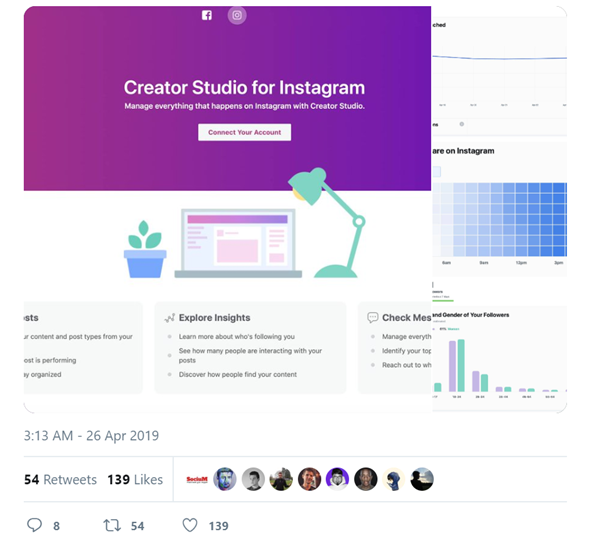
    Images via Matt Navarra on Twitter

    Social media industry consultant and commentator, Matt Navarra, recently tweeted an image of the Creator Studio’s Dashboard. Looking at the image, it looks like the new Instagram Creator Studio will be housed as a tab within Facebook’s Creator Studio dashboard. Note the toggle button for Instagram and Facebook are at the centre of the screen on top.

    What will the Instagram Creator Studio Offer?

    The dashboard will enable Instagram users to track and monitor several analytic metrics like – the activity status of their followers and their demographics – age, gender, etc. Additionally, the dashboard will also make it easy to monitor engagement stats of users. When the feature is rolled out, Instagram users will be able to access various metrics including – time periods when your audience is most active, engagement stats and other relevant demographic info.

    What will be the Impact of this Change to Users?

    It’s true that all these details are already available to Instagram Business users. However, the new Creator Studio for Instagram will make all the required details quickly accessible via a handy desktop app. Another major benefit of this new Creator Studio is that Instagram business account holders will be able to utilize a joint asset library for both their Facebook and Instagram accounts.

    When will the Creator Studio for Instagram be Available?

    Right now, it looks like this feature is being tested, so it’s not available for all Insta users. However, since this is a handy feature for Instagram creators, social media commentators believe that the app will be released globally soon.

    Once it’s made available, it will be a part of the Facebook Creator Dashboard, and you can easily access the Instagram Creator Studio app, by using the toggle button on top. However, to access this feature, you would have to have a connected Instagram account to your Facebook page.


  • Your Facebook News Feed might get a makeover with new font styles

    Your Facebook News Feed might get a makeover with new font styles

    Are you part of the social media crowd that still uses Facebook to post updates regularly or do you belong to the larger Facebook user group, who silently swipes through the news feed?

    Then, we’ve got some exciting news for you. Your news feed is about to look different.

    According to reports by SocialMediaToday, Facebook is testing new font styles for posts on the news feed. Facebook users would now be able to use a range of text effects while updating posts on their news feed.

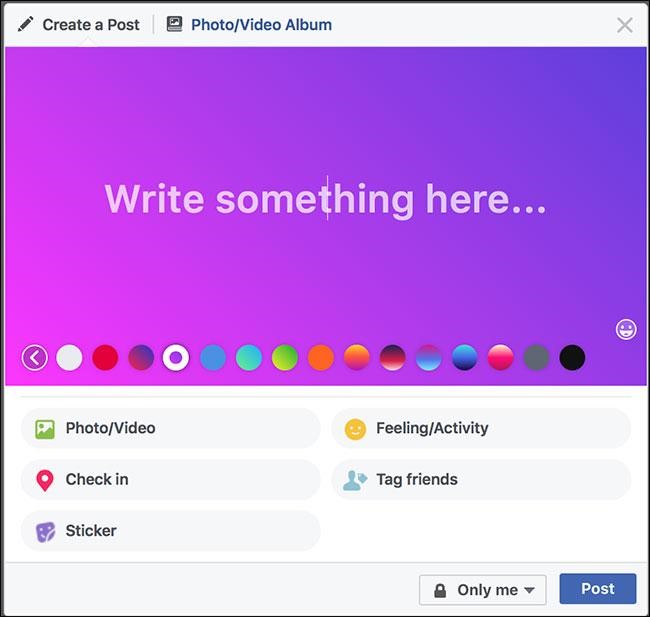
    As of now, Facebook allows users to change the background of the posts. So, instead of posting on the plain white background of the news feed, users were able to alter the background color, to make their posts stand out in the news feed.

    Image via Facebook

    Recent reports suggest that Facebook is working on providing font effects to its posts, which wasn’t available before.

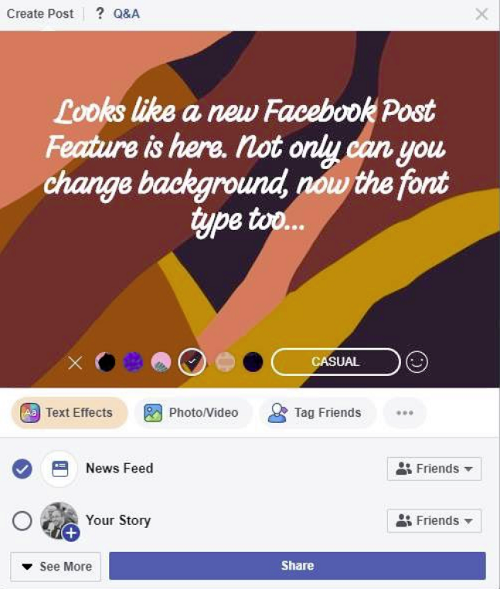
    Image shared by social media industry commentator Matt Navarra.

    As you can see, when posting updates on Facebook from desktop, users now have the option for adding “Text Effects.”

    What are the available Text Effects?

    Currently, Facebook offers five text features to choose from. Rather than being able to select specific font styles, users would be able to choose only font effects. The available options include:

    • Casual
    • Headline
    • Clean
    • Simple
    • Fancy

    Is this update available on mobile?

    As of now, there is no information on whether Facebook plans to roll out this update to all users including mobile users. Right now, it looks like Facebook is just testing this feature, making it available only for a few users.

    What’s the impact of this new update?

    While font effects work well in stories (since it’s a highly visual focus tool), social media commentators are perplexed by the relevance of this new feature in the News Feed. And, since users can already add a colorful background to their posts, this latest update doesn’t provide users with much of a leap.

    And, there’s the chance that this update could make the news feed look messy. As of now, there is no official data on the number of people who make use of Facebook’s colored backgrounds. Apart from the occasional attention-grabbing post, most users don’t use colored backgrounds when they post on their news feed since it isn’t the default option.

    Currently, Facebook offers these font features only to users who create Facebook stories. It’s interesting to see this feature being extended to regular posts. Social media experts believe that Facebook is trying to get users to post more frequently by providing them with added features and to familiarise them with Facebook Stories, the tool which the company wants user attention to shift to.

    Experts caution that these latest updates can get old really quick and could put off users from the news feed if it becomes cluttered with different font styles and backgrounds.

    As of now, Facebook has not provided any official update on whether this feature will be available to all or only for desktop users.

  • Is Facebook Bringing Back Messenger into the Main App?

    Is Facebook Bringing Back Messenger into the Main App?

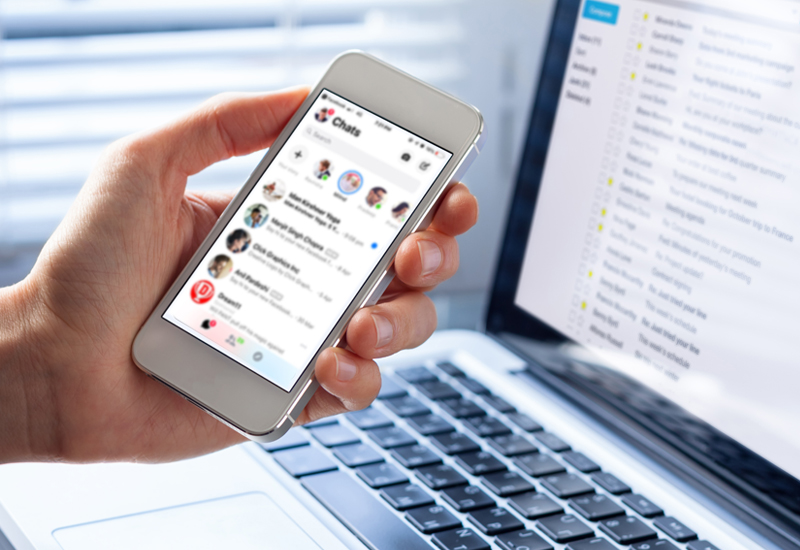
    Facebook’s decision to remove the Messenger app from the main Facebook app is one of the most criticised decision ever taken by the social media giant. Right now, the only way to message any of your Facebook friends is to download the standalone Messenger app from Google Play or the App Store and install it on your phone.

    Introduced in 2011, the Messenger app was integrated into the main Facebook platform until a few years back. In 2014, Facebook alienated the Messenger app, making billions of users download the app separately, to stay connected with their Facebook friends. While this provided Facebook, with a separate multi-million user platform, the move was largely criticised by both users and tech experts.

    Facebook may bring back Messenger into the main app

    Recently, researcher and tech-blogger, Jane Manchun Wong, who is famous for delving into the backend of popular apps, noticed a new feature within Facebook’s app that indicated that Facebook might have plans to integrate the Messenger with the main app.

    Wong recently tweeted on her Twitter account, that Facebook is likely working on an app redesign that it may launch in few months. She stated that the new redesign, instead of redirecting users to the Messenger app, opens the chat window within the main app in a separate section.

    However, Wong also noted that currently the chat feature within the app has only basic functionalities like sending and receiving messages. If you want to use any of the advanced features like sending photos, making a voice call or using reactions, then you must install the Messenger app. She also noted that these advanced features could be added before the redesign goes live.

    Facebook’s grand plan to unify all its apps

    Tech experts wonder whether bringing back the Messenger app into the Facebook app signals Facebook’s grand plan to unify all its chat and social apps including Messenger, Instagram, and WhatsApp.

    Earlier this year, The New York Times reported that Mark Zuckerberg, the Chief Executive of Facebook has plans to integrate all three major divisions of Facebook – WhatsApp, Messenger, and Instagram under the main Facebook app. While these three services will continue to operate as stand-alone apps, users could conveniently message across these platforms using the main Facebook app. When this happens, it will have major implications as it will allow more than 2.6 billion users to communicate across platforms for the first time.

    While this plan is in the works, the NY Times article reported that the unification wouldn’t happen until the end of this year or the beginning of the next year.

    What has Facebook got to say about the integration of the Messenger in the main app?

    In an interview to the Verge, a Facebook spokesperson stated that the company is testing new ways to enrich the messaging experience for users within the main Facebook app. However, Messenger continues to remain a stand-alone, feature-rich app connecting over a billion users’ monthly and they don’t have any additional details to share.

  • Facebook making small yet impactful changes to its platforms

    Facebook making small yet impactful changes to its platforms

    Facebook is making small yet definite changes as per the shifting business landscape and evolving customer preferences. These changes are visible across a multitude of applications like the Facebook site itself, Messenger, as well as Instagram.

    Today, we will look at some exciting updates happening on Facebook front.

    1. Stricter ad quality control

    Advertisers who used to get away with low ad quality in the past are going to find it difficult to continue with such ads. Facebook has enforced stricter policies around the quality and disruptive nature of the content served on ads. This page shows a list of do’s and don’ts for using ads that link to external landing pages or have deceptive ads. Advertisers who used to have a high ratio of ads versus the content displayed are also penalised.

    2. Messenger visual updates

    It has been reported that the Messenger application has gone through minor updates to its interface. In addition to stickers, gifs, and emojis, users can now also add ‘effects’ to their new message being composed on the interface. Currently, it is unclear how the ‘effects’ tab will actually work, but some days down the line, we can expect some tinkering to be done by the users and updates shared online about the same.

    3. Instagram Quick Reaction now available to all

    Facebook had rolled out the ‘Reactions’ feature to allow Facebook users to share your response to the content being shown in their feed. Some time back the same feature debuted on Instagram as ‘Quick Reactions’ and was made available for beta testing. It seems that now the feature has been rolled out to all users as of this week.

    4. Stories get a new look

    Facebook has taken a slew of steps in the past to ensure that the Stories section continues gaining traction among users. Even this month there was a small visual update. The People tab in the Messenger is now revamped to display a two-line presentation for each of the users shown in that tab. It will now mimic the current layout followed by the Chat tab inside the Messenger.

    5. Facebook job tools

    The social media giant has also rolled out an improved version of the Facebook Job tools. This helps employers to better find temp and seasonal hires for the upcoming rush Holiday season in the US. This will help them manage job applications and get a higher volume of response to job ads

    6. Facebook Archive Report

    US Facebook users who are interested in politics and issues of national importance now get their own central repository in the form of the Facebook Archive Report, a publicly available database. This will help them find information like the total number of ads and their advertising costs.

    These are some of the changes that are going to have a definite impact on the way users interact with the brand. It will also make life easier for advertisers who wish to promote their business online.

  • Facebook introduces improved Analytics Capabilities for its Pages and further expands it for Instagram

    Facebook introduces improved Analytics Capabilities for its Pages and further expands it for Instagram

    Facebook has launched a beta version to bolster its own site analytics capabilities. It has also rolled out Instagram analytics for marketers to test their ad efficacy. The phase-wise rollout will span many weeks and would be visible on the Facebook analytics dashboard.

    Let’s take a look at what are the new features introduced with these two updates.

    1 – Advanced analytics (Facebook Pages)

    The current analytics concentrated on individual posts that were seen or acted upon by the users. However, the new features seek to go beyond post-level analytics and dig deeper into insights. The beta phase analytics page is designed to provide a broader level of data into KPIs including the different actions taken by users on the page.

    Some of these actions consist of Post Impression, Page follow/unfollow, Page like/unlike, among others. By capturing these valuable events, marketers get a complete picture of what users did after they landed on the particular page. This empowers the page admin and allows decision makers to get richer insights.

    The admins can now utilise the new analytics and blend it with the already existing data on the dashboard to carry out a lot of actions. These include the ability to build new audience segments, monitor the conversions happening from the page, and track the path followed in the buyer journey. The blend of new analytics with the existing dashboard can also help compare audience demographics by factors like activity and channel.

    2 – Instagram analytics

    Instagram analytics is a more significant improvement over the existing Instagram Insights. This gives a broader picture of how the users interact with a brand. Want to see how the new Instagram analytics is a step ahead of the existing analytics/insight reporting? Check out these two new instances that show the immense value add made by Instagram account analytics

    • The marketers can track far more number of metrics needed to gauge the efficacy of the Instagram ad campaign. Some of the essential KPIs tracked include retention rates and lifetime value (LTV). Users who interact with your brand ads and content will be a part of the analytics reports.
    • The admins will also be able to build new audience segments to target them better. Admins can also check out the overlap among users who have utilised various channels to interact with Instagram. These may include app installs, social media visits, or website visits.

    What do these updates mean?

    These updates denote Facebook’s attempt to help the marketers track their ad campaigns better. The social media giant also wants advertisers to use native tools within the analytics ecosystem in order to measure the value provided by the ads served on the social media platform. With 80% of Instagram users following a brand, it is the perfect time for Facebook to integrate high-performance analytics on the platform.

    It will be some time before we see how the new features on Facebook analytics and Instagram analytics shape up the campaign efficacy of marketers. But the new additions do look to be a step in the right direction.

  • Facebook Renames Camera Effects to ‘Spark AR’

    Facebook Renames Camera Effects to ‘Spark AR’

    Looking at the growing influence of AR in every sphere of life and business, Facebook is coming up with new ways to reignite the efficacy of its existing applications. Towards this, it has now renamed its Camera Effects to ‘Spark AR’.

    The social media giant has teased this application at its annual F8 conference in April 2017. This week saw the full-fledged application upgrade to bring in the futuristic capabilities provided by immersive AR experiences.

    What are the changes we can expect?

    Facebook is no longer content with animations, masks, and playful effects delivered by the Camera Effects app. To expand to the wider AR domain, the renaming will be the first of many updates that the app will see in the coming few weeks. Even the community name has been updated from AR Studio to Spark AR Studio.

    Additionally, it has brought Spark AR to be used on other platforms like Instagram as well.

    Spark AR and Instagram

    Facebook’s think-tank endeavours to extend the usage of the app features beyond its own platform. Hence, it now provides the Spark AR’s content sharing ability to other platforms like Instagram as well. This way, Spark AR on Instagram will now go mainstream and not remain in the hands of the elite few like Kylie Jenner, NBA, or Gucci.

    Participants in a wider beta testing will be able to utilise Spark AR Studio in order to devise and deploy interactive AR based experiences and share these on Instream to their users. Developers can use this link for submitting their applications for beta testing.

    Why the name change matters?

    Earlier, the Facebook Camera Effects was available solely on one platform, i.e. on Facebook itself. Hence the name at that time made sense. Also, its scope of offerings was limited to minor animations and masks to be used by individual users in their chats, messages, or posts. Both these aspects about the application underwent a radical change since the first teaser about the new upgrade was shown at the 2017 F8 conference. As a part of the latest updates, the application delivers value not just for the Facebook site. It has greatly expanded its scope to allow Instagram users as well. Hence in its new avatar, ‘Facebook Camera Effects’ wouldn’t do justice to the broader role the app has now taken on. Thus the name change makes sense.

    There is one more reason why the name change would be apt. All individual components that are a part of the ‘Facebook Camera Effects’ ecosystem too will now have a common name to depict its association with this ecosystem. Hence, the existing ‘AR Studio’ too is now rechristened to ‘Spark AR Studio’.

    Interestingly, there is a third reason that justifies the name change which is equally imperative. Facebook is looking to bring in the immense business value provided by the AR domain. But tying it up with the existing ‘Facebook Camera Effects’ wouldn’t have given users an idea about the extended immersive capabilities now possible with the app. Hence, the new name ‘Spark AR’ seems to fit in nicely with the new possibilities presented by the application.

    Read all about the official announcement from FB here.

  • Facebook Messenger Design Revamp – All You Need to Know About It

    Facebook Messenger Design Revamp – All You Need to Know About It

    Those who use Facebook’s messenger service would support the fact that the application is riddled with features that one can easily do without. In an attempt to keep the layout cleaner, Facebook has launched a cleaner version of the messenger app.

    The Messenger redesign didn’t happen overnight. The social media behemoth had given a sneak peek of this change in its annual F8 conference held in May 2018. The change tackles three key areas

    –    Take out some of the unnecessary interface elements

    –    Put more focus on commonly used features that users want to get to in quick time

    –    Simplify the overall experience the user receives

    In addition, it has now put an additional ‘dark’ option for variety in interface appearance.

    While there was no official notification of how the sneak peek of May 2018 would transpire into the user devices till now, but now we see many reports coming in of users viewing the new display on the Messenger app. This shows that Facebook is rolling out the changes, starting with a handful of beta users.

    Some of the changes reported are as below –

    1 – Interface level

    At the interface level, we found the new appearance to be a tad jaded. Though it looks fresh from FB point of view, if we compare it to revamped applications like Skype chat, we can see that a lot of companies have already done this keeping in mind that a lot of chat activity now happens on the limited screen real estate of the mobile.

    2 – Looks

    The new look does help users who prefer an uncluttered layout or work with just a handful of the multiple functions available. They have done away with unnecessary lines, thus making the entire layout seamless. This goes very well with Google material design emphasis. Though some may feel that the all-white outlook may hinder the overall appeal of the screens. A good point though is the availability of the ‘dark’ mode for chatting at night.

    3 – Bottom bar

    Some radical changes have occurred in the bottom bar. It now houses just three icons. The camera button is missing here. But if we look closely we will see that the camera icon is now shifted from the bottom bar to the top right space. Same is the case with the ‘New Chat’ icon.

    The app surely looks a lot different from its previous avatar. It also syncs with the overall business philosophy of Facebook to simplify the user experience around the app. Initial responses from the beta launch too look encouraging. However, what will be the responses coming in after a full-fledged launch? That is a question only time can answer.

    What are your thoughts about these changes done on the Facebook Messenger interface? What points would you like to keep and what features would you like to do away with from the new interface? Do write to us and let us know.

  • Facebook’s Canvas Ads Gets a New Name and Updates

    Facebook’s Canvas Ads Gets a New Name and Updates

    Facebook had rolled out the ‘Canvas Ads’ feature in 2016 within the platform to help businesses advertise their product offerings in an eye-catching manner.  When activated, the section became a mini-site in itself with product listings displayed on the entire screen. With more and more purchasing decisions happening on the mobile currently, businesses find Canvas a viable channel within Facebook to get a creative outlet to display their brand online. It did help marketers compellingly tell brand stories, but Facebook thinks that the name itself doesn’t convey the gist of what the page does.

    To tackle this, it has now announced that it will be renaming the ‘Canvas Ads’ page to ‘Instant Experiences’, which is exactly what the social media platform does. The upgrade also consists of a few other back-end refinements in order to improve performance and page load speeds. Additionally, users now get to add in their contact details easily.

    What has changed?

    Here is a peek into the different changes brought about in the new ‘Instant Experiences’

    • Instant Storefront: allows businesses to display retail products in a grid format.
    • Instant Lookbook: prompts businesses to showcase their products in the context of a lifestyle image.
    • Instant Customer Acquisition: allows businesses to showcase the products and integrate a clear call to action for the user to carry out an action after seeing the ad.
    • Instant Storytelling: makes great use of graphics and video to let viewers know your brand better and connect with it.
    • Instant Form: allows people to quickly share their contact information for enquiries.

    Of these, the Instant Forms is a welcome addition. It helps users to leave behind an email or phone number so that the business can get back to you with a sales call.

    What’s in store for marketers?

    Marketers who want to track customer journey from initial view of the immersive ads right up to the conversion can now do so easily. This way they know when and how to re-engage with prospects. This is primarily driven by Facebook Pixel and third-party pixels into the campaign. If you are using Facebook Pixel on the website, it will automatically be integrated with the ‘Instant Experiences’ section as well. This tweak is expected to add substantial value to the marketing performance measurement function.

    It is indeed a refreshing change from the older interface provided by Canvas Ads. While the front end for “Instant Experiences” doesn’t undergo a radical transformation, there is a marked improvement in how the users respond to the interface. Especially with the Instant Forms options, the engagement part toward the buyer journey becomes easy to accomplish. For brands who haven’t tried out Canvas Ads in its previous avatar, the new “Instant Experiences” can be a great starting point to create Facebook ads and make an impact in front of Facebook users.

    Do write to us and let us know how your experience with the ‘Immersive Experiences’ ad display section within the social media platform was? We would love to hear from you.

  • 2-Factor Authentication for Page Managers Unveiled by Facebook

    2-Factor Authentication for Page Managers Unveiled by Facebook

    With an aim to expand the existing transparency levels, Facebook has been reported to bring forth modifications in the authentication and authorisation procedures for users managing large Facebook pages. This new authorisation procedure will allow the users to publish posts on the pages with enhanced transparency and authority.

    Background about the authorisation procedure

    The enhanced approval procedure is set to provide the users with a boost in audience reach and at the same time allow them to secure their accounts with aid from a “two-factor authorisation” procedure. The enhanced process will also require the users to authenticate their primary country location.

    The modified structure oriented with the authentication process has been reported to be initially launched in the US and shall be available to businesses across the globe later. It can be speculated that Facebook is aiming to expand the system in time broadly.

    How it affects the users?

    Facebook hasn’t put forth any requisites concerning how a page shall be qualified, whether it is to be depicted as a large page or not. However, the page managers or admins do need to go through this current authorisation method as a form of mandatory regulation. The managers are expected to receive the notice for the enhanced authorisation procedure at the top of their respective news feed. From the notification, they can get started with the authorisation procedure and thus initiate the process.

    The page banner associated with the authorisation process will be visible to the users as long as they do not engage in the completion of the procedure. Once all of the steps associated with the “Page Publishing Authorisation” have been completed, the banner shall automatically disappear. It has been further reported that if the user does not engage in the authorisation method within the stipulated timeline, they shall lose the authority of posting on their pages any further.

    Why the need for this move?

    This step by Facebook has been initiated to ensure that organisations and individuals do not make use of the social media platforms to mislead people into forged identity and services through their movements. Regarding the interference and public manipulation recorded in the 2016 US presidential election campaigns, Facebook caught the sighting of such organisations and entities that made productive use of their platform to engage in influencing the voters through the unsolicited content published across such pages.

    Facebook has also reported the fact that these modifications shall be soon introduced to other platforms like Instagram, which is set to enhance the spectrum for both of the platforms owned by the organisation. It is also expected that this procedure will not affect smaller organisations, ones that do not have a huge following or a humongous social media impact, but this procedure is undoubtedly enticing in terms of being a future process.

    This enhancement can be somewhat sighted as a little menace to the people that already own big pages. They have to go through the authorisation procedure right from the beginning once again, and this could be a hassle. However, because this will enable them to post content more transparently and in a more accountable manner, this minute hassle is undoubtedly a minimal price to pay.