
LS Staging

Tag: facebook advertisement

  • Weekend Digital Media Round-up: Google’s Expanding Shopping Ads, Facebook’s New Logo, Pinterest’s Renewed Mobile App and more…

    Weekend Digital Media Round-up: Google’s Expanding Shopping Ads, Facebook’s New Logo, Pinterest’s Renewed Mobile App and more…

    1. Google Expands Shopping Ads to Over 50 New Markets, Adds New Features

    Google is expanding shopping ads and introducing new features to help advertisers target shoppers worldwide. The new features are multi-country feeds, automated feeds and new merchant center experience. [Source: Search Engine Journal]

    2. Facebook Unveils New Logo With Unique Branding for All of its Products

    Facebook updated its company branding with a new logo that appears with different colors to distinguish each company it owns. The company says the new branding is designed for clarity – to make it clear that it’s the parent company of many popular apps. [Source: Search Engine Journal]

    3. Pinterest Launches a Refresh of Its Mobile App

    Pinterest has updated the look of its app for iOS and Android with a renewed focus on personalized recommendations and a more efficient use of space. The most obvious change when opening the app after the update is the reduced space around pins. [Source: Search Engine Journal]

    4. Google Adds New Visual Ad Options for YouTube and Google Images

    Google announced two new visual ad options for YouTube, and a new shopping ad option for Google Images, expanding your opportunities for direct consumer connection via these surfaces. [Source: Social Media Today]

    5. YouTube Launches a Redesign of its Desktop Homepage

    YouTube updated the design of its desktop homepage and the homepage of its apps on iPads and Android tablets. The company has added the option to add to queue on desktop – simply hover the cursor over a video and it can be quickly added to your list of videos to watch next. [Source: Search Engine Journal]

    6. LinkedIn Adds New Language Translation Settings to Broaden Usage Capacity

    LinkedIn has added two new language translation options in order to better facilitate on-platform communication. It will automatically translate it to English – but now, when you tap on the ‘Rate this Translation’ prompt at the bottom of the post, you’ll be able to find additional translation options under ‘Language Settings’. [Source: Social Media Today]

    7. Google Finally Launches the Anticipated Page Speed Report in Search Console

    Google is rolling out the highly anticipated page speed report in Search Console that was shown off earlier this year. The company’s new page speed report pulls data from the Chrome User Experience Report and automatically groups URLs into the categories of “Fast,” Moderate,” and “Slow.” [Source: Search Engine Journal]

    8. Google Rolls Out New Extensions for YouTube Ads

    Google is introducing new extensions for YouTube ads, which are similar to the extensions for search ads. Like Google’s search ad extensions, the extensions for video campaigns invite users to take additional action beyond the traditional ad click. [Source: Search Engine Journal]

    9. Facebook Expands Access to Brand Collabs Manager, Adds New Insights to Creator Studio

    Facebook announced some new additions to its publisher tools, including expanded access to its Brand Collabs influencer discovery and connection database, and new metrics within its Creator Studio dashboard. [Source: Social Media Today]

    10. Google Ads Editor Gets New Features & Support For New Campaign Types

    Google Ads Editor has been updated with support for new campaign types as well as several new features. The new features are searchable errors, shared negative keyword lists, condensed edit pane, image names and maximize conversion value for search campaigns. [Source: Search Engine Journal]

  • Weekend Digital Media Round-up: Google Ad’s Lead Form Extension, Facebook Messenger’s new features, Snapchat’s New Drawing AR Option and more…

    Weekend Digital Media Round-up: Google Ad’s Lead Form Extension, Facebook Messenger’s new features, Snapchat’s New Drawing AR Option and more…

    1. Google Ads Officially Announces Rollout of Lead Form Extensions

    Google confirmed it’s rolling out lead form ad extensions in the coming weeks, a feature that was recently spotted in testing. The company has been testing ad extensions that have the ability to capture leads. [Source: Search Engine Journal]
    2. Brands on Facebook Messenger get three new features to better connect with customers

    Facebook introduced three new features for Messenger designed to help brands communicate with their customers on the platform: icebreakers for commonly asked questions, updates to Click to Messenger ads, and more options for users replying to messages from a business page. [Source: MarTech Today]

    3. Snapchat Adds New, Free Drawing AR Option Within the App

    Snapchat is rolling out a new option which will enable users to paint their own 3D AR effects over their face, or anything else, from within the app itself. Users can use the tools in the front or rear-facing camera, enabling you to add new effects to whatever you like. [Source: Social Media Today]

    4. Google Shows Paywall Content in Featured Snippets

    A member of the search marketing community tweeted his surprise that Google ranked a paywalled web page in the featured snippets.  Google’s official description of featured snippets precludes content that cannot be clicked through to be read. [Source: Search Engine Journal]
    5. Facebook Launches New Option Which Enables Advertisers to List Ad Text Variants

    Facebook added a new option which will enable advertisers to include multiple text variations for their ad copy, which Facebook’s systems will then be able to choose from when displaying the ad to different users. [Source: Social Media Today]

    6. Facebook Launches ‘Preventive Health’ Tool to Raise Awareness of Personal Health Concerns

    Facebook launched a new ‘Preventive Health’ tool, an optional process within its main app which can prompt users to undergo regular health check-ups, based on their age and gender information. [Source: Social Media Today]

    7. Google Ads Brings New Sets of Data to Shopping Campaigns

    Google Ads can now report on cart data for shopping campaigns, tracking all information related to purchases. An ad click on a product may lead to sales of other products, so cart data allows advertisers to see any items purchased after ads are clicked, which products are most likely to convert, and which items are the top sellers. [Source: Search Engine Journal]
    8. Facebook Won’t Stop Lies in Political Ads – Here’s What it Should do Instead

    Facebook has been under fire in recent weeks over its decision to exempt political ads from its fact-checking process and rules, which essentially means that politicians will be able to run ads on the world’s largest social media platform and say pretty much whatever they want. [Source: Social Media Today]

    9. Facebook Announces Program to Help News Sites

    Facebook announced a new feature called Facebook News. Given Facebook’s popularity, Facebook News may become a significant source of audience growth for publishers. [Source: Search Engine Journal]
    10. Google launches Site Kit plugin for WordPress

    Google announced that Site Kit is available globally for WordPress users. Site Kit is a WordPress plugin that allows users to set up and configure Google services to get insights in their WordPress dashboards. [Source: Search Engine Land]

  • Weekend Digital Media Round-up: Google’s New Data Security Tools, Instagram’s Branded Content Tag, Microsoft’s Audience Targeting Solutions & more…

    Weekend Digital Media Round-up: Google’s New Data Security Tools, Instagram’s Branded Content Tag, Microsoft’s Audience Targeting Solutions & more…

    1. Google Adds New Data Security Tools, Including YouTube History Auto-Delete and Password Check-Up

    Google has announced a new set of data control and security options to help users better maintain their digital presence and avoid potential misuse. The company is adding a new incognito mode to Google Maps, giving the option to hide location history. [Source: Social Media Today]

    2. Instagram Adds Branded Content Tags for IGTV

    Instagram’s Branded Content Tags are still not available to all users, for those who can access them, they are now also being expanded to longer-form IGTV content. [Source: Social Media Today]

    3. Microsoft Introduces New Ways to Target Audiences With Search Ads

    Microsoft has new audience targeting solutions combining customer data with new technology to reach customers when they’re ready to buy. The new audience targeting solutions are available now as part of an open beta. [Source: Search Engine Journal]
    4. Google Search Console adds Change of Address tool to new interface

    Google announced that they have added the Change of Address tool to the new interface of Google Search Console. The change of address feature was available in the old Search Console but was not migrated when Google shut down the old interface. [Source: Search Engine Land]

    5. LinkedIn Campaign Manager adds audience targeting logic, demographic forecasts

    LinkedIn is adding audience forecasting information directly to the Campaign Manager dashboard and introducing new Boolean targeting logic for building audiences — both available globally. The platform is also introducing new demographic reporting metrics that will begin rolling out to all advertisers over the next two weeks. [Source: Marketing Land]

    6. Instagram Launches Product Launch Reminder Stickers and Tags to Capitalize on Audience Interest

    Instagram is adding in new features and options which encourage shopping in-app, providing new functionality for users, and new opportunities for businesses to get more out of their Insta presence. [Source: Social Media Today]

    7. Facebook advertisers can now use Stories ads to start conversations in Messenger

    Brands can now drive Facebook, Instagram and Messenger Stories ad traffic to start conversations on Messenger. Users can swipe up on Stories ads that have the new “Send Message” call to action to start a conversation with the business in Messenger without leaving the app they’re in. [Source: Marketing Land]

    8. YouTube Adds New Comment Filters in YouTube Studio

    YouTube has announced a new set of comment filters within YouTube Studio, which will make it easier for creators and brands to identify key video responses of interest. [Source: Social Media Today]

    9. Google Shopping Updated With New Design, Price Tracking, Local Inventory, More

    Google has upgraded Google Shopping with a redesign and several new features that make it easier for users to find what they’re looking for. The new experience starts with a personalized homepage that includes suggestions for new products, as well as sections to reorder common items or continue previous shopping research. [Source: Search Engine Journal]

    10. Google to update GoogleBot’s user agent

    Google will update Google’s user agent to represent the version of Chrome that GoogleBot is running. It is important to update any code you may have that may look at the user agent of GoogleBot to support this change going forward. [Source: Search Engine Land]

  • Why Marketers must look beyond Buyer Personas and use Data-Driven Insights to Identify their True Audience

    Why Marketers must look beyond Buyer Personas and use Data-Driven Insights to Identify their True Audience

    It’s a half-full, half-empty scenario. You could be seriously undermining the potential audiences outside your buyer personas by boxing your online marketing strategy around a fixated customer demographics.

    Let us explain the above statement with an example. Consider the case of a fitness wear brand whose target audience is women in their 20s and 30s. However, an in-depth look at web analytics for the brand’s e-commerce website reveals that they attract significant traffic from other women who lie outside this age group.

    By leveraging this data, the brand can convert these outliers (casual visitors beyond their target demographics) into paying customers. The brand can alter their marketing strategies or increase product categories to appeal to women of all ages, thereby boosting sales and revenues through these insights.

    On the other hand, if the brand doesn’t focus on web analytics, it’s likely to lose out on crucial conversion opportunities – as they would not have looked beyond their standard buyer personas.

    Brands should avoid getting trapped by a Limited Tunnel Vision of their Audience

    As this example illustrates, it is crucial for businesses to look beyond typical customer personas and consider the demographics of all current site visitors. Having a clear picture of the entire web audience helps businesses convert casual onlookers into paying customers.

    Once they accurately understand and segregate traffic categories, businesses can better channelize their marketing efforts, allocating the right budgets for various marketing campaigns, thereby enjoying higher conversions.

    How to perfect Web Audience Intelligence?

    To get an accurate picture of the current web audience, marketers must monitor both web analytics profiles and social advertising platforms. Here are a few guidelines on how marketers can learn about their true audience on different platforms:

    • Google Analytics

    By using various segmentation features and lists on Google Analytics, brands can get a clear picture of customer conversions based on age and gender. Additionally, it’s also possible to find out how age and gender are related to other user behaviour metrics like time spent per session, bounce rates and pages per visit.

    This gives a clear picture of who is visiting the site, as well as who is converting, thereby helping brands get better insights into their web audience.

    • PPC Ads

    PPC ad analytics help brands understand searcher intent, thereby moving visitors from down the funnel into upper levels. With that said, marketers have a hard time trying to understand why, despite high click-through-rates, the conversion rates remain low.

    By using audience demographics (like age, gender, household income, etc.) from Google AdWords/Bing Ads, marketers can compare how different factors contribute to CTR, CPC, Cost per conversion and other key metrics.

    Let’s take the above example of the fitness wear brand. If they find that they get plenty of ad clicks from women aged 40 and above, but poor conversion rates, then the brand can understand that they have to restrict ad clicks from certain demographics or alter the content to suit this demographic. If they take the second approach, they can come up with new product sizes and styles to appeal to this audience category and get them to convert into paying customers.

    • Facebook Ads

    Marketers can compare data like the age and gender of the followers obtained from Facebook Insights with the data from Google Analytics to find out if there is any difference between the general followers on FB and the visitors on the site.

    • LinkedIn Ads 

    LinkedIn doesn’t offer ad insights based on age and gender. Instead, it shows audience segmentation based on levels. Using the insights offered, marketers can find out if their ad clicks on the platform are coming from senior-level employees or entry-level employees.

    • Twitter Ads

    Twitter doesn’t offer detailed insights into followers, like Facebook. However, the platform provides gender and marital status insights. Marketers can use this data to compare it with insights from other platforms.

    The Key Takeaway

    While it’s healthy for brands to develop buyer personas to channelize their marketing efforts, it’s crucial not to miss out on sales opportunities beyond the pre-defined personas.

    By using data derived from all the platforms mentioned above, brands can gain a clearer understanding of website visitors, converters and how it varies from pre-defined buyer persona, thereby strategizing their marketing efforts to appeal to their entire web audience.

  • Weekend Digital Media Round-up: Google Search Console’s additional structured data in Report, Facebook’s New Ad Units, Instagram’s Spark Tool & More…

    Weekend Digital Media Round-up: Google Search Console’s additional structured data in Report, Facebook’s New Ad Units, Instagram’s Spark Tool & More…

    1. Google Search Console Now Reports on More Types of Structured Data

    Google is adding three more types of structured data to the rich results report in Search Console. Now, owners of e-commerce sites can use Search Console to easily check if Google can read all of their product markup. [Source: Search Engine Journal]

    2. Facebook to launch two new ad units; movie reminder and movie showtime

    Facebook is launching two new ad units named movie reminder ads and movie showtime ads which aims to help movie studios promote their latest releases. With movie reminder ads, when people see an ad for a film in their News Feed, they can now tap on the ‘Interested’ button to receive a reminder in their Facebook notifications when the movie hits theatres. [Source: ET Brand Equity]

    3. Instagram Opens AR Filter Creation Tools to All Users

    Instagram is once again following the lead of Snapchat by opening up its Spark AR filter creation platform to all users, while also introducing a new library of user-created visual tools. [Source: Social Media Today]

    4. Google to Remove Average Position Metric in Google Ads from 30th September 2019

    Google had announced that the company is planning to retire the average position metric from the Google Ads platform. In a recent post published by the search engine giant, the company has now revealed the deadline for the removal of this metric which is 30th September 2019. [Source: Logicserve Digital]

    5. Twitter Discusses Coming Features, Including Topic-Based Streams and Searchable DMs

    Twitter rolls out new tweaks and updates designed to boost usage. The platform is also looking at some larger-scale initiatives designed to help users – particularly new ones – find more relevant tweet content. [Source: Social Media Today]

    6. LinkedIn Expands Content Curation and Sharing Options in Sales Navigator

    LinkedIn continues to add more ways to utilize its data insights, this time through a new integration between its Sales Navigator platform and its employee advocacy system ‘Elevate’. [Source: Social Media Today]

    7. Instagram is Working on Layouts for Stories, New Boomerangs, More

    Instagram has been found testing several upgrades to stories that include a layout mode, new boomerangs, and redesigned icons. The new types of boomerangs give users 5 more options to choose from and the new layout mode for stories works similar to Instagram’s Layouts app. [Source: Search Engine Journal]
    8. Twitter Announces Removal of Third-Party Data Sources from Ad Targeting Options

    Twitter has confirmed that it will remove third-party data options from its ad targeting process, following Facebook’s lead in distancing itself from outside data sets, and the methods in which such may have been collected. [Source: Social Media Today]

    9. LinkedIn launches Audience Engagement Insights with addition of 5 new marketing partners

    LinkedIn is launching a new Audience Engagement Insights category as part of its marketing partner program and adding five new third-party analytics platforms that integrate with the LinkedIn Audience Engagement API: Amobee, Annalect, Hootsuite, Ogilvy and Sprinklr. [Source: MarTech Today]

    10. Facebook’s Testing New Third-Party VOD Subscription Partnerships to Boost its Video Offerings

    Facebook is working on a new, TV-connected video device, which would not only enable consumers to view Facebook Watch content on their home TV screens, but would also enable streamlined connection to third-party VOD providers, like Netflix and Disney – the latter of which will soon launch its own digital subscription offering. [Source: Social Media Today]

  • Should my Business Worry about Libra, the new cryptocurrency from Facebook?

    Should my Business Worry about Libra, the new cryptocurrency from Facebook?

    After months of speculations, last week, Facebook announced that the social media giant would lift the curtains on “Libra,” a brand-new cryptocurrency, sometime in 2020. Facebook announced that Calibra is a newly formed subsidiary to the parent company and aims to provide seamless and secure financial services by using the Libra network.

    Calibra and Libra: A Quick Explanation

    While Libra is a digital currency, it doesn’t have much in common with Bitcoin, the original cryptocurrency. The value of Bitcoin is basically because of its scarcity, and though it has been around for nearly a decade, it’s still considered a niche currency, not used for daily, everyday payments.

    Libra, is like Bitcoin, in that it will be tied into a blockchain (this blockchain is currently under development by Facebook). The similarities end there. Unlike Bitcoin, you cannot mine Libra. Instead, you must pay for it and purchase it.

    Facebook believes that Libra will become the global currency standard, like the popular currencies USD, GBP, and EUR.

    Coming to the all-important question: how will the value of Libra be determined, since it doesn’t have real-world assets like a country backing it?

    This is where things turn interesting. The value of Libra will be guaranteed by real assets provided by the partners that buy into Facebook-cofounded Libra association. Facebook has managed to rope in industry biggies, including venture capitalists, tech companies, and non-profit associations.

    eBay, Lyft, Spotify, Uber, Union Square Ventures, PayPal, Visa, and Mastercard are some of the top names in the association. You can find more about the founding members of the Libra Association in the whitepaper published by Libra. The company will have its headquarters in Geneva, Switzerland.

    What does this mean for Regular Users?

    Will it bite the dust like that time when Facebook was trying developing nations to use its platform for all their internet access by offering them free internet? Or will Libra become the first-ever digital currency to go mainstream?

    While that needs to be seen, Facebook’s goal here is to make Libra the go-to currency for transferring funds to friends and family in other countries and to make it the number one payment option for both online and offline purchases.

    Initially, Facebook will offer Libra as part of WhatsApp and Facebook Messenger, with plans to move it into a stand-alone app, later.

    This is where Calibra comes into the picture. Calibra is a digital wallet that will help users to save, spend, and send Libra. Initially, you can use the Calibra wallet to send and receive money instantly to anyone with a smartphone. Later Facebook plans to extend the functionality of Calibra to provide financial services for small businesses like paying bills, etc.

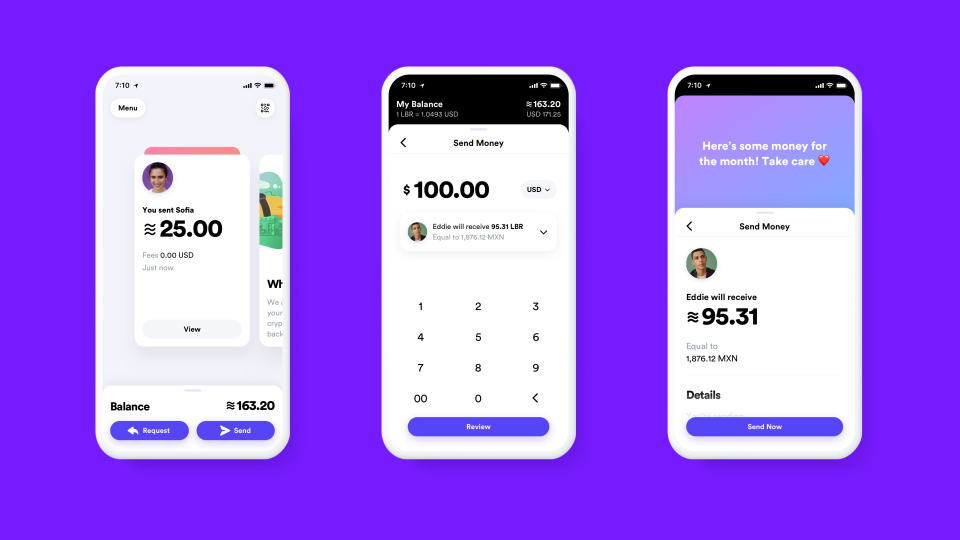
    sneak peek into Calibra’s interface, courtesy of Facebook.

    Calibra will use anti-fraud, and verification processes used by all leading credit cards, and provide live support to people who misplace their smartphone. Calibra even promises refunds if you lose your Libra because of fraudulent activities. Calibra will also value user privacy and will not share financial data with Facebook or other third-parties.

    Facebook claims that they are still a long way from launching Calibra. Interested users can sign up here to join the newsletter to be the first to receive information about the progress of Calibra and Libra.

    How will Libra and Calibra impact Businesses that sell via/on Facebook?

    Industry experts believe that entrepreneurs using Facebook pages for information about their products will not be impacted much. However, if you sell goods via Facebook, then you would have to make changes to include Libra as one of the payment currencies.

    However, since Facebook has an enormous reach, at least a few of your customers will be using the new crypto coin. Hence, it makes sense to include it in your payments page.

    When should you start making changes to include Libra?

    No hurries. Facebook is still in the process of development, and nothing has been confirmed yet. So, businesses need not panic and spend the interim time reading up on the merits and drawbacks of this brand-new venture from Facebook.

  • Measure your conversions and track the ads on Facebook

    Measure your conversions and track the ads on Facebook

    Do you regularly advertise on Facebook? But are your ads getting you the value? Or do you properly track and measure your return on investment on these ads? It is essential that you meet the objective you are setting on Facebook to understand the value. Let’s dive in the pool of Facebook conversion and pixels that keep tracking your ads.

    measure-conversions-on-facebook


    What is Facebook ROI?

    You must have often heard that you cannot measure return on investment on Facebook. You can measure all the efforts you put in for Facebook advertising, especially the one that drives an action and assigns a value to it. This is done through the following parameters:

    • Conversion Tracking
    • Offsite parameters

    What is known as Conversion Tracking?

    With this Facebook allows tracking all the conversions that have happened on your FB ad.

    For example: If you ran an ad and your conversions went up 40%. But do have proof to show that these conversions were because of your ads you did on Facebook? Or could it be something that would have driven it?

    This is where conversion tracking comes into the picture. With this, you are aware along with Facebook that users visited your site from the Facebook ad. With Facebook’s pixel you also get to know that your ad was performed.

    What is a Pixel Code?

    As the name suggests, it is a code provided by Facebook to track the ad objectives and parameters. This code is placed on the desired page, to understand that users have visited the page through Facebook.

    For example- You are running a Facebook ad to sell black dresses, when a user clicks on your ad, Facebook records an ad click. The users is taken to the assigned landing page after the user has shown interest and clicked on the ad. Facebook can follow the person anywhere to a different page using the snippet of the code.

    If the Facebook pixel is placed on the web page of the black dress and if the user visits that page through the Facebook ad, then the ad is termed to be successful. The Facebook pixel can also be placed on pages that the advertiser keen to convert. It can be the information page, basket page, contact us page, payment gateway or any other page.

    Different types of Conversions and Optimized CPM

    The most amazing part about this conversion tracking is that Facebook utilizes Optimized CPM to regulate who your ad reaches out to.

    This CPM will allow all advertisers to arrange all marketing goals regarding priority and then delivers all these ads against the goals in the most efficient way. Allows the users to maximize the budget value.

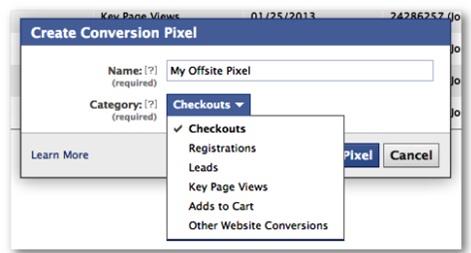
    Following are the different types of conversions:

    • Checkouts
    • Leads
    • Registrations
    • Page views
    • Add to cart
    • Other website conversions/visits


    Conversion Tracking

    Facebook users perform the above-desired actions through ads that use the conversion tracking. This targets ads to consumers who are most likely to convert to sales.


  • Facebook tests Ads in Groups

    It is believed that since Facebook is running out of Ad Space, it is looking at testing ads in groups. The aim is to make the maximum out of its 500 million users who are still left untapped. It claims to reach its maximum advertising capacity by Mid-2017. Even the workplace initiative is believed to be one of the channels to serve ads. Techcrunch received confirmation from Facebook that as a part of the trial, desktop and mobile versions have been rolled out.

    This update can be a boon for advertisers, as groups are a good way to reach out to the consumers. In time, we would know what the users have to say about this, as groups were one of the few ad-free spaces on Facebook.

    Source: https://goo.gl/HCi259

  • Facebook’s 20% Ad Image text overlay rule, changed.

    Facebook’s 20% Ad Image text overlay rule, changed.

    As per a report in Social Media Today, the 20% Ad Image text overlay rule no longer applies post 22nd March’16. During the period when the rule was mandatory, Facebook had provided its users with a basic grid tool, which would allow them to keep a check on the text overlay.

    Without any information or notification, the rules have been quietly dropped. However, the changes are not rolled out for everyone yet. Facebook will gradually roll it out, post its testing. Now that the grid is gone, Facebook has provided a simple guide that points out the level of reach the ad will have, based on the text over the ad Image.  Hence, the users will have to make their own judgement based on Facebook’s feedback over the image reach.

    As per the new basic tool, there are four categories of text overlay that will give its users a clear idea of the post’s performance:

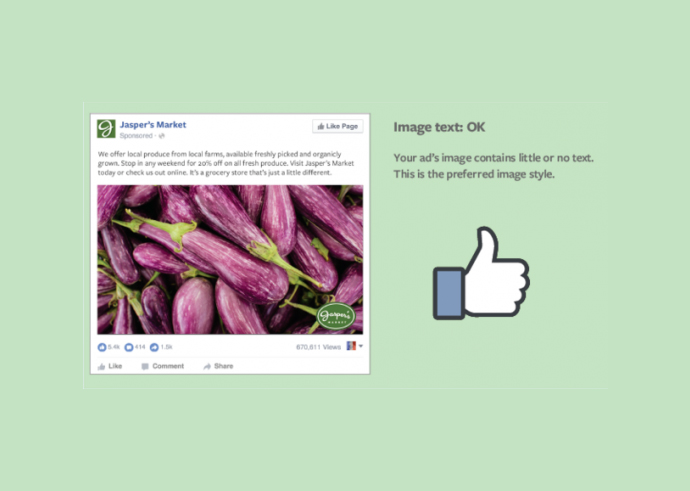
    •  Image text : OK
    • Image text : Low
    • Image text : High
    • Image text : Medium

    Your image text is classed as OK, mostly if there are no text overlay, excluding the company logo.  As shown in the image below.

    Facebook image tool

    (img. courtesy : socialmediatoday)


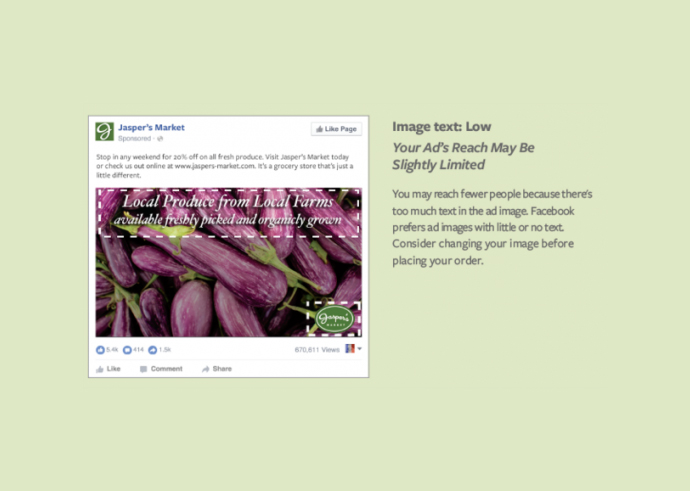
    Similarly, if it is classified as low, the reach may be further limited. Facebook cites too much of text as a reason for this.  Here is an example mentioned below:

    facebook features @LogicserveDigi

    (img. courtesy : socialmediatoday)

    Same is the case with medium classification. Facebook suggests that the reach will be comparatively lesser  than the images with no texts, as Facebook prefers limited or no next. It even urges the user to consider changing the image.

    facebook features @LogicserveDigi

    (img. courtesy : socialmediatoday)

    If your image is loaded with too many texts, then, Facebook might not consider publishing it, and urge the user to keep the text level minimum to qualify for the ad.

    facebook features @LogicserveDigi

    (img. courtesy : socialmediatoday)

    Here is a list of exceptions on the text that do not impact your ads.

    •  Movie posters, Book covers, Album covers etc.
    • Posters for various events such as Festivals, Comedy shows or sporting events
    • Product images where the whole product can be seen
    • Text-based business calligraphy, cartoon or comics etc.
    • App and game screenshots
    • Infographics or Legal texts


    So what does it consider as text?

    • Logos: Any text-based one is counted as text irrespective of its size
    • Watermarks and Numbers


  • Types of Facebook Bidding Strategies

    Facebook Bidding Strategies @LogicserveDigi

    When we are talking of advertisements, one has to mention Facebook advertising. It is by far one of the most popular and also effective advertising forms. Facebook has a lot of users and this makes it a befitting platform for the sake of enhancing the total reach which you have.

    However, not all Facebook advertisements turn out to be successful. Ever wondered what sets the best apart from the rest? There are tips, strategies and methods which you need to be aware of. If you have not kept an eye on these points, it will be terribly difficult for you to make the most out of Facebook ads. Here, we will, talk of the main things which you need to know to maximize the benefits you can reap from it.


    Choose The Apt Strategies

    Facebook has taken advertisements to an altogether new level. Here, not only do you advertise your firm, but you exercise complete control over too many factors. There are four diverse strategies from which you can choose and they are namely

    • CPM: cost per mile
    • CPC: cost per clicks
    • OCPM: optimized CPM
    • CPA: cost per action

    Each of these strategies has their own benefits and suitability. The money you are paying for these advertisements differs based upon the strategy which you have chosen. Now, the main thing which you have to do is first determine the type of strategy which will be best for your firm.

    Remember, this can be a very crucial decision because in the end, it will decide as to whether or not you are able to make the most out of your ads.

    If you are focusing on micro targeting and you value the views which you receive because your main aim is to increase your exposure, it is CPM that seems to be the best choice. Those who are on the lookout for performance and are more focused on the clicks they get can settle for CPC. If you sell such services where the call to action is important for you, OCPM looks to be good. However, in most cases, it is seen that CPA turns out to be the best bidding option which you have.

    No doubt, the strategy which you are choosing will depend upon the parameters that are directly a part of your business.


    Analyze The Cost Factor

    Many a times, it is seen that people are not willing to spend a great deal of money on advertisements. However, you need to calculate the returns which you are getting when you put in an investment for such expenses.

    If your Facebook advertisements are leading to sales, the expenses actually turn out to be an investment. When you have a small budget, you can start slow, but do not neglect these advertisements because there are firms that have managed to increase their business significantly because of the smartness with which they handled Facebook advertisements.

    So, make sure to devote time, effort and money to your advertisement campaigns because they have immense potential.


    Previous Post: Tips to Find Customers on Facebook