
LS Staging

Tag: Conversion Rate

  • Audience Activation in GA4

    Audience Activation in GA4

    In today’s digital landscape, reaching the right audience at the right time is a critical aspect of any marketing strategy. Here’s where segmenting audience becomes important in delivering more relevant and personalized experiences according to the characteristics, behaviours, and preferences of target audiences.

    This goal is now achievable through Audience Activation with GA4 (Google Analytics 4) where Google allows marketers to build custom audiences based on specific user behaviours, preferences, and attributes. These audiences can then be used to create highly targeted marketing campaigns that reach the right people at the right time with the right message. Whether it be through targeted search ads, display ads, video ads, or personalized website experiences.

    By leveraging this power, marketers can drive higher conversions and improve overall user experiences. Here are some of the many ways you can activate audiences in the GA 4:

    1.Target Customers Within Specific CRM Segment

    Reach users who fall into sub-segments of your observable customer base, defined by regions, preferred product categories or most-frequent retailer chains.

     Examples

    1. Users who purchase your items at discount in your offline stores post online visit
    2. Customers who are responsive to CRM communications about a particular product category

    2.Optimize Bids Towards Users with Specific Intent

    Define an audience trigger to fire conversion events based on specific intent signals such as adding items to cart and use this event as optimization signals for your campaigns.

    Examples

    1. Users who spent at least 1 minute on product- related pages & screens within last 7 days regression Model’ provided by Big Query to build
    2. Users adding items to shopping cart or users initiating checkout process
    3. Users repeatedly viewing product detail pages

    3. Target Recently Inactive Customers

    Reach users who have been active in the past but no longer are, such as lapsed purchasers or app users. Re-engage them with specific incentives and personalised offers.

    Examples

    1. Users who abandoned shopping cart within last week
    2. Users who initiated signup process, but did not complete
    3. Users with items in basket, yet to initiate checkout
    4. Users who installed app, and stopped utilizing app

    Marketers can use the advanced targeting capabilities not only to improve customer engagement but also to boost conversions and ROI by putting the right hat on the right head at the right time.

    Not to forget, the above are just a few examples, and the possibilities of such customized audiences’ creation are limitless.
  • Measure your conversions and track the ads on Facebook

    Measure your conversions and track the ads on Facebook

    Do you regularly advertise on Facebook? But are your ads getting you the value? Or do you properly track and measure your return on investment on these ads? It is essential that you meet the objective you are setting on Facebook to understand the value. Let’s dive in the pool of Facebook conversion and pixels that keep tracking your ads.

    measure-conversions-on-facebook


    What is Facebook ROI?

    You must have often heard that you cannot measure return on investment on Facebook. You can measure all the efforts you put in for Facebook advertising, especially the one that drives an action and assigns a value to it. This is done through the following parameters:

    • Conversion Tracking
    • Offsite parameters

    What is known as Conversion Tracking?

    With this Facebook allows tracking all the conversions that have happened on your FB ad.

    For example: If you ran an ad and your conversions went up 40%. But do have proof to show that these conversions were because of your ads you did on Facebook? Or could it be something that would have driven it?

    This is where conversion tracking comes into the picture. With this, you are aware along with Facebook that users visited your site from the Facebook ad. With Facebook’s pixel you also get to know that your ad was performed.

    What is a Pixel Code?

    As the name suggests, it is a code provided by Facebook to track the ad objectives and parameters. This code is placed on the desired page, to understand that users have visited the page through Facebook.

    For example- You are running a Facebook ad to sell black dresses, when a user clicks on your ad, Facebook records an ad click. The users is taken to the assigned landing page after the user has shown interest and clicked on the ad. Facebook can follow the person anywhere to a different page using the snippet of the code.

    If the Facebook pixel is placed on the web page of the black dress and if the user visits that page through the Facebook ad, then the ad is termed to be successful. The Facebook pixel can also be placed on pages that the advertiser keen to convert. It can be the information page, basket page, contact us page, payment gateway or any other page.

    Different types of Conversions and Optimized CPM

    The most amazing part about this conversion tracking is that Facebook utilizes Optimized CPM to regulate who your ad reaches out to.

    This CPM will allow all advertisers to arrange all marketing goals regarding priority and then delivers all these ads against the goals in the most efficient way. Allows the users to maximize the budget value.

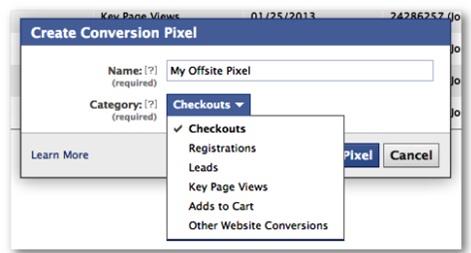
    Following are the different types of conversions:

    • Checkouts
    • Leads
    • Registrations
    • Page views
    • Add to cart
    • Other website conversions/visits


    Conversion Tracking

    Facebook users perform the above-desired actions through ads that use the conversion tracking. This targets ads to consumers who are most likely to convert to sales.


  • Quick Pay Per Click – PPC Glossary

    Some commonly use terms while juggling with pay per click advertisements-

    • Bid: The maximum amount of money placed on a pay-per-click ad.
    • Click: Number of times the ad has been clicked.
    • Conversion Rate: Percentage of visitors converted into clients/purchasers.
    • CPC: Click-through rate defines the amount the user pays if his ad is clicked.
    • CPM: Cost per mile is the cost for 1,000 ad views or impressions.
    • CTR: Number of ad clicks/ number of impressions x 100; metric of account performance.
    • Hits: Also known as views, the number of web site visitors including repetitive onces.
    • Impressions: Number of times the page has been viewed
    • Keyword: Single or a group of important words that define the web site content and display the page when entered on the search engine box.
    • ROI: Return on investment is the money made on pay per click ads.