LS Staging

Tag: Campaign Tracking

  • Supercharge Your Business with Geo-Based Targeting in Google Analytics 4

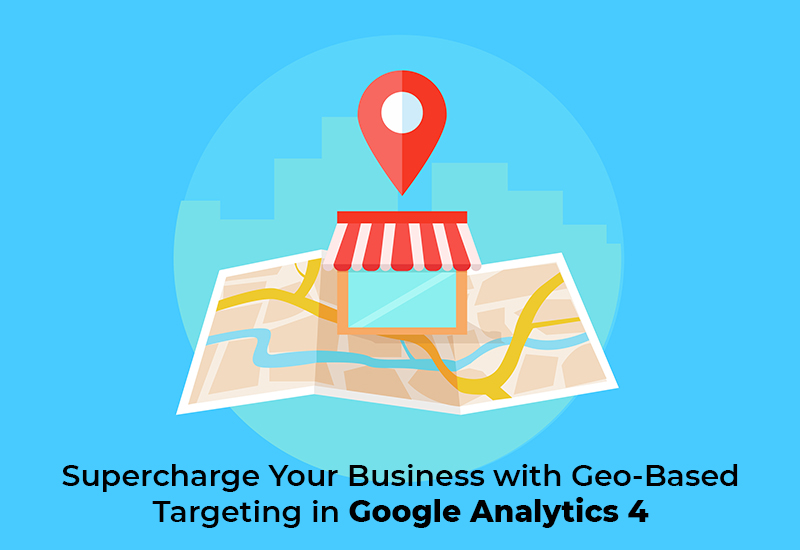
    Supercharge Your Business with Geo-Based Targeting in Google Analytics 4

    In today’s competitive business landscape, reaching the right audience with targeted marketing efforts is crucial for success. Geo-based targeting, powered by Google Analytics 4 (GA 4), offers businesses the ability to connect with customers on a more personal and localized level. This approach not only enhances the relevance of marketing campaigns but also improves efficiency, increases conversions, and ultimately enhances the overall user experience. In this blog, we’ll explore the various use cases of geo-based targeting with GA 4 that can help you supercharge your business.

    1. Localized Marketing Campaigns:

    With GA 4, businesses can create highly effective localized marketing campaigns that resonate with customers in different regions. By analyzing user location data, you can gain valuable insights into where your customers are located and tailor your marketing messages, ads, and content to match their local interests and preferences. This personalized approach boosts engagement and increases the likelihood of conversions.

    For example, if you run an e-commerce store selling outdoor gear, you may notice that customers in colder regions are more interested in winter clothing while those in warmer areas focus on camping and hiking gear. By crafting region-specific campaigns, you can effectively cater to the unique needs and preferences of each target market.

    2. Region-Specific Product Recommendations:

    GA 4’s user behavior tracking provides a wealth of data on customer preferences in different regions. By leveraging this valuable insight, businesses can offer personalized product recommendations based on the geographical location of their customers. This targeted approach not only enhances the customer experience but also increases the chances of converting leads into loyal customers.

    For instance, an online bookstore can use GA 4 data to understand which genres or authors are popular in specific regions and use that information to recommend relevant books to customers based on their location.

    3. Localized Pricing and Offers:

    By harnessing the power of GA 4, businesses can gather data on user engagement and purchasing behavior in different regions. Armed with this information, you can implement dynamic pricing strategies based on location, offering region-specific discounts, promotional codes, or pricing adjustments. This approach optimizes conversion rates and maximizes revenue by aligning your pricing with the varying economic sensitivities and purchasing power across different regions.

    4. Inventory Planning:

    GA 4’s ability to provide valuable user behavior data combined with geolocation information allows businesses to optimize their inventory planning. By identifying demand patterns for specific products in different regions, you can adjust your stock levels accordingly. This data-driven approach ensures that you have the right products available in high-demand areas, leading to improved customer satisfaction and increased sales.

    Conclusion:

    Geo-based targeting with Google Analytics 4 offers businesses a powerful tool to optimize their marketing strategies and connect with the right audience in a more impactful and cost-effective manner. By understanding and leveraging customer data based on geographical location, businesses can create personalized experiences, improve customer engagement, and ultimately drive growth in their ecommerce ventures.

    However, it’s essential to ensure compliance with privacy regulations and obtain appropriate consent when collecting and using user location data. Additionally, setting up GA 4 correctly to track and analyze geolocation information is crucial for successful implementation.
  • Google announces better evaluation tools for your Adwords Account

    Google announces better evaluation tools for your Adwords Account

    evaluation-tools-for-your-adwords-account_cover-image @LogicserveDigi

    There is a new feature waiting for you in your Adwords account. Google made an announcement recently about the new additions and features in your Adwords account. Campaign groups and performance targets are envisioned keeping in the mind the futuristic path of digital advertisement. These features make it easier to track and estimate the growth of your marketing campaigns.

    They made this announcement on their AdWords blog mentioning that these two unique features help to track the performance, performance targets and record the campaign groups. Jon Diorio (Google Team) on Google+, excitedly informed at the launch that if users want to reduce the time and energy they use, to monitor and track performance by the campaign goals, then this feature is the best suitable for them.

    Everything you need to know about a Campaign Group

    • The Campaign Group Feature allows users to group up all Google ad campaigns together.
    • This can be set for all types of ad campaigns including search, shopping, display and YouTube.
    • This feature makes it easier to track and improve your ad campaigns time to time by the progress it shows.
    • The vision of Google by implementing this feature is to help all marketers to track marketing arenas across the network of ad prospects by the medium of grouping.
    • An example provided by Google included the ‘Holiday Launch’ campaign in which you could easily link the YouTube campaign statistics to the e-commerce and other search ads.
    • The Campaign Groups is a strictly monitoring feature and at this point, it does not include any management feature.


    google_adwords_introduction @LogicserveDigi

    Campaign Groups are accessible and situated on the left sidebar of the AdWords. The setup of campaign groups are quite simple, and it is possible to set several groups with distinctive targets.  After users add various campaigns to a particular group, they can monitor the performance on clicks, conversions, goals and other specific targets set like total expenditure, total conversions, total clicks and average CPA or CPC.

    Campaign Groups are accessible and situated on the left sidebar of the AdWords. The setup of campaign groups are quite simple, and it is possible to set several groups with distinctive targets.  After users add various campaigns to a particular group, they can monitor the performance on clicks, conversions, goals and other specific targets set like total expenditure, total conversions, total clicks and average CPA or CPC.

    Everything you need to know about Performance Targets

    • This new feature of performance targets provides a push to your ability and performance of the AdWord campaign
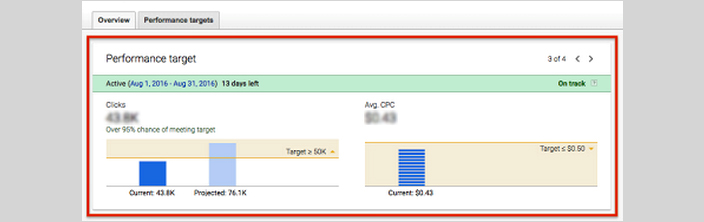
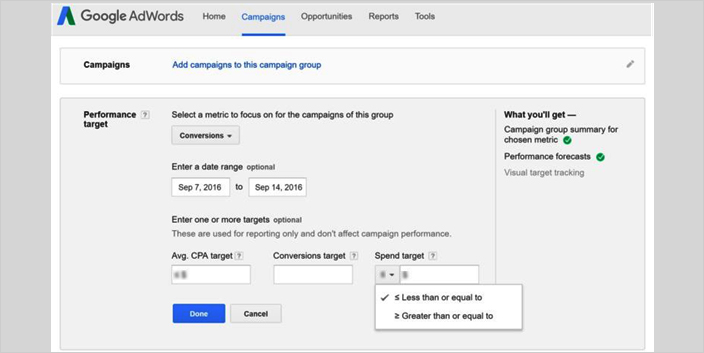
    • This new feature sets goals for the campaign and tracks all the clicks and conversions for the campaign group.
    • After combining performance targets with campaign groups, you set targets, clicks and conversions for Google’s network of market platforms.
    • The Product Manager of Google Adwords, Jon Diorio mentioned in his interview that with this new feature you can get to know the clicks or conversions along with the budget and the CPA or CPC you want to maintain.
    • With this, you can get to know how your campaign group is performing automatically in a single view.
    • Will be shown against the goals and performance that will be achieved at the end of the campaign period.

    performance_target @LogicserveDigi

    LogicSpeak: However, this feature won’t hamper the way Google serves ads to various users but will help to optimise campaigns by providing better evaluation tools.

  • Pay per Click Management Services

    Pay per Click is a fast growing Online Marketing tool used by several enterprise including small business establishments. Due to rising competition, the cost of keywords has increased resulting in the increase in cost per click (CPC). In such swiftly evolving and challenging market it becomes necessary to efficiently manage your pay per click advertisements. A Pay Per Click management company helps in optimizing these services for a profitable campaign and better returns.

    A PPC advertisement management service program includes the following task:

    1. Keyword Selection: Extensive market research and selection of appropriate keywords.
    2. Creative titles and adverts: Properly coined titles and well conceptualized adverts help to maximize click-through and conversion rates.
    3. Setting destination URL: Landing page of any searched keyword is the mirror of your website and product/service. Choosing the appropriate URL increases the prospect of increasing the conversion rate.
    4. Campaign Tracking: Outcome of a PPC advertisement can be measured. This service aids to the process of tracking codes to measure the conversion rate. These in turn help to analyze the ROI.
    5. Bid Management: Bid performance monitoring, bid price changes etc.
    6. Regular Performance Analysis: Analysis of various aspect of the campaign like keyword costs, conversions, text ads etc…and providing a performance report