LS Staging

Category: Search Engine Optimization (SEO)

  • Google announces Accelerated Mobile Pages (AMP) will trump App Deep Links

    Google announces Accelerated Mobile Pages (AMP) will trump App Deep Links

    Speaking at SMX East, held recently in New York, the head of Global Product Partnership at Google, Adam Greenberg revealed that AMP pages will “override app deep link”. For example, if you are a publisher whose website has AMP (Accelerated Mobile Pages) URLs activated and if you have a mobile app with Google App Indexing, users who download your app will be able to view the AMP URL instead of the deep link to the content contained in your app.

    amp_google_deep_linking

    Google’s Senior Webmaster Trends Analyst John Muller too confirmed this statement by tweeting—

    Recently, Google was in the news for carrying AMP to the core mobile search results. However, the tech giant was quick enough to make notable changes to its project soon after the rollout. As per the changelog, AMP will override app deep links.

    Google has taken several initiatives over the years to promote App Indexing by encouraging app developers to incorporate deep links to their apps along with App Indexing. But presently, if you have deployed both AMP and App Indexing to your website, Google search results will prefer to show the AMP pages above the deep link to your app pages.

    What Made Google Update Its Changelog Soon After the Rollout?

    Reiterating on the immediate and quick update, Google said that they have taken this decision because AMP helps them deliver their services in a better way because of its reliability and speed, besides helping Google enhance the user experience. The tech giant further said that Accelerated Mobile Page uses ten times less data compared to a non-Accelerated Mobile Page. Moreover, AMP utilises smart caching to ensure content and advertorials are displayed flawlessly.

    LogicSpeak:

    As mentioned above, Google believes people like AMP pages as they load pretty fast and consume 10x less data compared to non AMP pages. To provide a faster experience, Google is planning to show your AMP pages over the deep link to the page. In simple terms, if your user has downloaded your app and you have the deep linking in place; at the same time if you have created AMP pages, Google will serve the AMP pages above the deep link to your app pages. This can reduce traffic to your app pages.

  • User Explorer from Google Analytics Get detailed insights on your website or app user at an individual level

    User Explorer from Google Analytics Get detailed insights on your website or app user at an individual level

    Google Analytics @LogicserveDigi

    If you are using any of the marketing automation platforms or customer analytics tools like Hubspot, Pardot, Marketo, Eloqua, Kissmetrics or Mixpanel, to know the individual user behaviour on your website or mobile app, you may now want to use Google Analytics’ latest feature called the ‘User Explorer’ report instead. As the name suggests, the report provides detailed insights into an individual user’s activity on your website or the mobile app, as against the aggregate user behaviour that Google Analytics used to provide so far.  This extremely useful feature from Google is now out on beta, and is available under the ‘Audience’ menu in the Google Analytics view of your website or mobile app.

    This feature will allow marketers to understand the entire user journey and the actions taken before reaching a desired outcome. It can also help them re-engage anonymous individual customers who have not converted, through existing marketing channels. Especially for the e-commerce sites, the report can provide post-purchase behaviour of an individual customer, like the frequency of return visits and purchases, thus enabling the e-commerce players to calculate an individual customer’s lifetime value.

    What can you get from the User Explorer report?

    Overall User Analysis

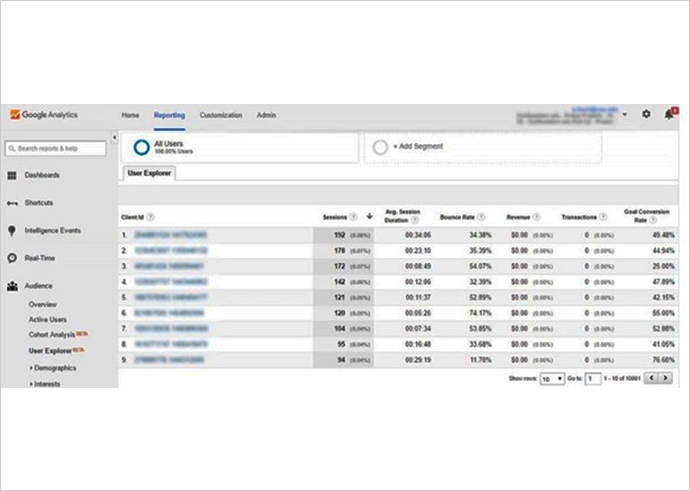
    To begin with, the default User Explorer page displays a list of client IDs collected from visitors’ devices and browsers with basic data, including count of sessions during the selected time period, average session duration, bounce rate, revenue, transactions and goal conversion rates. You can sort this list on each of these metrics, to answer questions like ‘who have visited the most often’, ‘who have spent the most time’, ‘who have had the highest no. of transactions’ or ‘who have the highest goal conversion rate’.

    user explorer google analytics @LogicserveDigi

    Multisession User Analysis

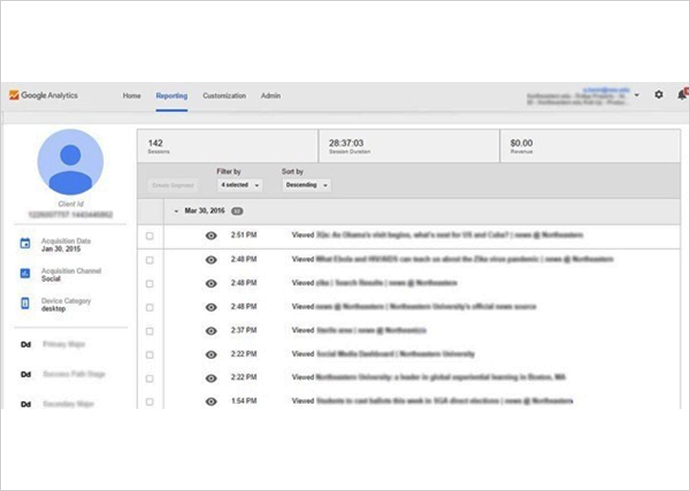
    This is where the feature adds significant value. Clicking on any of these client IDs provides the detailed analysis at an individual level, where the report displays a user’s activity in a timeline view, with key facts like the user’s acquisition date, acquisition channel, device type, and their custom dimensions. The user interactions in this view can be filtered by Pageview, Appview (available only in mobile app views), Goal, E-commerce or Event, and individual activities can be clicked for additional details.

    Google analytics news @LogicserveDigi

    The client IDs are randomly generated by Google Analytics, and thus, are completely anonymous. Though these IDs persist across multiple sessions, they change if the user changes the device or the browser to access your website or app. You can get cross-device and cross-browser user tracking, by enabling user authentication systems (like user logins) on your website or app.

    User Segmentation

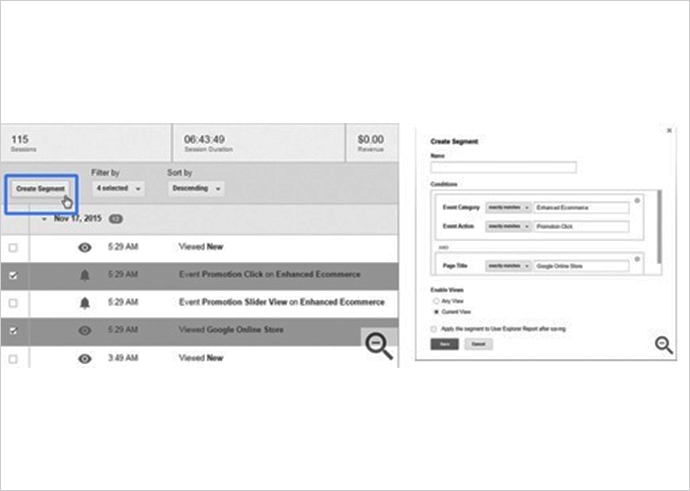
    You may be using Google Analytics user segments already, through Cohort Analysis, to study specific types of visitors, but User Explorer takes this one step further. By clicking on a combination of actions that a specific user engaged in (a certain page visit, an event triggered, specific value generated), you can create a user segment which, if applied to the entire report, will allow you to extract similar users in your audience. This will let you see how a particular user segment behaves across your site or app. You can also re-market specifically to customers of this segment.

    google analysitcs news @LogicserveDigi

    How to get the most out of your User Explorer report?

    To get the most out of this feature by Google Analytics, make sure you do the following:

    • Add “short of purchase” as a value to your goals to help you identify users close to being your customers
    • Filter out the staff and agency visits from your reports, using a filtered view
    • Create and use segments to understand different types of visitors: loyal fans, fast shoppers, international customers, anxious online shoppers, job seekers, information hunters, lowest price buyers
    • Add user authentication systems like user logins to your sites and apps to enable cross-device and cross-browser multi-session analysis


    You can imagine how useful this new feature from Google Analytics will be, right from identifying your most valuable customers, their behaviour before they reach a desired outcome, to cross-device user journeys in response to your marketing campaigns, thus knowing their effectiveness, to establishing best practices to re-market specific user segments. The User Explorer report can also help you trace inconsistencies in the UX and UI design of your website or app, based on the user experience, which can then be improved to drive higher conversions. All in all, the User Explorer report from Google Analytics can be your next starting point to build amazing experiences for your customers.

  • Google continues its efforts to make the web more “mobile-friendly”.

    Google makes web mobile friendly @LogicserveDigi

    On 16th March’16, Google announced on its official blog that from May’16, it will start rolling out an update to its mobile search results. The update will help in increasing the effect of the ranking signal. This will help users find even many more pages that are not only relevant to the user’s search, but also mobile-friendly.

    Last year, on 21st April’15, Google had announced that it would be rolling out mobile-friendly updates to include it as an important component of page ranking. It will roll out gradually, hence there won’t be an immediate drop in the no. of pages that aren’t mobile friendly which would be visible on search results immediately.

    Search Engine Land states that since the update is a “page-by-page” signal, it can take time for Google to access each page. Hence, the update will be gradual.  However, it is unclear how much time it would take to be rolled out completely.

    Google goes on to mention that if your site it already mobile-friendly, this update will not have a major impact as it did, when it was rolled out for the first time.   I had listed out the parameters last year, you can check it here.

    Mobile friendly test Google @LogicserveDigi

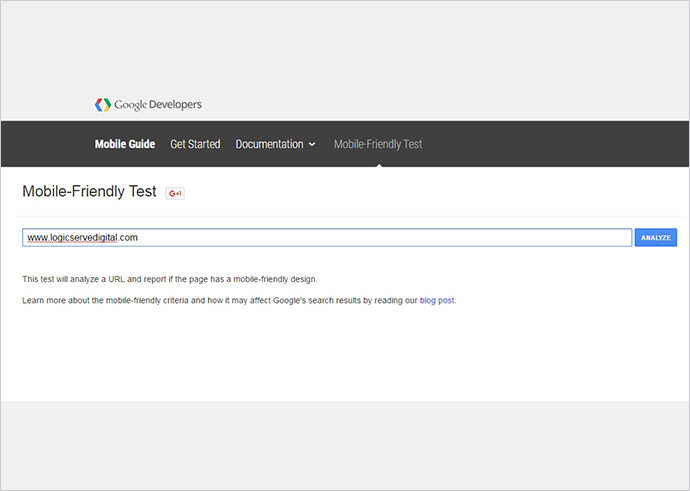
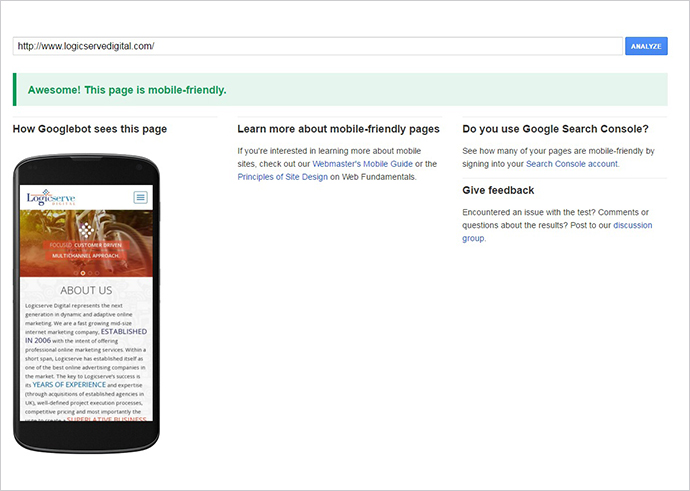
    Now, how do you know if your site is mobile- friendly? Well, Google has its own tools that will help you to know if your site is mobile friendly or not.  You can check your website’s mobile-friendliness here.

    Mobile Friendly Test Tool @LogicserveDigi

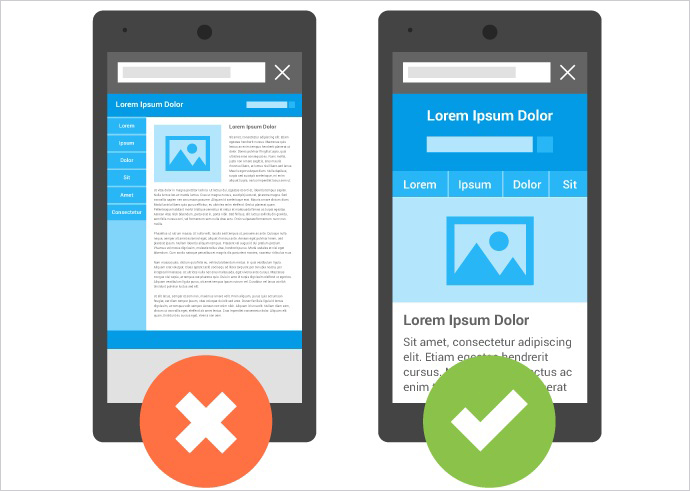
    You can read more about how to make your site mobile friendly here.

    Google Mobile Friendly @LogicserveDigi

    LogicSpeak: Mobile search has already superseded desktop queries. While Google had already cleared its stand on importance of ‘mobile friendly’ websites in the Google Algorithm, another roll-out in the month of May would certainly bring more importance to mobile-friendly sites. Apart from improving the mobile amiable factors on your site, pay equal attention on creating quality content. Amalgamation of both would bring you better results.


  • Google Smart Goals for ‘Smart’ optimisation of your Adwords

    Is there any way businesses can identify premier quality visits to their online websites and at the same time optimise them? Yes, there is a ‘SMART’ way! Smart Goals, powered by Google Analytics, can help you to measure not only conversions but also optimise the Adwords campaign. If you are an advertiser or analytics user these Smart Goals are sure to give you an edge over the competitors. This new Google Analytics feature effortlessly nurtures your bids, ads, and websites.

    What are Smart Goals? Let’s take a closer look!

    Smart Goals, is a smart way to gauge the performance of your website with the help of metrics which traces the high quality visits that have high probability to convert. These metrics consider various signals while assessing the smart goals, such as session duration of the user, pages per session, type of browser used, type of device used etc. Thus, configuring the goals rightly enables Google to provide crucial information, such as the conversion rate of your application or website and also overall number of conversions. So, here is the step-by-step guide on how Smart Goals work:

    A step-by-step guide on how Smart Goals work

    1. By using machine learning, Smart Goals analyses loads of signals to determine which signals have high probability to get converted on your website.
    2. Each quality visit is allotted a score. The best visit is then translated into smart goals.
    3. A threshold is established to determine the ‘best’ visits by picking up about 5% of the traffic coming to the website through Adwords.
    4. Once the threshold is established, the Smart Goal feature is enabled on the website to trace website visits, and also ties it up to the other channels of traffic sources, other than Adwords.
    5. You can effortlessly import the Smart Goals into Adwords once they are enabled in Google Analytics.

    Things to remember before using Smart Goals

    Smart Goals not only help you to optimise your ad campaigns but also help them convert the visits into potential leads and customers. However, before you go further, there are certain requirements you need to fulfil to activate Smart Goals that are listed below:

    • Adwords account and Google Analytics account should be linked
    • Before you set up Smart Goals, ensure at least 1000 clicks to the selected Google Analytics account is sent from the linked Adwords account in the past 30 days
    • No more than 1 million hits per day are received by the reporting view
    • Make sure the Google Analytics ‘Data Sharing’ setting – ‘Google Products and Services’ is turned on

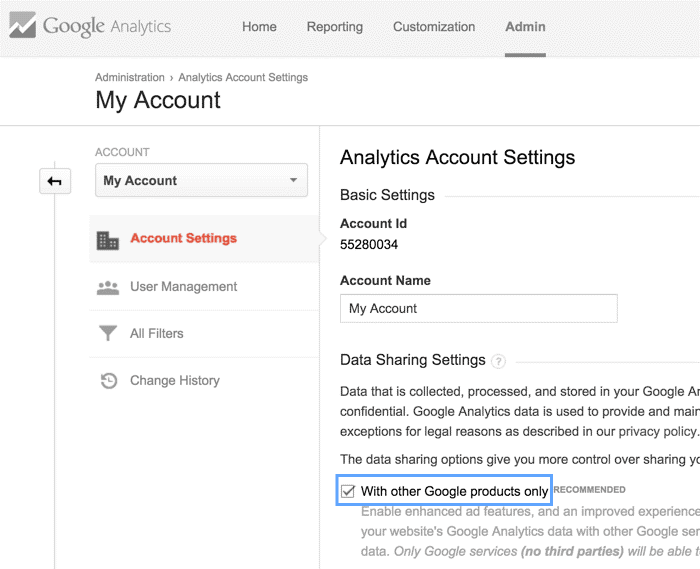
    Step-by-step guide to enable Data Sharing

    Once the above given requirements are fulfilled we can move ahead and enable the Data Sharing.
    Smart Goals


    • Login to the Google Analytics
    • Decide on which analytics account you want to enable Data Sharing and navigate to that account
    • Select ‘Account settings’ in the Account column
    • Tick ‘With other Google products only’ check box under Data Sharing settings


    3 Simple Steps to work with Smart Goals

    Now that we have enabled the Data Sharing let’s see how we can enable the Smart Goals.

    Step 1: Enable Smart Goals

    • Login to Google Analytics
    • Select the Admin Tab

    Smart Goals

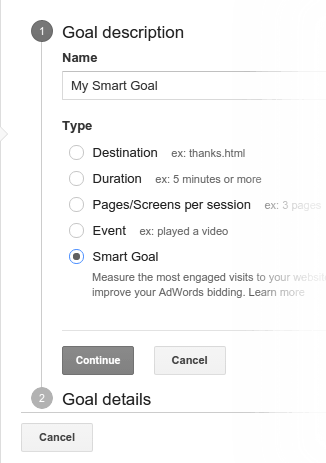
    • Click on Goals > Select Smart Goals
    • Give a name to your Smart Goal and Save
    Smart Goals

    Note: If you select an Industry category, the Goal description might appear different than what is shown in the image above. So, kindly ignore it and click on Smart Goals.


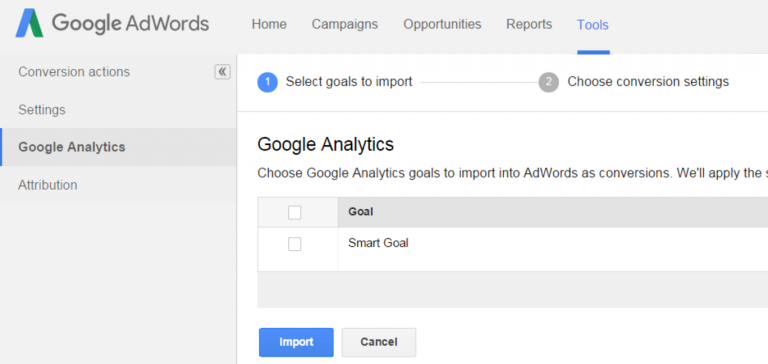
    Step 2: Import Smart Goals to AdWords

    In order to optimise the Google AdWords performance, it is essential to import them into AdWords. Follow these basic steps to do so:
    Smart Goals

    • Link the Google Analytics and AdWords accounts
    • Once linked, wait for 30 minutes to get the imports
    • Sign in to AdWords account
    • Click on the Tools Tab > select Conversions
    • Go to the left hand menu and click on Google Analytics
    • Check the boxes you wish to import. Click continue
    • The next page will display the settings that apply to the goals you selected. Click on import goals
    • Click Close to if you have completed the process or click Import more to import more goals

    Step 3: Use Smart Goals to optimise AdWords

    Once the Smart Goals are imported let them amass data for a few weeks. The first step to start using Smart Goals is to calculate Cost Per Acquisition (CPA). Simply divide the expenditure of the ads by number of Smart Goals completed.

    Let’s take an example:

    Your expenditure in Adwords in past 2 weeks = $2700

    Number of Smart Goal conversions = 90

    Therefore, the average CPA = $2700/90 = $30

    So the average cost for acquiring a session having high probability to convert is $30. In this case, you should set your CPA target to be $30 in the AdWords.

    Note: To optimise AdWords, Google also recommends you to use a flexible automated bidding strategy, called as Target CPA bidding and if you wish to manage the bid by yourself use manual CPC bidding.


    How to see Smart Goals perform?

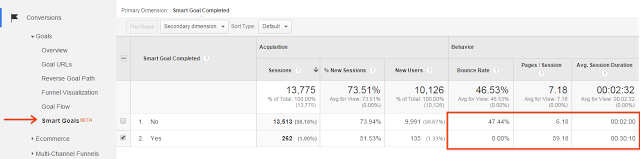
    To see how the Smart Goals are performing, you need to check the Smart Goals report. It helps you to distinguish between the Smart Goals Traffic and the other traffic. To generate the report go to Conversions> Goals> Smart Goals report.

    Smart Goals Limitations

    Though these Smart Goals turn out to be useful for the advertiser, they have their own limitations. They are listed as follows:

    • You cannot customise or configure them
    • They can take up only one of the available 20 slots
    • You can only have one Smart Goal per view
    • They are unavailable for views that get 1 million + visits per day
    • In AdWords, they don’t support VTCs (View Through Conversations) or cross-device conversions

    Well, all said and done, these smart goals are yet not completely rolled out for all the analytics users or advertisers. However, you can expect it to be gradually made available for all the users.
     

  • ‘Search Appearance’ – A new filter in the Google Search Analytics

    Search-Appearance @Logic serveDigi

    As per the announcement made by Zineb Ait Bahajji, Google has added a new filter ‘Search Appearance’ to its Search Console that will track ‘install app’ button in the Search Analytics.

    At present, this filter will allow you to see ‘Install App’ button data in the search engine’s mobile search results. It will further enable you to see what queries typed by the users allowed them to see the ‘install app’ button in their search results. This data will be segmented according to country, keyword and other filters. With this data you would know from where most of your app users come. However, the report would not show how many users completed the download process. It will only show how many people clicked on the button from the search results.

    SearchAppearance

    Zineb also stated that this filter will not track actual downloads process from the Play Store. However, it will provide information from the button’s appearance in the Google’s search results.


    Further, Google’s ‘Data Anomalies Page’ states that this filter will have an impact on the total number of impressions and clicks in the analytics reports. For instance, if the Google changes its data aggregation methods or if in case there is any logging error, you might see a fall in the analytics chart.

    Reference: https://goo.gl/reWpKX, https://goo.gl/NamhNX

  • Tips to create an effective mobile friendly website

    mobile-friendly-website @LogicserveDigi

    The Smartphone has undoubtedly become our window to the outside world. With statistics indicating that India will have more than 650 million Smartphones by 2019, this window is only likely to become ubiquitous.

    Why do I need to make a website mobile-friendly?

    The portability offered by the Smartphone is second to none, making it the gadget of choice for anyone who doesn’t have access to a desktop computer or a laptop. It is for this reason that it becomes essential to optimize websites for use on mobiles, as a website’s desktop version is quite different from that of a mobile version. In order to improve the user’s experience on the website, and let them get the most out of the visit to the website, it is crucial to develop a mobile-friendly version of your desktop website.

    How is a website’s desktop version different from its mobile version?

    A desktop version is designed to fit the screen of the relatively bigger desktop computer. When the same website is viewed on the mobile, the contents are not optimized to be viewed on a smaller screen; the user needs to zoom in and out to view the contents better. Furthermore, websites with many images or high resolution images take more time to load on a mobile than on a desktop or a laptop. In a mobile version of the same website, the size and resolution of the images are optimized for quicker and more efficient loading.

    Where do I begin?

    One needs to take into account the access to developer resources, expertise, and one’s business model before embarking upon the task of transitioning their website from a desktop version to a mobile version. Essentially, creating a mobile site involves taking parts of your current desktop site and establishing them in a mobile- friendly design.

    What are the top three factors I need to consider when designing a mobile site?

    1. Ease of use for visitors

    Begin with outlining the possible steps that the site user may engage in. Simplify the process to ensure that each step is easy to complete on a mobile phone.

    1. Effectiveness of use

    Measure how conveniently the user can carry out their tasks on the mobile site. A user- friendly interface is the foremost factor that any visitor to your mobile site considers and appreciates.

    1. Consistency in design pattern across all platforms

    Using a Responsive Web Design ensures that the page uses the same URL whether the user is accessing the website from a mobile phone, desktop, or tablet. The core benefit of using such a design pattern is that you need to maintain only one version of the website as opposed to two which includes a desktop and a mobile version. With RWD, the website responds as per the screen size of the device being used to access the website.

    What are the different design patterns? And how does the search engine recognize my site across different platforms?

    Your website can appear in one of the three ways, as follows:

    • Responsive Web Design

    With this design, your website’s URL as well as HTML code remains the same across all platforms such as mobile, desktop, and tablet. The only thing that changes is the way the content appears on the screen, depending on the screen size.

    • Dynamic serving:

    It uses the same URL not considering the device type. However, it generates different versions of HTML depending on the device.

    • Separate URLs

    Such a configuration identifies the device the user is using, and accordingly redirects them to the appropriate page.

    Regardless of the kind of configuration you may opt for your mobile site, your site will benefit from the added convenience that site visitors and users receive from the new interface.

  • Google’s AMP project to enrich mobile search experience

    SEO-tips-2016 @LogicserveDigi

    The online web has seen a considerable shift in the way mobile users consume content online. When people are consuming tremendous information online, it becomes quite taxing for the publishers, if the WebPages take too long to load. This is because the advertisers find it quite challenging to get customers attention to the ads when the pages load at a snail’s pace.

    Looking at how testing the mobile web can be, many content sharing platforms are in the hunt for alternatives. Accelerated Mobile Pages (AMP) is the new open source alternative that is expected to enrich the mobile search experience by allowing faster loading of the mobile web pages. AMP HTML helps websites to build lightweight web pages that load instantly on the mobile devices.

    Google on 9th December held a meeting where it updated about its AMP initiative. Google is expected to begin sending traffic to AMP pages in its search engine by late February, 2016. Around 30 publishers from around the world are taking part in this initiative.

    AMP initiative key areas

    The Google update on AMP focuses on three major areas that are explained below:

    • Advertising

    Ads help finance free content and services online. With AMP, Google aims to support an all-inclusive range of ad networks, formats and technologies. Its main objective is to support paywalls and subscriptions. The project will allow faster ads, resizing of ads, view ability support and integration with certain sponsored content providers and data management providers.


    • Content

    To make stories standout and more interactive, publishers are heavily relying on the rich content such as maps, image carousels, data visualisations, videos and social plug-ins. To monetize this content they need to implement analytics and advertisements to understand what appeals to the readers. The AMP project allows publishers to concentrate on creating great content, at the same time relying on the shared components for greater user experience and higher performance.

    • Distribution

    People enjoy sharing content anywhere and everywhere, which can be shared instantly across the world. Thus, for publishers, distributing content across all the devices and platform is vital. To help publishers host their content and to efficiently distribute it, Google has designed high performance cache servers that are available free of charge globally.

    According to Google, this collaboration with technology companies and publishers will together help make the mobile users online experience better. The first group of technology partners who expressed interest in integrating AMP HTML pages are WordPress.com, Pinterest, Twitter, Adobe Analytics, LinkedIn, Chartbeat and Parse.ly. With this Google hopes the mobile web to work faster and better for everyone.


    Reference:

    https://goo.gl/4Of601, https://goo.gl/MYnPQ5, https://goo.gl/5ZRRw4

  • Is HTTP2 the next big thing in SEO?

    Is HTTP2 the next big thing in SEO?

    http2 @LogicserveDigi

    Let us look at what HTTP2 is all about

    The HTTP1 protocol has been in use for the last 15 years now. Considering the way websites are being developed and viewed now, it is definitely time for an upgrade!

    Why is there a need to revise HTTP?

    Loading web pages on the HTTP1 protocol is more resource intensive as only one request per TCP connection is allowed. To overcome this issue, web browsers used multiple TCP connections so that parallel requests can be issued. However, multiple connections have its share of limitations. It could be counter-productive as congestion due to multiple requests affects the performance of the network. Also, browsers take more than their share of network resources.

    To overcome these issues with HTTP1, hacks such as spriting, data: inlining, domain sharding and concatenation have been introduced.

    What is HTTP2 and how does it make things easier for us?

    HTTP2 changes the manner in which data between the server and the client is transmitted.

    This latest update to the HTTP protocol brings in improvements such as efficiency, speed and security.

    More importantly, the switch from HTTP 1 and HTTP2 protocol doesn’t necessitate changes to existing web applications. The advantage is that new applications can make use of new features for increased efficiency, speed and security.

    • Efficiency 
      • HTTP 2 doesn’t require multiple connections to the server to load a website. A single connection completes the process of downloading various elements of a website efficiently.
      • The header compression feature enables the HTTP2 protocol to transmit information between the server and the browser in the form of compressed binary codes. Compression of codes prevents excess overhead. On the other hand, HTTP1 requests are all exchanged in the textual format leading to excess downloads. The impact of this overhead is considerable, more so when websites are getting downloaded on mobile devices.
    • Speed 
      • The multiplexing feature, in the updated protocol, allows multiple requests on the same connection and downloads the files simultaneously. On HTTP 1, a new transfer can be initiated only once the previous transfer has been completed. It leads to a significant increase in the page load time.
      • Server push is another great feature which will enable pages to load much faster by allowing the server to prioritise content. A server sends HTML is response when a web browser requests a web page. Servers have to wait for the browser to issue requests of the embedded assets before it can again send the JavaScript, images and CSS. With HTTP2, the server can avoid this round trip by “pushing” the responses the user will need.
      • With the prioritisation feature the HTTP2 technology, requests are assigned dependency levels. Servers utilise this information to prioritise resources and deliver information faster to high-priority requests.
      • HTTP2 protocols are binary codes and hence are more compact, less prone to errors and more efficient to parse. Significant amount of time is saved with the addition of this feature.
    • Security

    HTTP2 is compatible with both uniform resource identifiers – HTTP (without encryption) and HTTPS (with encryption). Most web browsers such as Mozilla Firefox, Google Chrome, Apple Safari, Opera, Internet Explorer, and Microsoft Edge will support HTTP2 over TLS, which makes encryption mandatory.
    Why is it better for SEO?

    • Faster website loading – HTTP2 has to potential to significantly reduce page load time. Most web browsers support the HTTP2 protocol.
    • Easy implementation for HTTPS sites – Enabling the updated protocol for HTTPs websites will be simpler.
    • No hacks required – Since HTTP2 uses a single request/response communication, hacks such as domain sharding, image sprites, inlining Javascript and CSS will no longer be required to reduce the number of requests from the server.
    • Mobile friendly protocol – Compression of header tags will make downloads of mobile websites more efficient and faster
    • Backward compatibility – Servers and browsers which use HTTP1 will be compatible with HTTP2-enabled servers and browsers.
    • URL structure – The change in protocol will not impact the existing website URLs.

    LogicSpeak:

    Is it really good enough for SEO?

    • Though initial testing has revealed that HTTP2 performs better than SPDY and HTTP1, it has to go undergo more trials
    • Website performance may depend on how well it has been optimised. Also, the SSL handshake for HTTPS websites may slow down the websites.
    • Businesses and organisations considering switching to HTTP2 technology for their websites should be ready to move to HTTPs first. Currently, most browsers do not support HTTP unencrypted.
  • How Semantic Search Is Changing the Landscape of Insurance Digital Marketing

    Semnatic search SEO @LogicserveDigi

    The onset of digital marketing has made customer interaction not only real time but much easier too. The current trend of semantic search has forced the insurance sector worldwide to give an impetus to the role of search in connecting with the masses. Undoubtedly, insurance digital marketing is likely to gain to great extent through semantic search.

    Semantic Search Defined – ‘Natural Connect’ with customers

    In simple words, semantic search will highlight those results whose content implies and satisfies the query searched for, rather than a mere mention online. When marketing insurance semantically, the emphasis should be on making a ‘natural connect’ with potential and existing customers. When you are availing digital marketing tools for your insurance services, the focus should be on meeting up to the customer’s expectations accurately. Crucial to the semantic search is the fact that your service meets up to the requirements of the customers.

    Semantic Search V/s SEO – More than just a search engine friendly website

    Look forward to a much personified websites which looks far more superior to the existing one. Yes, semantic search will enhance your website with a more impressive and meaningful identity that incorporates something more than just keywords, back links and other SEO technicalities – an identity with which your customers would prefer to be associated with. With search engines committed to providing accurate and meaningful results to the queries, a semantic approach promises to make your website even more meaningful.

    Digital connection – Building relationships

    Digital Marketing has given leeway to connect with customers real time, albeit virtually. For some, it’s matter of convenience while for some it’s the preference factor. However, the core factor to ‘build relationships’ takes an entirely new perspective each time when you reach out to each other.

    Mobile Search – Be where the customers are

    With mobile becoming the preferred interface, it becomes inevitable to have a mobile presence. Crucial to the mobile interface, it the display of information and the ease in navigation simplifying a prospective customer’s visit thereby leading to a conversion or retaining an existing customer. The essence of your mobile interface should be highly convincing and assist the customer in making ‘the decision’ in your favour.

    Insights – Trust factor and real-time support

    Staying committed to serve and build the customer’s trust takes utmost priority as you interact with them across all levels. Real time support and responses go a great way in building relationships. No doubt always ‘being there’ for customers, is a difficult proposition but certainly not impossible. Finding ways out, offering real time solutions and support are definitely crucial to sustaining a healthy and budding customer relationship.

    Logic Speak:

    Within the semantic search landscape, the digital marketing strategy works across two focal points. Undoubtedly, the prime focus is on ‘Customer Connect’ with the secondary focus on ‘Business Enhancement’, considering a multi faceted strategy initiated, offering an enormous amount of search data and related analytics.

  • Facebook Partners With Google To ‘Deep Link’ Its App For Android Users

    FB unfriend facebook @LogicserveDigi


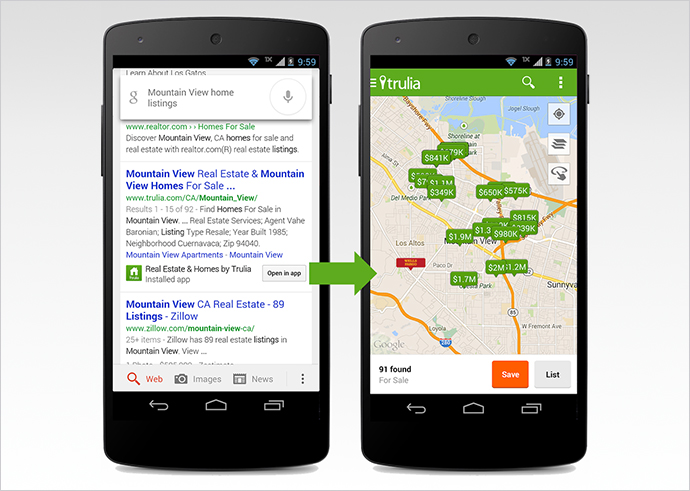
    To make the mobile search feature more appealing for the users, Google, the largest search engine has started ‘deep linking’ the apps on its search results. ‘Deep Links’ allow the user to directly jump on the relevant page on the mobile app, which is already installed in his mobile, from the search results. It means, when a user searches for publicly available data on the website and clicks on the search result he can directly launch the relevant page of the app, provided the app is already installed on his phone. Earlier, when users clicked on the search results, in spite of having the application in the phone, they were taken to the login page of the mobile version of the website.

    deeplink @LogicserveDigi

    Now that Facebook has partnered with Google to crawl and index its mobile app, the users searching for Facebook’s publicly available information can jump directly on the required page of their already installed app by clicking on the search results. This means, the users will not be directed to the mobile web page of the social networking site for login.

    Only the apps that have corresponding content to a web page can enjoy the benefit of App Indexing. Currently, this service is not available for the apps that do not have a web page.

    By implementing the Google’s App Indexing service, Facebook has certainly bridged the gap between search on the web and apps. Moreover, it also justifies the objective of Google to make the search results relevant.

    Thus, it turns out to be a win-win situation for all those who are concerned with this development. For Google, it is a great way to improve the experience of its mobile users, for Facebook it is an opportunity to get users to spend more time on the app and for the users it is a time saver that bypasses the login process, allowing them to access information instantly.

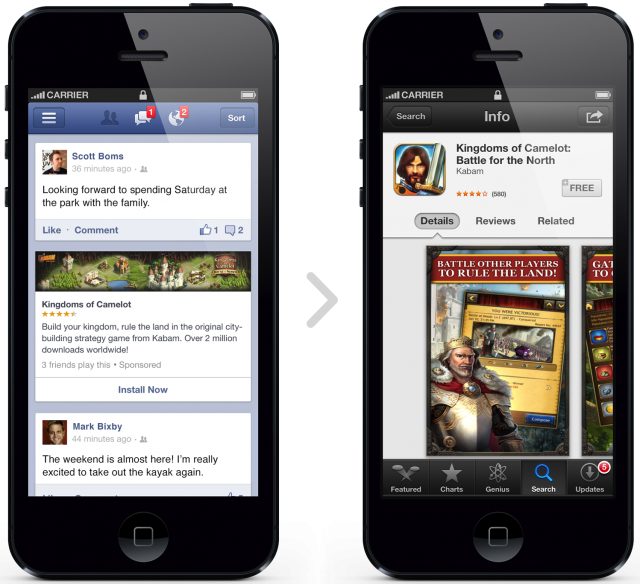
    facebook mobile ads @LogicserveDigi

    Earlier this year Google introduced App indexing for Android apps and later also for iOS apps. This enabled users to get information from the deep links and search results displayed within the apps indexed by the search engine. Initially, this service commenced with a few apps, and was soon released among other app developers who wished to get their applications indexed. Though the agreement between Facebook and Google is limited to Android right now, we can soon expect it to extend to Facebook for iOS app.

    Users need not worry about disclosing their private content to Google. This is because, though this development gives Google the right to use more information, it cannot access the content that is private or requires user login. To get access to the private content users can use Facebook Search, the recently updated service of the social networking giant. Thus, the search results are confined to the content that is publically shared.

    Well, even Twitter users can enjoy similar hassle-free browsing experience, for recently, Google has also partnered with Twitter to display relevant tweets directly from its search results and apps.

    LogicSpeak

    “With Facebook now opening upto Google, this is good news for users. At present, if you search for a friend’s name on Google, while the Facebook profile page might be one of the first links, it won’t take you straight to the app. The link instead opens a mobile version of the Facebook site and does not reflect any information about that particular profile. Also the listings are restricted to profile pages only.

    However with this new deal, public posts, photos that are public, etc will also be reflected in Google’s mobile search. Though this will decrease the number of visitors on Facebook website, it will shorten down the search time for any user. Let us see how this deal progresses in the future”

    At present, if you search for a friend’s name on Google, while the Facebook profile page might be one of the first links, it won’t take you straight to the app. The link instead opens a mobile version of the Facebook site and does not reflect any information about that particular profile. Also the listings are restricted to profile pages only.

    However with this new deal, public posts, photos that are public, etc will also be reflected in Google’s mobile search.

    Reference: https://goo.gl/fw0YpW, https://goo.gl/fPMem7, https://goo.gl/bUF9fd , https://goo.gl/qAM5bq