LS Staging

Category: Search Engine Optimisation

  • The Evolution and Future of Digital Advertising in India

    The Evolution and Future of Digital Advertising in India

    In the early 2000s, when digital advertising was still in its infancy, few could have predicted the seismic shift it would create in the marketing landscape. The real game-changer came when Google began integrating advertisements with its search engine results, fundamentally altering how brands reached consumers. This move marked the dawn of a new era where search engine optimization (SEO) became the holy grail for businesses vying for that coveted first-page spot.

    But the revolution didn’t stop there. Google’s acquisition of YouTube in 2006 added another dimension to digital advertising, transforming the platform into the second-largest search engine globally and a powerhouse for video ads. This early pivot from traditional media to digital set the stage for the explosive growth we see today, with digital advertising in India projected to reach $21 billion by 2028, growing at a compound annual growth rate of 19-20% .

    As the digital landscape expanded, so did opportunities for advertisers. What started with basic text ads alongside search results has transformed into a multi-faceted ecosystem with display ads, video content, and social media at its core. This evolution was accelerated by the widespread adoption of smartphones and affordable internet, making digital advertising a critical tool for brands aiming to stay competitive.


    The Growth Phase and Current Trends

    Today, digital advertising in India is a dynamic and essential component of the marketing mix. To understand how the industry has reached this point and what’s driving its current momentum, it’s crucial to explore the latest trends shaping the landscape.

    • Social Media Boom: Platforms like Facebook, Instagram, and YouTube have become essential tools for brands to reach their audiences. With millions of active users, social media has enabled brands to connect with consumers in real-time, creating opportunities for viral marketing, user-generated content, and direct engagement.
    • Personalized Advertising: Data-driven strategies allow brands to target specific demographics with tailored content. From programmatic advertising that automates ad buying to hyper-personalized campaigns, brands can now reach “an audience of one” with customized messages based on a consumer’s geography, language, behaviour, and preferences.
    • Influencer Marketing: Leveraging the authenticity and reach of influencers, brands collaborate with social media personalities to create content that resonates with target audiences. Influencer marketing has become a powerful way to build trust and drive engagement, especially among younger consumers.
    • Over-the-Top (OTT) Platforms: Streaming services like Netflix, Hotstar, and Amazon Prime Video have created new opportunities for video advertising. With more consumers cutting the cord on traditional TV, OTT platforms offer targeted ad placements within premium content, reaching audiences who are increasingly consuming media on-demand.
    • Programmatic Advertising: The automation of ad buying through programmatic platforms has revolutionized digital advertising. By using real-time data to optimize ad placements, programmatic advertising ensures that brands reach the right audience at the right time, improving efficiency and ROI.
    • Regional and Vernacular Content: As digital penetration increases across India, brands are focusing on regional languages and local content to connect with diverse audiences. This shift towards vernacular content allows brands to tap into new markets and engage consumers in a more relatable way.
    • Audio Marketing: With the rise of podcasts and voice-activated devices, audio advertising has gained traction. Brands are now exploring creative ways to integrate audio ads into consumers’ daily routines, reaching them through platforms like Spotify and popular podcast shows.
    • E-commerce Integration: The growth of e-commerce platforms has made digital advertising more transactional. Brands are leveraging data from online shopping behaviours to create highly targeted ads that drive conversions directly on platforms like Amazon, Flipkart, and Myntra.
    • Video Content: As consumers increasingly favor video content, platforms like YouTube and Instagram Reels have become key battlegrounds for digital advertisers. Short-form videos, live streaming, and interactive video ads are driving higher engagement and providing brands with new ways to tell their stories.

    These trends highlight the dynamic nature of digital advertising in India, where innovation and consumer behaviour continue to shape the landscape.


    Challenges in Digital Advertising

    Despite its growth, digital advertising in India faces several challenges. Privacy concerns and stricter regulations are making it harder for advertisers to track users’ internet browsing history. Big tech platforms like Apple, Google, and Meta are increasingly restricting advertisers’ ability to gather data, which could impact ad targeting and effectiveness.

    The rise of ad blockers also presents a challenge, as consumers gain more control over what ads they see. This shift could lead to the rise of permission marketing, where brands need explicit consent from users to deliver promotional messages. As consumers become more selective, brands may need to explore alternative strategies, such as creating their own entertainment content or increasing brand placements in films, TV shows, and games.


    The Path Ahead

    Looking ahead, the future of digital advertising in India will likely be shaped by emerging technologies. Artificial intelligence (AI), augmented reality (AR), and blockchain are poised to revolutionize how ads are created, delivered, and measured. Voice search and smart devices will also play a crucial role, as brands find new ways to integrate their messaging into everyday interactions with technology.

    Personalization will continue to be a key trend, with brands focusing on delivering more relevant and contextual ads based on a consumer’s geography, language, mindset, and behaviour. Additionally, as sustainability and ethics gain importance in the advertising world, brands will need to consider the impact of their messages on both the environment and society at large.

    The future promises even more innovation, with emerging technologies and ethical considerations shaping the next phase of growth. For marketers in India, staying ahead of these trends will be crucial to maintaining a competitive edge in the ever-evolving world of digital advertising.

  • Complete Guide to Robots.txt File and SEO Protocols

    Complete Guide to Robots.txt File and SEO Protocols

    A robots.txt file is basically a text file that webmasters create to instruct the search engine robots which URLs/pages to crawl on a website. This is used to improve the crawl budget for the website.

    What is a robots.txt file used for?

    A robots.txt file is used to manage crawler traffic to the site and usually to keep a file off Google, depending on the various file type:

    File Type Robots.txt effect
    Web Page Manages your website crawl budget

    Avoids crawling unimportant or similar pages on your site

    Pages will still get indexed in search results with no description

    Note – If other pages link to your page with descriptive anchor text, Google could still index the page without visiting.

    Digital Assets Prevents image, video, and audio files from appearing in Google search results

    This will not prevent other pages or users from linking to your image, video, or audio file.

    Robots.txt file limitations:

    Depending on your goals, consider other mechanisms to ensure your URLs are not findable on the web.

    • txt directives may not be supported by all search engines
    • Search engine crawlers may interpret syntax differently.
    • A page that is disallowed in robots.txt can still be indexed if linked to other sites.

    Steps to create a perfect Robots.txt file:

    A robots.txt file should be added at the end of any root domain. For instance, if the site URL is www.abc.com, the robots.txt file lives at www.abc.com/robots.txt. robots.txt is a plain text file that follows the Robots Exclusion Standard consisting of one or more rules. This rule allows or blocks access for a mentioned search engine crawler to a specified file path in that website. Unless the rules are specified in the robots.txt file, all files on the site are allowed for crawling.

    Simple example for robots.txt with few rules:

    User-agent: Googlebot
    Disallow: /nogooglebot/
    User-agent: *
    Allow: /

    Sitemap: http://www.abc.com/sitemap.xml

    This file means:

    1. Googlebot, i.e., the user agent, cannot crawl any URL that starts with abc.com/nogooglebot/.
    2. All other user agents can crawl the entire site. By default, other user agents are allowed to crawl the entire website even if this rule isn’t added.
    3. The site’s sitemap file is located at http://www.abc.com/sitemap.xml

    Formats and Location Rules:

    •  The file name must be robots.txt
    •  A site can have only one robots.txt file
    • txt file needs to be placed at the root of the website host to which it applies. For instance, considering the URL is http://www.abc.com/robots.txt. It cannot be placed in a subdirectory, i.e. http://www.abc.com/page/robots.txt
    • This file can be applied to
    • a subdomain (http://web.abc.com/robots.txt) or on
    • non-standard ports (http://www.abc.com:8181/robots.txt)
    • Google may ignore characters that are not part of the UTF-8 range, potentially rendering robots.txt rules invalid.
    • Adding rules to the robots.txt file

    Instructions should be added for search engine crawlers on which parts of your site they can crawl. Check on these guidelines when adding rules to your robots.txt file:

    • A robots.txt file consists of one or more groups
    • Each group consists of multiple guidelines or instructions, one directive per line. Each group begins with a User-agent line specifying the target of the groups. For example:

    User-agent: *
    Allow: /
    Disallow: /search/

    • A group gives the following information:
    • Who the group applies to (the user agent)
    • Which directories or files that user agents can access

    Which directories or files that user agent cannot access

    • Search engine crawlers process groups from top to bottom
    • By default, the user agent can crawl any page or directory not blocked by a disallow rule
    • Rules are case-sensitive. For example, disallow: /login.asp applies to https://www.abc.com/login.asp, but not https://www.abc.com/LOGIN.asp

    The # character marks the starting of a comment
    Google’s crawlers support the subsequent directives in robots.txt files:
    User-agent:

    Each search engine must identify itself with a User-agent. This defines the start of a group of directives. Usage of an asterisk (*) matches all search engine crawlers except for the different AdsBot crawlers, which must be named explicitly.

    For example:
    # Example 1: Block all but AdsBot crawlers
    User-agent: *
    Disallow: /

    # Example 2: Block only Googlebot
    User-agent: Googlebot
    Disallow: /

    # Example 3: Block Googlebot and Adsbot
    User-agent: Googlebot
    User-agent: AdsBot-Google
    Disallow: /

    disallow:
    At least one or more disallow entries per rule. A directory or page to the root domain that you do not want the user agent to crawl. If a robot’s rule refers to a URL, it must be the entire URL path as visible in the browser. If it refers to a directory, it must start with a / character and end with the / mark. For example:

    #Disallow: Page and directory

    User-agent: *
    Disallow: /login.html
    Disallow: /search/
    allow:

    At least one or more allow entries per rule. A directory or page to the root domain may be crawled by the user agent just mentioned. Allow rule is used to override a disallow directive to allow crawling of a subdirectory or page in a disallowed directory.

    For a single page, specify the entire URL path. To add a directory, end the rule with a forward slash ‘/’ mark.

    For example:

    #Allow: Page and directory, and override
    User-agent: *
    Allow: /login.html
    Allow: /loan/
    Disallow: /search/
    Allow: /search/

    sitemap:

    One or more xml sitemaps can be declared in robots.txt. Sitemaps are an effective way to indicate which content Google should crawl, as opposed to which content it can or cannot crawl. For example:

    Sitemap: https://www.abc.com/sitemap-images.xml

    Sitemap: https://www.abc.com/sitemap-index.xml

    Upload the robots.txt file

    Once the robots.txt file is created, you can make it available for web crawlers. Contact your hosting company to upload the file as it depends on your site and server architecture.

    Test robots.txt markup

    Test whether your uploaded robots.txt file is publicly accessible, open the browsing window and navigate to the location https://www.abc.com/robots.txt

    Google offers testing robots.txt in Search Console. You can only use this tool for robots.txt files that are already accessible on your site.

    Submit robots.txt file to Google

    Google’s crawlers certainly find and start using your robots.txt file once uploaded to the domain root folder. No action is required here.

    In case you update the robots.txt file, it is essential that you refresh Google’s cached copy.

    Useful robots.txt rules

    Here are a few common useful robots.txt rules:

    Useful Rules Code Comment
    Disallow crawling of the entire website User-agent: *

    Disallow: /

    URLs from the website may still be indexed, even if they have not been crawled.
    Disallow crawling of an entire site, but allow Mediapartners-Google User-agent: *

    Disallow: /


    User-agent: Mediapartners-Google

    Allow: /

    Hides your pages from search results.

    Mediapartners-Google web crawlers can still examine them to decide which ads to show visitors on your site.

    Disallow crawling of a directory and its contents User-agent: *

    Disallow: /search/

    Disallow: /about-us/

    Disallow: /about-us/archive/

    Add a forward slash to the directory name to disallow the crawling of a whole directory.

    The disallowed string may appear anywhere in the URL path,

    so, Disallow: /about-us/ matches both

    https://abc.com/about-us/

    https://abc.com/why-us/other/about-us/

    Allow access to a single crawler User-agent: Googlebot-news

    Allow: /


    User-agent: *

    Disallow: /

    Only googlebot-news can crawl the entire site
    Allow access to all except for a single crawler User-agent: Unnecessarybot

    Disallow: /


    User-agent: *

    Allow: /

    All bots can crawl the site except for Unnecessarybot
    Disallow crawling of a single web page User-agent: *

    Disallow: /login_file.html

    Bots can crawl all web pages on your site, except for the login_file.html page
    Disallow crawling of files from a specific file type User-agent: Googlebot

    Disallow: /*.gif$


    User-agent: *

    Disallow: /*loan/

    Adding * prior to the string/file extension will disallow files/paths containing a specific string or file type


    Disallow for crawling all .gif files

    Block all images on your site from Google Images User-agent: Googlebot-Image

    Disallow: /

    Google cannot index images and videos without crawling them
    Block a specific image from Google Images User-agent: Googlebot-Image

    Disallow: /images/logo.jpg

    This will disallow the logo.jpg file to be crawled
    Use $ to match URLs that end with a specific string User-agent: Googlebot

    Disallow: /*.pdf$

    This will disallow all pdf files from crawling


    Learn about how Google interprets robots.txt specifications in the coming chapters for robots.

  • This ONE Thing Will Change The Way You Approach SEO

    This ONE Thing Will Change The Way You Approach SEO

    “How much time will it take to rank this keyword?”

    It is the most annoying ‘million dollar question,’ every client throws at the SEO guy.

    And the typical response is..

    “Ummm.. 3–6 months”

    “Well,6–9 months give or take”

    And my favourite..

    “It depends”

    It doesn’t matter, which part of earth they are from, businesses that  need SEO services will ask this question.

    I have been on the receiving end too many times 🙂

    I am not against asking this question. But,one should get the entire picture before taking up any activity. And in this case, one might not be familiar with how SEO works.

    But the problem comes afterwards, when people have set unrealistic expectations while answering such questions. You just end up inviting trouble.

    How should we address this issue with all parties coming to a mutual agreement?

    Well, there is an critical factor to consider when approaching SEO activities. You need to constantly remind yourself of this one thing, and this is PATIENCE

    Patience is the number one investment you need to do when dealing with SEO activities. (this applies to both the client and the SEO guys)

    Patience is one virtue that you must swear by while you are dealing with SEO activities. What?! Hold on, you’re telling me with technology advancement, evolution in tactics and numerous data points at disposal, SEO still requires us to be patient?

    YES, that’s true. And I get it, the core pain point lies here.

    Why pay a digital marketing agency  that is potentially sitting on the other side of the planet and I can’t even know what I am getting for it? I need to be patient?

    Again, YES! You need to have patience.

    Here’s the thing-

    Long-term strategies are always better than short-term fixes.

    And there is no better way to resonate this with SEO. You have to be in it for the longhaul.

    SEO is not a sprint race; it is a never-ending marathon. Even if you cross the finish line, YOU HAVE TO KEEP RUNNING.

    We live in a world where..
    Love is found on a right swipe,
    Smartphones are delivered within the same day,
    “Advanced” courses are completed in six hours.

    So trying to convey someone (who is not SEO savvy) that it will take 6 to 12 months or even more to rank keywords in the top positions, and they will happily accept it- It’s not going to happen.

    Nobody ever thinks that the smartphone that got delivered the same day went through a journey of research and engineering. And that journey wasn’t completed in a few days.

    But no, we want everything NOW!

    Unfortunately, with this ‘instant gratification’ mindset, people end up taking the unethical route or ‘Blackhat’ technique to implement SEO tactics. This includes publishing duplicate content, buying links or creating irrelevant and low-quality backlinks.

    You may see quick results, but the party won’t last long. Search engines will eventually figure this out and penalize your website for manipulative practices.

    You have also seen YouTube videos or read articles about the ‘hacks’ of SEO, how implementing A-B-C steps will get your website ranking on the first page of Google, some plugins which can push your keyword rankings, and so on. These suggestions can be good for someone who has just started the SEO journey. But there’s no additional information which can be helpful. Many of these suggestions are like those chocolate bars, the same flavour wrapped in a new cover.

    We keep exploring the web, hoping to find better answers. Why?
    Because it is hard to accept that things will take time. Simply put, we become impatient.

    The fact is, each business is unique. And there are multiple factors deciding how much effort and time it will take to rank your website. Sure, many of those factors are in our control and can be executed by the book, but a lot also depends on what the client’s goals are.

    How competitive is the business?

    What location are you targeting?

    Who are you targeting?

    Do you have the budget to implement the strategy?

    Is the product even ready for sales?

    And many more..

    There are factors like these that need to be properly addressed, as it can prevent us from executing activities as planned.

    SEO is beautiful. When done right, it will give you the desired fruits, but it demands some respect.

    Some of us who are already familiar with SEO, have experienced undesirable delays. For example

    • Indexing — Getting a new Title tag indexed could take more than 24 hours when you expect it within 5 minutes. You keep submitting the URL in Google Search Console, but nothing. Frustration.
    • The Google dance — Keyword which was ranking on the 2nd page till yesterday, suddenly started ranking on the 9th page.

    You do your diagnosis, come across errors and quickly fix them. But Google doesn’t show you the results immediately. You need to take into account such uncertain events and deal with them patiently.
    There are several examples where I can go on talking about unexpected delays in SEO activities, but that’s for some other day.

    While these are technical issues we face during the SEO process, there are a couple of things we should address before the process starts

    Managing expectations

    Before any SEO project starts, it is vital to have a detailed discussion about the project. Educating each other about what goes behind the scenes will give you more clarity about the process. The understanding of being patient gets more receptive. Let’s not have short-term greed, which will lead to long-term resentment.

    Expectations need to be managed throughout the funnel.

    Response Time

    Sometimes getting approvals for a very rudimentary purpose goes through the organisation’s hierarchy. For example, getting access to Google Search Console.

    I have faced such issues many times, especially with Fortune 500 clients. The key here is to have a SPOC who gets these things out of the way, so everyone focuses on important matters ats hand.

    I agree that it can be difficult to convince higher management that making changes takes time, and search engines can be slow to react. But,as we have discussed, it is important to be clear and set the expectations right from the word go.

    SEO is a complex process. It takes time for search engines to trust your website. After all, Google is made to help users get the right information and that should come from a trustworthy source.

    Have patience and build trust, it will be worth it.

    So the next time someone asks you, “How much time will it take to rank this keyword?”

    Send them this article 🙂

  • 2022: Getting Ready for the Incoming SEO and Digital Marketing Trends

    2022: Getting Ready for the Incoming SEO and Digital Marketing Trends

    Today, most businesses know the importance of SEO in attracting the target audience to their websites. However, SEO can be a double-edged sword. While a new and updated SEO strategy can significantly improve your online presence, old and outdated tactics like keyword stuffing can be ineffective and negatively impact SEO as well.

    Therefore, digital marketers need to quickly adapt their search engine optimization strategies to the latest SEO trends to ensure a better ranking on Google search pages.

    Digital marketers can watch out for the following latest SEO trends for the year 2022.

    • Greater Role of AI

    Artificial intelligence (AI) continues to have a significant impact on almost all traditional fields ranging from business and commerce to medical sciences. It is no surprise that SEO strategies in future will have to be moulded around AI.

    Since its introduction in 2015, the AI-based Google RankBrain algorithm has been continuously learning, analyzing and getting better at ranking content. Today marketers can use AI to analyze data such as the amount of time a user spends on your web page, the conversion rate, etc., to create an SEO page with quality and relevant content.

    • Mobile Friendliness for Better Google Ranking

    Long before July 1, 2019, when google shifted to the mobile-first index for new websites,  SEO marketing experts knew that the mobile-friendliness of sites would play a greater role in ranking.

    The amount of smartphone penetration in India and the world over is phenomenal, and people are spending more time surfing the internet in a mobile phone web browser than a personal computer. This can be corroborated by the fact that all the top trending websites on any topic are mobile-friendly.

    While the older web pages are still ranked on various other factors, digital marketers would like to enable mobile-friendliness for such web pages for good page rankings.

    • Quality Content Will Remain The King

    Quality content was and will remain a deciding factor. Google’s E-A-T (Expertise, Authoritativeness, Trustworthiness) principles emphasise delivering quality results to the user.

    Therefore, the well-researched, informational and original content will always have an SEO search advantage on Google search algorithms.

    • Using Long-Tail Keywords

    General search trends in recent years suggest that google puts greater emphasis on providing relevant results to the conversational style of search queries. This is a good stance by Google as sometimes the user does not know the exact keyword to search.

    For example, a user might want to know about discount brokers without knowing the exact term. Such a user may end up typing a query such as Low-price Demat account provider or something like that.

    Therefore, digital marketing trends 2022 can witness the emergence of long-tail keywords as an effective tool of conversation between the user and the search engine.

    • Including Videos

    There is a reason why some of the established names in blogging now include videos in their profile. The young generation is spending more time on online video platforms like YouTube, Instagram reels, TikTok, etc.

    Therefore, including relevant videos has become important for 360-degree search engine optimization in digital marketing for any business.

    While technical SEO is here to state, top digital marketing trends indicate a surge toward providing the most relevant search results to the user at minimum possible clicks. It is imperative that SEO is yet to witness many changes in the near future as well.

    As digital marketers, the best thing we can do is to blend the latest developments in SEO with traditional parameters like user feedback and deliver customised solutions.

  • SEO Technical Audit Checklist 2021: How to make your website crawler friendly

    SEO Technical Audit Checklist 2021: How to make your website crawler friendly

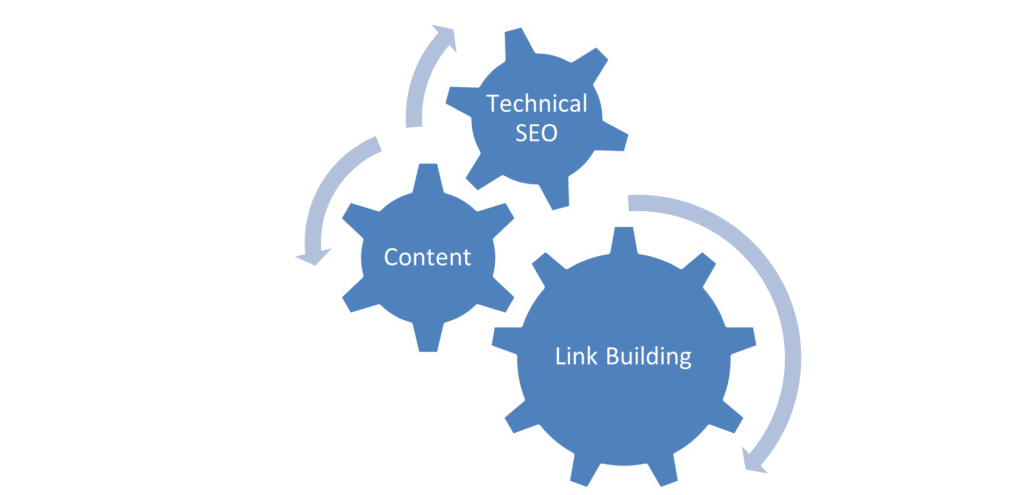
    SEO, as a process, basically consists of 3 important parts; Technical SEO, Content and Link Building.

    What is a Technical Audit?

    A technical audit is a process to check the crucial technical aspects of your website. Understanding and maintaining your website by identifying these technical aspects can help you rank prominently, drive organic traffic, and help achieve your goals.

    1. Content Visibility 

    Since content plays a huge role in targeting our keywords and providing relevant information for our product offering, it is imperative to ensure that the content is visible and available to the user and the web crawlers. This makes it a good first step for a technical audit.

    Ensure that the homepage, category pages, product pages, and all other high priority pages are visible to the user and available to the crawler.

    Given below are a few methods to check if the content is readable to the crawlers

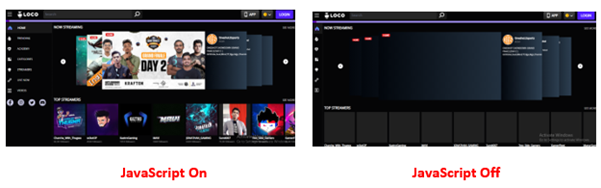
    • Disabling JavaScript

    JavaScript can be disabled in Chrome to see if any critical elements of the webpage are not rendered. Unrenderable content, links or navigation elements could indicate that the crawler cannot view the webpage present. 

    Since Google has stated that it can render JavaScript websites now, a few additional checks need to be performed to ensure that the website’s content is renderable.

    • Cached version of the website

    A cached version of the website

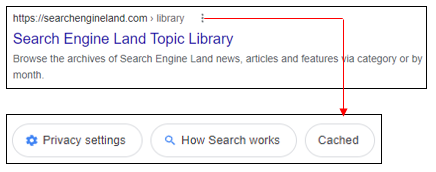
    One way to check how the Googlebot views your page is to check the cached version. Checking the cached version of the webpage can help you identify if any essential content elements of the website are missing or not being rendered correctly.

    Given below are methods to check the same

    • Use the “site:” search operator in Google to find your page in the index (e.g., Site: example.com/abc)
    • Click on the three dots next to the page’s URL and click on ‘Cached

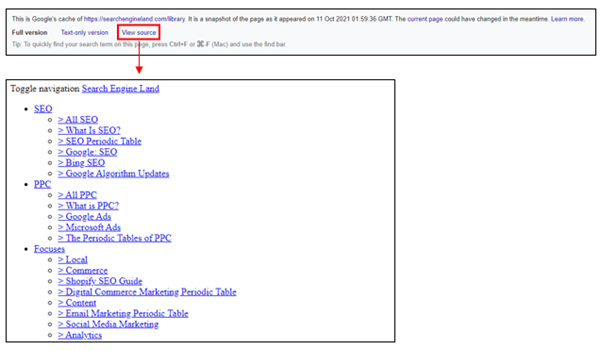
    This will show you the cached version of Google’s page in their index from the last time it was crawled.

    • The text-only version will help you understand if the content present in a webpage is rendered properly. 

    Alternatively, you can check the cached version of a specific page using the “cache:” operator (cache: example.com/example-url)

    Content Rendering

    To analyse if the content on the webpage is visible, we also need to understand how content is rendered. Rendering is the process where Googlebot retrieves your pages, runs your code, and assesses your content to understand the layout or structure of your site.

    There are three different types of rendering for web pages that can be leveraged to present content to the user and bot

    • Client-Side Rendering
    • Server-Side Rendering
    • Dynamic Rendering

    The debate between client-side rendering, server-side rendering, or dynamic rendering is only relevant for websites that utilise JavaScript. If your website is purely HTML, there’s nothing that human users or search engine bots need to render.

    Refer to the below-mentioned link for more information about Content Rendering

    (Reference Link)

    2. Indexation Checks

    To rank for relevant terms, increase visibility, and improve organic traffic, one must ensure that all website’s important pages are indexed in Google. 

    Given below are a few checks that you must do to check indexation

    • Google site: query

    In the Google search field or browser Chrome search bar, you would type in the following:

    site:www.abc.com

    This, in turn, will give you a list of all the indexed pages of your website, thereby helping you understand any indexation issues if present.

    The site: query can also be filtered using different options for specific indexation checks

    site:www.abc.com/subdirectory/

    Only displays the indexed pages in the directory /subdirectory/

    site:www.abc.com Phrase of choice

    Only displays those indexed pages which contain the phrase of your choice

    site:www.abc.com inurl:phrase

    Only displays those indexed pages which contain the word “phrase” in the URL

    site:www.abc.com intitle:phrase

    Only displays those indexed pages which contain the word “phrase” in the title

    site:www.abc.com filetype:pdf

    Only displays those indexed files with the chosen filetype

    • Google Search Console

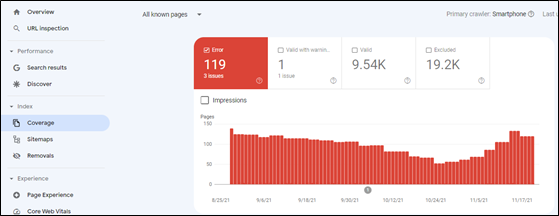
    Google Search Console provides an overview of the indexed pages. Indexation can be checked by clicking on the option ‘Coverage’ under the ‘Index’ section.

    As seen from the above illustration, Google Search Console also provides valuable insights concerning indexed pages, including the presence of ‘no index’ tags, 404 pages, and server errors.

    3. Duplicate Content Checks

    Duplicate content confuses Google in choosing the identical pages that it should rank in the top results. This, in turn, harms website ranking, thereby leading to a drop in organic traffic in the process.

    Given below are a few checks that you must do to prevent content duplication

    • On-Page Elements

    Make sure that all the pages have a unique page title and meta description in the HTML code of the pages. Also, headings (H1, H2, H3 etc.) should be unique for every page. 

    • Use of Proper Canonical URLs

    The canonical tag is an integral part of letting Google know which site is original and should be ranked and which pages should not be ranked. If there are multiple similar pages, Google will be confused concerning ranking. As a result, it is vital to ensure that a proper canonical tag is defined pointing towards the master page.

    • HTTP vs HTTPS or WWW vs non-WWW pages

    If your site has separate versions for abc.com and www.abc.com (non- WWW and WWW versions of the website), Google will identify both the versions as duplicate content, thereby negatively affecting indexation and rankings. Similarly, different versions for HTTP and HTTPS can also create duplicate content issues. Proper 301 redirect (Permanent Redirect) should be employed to prevent duplication issues.

    • Use of Hreflang tags

    Hreflang tags are code snippets that tell search engines what language the content on a page of your site is written in, what geographical region it’s intended for and its relation to other pages of the website.

    Example

    <link rel=”alternate” hreflang=”en-in” href=”http://www.abc.com/in/” />

    With respect to multilingual websites, it is highly imperative to implement hreflang tags correctly.

    Refer to the below-mentioned link for more information on Hreflang Tags

    (Reference Link)

    4. Secure Protocols (HTTPS)

    As per Google, HTTPS is a ranking signal. To capitalise on the same, one needs to ensure that non-secure versions (HTTP) are changed to HTTPS.

    Given below are a few checks you must do to get a sense of the overall security protocol of the website.

    • Check the website’s homepage, category pages and product pages for HTTPS. Try accessing the website using the Non-Secure Protocol (HTTP) and check if it is getting redirected to the relevant HTTPS version of the website. The presence of the HTTP version of the websites can create mixed content issues like content duplication.
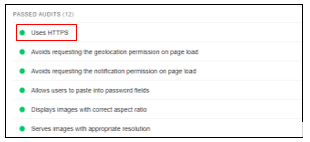
    • You can use Google’s Lighthouse browser plugin to verify if HTTPS has been used across the website. With the plugin installed, click ‘Generate Report’. Once the report id is generated, check under Best Practices > Passed Audits

    Source – Lighthouse

    Refer the below mentioned link for more information about HTTPS

    (Reference Link)

    5. Scanning for Broken Links

    To ensure that we cater relevant pages to the crawler and user, we need to check for pages displaying a 404-error status code (Page Not Found). Broken links on indexation can lead the users to an error page, thereby having a negative impact on user experience. 

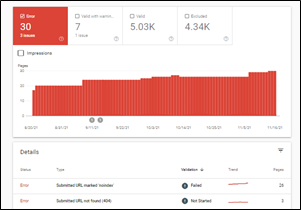
    The Search Console ‘Coverage’ report can help you identify any error pages present on the website. On selecting ‘Errors’, one can scroll down and check for pages displaying a 404-status code.

    Source – Google Search Console

    These pages can be redirected to other relevant pages within the website to ensure that we do not lose out on potential traffic.

    6. Auditing Robots.txt file

    A robots.txt file tells search engine crawlers which URLs the crawler can access on your site. It is mainly a directive to ensure that only relevant pages are presented to the crawler to ensure maximum coverage and avoid irrelevant indexing pages.

    The robots.txt file can be accessed by typing in the below-mentioned URL

    (Reference Link)

    The most common directive to ensure that all the pages are accessible to the crawler is as given below.

    User-Agent: *

    Disallow:

    Sitemaphttps://abc.com/sitemap.xml

    The asterisk symbol (*) denotes all user agents. Pages that need to be blocked can be added in the disallow directive. In contrast, the XML sitemap will present the crawler with all the website’s relevant pages, facilitating smooth crawling.

    Refer to the below-mentioned link for more information about how robots.txt works

    (Reference Link)

    7. Auditing XML Sitemap

    An XML Sitemap is a file that contains a list of all the crucial pages of the website to help Google find and index the same. The XML Sitemap can be accessed by typing in the below-mentioned URL

    (Reference Link)

    The exact URL of the XML sitemap can also be located in the robots.txt file.

    One must ensure that the XML Sitemap only contains relevant URLs that you want to get indexed.

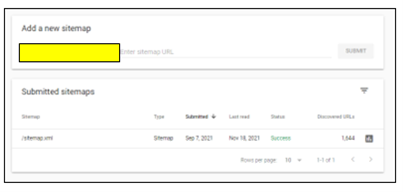
    The XML Sitemap can also be added to Google Search Console by choosing the ‘Sitemap’ option under the ‘Index’ section to analyse if all the URLs present are valid and improve discoverability.

    Refer the below mentioned link for more information about XML Sitemaps

    (Reference Link)

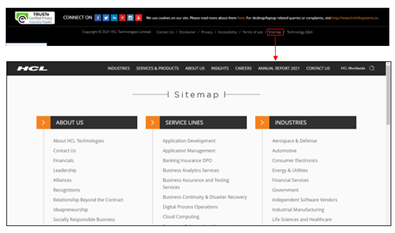
    8. Auditing HTML Sitemap

    HTML Sitemap is an HTML file that contains all the website’s important pages and creates a general picture of the entire website. In simpler terms, XML Sitemap is for crawlers to understand the site structure, whereas an HTML Sitemap serves users with relevant pages of the website.

    The HTML Sitemap is usually located at the website’s footer section, helping users understand the site hierarchy in detail, thereby facilitating smooth navigation.

    Like XML Sitemap, one must ensure that only relevant pages are added in the HTML Sitemap.

    9. Page Speed Checks

    Page speed is a measurement of how fast the content on your page loads.

    Page speed is often confused with “site speed,” which is the page speed for a sample of page views on a site. Page speed can be described in either “page load time” (the time it takes to display the content on a specific page fully) or “time to first byte” (how long it takes for your browser to receive the first byte of information from the webserver).

    For both desktop and mobile search rankings, Google has announced that page speed is a ranking factor. Page speed also can poorly affect user experience, increase exits, and increase bounce rate.

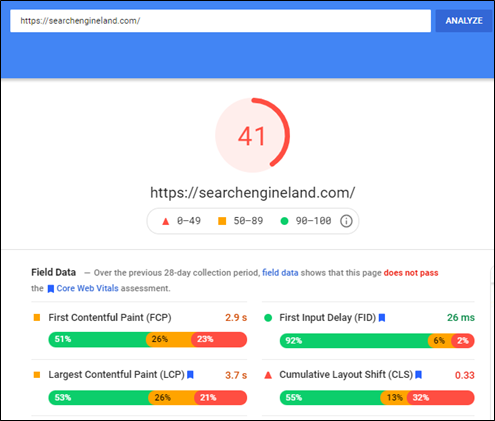
    Go to the Google PageSpeed Insights tool and enter your site’s URL

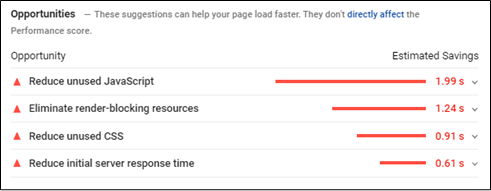
    The tool, in turn, will provide a score for your desktop and mobile version with specific recommendations to help improve the page score and eventually improve the website experience as well.

    Core Web Vitals

    Core Web Vitals are a set of specific factors that Google considers important in a webpage’s overall user experience. Core Web Vitals are made up of three specific page speed and user interaction measurements: LCP (Largest Contentful Paint), FID (First Input Delay), and CLS (Cumulative Layout Shift)

    Since Google has made Core Web Vitals an important ranking factor, ensuring that the scores meet the guidelines set is vital.

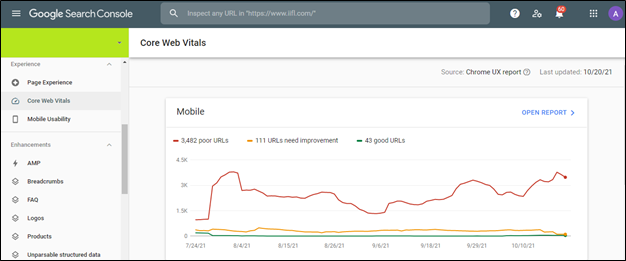
    Core Web Vitals can be checked using Google Search Console in the ‘Experience’ section.

    Core Web Vital scores for all URLs on Mobile and Desktop is given in the above dashboard. This makes it easier to identify and optimise the pages based on three vital parameters.

    Refer to the below-mentioned link for more information about Google Search Console

    (Reference Link)

    1. Mobile Checks

    With the advent of mobile-first indexing and the increasing number of mobile phone users, it is imperative to ensure that the website is mobile-friendly for user experience, indexation and ranking purpose.

    Mobile Optimization ensures that mobile visitors have an experience optimised for their device and considers factors such as website design, site structure, page speed and more to ensure a seamless and quality mobile experience.

    Given below are a few vital mobile checks that you must do

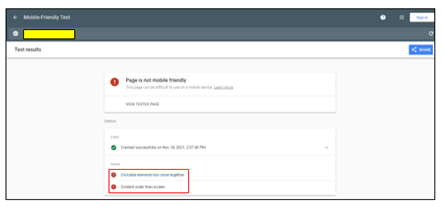
    • Use the Mobile-Friendly Test Tool

    The Google Mobile-Friendly Test is a free tool that allows you to type in the website URL and find out how mobile-friendly Google thinks their site is. It also gives specific recommendations concerning mobile checks, helping identify any issues (if any).

    Content Mismatch

    It is vital to ensure that the content present on the mobile device and desktop is the same. Keeping in mind the mobile-first approach taken by Google, if your mobile site has less content than your desktop version, Google might not get additional information about your website, thereby hampering the indexation and ranking of the website.

    Although different designs can be adopted for the mobile version to maximise user experience (Creation of accordions and tabs to show content), the content present should be exactly like that of the desktop version

    • Use Large Buttons

    Mobile-friendly websites need to have call to action buttons that are large enough to induce users to tap them rather than zoom. This, in turn, makes it easier for the user to navigate and increases user-friendliness in the process.

    Additionally, there needs to be spacing between hyperlinks. If links are placed too close to each other, users might attempt to click on a link and accidentally click on a different one, thereby hampering user experience in the process.

    • Make the text large enough to read

    The text on the website needs to be legible and large enough, thereby making it comfortable to read. Users should not have to zoom in and scroll left or right to read something as this might negatively affect user experience.

    • Navigation Mismatch

    The options present under the navigation in the mobile version should be similar to the desktop version to ensure accessibility. Missing options in the navigation menu can affect the website’s visibility, affect ranking, and hurt user-friendliness.

    • Simplification of Navigation Menus

    Since desktop website menus have a lot of space, they can take up the entire bar at the top of the screen with additional drop-down options without negatively impacting the user experience.

    There isn’t much space to incorporate the menu like the desktop version with respect to mobile devices.

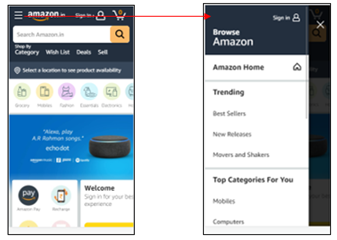
    Mobile-friendly websites must use simple menus that are easy to use and present an accurate overview of the website. Users can then use categories, filters, or the search functionality to navigate further.

    Most mobile-friendly websites use the hamburger menu. A hamburger menu, when clicked, opens to reveal a navigation menu, thereby not utilising a large amount of space.

    • Avoid Pop-Ups and Intrusive Interstitials

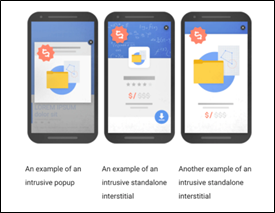
    In 2017, Google rolled out an algorithm change that penalizes websites that include specific types of pop-ups on mobile devices.

    As stated by Google, the below mentioned pop-ups can have a negative effect on the website by making content less accessible.

    Source – (Reference Link)

    As seen from the image, any pop-up or interstitial that makes it difficult to access the content is termed as intrusive and can lead to further penalties.

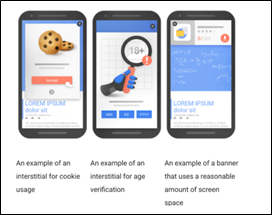
    Given below are the pop-ups that are not deemed as intrusive thereby having no negative effect on the website

    Source – (Reference Link)

    As seen from the above image, pop-ups that do not take much space, add value to the user journey and cookie usage settings are not deemed as intrusive.

    11. Auditing Backlinks

    Backlink Audit is the process of analyzing links pointing your website. The process involves identifying good and bad backlinks and developing a robust strategy.

    Backlinks for your website can be downloaded from Google Search Console by choosing the ‘Links’ option.

    Backlinks can also be extracted by third party tools like Ahrefs and Majestic SEO.

    Given below are few steps to understand how backlinks need to be audited

    • Benchmark Your Backlink Profile Against Competitors

    With the help of third-party tools, we can analyze the backlinks for our competitors to understand the quality for the same. This can help you create a robust link building strategy for your website.

    • Find and Evaluate Each Backlink You Have

    Backlink portfolio of the website needs to be analyzed in order to identify and remove irrelevant and spammy links pointing to your website.

    Since, Google can penalize you for disavowing sites for no apparent reason, it is highly important to ensure that only spammy links are disavowed.

    Irrelevant backlinks can be divided into two separate categories: Low Quality Links and Spammy Links.

    In case of low-quality links, one can reach out to the site owner to get the link removed from their end. Whereas in case of Spammy links (Porn Sites, Casino Sites etc.) , they can be removed by submitting a list of URLs in Disavow Links (Reference Link)

    • Domain Authority (DA) Bifurcation of website

    Domain Authority of a website describes its relevance for a specific subject area or industry. The domain authority score helps us understand the authority of the website for that industry.

    Getting backlinks from high domain authority will not only help solidify our backlink portfolio but also help increase our domain authority in the process.

    • Anchor text diversification

    Anchor texts are the visible, clickable words used to link one page to another. Anchor texts can have a major influence on rankings in the search engine result pages since the crawler gets more information about your brand and product offering through the anchor text. As a result of which, it is highly important to ensure that we do not overuse terms like click here, learn more etc. Anchor texts should have a healthy mix of brand terms and relevant non brand terms to ensure relevancy and visibility.

    12. Analytics Set Up

    If Google Analytics is already set up, ensure that it is set up and working properly to get accurate data.

    Checks that can be done to ensure proper set up

    • Source Code

    Check your source code (Ctrl+U) of the Home Page, main category pages, and product pages for the presence of the tracking code associated with your Analytics account and property. Since some Content Management Systems handle page templates differently, it’s a good idea to check each kind to make sure tracking is consistent.

    The code should be installed in the head tags (between <head> and </head>) and usually includes an ID that you can match with your Analytics property/view.

    • Google Tag Assistant

    Google’s Tag Assistant browser plugin can help verify if the tracking code is installed correctly.

    • Analyze the Google Analytics Traffic

    If you see extreme shifts in data, then it could be an indication that the tracking code present is not firing properly when loaded.

    In your Google Analytics data, look for periods with no sessions, sudden change in traffic and very high/low bounce rate. These can be symptoms of potential tracking code issues

    13. Accessing Google Search Console

    Search Console is a free tool from Google that helps developers, website owners, and SEO professionals understand how their site is performing on Google Search.

    Search Console allows you to check indexing status and optimize visibility for the website. It also allows you to check for pages displaying server error, manual actions, page experience, core web vitals to help identify issues within the website.

    Refer the below mentioned link for more information about Google Search Console

    (Reference Link)

  • 3 Important Stages to Write Efficiently

    3 Important Stages to Write Efficiently

    Although there isn’t any technical aspect to writing a content but following a process would surely help in writing content seamlessly. Let’s delve into the different stages of writing below.

    If you are on this page you surely know how integral the process of writing is. And this goes without saying that it is exceptionally important to plan your writing before you start. Your readers not only expect a grammatically correct content but also a well organised, clearly written and informative piece. Remember a well written content can also help increase customer engagement to your website. Below are the few stages that would help you to kickstart your writing journey.

    To start with let’s divide the content writing process in 3 stages –

    • The planning stage

    The planning stage can further be split into the research and the brainstorming session.

    This is the crucial stage where you would need to think about what you want to write and how you want to write it thereby foreseeing the text that you would finally want.

    Choose the topic, define your content outline, and narrow it down further to develop your text. Research well on the information you want to include and understand the subject well before you proceed with writing.  

    Brainstorming here would help you to prepare the pointers that you would be elaborating. Jot down all the pointers, ideas, words or even phrases that you find would be relevant to your writing. Organise all your ideas in a sequence to structure your content.

    • The writing stage

    The second stage can be split into the drafting and refining your content.

    Keeping your audience in mind start elaborating your ideas. Your introduction should define the topic while keeping in mind that it should be enticing enough for readers to read further.

    The body explains every idea around the topic, it should be supported with data, facts, or illustrations. Plan the expected length of the content and elaborate accordingly. Use connecting words to unite arguments or the phrases.

    The conclusion is a short summary of what is written in the entire content. A strong ending would push the readers to ask for more.

    A quick tip would be to focus more on relevancy than on the mechanical aspect such as grammar, spelling or punctuation.

    If time permits read your draft and try redrafting it by adding any other important pointer that you feel would be relevant.

    Analysis your content by checking if you have used relevant connectors, whether every argument is properly explained, have split your content in proper paragraphs. Do each paragraph logically follow the next paragraph

    • The execution stage

    The execution stage is where you edit your content and proofread.

    This stage is where you judge your content basis the information and language used. Meticulously look for any grammar, spelling or punctuation errors. Your sentences should adhere to the guidelines shared by the publishing company.

    Edit any repetitive information and diversify your language construction to make the writing more precise and educative.

    The last part before publishing is the proofread part, this is to be double sure that your content is flawless. Any minute errors that have missed your attention or any last-minute change that you would want in your content.

    A tip is to read your content loud – once forward and once backwards. This way you cannot avoid any mistake in your content.

    Following the process would help you structure your writing but it only get’s better with time and practice. Judge your writing ruthlessly, don’t hesitate to remove an entire paragraph or rewrite the entire draft. This will help you present the perfect piece to your readers.

  • Featured Snippets: A Short CTR Study on Different Types of Featured Snippets and the art of Optimizing for it

    Featured Snippets: A Short CTR Study on Different Types of Featured Snippets and the art of Optimizing for it

    What are featured Snippets

    A featured snippet is a feature of the search result page that provides maximum and accurate information to your query on top of the page, along with citations to your website.

    Types of Featured Snippet

    • Definition Box

    This is a snippet of text designed to give web users a direct, concise definition or description relating to their query. 

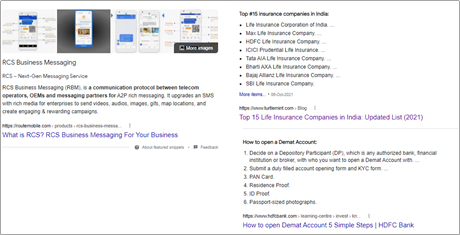
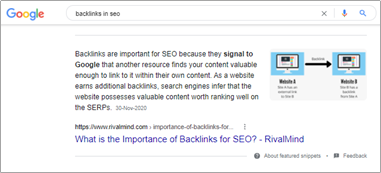
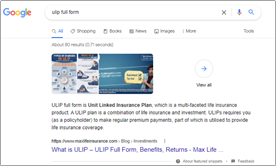
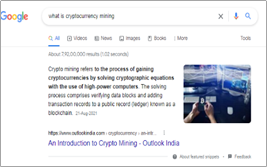
    For example – when you search for ‘Backlinks in SEO,’ Google shows a definition box on the top, which has the basic definition, title, website URL along with image (the image could be yours or 3rd party)
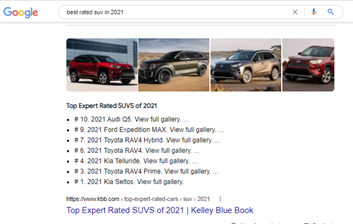
    In most cases, Google tries to show a Definition Box for “What, Full Form & meaning” related queries as they all are inclined towards understanding the basics.

    Example

    • Table

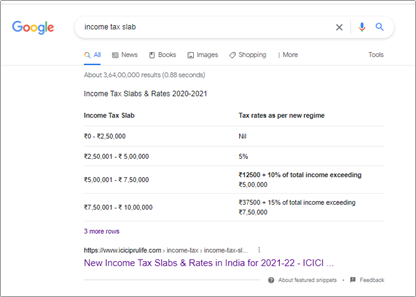
    This is where Google pulls data from a page and displays it as a table.

    Here’s an example

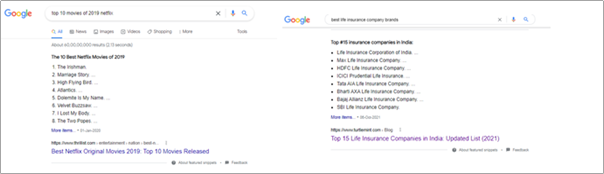
    • Ordered List

    This is a list of items presented in a specific order. Google tends to use ‘Ordered Lists’ for queries that need a set of steps.

    The key here is to lay out your page so that the specific steps or lists of items are presented in a way that Google can easily understand.

    Specifically, you want to wrap every item or step in H2 or H3 text and present each item as a subheading.

    • Unordered List

    This is Google’s way of presenting a list of items that don’t need to be in any particular order.

    Example

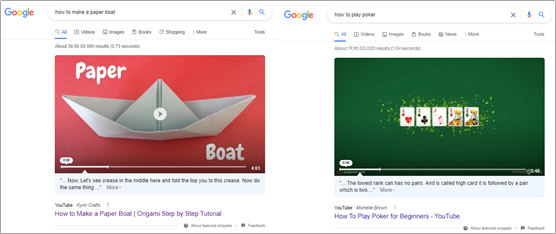
    • Video Featured Snippet

    In this type of featured snippet, Google tries to identify relevant videos suited for the queries and deliver the best results.

    Example

    Why are featured snippets important?

    Featured snippets are vital as they allow you to rank higher along with much bigger SERP Estate, which can have a significant impact on your website traffic.

    Mainly featured at the top of the page, featured snippets stand out from the regular organic results, thereby giving you more eyeballs and brand recognition. 

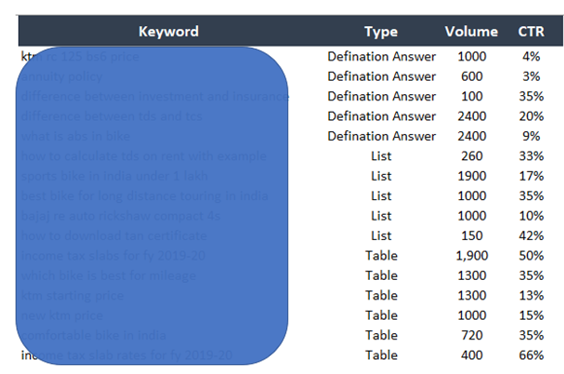
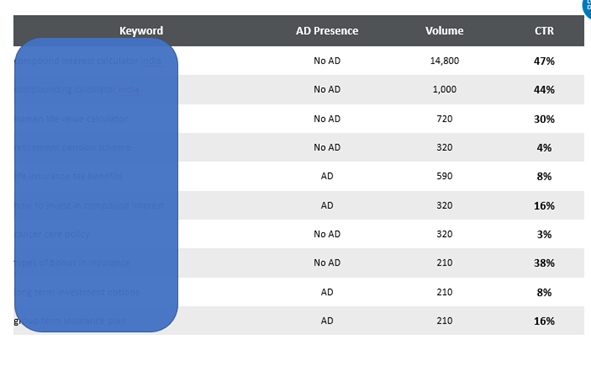
    CTR STUDY – Below are the sample data for reference out 300 total KW analyzed

    Sample – Featured Snippet AVG. CTRs based on its type

    Position 1 AVG. CTRs based

    Findings – 

    Definition featured snippet: Can vary from 3% to 35% based on the intent and query

    List and table featured snippet CTRs can vary between 14% to 50% based on the query intent with no ads and 4% to 9% if there are ads.

    No 1 Position results CTR can vary between 8% to 14% with ads

    No. 1 Position result CTRs can vary between 30% to 45% without ads

    Based on the above table, we can see how different featured snippets significantly improve a website’s CTRs (click to ratio). There are situations where the CTRs might be very low based on the intent, results. 

    For example – Someone searching for meaning will get a definition, and the CTRs would below. The same person might search a what query and still get a definition or SERP. However, the CTR could be much higher because that query intent was to know more.

    Examples – Term insurance meaning, why term insurance is important

    Types of Queries that can trigger above Featured Snippets

    Paragraph: In this, Google extracts text from a page to provide an exact answer to the users’ query.

    This featured snippet can be triggered by “WH” questions, such as

    • What is/are
    • Why is/are
    • Who is/are

    The Numbered List: These featured snippets often list out steps that explain how to do something which involves step by step process.

    This featured snippet can be triggered by

    • Recipes
    • DIY tasks
    • How to
    • How do I

    Bullet List: Listicles are made for these types of featured snippets, whether you’re ranking items or simply listing them.

    This featured snippet can be triggered by

    • Best/Top of lists
    • Ranked items
    • Unranked items
    • Feature lists

    Four tried and tested methods with anecdotal evidence to get Featured Snippet

    • Identification of Keywords
    • Content Structuring and writing
    • Utilization of Headers, Title and HTML Tags
    • Improve readability for crawlers with Schema Markups

    Step 1#: KW Identification

    The most important step is to identify the keyword theme and keywords that you would like to target. You can decide the themes that you want to target and go ahead with optimizing the page. For example, if you are in travel business and want to rank for ‘CIBIL Score Check’

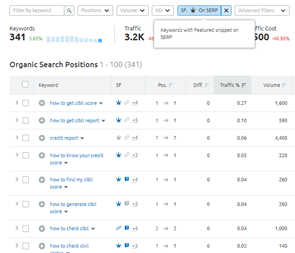
    • Go on Google search and look for the competitor, utilise SEM Rush to identify all the keywords for which the competitor is ranking for using filter

    This is how you will get list of top wks. for which the competitor is ranking on Featured snippet.

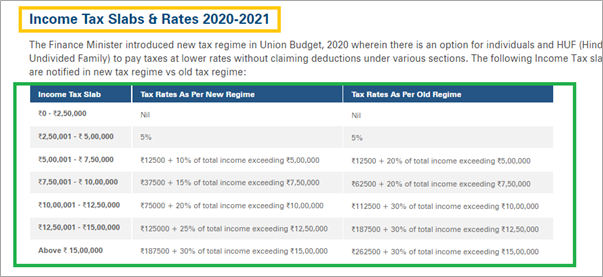
    For further we will be utilizing Income Tax Table, Netflix Movies order, unOrder EDTech, Schema Markup definition as a theme for anecdotal observations.

    Step 2: Content Structuring

    One of the most important aspect when it comes to the chances of getting featured is content and how its structured.

    While we evolved long way the way we consume content and that’s what goal has been for major search engines, to provide good, reliable and consumable content.

    This has led to the way people create and publish content online and those who did, started receiving the benefits of Featured Snippet.

    • Keep the title of the article conversational in nature along with the targeted query.
    • Start answering right after the question and keep it to the point – Example
    • Ensure the content in these questions are between 35-55 characters based on the query intent.
    • For example, a definition might be 35 characters while steps or list may be 55.
    • Its highly recommended to have hero image/video to enhance your Featured Snippet and more landscape
    • Enhance the readability and visual representation with appropriate structuring use Bullet Points, Numbering
    • Ensure your headers are what, how, list, steps, process to give better content understanding for crawlers

    Step 3: Utilization of Headers, Title and HTML Tags

    Headers, page title and HTML Tags are integral part of your featured snippet strategy as it helps search engines to better understand the context of the page. Hence, it becomes paramount for SEOs to utilize these efficiently.

    Tagging your important questions under H1, H2,H3 so emphasis on the query that is targeted and gives search engines better understanding

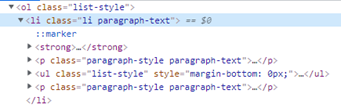
    HTML Tags such as <TH> <OL><UL> are some of the most important HTML tags that can be used represent table in much better tabular format. Such type of content is tag under aforementioned html tags.

    Step 4: Use Schema Markup Tags

    Schema Markup (or schema.org markup) is a form structured data along with set of parameters to filled for specific entity or web page which goes into the HTML of the page so that search engine crawlers can better understand the content in a much efficient way. There are several ways to implement such as microdata, rdf. However, JavaScript Object Notation-Linked Data, or JSON-LD is the most popular of all

    While devising your featured snippet strategy Schema can play a pivotal role in uplifting your chances.

    You can use following schema –

    Quick Analysis and Observations

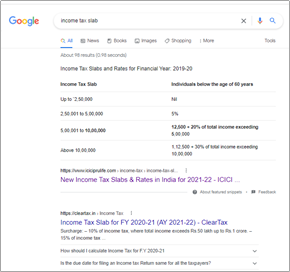
    Income Tax Slab – you get a TABLE Featured Snippet

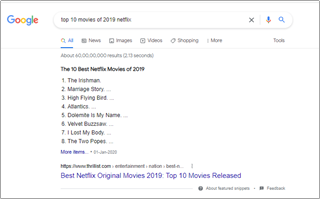
    Netflix – You get Ordered List Featured Snippet

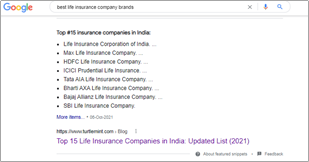
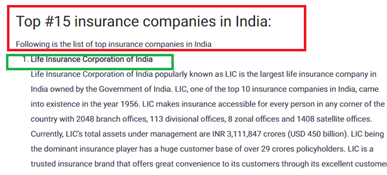
    Life Insurance Company – Unordered List

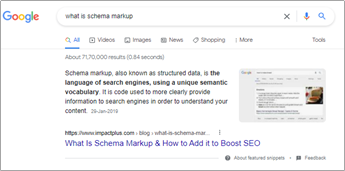
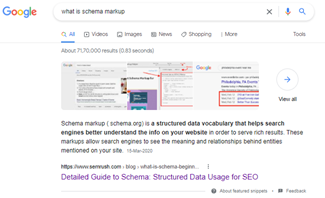
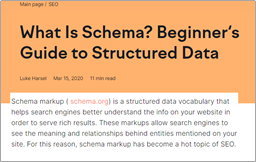
    Schema – You get Definition Featured Snippet

    Table Snippet observations

    As per my observation working with numerous clients looking at their data, I have come to a conclusion that the data for such type of featured snippet is exact replica of the data present on the website page under a well-structured table.

    Based on our example on step 2 let’s observe for income tax slab

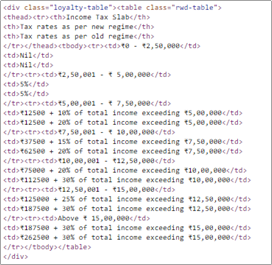
    HTML Code

    The key take way here is to have the Keyword Targeted in your Headers along with the data in a well-structured table format and it’s important to use the <TH><TD> tags as majority of the table featured list gets triggered if a website has utilized these html tags.

    In addition to this, we have also observed for numerous queries the table featured snippet shows content anywhere between 45 -55 characters

    List Featured Snippet Observations

    Ordered List

    Based on the search query in step 2 which was “top 10 movies of 2019 netflix”

    Unordered List

    The Key here is to utilize the H1 tag to target your important keyword for which you want to rank for in Featured Snippet. Additionally, the movie names subsequently are tagged as H2 and important to note here is to have the numbering which helps the objective. Along with this most importantly utilization of OL& UL Tags can have positive impact on your chances

    Definition Featured Snippet observations

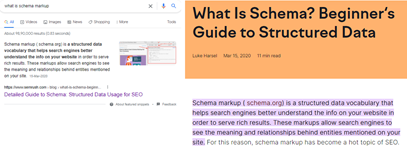
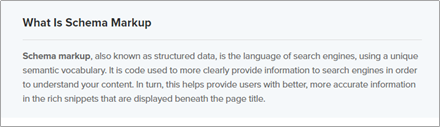
    Based on the search query in step 2 “What is schema markup” we were getting 2 different results now and then. Let’s look at these website pages –

    (SEMrush)

    (Impactplus)

    The key observation here is how the content/definition/answer for the query is described. The content in both the cases seem more like a dictionary context and starting the content in this tonality would improve your chances of ranking in this position. Apart from this few other this you should focus are

    1. Usage of headers (H1,H2,H3)
    2. Implementing article markup
    3. Ensure your answer is within 30-40 words
    4. Include Hero Image and implement alt tags

    Passage Indexing Observations

    Google passage indexing is an automated feature that pulls sections from pages into search engine results, even if the page covers a slightly different topic from the main one.

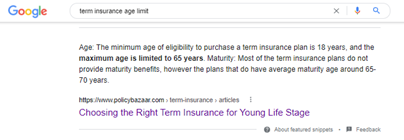
    Example – Term Insurance Age Limit

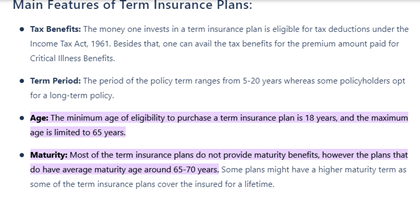
    When user clicks Google takes me to exact location of the content automatically by highlighting the context

    We can clearly see the article topic is something different from that of the query however due to passage indexing algorithm Google deemed the website to be authoritative in its domain and because the website has covered the content. The key takeaway would be to have more information about a specific topic and enhance the master articles or content to reap additional search traffic

    3.5 Optimizing for Video Featured Snippet

    Although, optimizing for video featured snippet can be a daunting task given the fact YouTube dominates the video search and anything related to Google. Having said that it shouldn’t stop a marketeer to be creative and think outside of box

    Other Factors to consider are Backlinks.

     You may wonder all that we have seen above is related to the way content is written, structured, usage of appropriate queries and other html tags. However, backlink forms a core factor here too why? Because majority of times for each industry you will vastly see similar names in the featured snippet / organic SERPs because they have higher authority then any smaller players out there. Hence, I believe backlink plays and important role along with

    For example –

    In india for insurance segment will always see the known player HDFC, ICICI, Policy, Max acquiring the maximum market share due to their authority.

    For Stock Market you will see MoneyControl, Zerodha, Groww, Upstox, Mutual Fund Sahi hai

    Featured Snippet and Voice Search

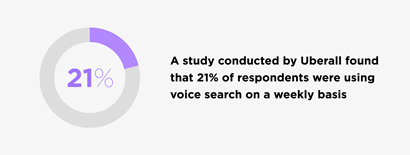
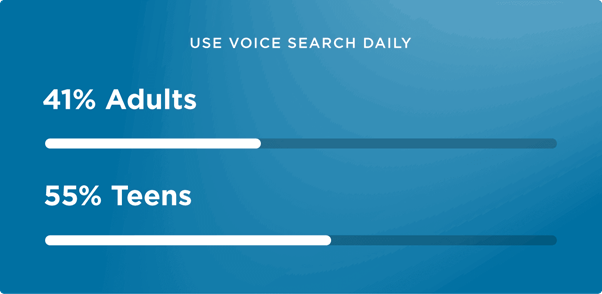
    40% of internet users in the U.S. use voice search, so yes this is the next big thing that’s happening.

    The Manifest also reported that younger generations (ages 18–34) are more likely to use voice search to issue commands (27%), while older generations use it to find information (52% of users over 55).

    More voice search stats –

    20% of mobile queries are now voice searches 

    40.7% of all answers from voice search are pulled from a Featured Snippet

    The average voice search result contains only 29 words

    Websites with high domain and link authority tend to rank best in voice search

     – source

    You don’t need to do anything different however you have to ensure the keywords or query that you are targeting is more of conversational nature while following all the above strategies.

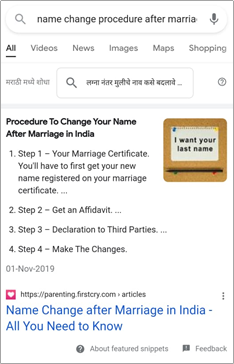
    For example: I used voice search – “Name change procedure after marriage for a girl”

    Some queries,

    • How to reach Pulga valley from kasol by foot
    • Near Me (GMB & Website)
    • Quick information – why money plant is called a money plant

    My Thoughts

    Featured Snippet is Google’s way to enhance user experience by providing quality results. However, that’s a challenge for SEO experts to ensure that they work on CTR to influence people to click and visit your website.

  • SEO in 2022 – Checklist for Brands and Marketers

    SEO in 2022 – Checklist for Brands and Marketers

    While hosting good content will always be a top priority, businesses today know that growing organic traffic to their website is equally important for increasing their online visibility. As a result, there has been a renewed interest and focus on SEO strategies that can help in growing website traffic.

    Digital marketers are keeping abreast of the latest trends and techniques in search engine optimisation and how to leverage them in recent times.

    So what do marketers need to focus on in 2022 when it comes to leveraging SEO? Let’s find out.

    Core Web Vitals

    The Google algorithm uses certain page experience signals to determine the quality of the websites and rank them accordingly. In June 2021, Google added three new page experience signals that are collectively called the Core Web Vitals. These three web vitals are-

    • Largest Contentful Paint (LCP)

    LCP measures the time taken by the largest visible image or block of text on the web page to load.

    • First Input Delay (FID)

    FID measures the time delay between the user’s first interaction and the browser’s response to the user interaction.

    • Cumulative Layout Shift (CLS)

    CLS measures the stability of the website content while the site is still loading.

    The emphasis is on page rendering speed and stability. While websites with simple and static contents are unlikely to be immediately affected by the core web vitals, dynamic websites that host advertisements can get affected in the google ranking algorithm.

    However, digital marketers can start reviewing their SEO strategy and make changes before they experience any drastic change in their ranking in Google search. Furthermore, Google had publicised these changes well in advance, showing the intent to help the SEO and developer community to better prepare their web content.

    Making Websites Mobile Friendly

    The smartphone penetration, along with affordable internet services, has been phenomenal even in developing economies. For instance, India has many households where there is a smartphone but no desktop or laptop PC.

    As a result, most internet surfing today is happening through mobile phones. Therefore, it was inevitable that the Google search algorithm would prioritise mobile-friendly websites.

    So, it is no surprise that starting from 2019, mobile-friendly websites are indexed first by default.

    Understanding MUM

    The Google Multitask Unified Model, or MUM, will use an AI-powered algorithm to improve the online search experience. MUM aims to remove the need for multiple searches by the user. Instead, it aims to interpret the search context through text, images, videos, and audio to understand the user’s needs.

    Furthermore, it understands 75 different languages. Thus, it has the potential to refine over time to understand complex queries used in human-to-human conversations.

    While MUM will be currently introduced as an update to Google Lens, it has a vast potential to change the online search experience completely.

    Therefore, digital marketers will be keeping an eye on how things turn out with MUM. But, for now, marketers need to focus on image optimisation through alt tags, geotagging, etc.

    Emphasise on Voice Search

    We have already witnessed the launch of some fascinating voice-based apps and products such as Amazon’s Alexa, Apple’s Siri, or Google Assistance. It is therefore imperative for businesses to make their websites more conversation-friendly.

    This means more query-based segregation of contents where conversational-style questions are framed to get favourable search results.

    For example, consider using the query “ How to open a bank account?” instead of using the traditional “Steps to open a bank account”.

    Google Does Not Want Searchers to Visit your Website

    About 49% of Google Searches lead to no-clicks. Google wants brands to answer people’s queries without taking them away from the search engine. Snippets can help you rank better, but it also is a double-edged sword as it could mean the visitor may not click on the link and may be satisfied with the answer provided. While this may seem detrimental for your SEO, featuring snippets can help you get a better ranking and build your brand value. This, in turn, can impact your overall SEO score.

    Rank Better in 2022 with SEO

    Creative advertisements, quality content, and storytelling will remain integral to brand-building and sustained business growth. However, SEO is likely to play an equally big part, if not more, in shaping the online visibility of businesses.

    With Google tweaking its algorithm every once in a while in addition to incorporating new features or parameters, the world of digital marketing will surely witness some interesting times ahead.

  • Seven Brilliant Blog- Writing Tips for Brands to Increase Engagement

    Seven Brilliant Blog- Writing Tips for Brands to Increase Engagement

    If you own a blog but find it challenging to get enough visitor as you would have liked, then this post is exactly what you may have been looking for. In this blog, we will discuss a few tips to help increase blog traffic and brand engagement.

    Tip 1 – Know your audience

    Remember, audience is the king. So, it is pivotal that you understand your audiences’ interest, needs, and address their concerns. Your blog should cater to their needs.

    For example,

    My blog helps amateur investors who want to know more about investing.

    Once you have identified your target audience, you can segment them based on their personas. For example, if you are a small business catering to the rural audience, it would help to write blogs in the regional language to appeal to the audience in a better way.

    A persona-based writing approach will yield better results in terms of audience interaction and engagement than a universal or standard writing approach.

    Tip 2 – Curate specific content that your audience wants

    Your primary objective of the blog is to engage with the audience, and so you would want them to interact and engage with your blog page and/or website more. So, it is vital that you provide the best experience to them while they are on your blog. So, make sure that you curate specific content that gives them the information they are looking for and need.

    The following tips can help

    • The content should be crisp, and precise. More importantly it should tell how it can help the readers.
    • Avoid using too many unnecessary widgets that could distract your reader’s attention while they are on your blog.
    • The navigation on your blog must be simple and user-friendly.
    • Keep your blog updated regularly and add fresh content.
    • Avoid using heavy graphics that could impact the page load time.

    Tip 3 – Create smart, eye-catching headlines

    Headlines are the hook that gets your readers’ attention. So, it should be eye-catching enough to compel them click on the link and read further. But at the same time, make sure that your content delivers what the headline promises.

    This is vital to get the right kind of traffic and people who visit the blog may be interested in what you have to offer. This increases the chances of better engagement with the readers, and it will have a good impression on them.

    Tip 4 – Leverage the trends

    As a brand owner who is trying to increase engagement through blogs, you must be constantly only your toes and be aware of the latest trends and leverage them to your advantage. Being the first one to build on the trend is a great way to connect with the audience better and increase engagement.

    Tip 5 – Publish different types of content

    There is a lot more that you can publish other than simple blog posts.

    This includes:

    • Video – Videos are a great way to retain the audience attention for a longer period. The longer they stay on your blog/website better the interaction and conversation rate.
    • Podcasts – Recently, podcasts have gained immense popularity as a communication medium. People who don’t like to read long text, prefer listing to podcasts and it helps brands to convey the message better.
    • Infographics – The importance of a good infographic cannot be stressed enough. It is a pictorial representation of the facts/data you provide in the content. It has a significant impact on the reader’s mind as it appeals to the reader’s visual senses.
    • Interview – Interviews with subject matter experts/influential personalities helps you win reader confidence better.

    Tip 6 – Add Powerful Visuals

    Visuals are a powerful medium of communication and if you don’t leverage it in your blogs, then you are potentially losing out a massive opportunity to increase engagement. Visual could be anything, images, an embedded video, or infographic. It not only makes your blog look attractive, but also immediately catches the attention of the reader and makes them stay for a while longer than usual.

    Not everyone likes to read a full blog or can understand the text immediately. So, having visuals can help people learn through visual stimulation.

    Tip 7 – Place the CTA smartly

    One of your primary objectives of the blog would be eventually to increase business, right? So, while you are trying to interact and engage with the customer through your blog, you can immediately try to convert them into a potential customer by using the call-to-action smartly.

    While you are giving of the information that the potential customer is look out for, you can entice them to click on the link of your products or service and who knows may you will have a new customer added to your list.

    But the CTA should not sound like you are trying too hard to sell.

    Bonus Tip – Give your readers something for free

    Most blogs don’t get return visitors. But you can keep your audience keep coming back to your blog page for more.

    The best way to do this is to offer something for free to them in return for subscribing to your mailing list.  This will help send you regular updates about new content to the people. The free offering could be anything as simple as discount code, an e-book or something else depending on your bloc nice and offering.

  • Unleash SEO to Build your Brand with these 9 Best-kept Secrets

    Unleash SEO to Build your Brand with these 9 Best-kept Secrets

    Marketers often use search Engine Optimization (SEO) to meet various marketing and business goals, such as;

    • Generate leads
    • Increase traffic
    • Improve sales
    • Increase ranking for some important keywords

    However, many marketers join the SEO bandwagon quite late in their business journey, which many experts advise against. Not implementing a solid SEO strategy while building your brand can cause a disconnect between your branding and SEO strategy, which might cost you later. Moreover, branding can have a positive impact on your SEO and vice versa.

    Let’s have a look at how good SEO can impact your brand awareness and visibility.

    1. Posting Awareness Stage Content

    The top-of-the-funnel contents such as blogs, social media updates, infographics, e-books, web pages, newsletters, primary researches, etc., facilitate awareness. The Google search algorithm prioritizes such contents to provide the most relevant information to a user’s query.

    Use long-tail key phrases that are closely related to your content and design your content around them. Add semantic key phrases and questions as subheadings.

    For example, if you are using a long-tail key phrase like cook traditional Goan Fish Curry, then use semantic key phrases like coconut milk, tamarinds paste, red onion. Some related graphics can also help.

    • Focus on the User Experience, Not on the Technology Employed

    Starting May 2021, Google has stopped differentiating between AMP (Accelerated Mobile Pages) and Non-AMP pages. This means any web page can have a shot at the top ranking depending upon its newsworthiness. All you need to do is submit your website to Google News. Along with great content and optimization, your website can rank in top stories.

    • The Right Mix of Organic and Paid Ads at the Right Time

    With smarter algorithms and SEOs, people are becoming smarter too. People prefer organic and natural search results to paid advertisements. However, this doesn’t necessarily mean paid ads are bad. In fact, when done right, paid ad campaigns can help you improve your brand awareness and expose your brand to a completely new set of audiences. The secret lies in using the right mix at the right time after evaluating your business goals, your budget and your marketing strategy.

    • Keep Yourself Updated with Google SEO Updates

    Google has never been so transparent in the past regarding its ranking methodologies. While it still shies away from sharing exceptional details regarding its new core web vitals, a dive into some of its blogs and tweets can give you a good idea of where it’s headed in the future. 

    • Target Long-Tail Keywords in the Beginning

    Many marketers commit the cardinal mistake of wasting too many resources trying to rank for primary keywords when building a brand. However, this is easier said than done. While the keyword’s search volume might attract you, it also means higher competition. It isn’t easy to compete with another site with a much higher domain score and authority and is already getting a lot of traffic for the keyword. So instead, focus on long-tail keywords and build your way up to rank for some of the primary keywords as well.

    • Don’t Take Voice Search Lightly

    We are not even considering smart speakers yet. But more and more people are using voice search through their smartphones. Therefore, you should consider including voice search in your SEOs. You can consider including answers to the most asked questions in a lucid manner. Above all, it should appear natural.

    • Use Snippets for Branding

    Let’s face it. Google wants us to answer searcher’s queries without us taking them to our website. Whether you look at the emergence of voice search or the snippets or even Google My Business, it’s pretty evident, people don’t want to visit a site unless they’re very sure and want to explore further. Now, this is both a challenge and an opportunity. Focusing on snippets can help you answer your searcher’s queries and win their trust. If you’ve helped them once, they’re more likely to trust you when they’re looking for a service or product that you offer.

    • Go Local Build Global with GMB

    Google My Business is a great way to build your brand from scratch locally. It offers many features such as recommendations, ratings, and product descriptions that can improve your local SEO and brand awareness. In fact, as more and more people look for genuine reviews, GMB is emerging as a trustworthy resource for searchers to find out the true information about a company.

    • Publish EAT (Expertise Authority Trustworthiness) Content

    The google search algorithm thrives on excellence. Therefore, try to publish original and trustworthy content that proves your authority and expertise on the subject matter. Keep consistency and regularity in publishing your data, and Google can catch you up on its search results.

    Rome was not built in a day. Neither do brands. However, SEO can help you build a brand that can outgrow itself into an idea or even a way of life. Use these tips to build your brand awareness and visibility early on. It can go a long way in improving your authority in the space and garner a bigger market share.