LS Staging

Category: Pay Per Click (PPC)

  • 10 Simple Ways to Improve the Accuracy of Google Analytics Data

    10 Simple Ways to Improve the Accuracy of Google Analytics Data

    Often, business owners find themselves staring at the Google analytics data and are sceptic about its accuracy. The objective of this post is to help you identify the most common errors of the Google analytics data and provide you ways to fix the errors.

    No view filters

    View filters are of great use to segment the vast data into different relevant buckets for easy analysis. However, the amateur users do not use the filters to its fullest potential. The search and replace filters functionality greatly help in making the page requests URI easily readable. The upper and lower case filters help in making sure that the report rows do not split because of their case sensitivity. It is advisable for all the business owners and marketers to use the various filters while using the Google analytics; it will help you clean up the data and not just segment it. The view filters offer a perfect solution for cleaning up all your data.

    Filters

    While using filters is a great way to clean the data, on the flip side, the filters, if used incorrectly can be destructive. The irrevocably alter the data as it comes into the Google Analytics reporting database. The best solution to avoid losing data is always to have a single view that is not filtered by any destructive options in the configuration. You can create a quick and dirty testing view and throw all your filters there first and filter the data. Deploying the filters incorrectly can be detrimental, especially if you are dealing with historical data.

    Self-referring

    If you check the referral report and see your domain as a referral, then you would have a self-referring issue. This problem occurs because you would have no idea of the source of the traffic, which literally translates to not being able to attribute the traffic to your marketing endeavours. It would be worse if you have spent money on online marketing and you have no idea about what percentage of traffic makes up for the self-referrals.

    There is literally a sea of information available on the internet on how to fix this issue. However, experts suggest that the most common reason why this happens is that one or more than one page on your website lacks the GATC or the Google Analytics Tracking Code. The problem with not having GATC is that, if a user over the course of the time they spend on the website, visits a certain page that does not have the tracking code, then the GA would consider the previous page as exit and the next page would be considered as the entrance with your domain as the referral. GA experts have corroborated that the most common page that lacks tags is the 404 error page.

    No stripped query parameters

    The query parameters are simple, the values that are added to the URL in the format of ?key=value&key2=value2. You can strip out the view-by-view query parameters through the view setting page on the admin menu. These values mean many things and it is very common for the content management systems to use the values and the external tracking applications. The query parameters, not necessarily always dictate the content on the page; sometimes it is just the session or the user data the CMS needs to shuffle the page around. An important note – as an analyst, they hold no significance for you.

    You must know that every reporting row in your content report is unique and every combination of query parameter will have its own row, which will split the data for a page into different rows. It is quite possible that you would only look at the row for a particular page that is utilised the most and it surfaced by column sorting.

    Not having default view page

    Another effective and easy technique to clean up the day is to set the default page in the view settings. What this essentially does is, it aggregates the root domain “/” with any page that you set as the default page. For example, if you set “index.php” as the default page, the “/index.php” in the content report will be combined in with “/” into one clean row. All the query parameters that you have added will break into their own separate rows.

    A bad architecture

    Apart from the bad data, the odds are quite high that you might be looking at the wrong place. While setting up the account make sure that you name the account so that, is easily identifiable; you must know which web property or account you are referring to within 10 seconds. Setting up an account can be very basic or complex; you need to figure out a way to know how everything ties together.

    No annotations

    One of the major benefits of having annotations is that it compensates for the changes you have made to the account while viewing the historical data. You may probably remember the last couple of changes that you have made to the GA account. However, it is not possible for you to remember the changes made over the course of one year. It is literally not possible to remember all the filters that you have applied. This is where the annotation plays a vital role. While you are building historical data, the annotation will give a clear log of what the data means so that you get the right insights.

    Case sensitive campaign fumbles

    One of the best features in GA is the campaign tracking feature. However, you must know that the campaign tagging is always case-sensitive, which means that if you are launching three different campaign and you list the medium as EMAIL, Email and email, these will show as completely different mediums. It is therefore highly advisable that you have some kind of reference document that the marketing professionals can access and collaborate while creating campaign tags.

    Adding the code at the wrong place

    The best way to place the GATC on the website is quite dynamic and it keeps changing. While you are creating a web property or within your GA admin panel where the tracking code is located there is always a brief description where it exactly needs to be placed.

    Using GATC that is outdated

    This is another very common reason why the data is messed up. The javascript tracking code that you place on the page calls the Google mothership and references, which can be best described as a little web program. This program, just like any other computer program is constantly improved and on some occasions, you would need to update the GATC and take advantage of the new features of GA. Make sure that the GA code is up to date.

  • Customer Engagement in the New Age of Social Networking, Mobile, and Messaging

    Customer Engagement in the New Age of Social Networking, Mobile, and Messaging

    In today’s time when the social media and mobile marketing is constantly evolving, the marketers have to be on their toes always and adapt themselves to the new trends. This is the key to staying competitive in the market; if you fail to adapt, it will not be long before that your business would face doomsday. Today, there is no single right or wrong approach or one correct answer to cater to the needs of the customers.  

    With the drastic increase in the usage of mobile phone and social networking platforms for shopping and connecting with the brands, marketers around the globe are trying to available at the customer’s service right at their finger tip. Not to mention, the brands today are taking all the efforts to be available at their potential clients’ disposal at the customer’s own convenient time. The objective is to provide the customers with a seamless experience. For all the amateur marketers out there, the experts suggest that here is how they should look at customer engagement in the age of social, mobile and messaging.

    Mobile is the big thing
    Research conducted by comScore indicates that time spent by people across all digital platforms, the mobile usage accounts to 65% and major activities include checking e-mails, using social media platforms for connecting with friends, carrying out daily tasks and shopping. Marketers have realised the importance of engaging customers on their mobile phones and therefore are optimising their content for small screens. Research also indicates that by the end of 2018, online shoppers will place more orders on their phones than any other devices.

    This opens up a huge avenue for marketers to engage with their customers. However, marketers must realise the fact that mobile marketing is all about timeliness and creating a sense of urgency. Based on the customer’s preferences, marketers can send push notifications through messages or apps to keep the customers updated about the status of the order or offer them an exclusive promotional offer.

    Social media has become the cornerstone of brands

    A popular headwear brand LIDS, over the years, one the back of its strong social media strategies developed a huge fan base. However, the company soon realised that to sustain for a long time, it had to make the social media marketing the centre of all their marketing efforts. Consequently, to (or “intending to”) get a better understanding of customer engagement on social media platforms what the company did was? They build a social media command centre that constantly keeps a tab on the traffic and study the behavioural pattern of the visitors.

    The brand today is also keeping a close eye on what the people are talking about LIDS. The command centre also drives the communication of the marketing team in a way that it is easy to fathom for a layperson. The efforts of the command centre reaped huge rewards for LIDS; the brand’s fan following on Facebook skyrocketed from 450,000 followers to 800,000 followers.

    Messaging is the future of customer engagement  

    The future of customer engagement on digital platforms greatly depends on how brands figure out how they find the right balance between public and private applications. It is highly unlikely that people would tweet their credit card number or post the same on Facebook to complete their online purchase with a particular retailer. At the same time, it is not very convenient for the brands to conduct business through e-mails or phone calls. In such a situation, the messaging apps provide a middle ground for both the customers and the marketers.

    In recent times, brands across the globe are increasingly using messaging apps like Whatsapp for their business purposes. These apps do not allow marketers to serve customers automatically but also helps maintain a one-to-one experience for the customers.

  • Google to Open its Store Visit Program to More Advertisers

    Google to Open its Store Visit Program to More Advertisers

    It is no doubt that the current digital marketing world is at its competitive best, the marketers are leaving no stone unturned to gain an edge over the others. Well, if you have been struggling with your marketing endeavors here is a good news for you, Google is here to help you understand the impact of your marketing strategies.

    The search engine giant recently announced that it used enhanced measurement techniques and learning-powered modeling to track more than four billion store visits from the ad clicks and it has noticed a staggering growth of one billion clicks in less than one year. Based on the analysis of the clicks, Google has come up with the following observations, which can help companies around the world to improve their marketing strategy.

    Have a better understanding of The Geography and the Geometry of stores

    The mapping team at Google has developed a technology that helps not only helps the advertisers their store location but also the shape of that sore. The team has mapped the coordinates and the borders of millions of store building in a precise manner. This greatly helps the business organizations to understand the starting point of the location.


    Get started on store visits

    Once you have had a good understanding of the store visits, there are a few mandatory requirements that you need to meet first to take advantage of the visits:

    • You need to first create a Google My Business Account and link it with your AdWords account.
    • Set-up the location extension in your account
    • Create multiple physical store location in a qualifying country
    • Receive many ad clicks and store visits


    Google has announced that it is now set to make the data of the store available to thousands of new advertisers owing to the advancements in the new components of the measuring capabilities. The search engine conglomerate has said that it measures the store visits based on the anonymized and aggregated data of users from around the world who keep the location history tracking feature open on their mobile phone. The recent changes implemented by Google in its mapping feature including the Google Earth and Google street view images helps the users to get precise information about where the buildings begin and end.

    As you measure all the users who come to your store through ad click, here are a few simple tips that you must keep in mind:

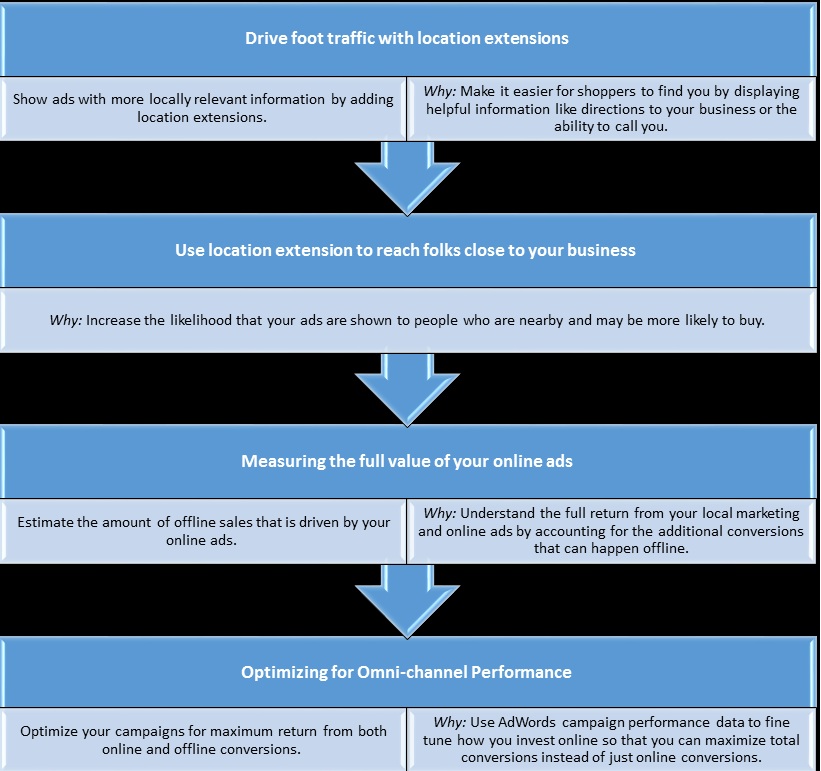
    • Boost the visibility of your online advertisements to be more discoverable to the potential customers
    • Re-structure your marketing strategy to ensure that your ads reaches the right person through smart targeting and bidding
    • Keep a track of all your online marketing efforts to evaluate the growth in the offline value
    • Closely observe the performance of your online ads and keep fine tuning it to maximize the returns on both online and offline conversations.

    The location extension targeting is a great starting point for all the marketers to reach out to the potential customers through mobile marketing. You can keep a tab on the frequently used search terms to ensure sure that you are discoverable to people who are using search phrases like ‘near me’. Thus by including store visits in your total conversion rate, you will get a clear view of the impact your marketing strategies.

  • Four Analytics Tools for Tracking Online Behaviour of Users

    Four Analytics Tools for Tracking Online Behaviour of Users

    Web analytics, the process of tracking the online behaviour of web visitors is the ideal way of predicting the future actions of your online visitors. If you are running a commercial website, it is imperative for you to analyse your web statistics to know the behaviour and buying habits of your customers. However, you should keep in mind that web analytics is not limited to mere compilation and analysis of your data or your competitors’ data; what matters the most is how you utilise the accumulated data. Once you have gathered adequate data, you need to convert the data into actions for improving your site and meeting your business objectives such as— enhancing customer engagement, retaining customers, attracting new customers, boosting sales, and so on.

    Moreover, by tracking the online behaviour of users, you can find out your best traffic sources, the type of content web visitors like to read, the links that they follow, and the web pages that get the maximum clicks. Analyses of these factors also help you comprehend which areas of your website need work so that you can improve your website accordingly.

    Nevertheless, sifting through all the data generated by your website can be quite an intimidating process; however, by picking the right tracking tool, you can easily analyse the behaviour of your web visitors in your site. Here are four useful analytics tools that you can utilize to analyse the activities of your web visitors on your site.

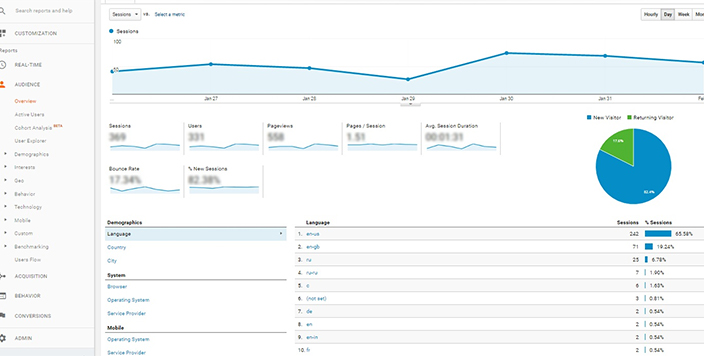
    • Google Analytics: This free analytics tool known for its robustness is used by 57 percent of the 10,000 most popular websites worldwide. If you own an e-commerce site, this tool is highly recommended for you as it provides you with valuable data pertaining to user behaviour besides tracking your transaction data and determining the specific pages on your site that drive maximum sales. Google Analytics also gives you an idea about the demographics of users visiting your website including the device that they are using.
    Source : Logicserve Digital
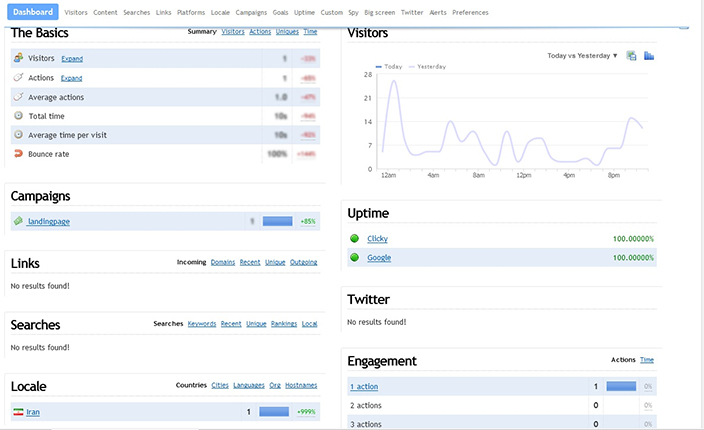
    • Clicky: This website traffic analytics tool is an ideal option for those who are seeking more exhaustive information about their online visitors. Clicky is a real-time traffic analysis tool and also easy to install and use. It features a simple dashboard that instantly exhibits your latest statistics such as the number of users visiting your site, the pages they are viewing, time spent by them on your site, and the sources they are coming from. Clicky comes with a unique ‘Spy’ feature that allows you to view the visitors on your website so that you can keep an eye on the trends, as and when they occur. This analytics tool has both free and paid plans.
    Source : Clicky
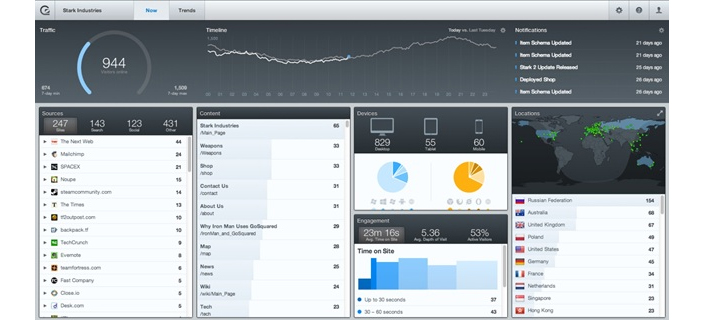
    • GoSquared: This is yet another effective tool designed for websites and apps to track the online behaviour of users. This platform has a sleek interface and is easy to navigate. What’s more, it is available in both paid and free versions. GoSquared has a real-time monitor that allows you to view web visitors on your site in real time along with the sources from which they come to your site. It also enables you to join Twitter conversations instantaneously if there is someone linking to you. The best thing about this tool is its ability to estimate bounce rates more precisely compared to other analytics tools.
    Source : The Next Web
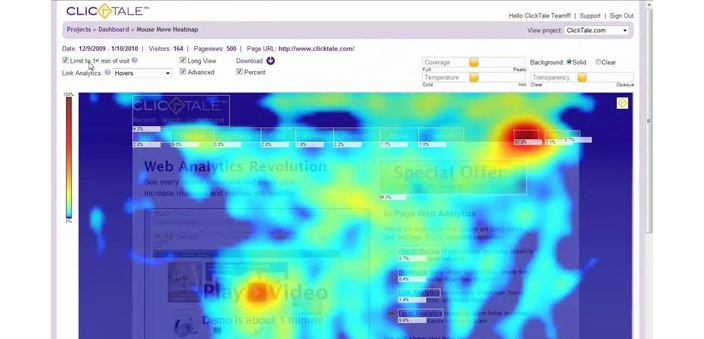
    • ClickTale: Data accumulated by ClickTale provides you with useful insights so that you can satisfy your web visitors by creating more value. This analytics tool is ideal for determining user behaviour, their requirements and intent. Along with conventional conversation analytics, this tool generates visual heat maps and reports by making use of meta-statistics. For example, while reading a specific text, web visitors usually keep hovering over the text. The Mouse Move Heat Map of ClickTale presents this statistics to enable you to perceive how different layouts of web pages affect user behaviour. ClickTale basically acts like a video recorder that provides you with visitors’ recorded sessions besides providing comprehensive data about useful user behaviours, scroll reach, attention span, mouse click, and mouse movement. This analytics tool has both free and paid versions.
      Source : i.ytimg


      So these are the four analytics tools picked by us for tracking the online behaviour of website visitors.  These tools go a long way in helping you understand the online behaviour of your users so that you can optimize your online presence as well as enhance the utility of your online services. Which tool are you using to understand your web analytics? Do share your views with us.


  • How to Improve Website Conversion Rates?

    How to Improve Website Conversion Rates?

    In order to achieve high sales volume, it is necessary to have a good conversion rate. The term ‘conversion’ not only implies ‘sales’ but also refers to the specific actions of online visitors on your site such as— purchasing a product, subscribing to your emails, downloading a whitepaper, or filling out a contact form.

    The key objective of every digital marketer is to generate website traffic that converts into leads. If your website is getting decent traffic but you are not getting good conversions, you need to follow certain result-oriented measures to improve your website conversion rates. In this post, we will share some conversion tips to help you increase your website’s conversion rate.

    • Build a Solid Plan for A/B Testing: Also known as split testing, A/B testing is a great way to know the preferences of your customers. A/B Testing is a procedure in which you conduct concurrent experimentation between two pages to find out which page outperforms the other. It is the most popular method followed by digital marketers to confirm if any novel addition or alteration to their web page will actually help improve its conversion rate.
    • Create a Convincing Value Proposition: It is the most crucial conversion factor as it explains why a prospect should prefer you over your competitors. Thus, you should create a compelling value proposition that reflects the uniqueness of your business and differentiates you from your competitors. In order to understand the true efficacy of your value proposition, you must conduct tests to find out how it inspires your target audiences. Furthermore, it is equally important to communicate your value proposition effectively to derive the best possible results.
    • Avoid Using Business Jargons: Avoid annoying your visitors with complicated business jargons as it may drive away your leads. When prospects visit your site to purchase a product, they look for something that will make their life simpler. Using complicated language makes it difficult for your prospects to comprehend what you are trying to convey.
    • Do Not Include Any Unnecessary Field: Shorter signup forms have better conversion rates, as adding an unnecessary field in your signup form often reduces conversion. Visitors do not prefer filling out information that is not necessary for purchasing your product or to subscribe to your newsletter. Thus, you should not ask visitors to provide details that you don’t need to know. Moreover, to make the signup process simple, you should provide your visitors with the option of signing up using their Google or Facebook account. Furthermore, in order to provide your customers with a sense of security, do not forget to declare that their private information will never be shared with third parties.
    • Make Your Pages Distraction-free: Distractions often divert visitors away from the goal; thus, make sure you minimize distractions from your product pages, and checkout page. Minimizing unnecessary links and irrelevant information from your checkout page can significantly enhance your website’s conversion rate. For example, in order to win the undivided attention of its customers, Adidas takes out the navigation bar from the top of its checkout page. Similarly, Amazon hides the menu as soon as users land on its checkout page.
    • Simplify the Process of Buying: Your objective is to make the process of signup simple and easy. Your prospects should be able to easily figure out where to click and how to purchase from your site. Thus, make sure each page of your site visually guides your visitors so that they can take the next step with ease. Moreover, you should never compel your prospects to sign up in order to purchase from your site. The best option is to allow users to checkout as guests. At the same time, you should emphasize on security features, easy returns, and free shipping.
    • Eliminate Risks: Every transaction involves risk, and generally it is the buyer who bears most of the risk. However, if the transaction involves big risks, then prospective buyers would refrain themselves from purchasing from your site. Thus, it is imperative to remove all possible risks to keep visitors from leaving. For example, Dominos Pizza assures that if your pizza is not delivered in 30 minutes, the pizza would be free. With such an assurance the fear of risk gets eliminated.

    There are countless other ways to enhance your website’s conversion rates. However, the above-mentioned tactics can be a great way to start with. By adhering to the above-mentioned guidelines, and monitoring your conversion rate regularly, you will be astounded to see how your conversion rate increases terrifically.

  • Everything you need to know about view through conversions

    Everything you need to know about view through conversions

    View through conversions measures the performance of your display campaigns i.e. people who saw your ad on display network websites but did not click on your ad.

    view-through-conversion

    It is crucial to consider view through conversions because it helps to monitor the indirect value that your Google Display Network Campaigns are delivering. View Through Conversions records the number of conversions that happened within the 30 days window period after a user saw your ad, but did not click on it and resulted in a conversion from some other channel apart from Paid Media i.e. a conversion from Organic, Direct, Referral, etc.

    Here are some main advantages of using view-through conversion tracking:-

    1. You can identify the list of websites that are generating view through conversions and create placement-targeted campaigns

    2. You can optimise your campaign’s performance considering the view through conversions as it is an indirect value add on for your campaigns

    3. You can bid more aggressively for the placements that are generating more view through conversions. If the users click your ad and result in a conversion, then this will be reported directly in conversion and not view-through conversions

    View-through conversions are tracked through the AdSense cookie, and they’re only reported for Display ads on the Google Content Network. They are not reported for Search Campaigns or text creatives in content campaigns.

  • Expanded Text Ads: What has changed and how it helps

    Expanded Text Ads: What has changed and how it helps

    expanded-text-ads @LogicserveDigi

    The long awaited expanded text ads have finally arrived, but are we ready? Google has designed these ads considering both, the advertisers and the mobile-first world users in mind. So, what exactly has changed and how can it help us? Before, we answer this question let’s first understand what are expanded text ads.

    What are expanded text ads?

    Consider yourself as an artist who is painting on 1”x1” canvas for 15 years. Suddenly, someone hands over twice the size of the canvas. Would you fill up the extra space with more clouds and land? An ingenious artist would use up the space to bring up a stunning and all comprehensive landscape. Likewise, the expanded text ads gives you the freedom to flex your creative PPC muscles by exceeding the character limit.

    Here’s is what has changed –

    Expanded Text Ads: Exceeding character limit @LogicserveDigi

    Image Courtesy: Google user content

    • Two headlines and more characters

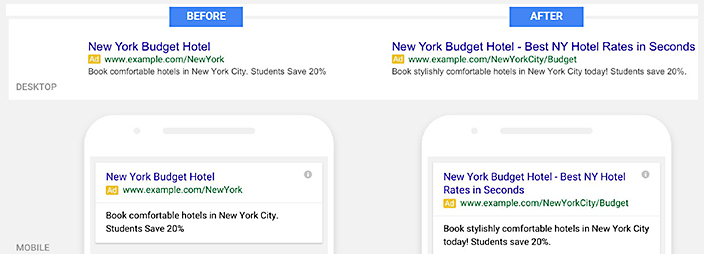
     Instead of 25-character headline, we now have two headlines with 30 characters each i.e., 60 characters!  It is a wonderful opportunity to have a desired call-to-action. Both headlines will appear on the single line (as shown on the left hand side of the image). However, the second one might come after a line break or Google might even truncate the second line, if required. Languages such as Japanese, Korean and Chinese having double-width characters are allowed to have 15 characters. This addition is sure to add up to the effectiveness of the ad.

    • Expanded description

    Remember the canvas; its size has increased by 14%! The 70-character limit for the description has been extended to 80-character. Often we find it impossible to utilize the 35 character in description line 1, and forced to move the long phrase or word to the next description line. This extension in character limit for description comes as boon for us, isn’t it?

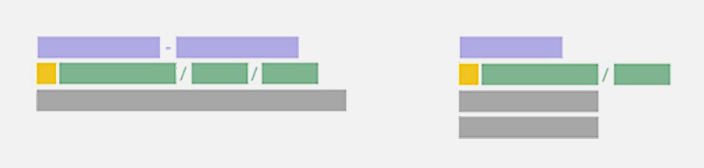
    Check out the below given image for more clarity. In the standard text, we have less character limit for description line, however in the expanded text ad we have much better call to action due to extended character limit on a single line.

    Expanded Text Ads Description:Character Limit @LogicserveDigi

    Image Courtesy: Wordstream

    • URL customization

    No need to enter a display URL to match the final URL domain. Adwords will pick the domain from your final URL and show it as your display URL.

    For instance,

    Your final URL is www(dot)example(dot)com/megastore/all-inclusive/deals, your display URL will be, www(dot)example(dot)com

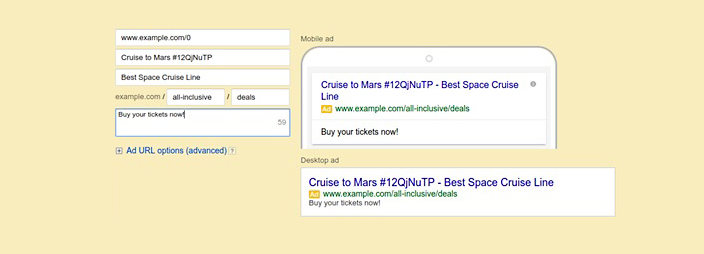
    Well, you have another option of having path fields with 15-character limit. It will be a part of your ad’s display URL, positioned after the website’s domain.

    For instance,

    Your final URL is www(dot)example(dot)com/megastore/all-inclusive/deals, and you might like to have path text to be all-inclusive and deals. So, your display URL will be www(dot)example(dot)com/all-inclusive/deals

    This is how the ads will look in Adwords interface.

    Expanded Text Ads Present and Former Text Ads @LogicserveDigi

    Image Courtesy: Google Developers

    Google recommends using path text, as it will give the users a better idea of where they will land on your website.

    Learnings:

    The major benefit of expanded text ads is the increase in CTR (Click-Through-Rate).  It makes sense, as your ad will have more space in search engine results with detailed information and call to action.

  • Can PPC be used for Lead Generation by SMEs?

    Can PPC be used for Lead Generation by SMEs?

    PPC-be-used-for-Lead-Generation-by-SMEs @LogicserveDigi

    Small and medium sized businesses often look for no-budget to low-budget marketing and promotion options to reach and acquire their local customers. They usually depend on organic online search rankings to build their online presence. So paying for online searches, through pay-per-click (PPC) advertising is often seen as an expensive option. Moreover, PPC is often thought of as helpful only to e-commerce players, to lead consumers to shop for products. That is, of course, a misconception.

    SMEs have a lot to gain from PPC, especially when it comes to businesses that need lead generation through targeted advertising. Lead generation is meant to get potential customers into the lead-tracking system in order for them to begin an information period with the company, in which the company learns more about customer’s needs, while the customers learn more about the company’s products and services. The ultimate goal is to strike a deal, and thus, acquire a customer.

    How does PPC fare against other lead generation methods?

    A typical lead funnel utilizes a variety of ways to generate leads. Let’s look at some of the prominent ones and analyse how PPC may be more effective:

    • Blogs: These are a good source of leads, but need constant replenishing with high shareability quotient and a good user base, which often takes a lot of time.

    Logicserve_Blog @LogicserveDisgi

    • Email: Communicating with existing subscribers, or targeting a new set of people through bought databases is possible via email, but often you can only hope to add new leads for your business.

    Emailer @LogicserveDigi

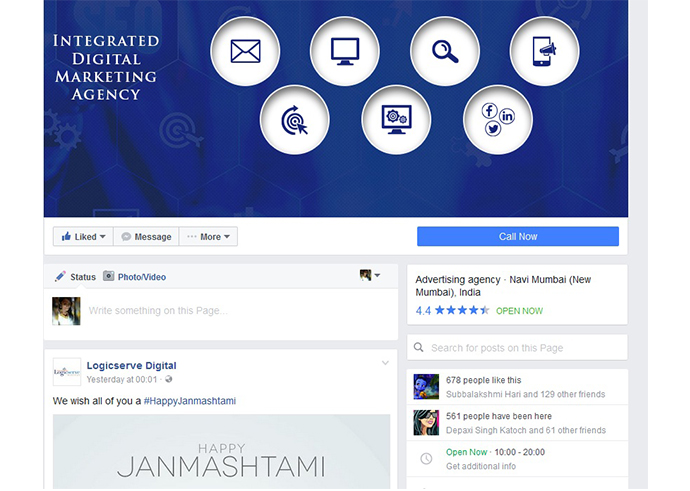
    • Social media: Facebook, Twitter and other social media networks can get business new followers build exposure to a large audience. But followers may not necessarily be your target audience who need your product or service.

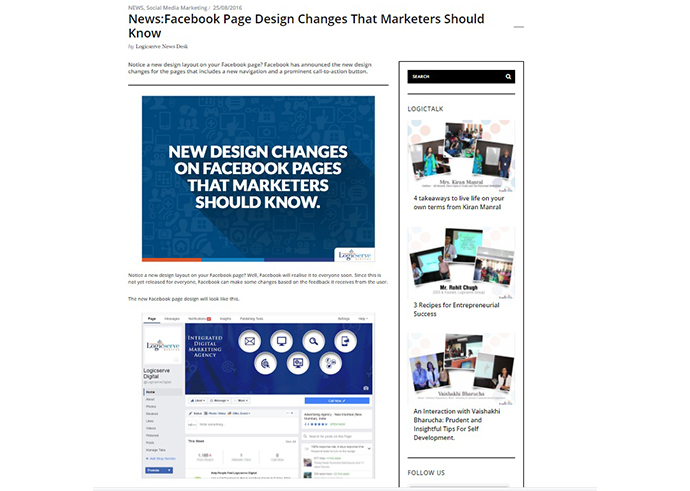
    Facebook-Page @LogicserveDigi

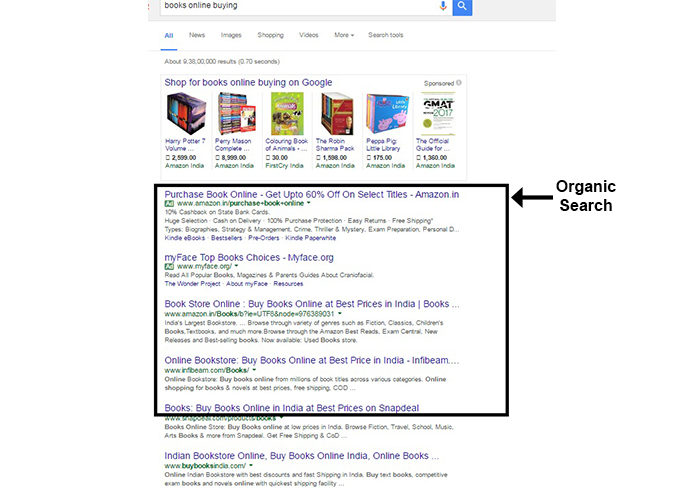
    • Organic search:  4 out of 5 search clicks come from organic listings on the first page, with the advantage of free clicks. But then you have a lot of competition, and it may take an unusually long time for your business to earn a place on the first page.

    Organic-search @LogicserveDigi

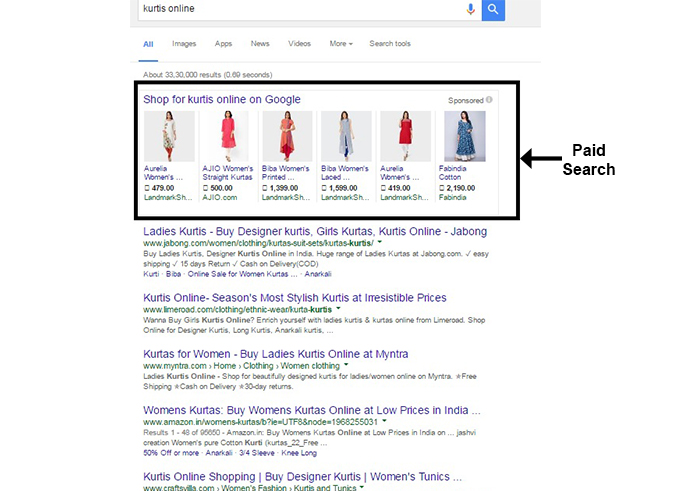
    • PPC: This allows your business to appear instantly on the first page to the most relevant audience, those who are searching for a solution to their problem. PPC increases awareness of your business to much higher levels than before.

    Paid-search @LogicserveDigi

    Yes, PPC is a paid search channel. But considering the costs involved in managing social media, blogging, search engine optimization, and e-mail marketing, PPC is comparatively an effective option for most businesses to reach a targeted audience online with full control of expenditure and return on investment.

    How to use PPC effectively for lead generation?

    • Direct potential customers to a landing page instead of the home page – While your home page may contain comprehensive information about your offerings, a well-designed landing page will generate a direct action from the customers for them to be converted into paying customers. A good PPC landing page may be independent of your website.
    • Offer something to your audience – Since you’re not leading your customers to shop instantly for any product or service in a lead generation campaign, and you’re asking for their information, you may as well offer them something they might find useful, like a whitepaper or a brochure.
    • Keep focused communication across touchpoints – The landing page should be able to continue the same story as you’d told your customers in the PPC ad. It should provide more information on the product or the service mentioned in the ad that they’ve clicked.
    • Optimize communication on the landing page – A PPC landing page will be the customer’s first point of contact with you it needs to have just the right information in a concise and visually appealing manner. Also, the lead generation form needs to just the relevant fields which can be filled up easily by the customers without any reluctance.

    PPC or Pay Per Click advertising is a dependable method of generating targeted leads to your business, provided you optimize the customers’ journey from point they click your PPC ad to the point they exit the landing page.

  • Google Announces Some Major AdWords Changes

    Google Announces Some Major AdWords Changes

    Yesterday, at the Google Performance Summit, the search engine giant announced some major updates for AdWords advertisers. The announcement was made by Jerry Dischler, Vice President of Product Management and Sridhar Ramaswamy, Senior Vice President of Ads & Commerce.

    Before we talk about the updates, let’s first have a look at the current effectiveness of Google AdWords and the factors that offer the most needed boost in terms of economy.

    In 2015, Google’s search and its advertising tools were responsible for driving approximately $165 billion worth economic activity in the United States alone, which is indeed a big deal.

    Trillions of searches are being performed on Google.com, and more than 50% of these searches are carried out on smartphones.It is observed that around 1/3 of the total mobile searched on Google are location-based. Interestingly, these searches are found to be growing 50% faster than any other type of search query performed on Google.

    Ever since AdWords store was introduced around 2 years ago, more than 1 billion store visits were recorded worldwide.

    With that being said, how will the latest AdWords update benefit the users?

    • The prime motive behind releasing the update is to help marketers and advertisers across the globe to succeed in the mobile-first world. In the new update, Google plans to redesign almost everything including the creatives, bidding and the workflow.
    • Initially, Google had launched the Universal App Campaigns that helped app owners to reach out to a wider set of audience. All you have to do is just add a few lines of text, place the bid, provide your billing info and the rest is taken care of.
    • To add further boost to your overall marketing campaigns, Google has launched the following new products:

    Responsive Ads for Display

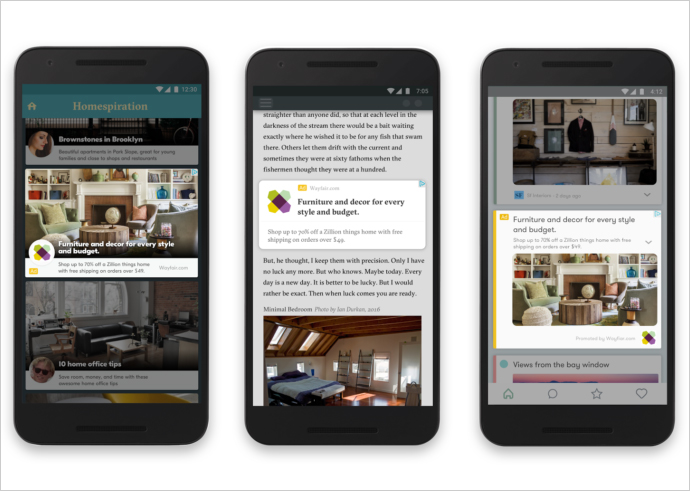
    Display ads will now be able to rightly adapt to the website content on which they are being displayed. These ads will blend with the style of the content they are added to. Creating these ads is easy. All you need to do is simply provide a headline, description, image and the related URL. Google will help you out with the rest.

    Google adwords @LogicserveDigi

    Local Search Ads for Google.com and Google Maps

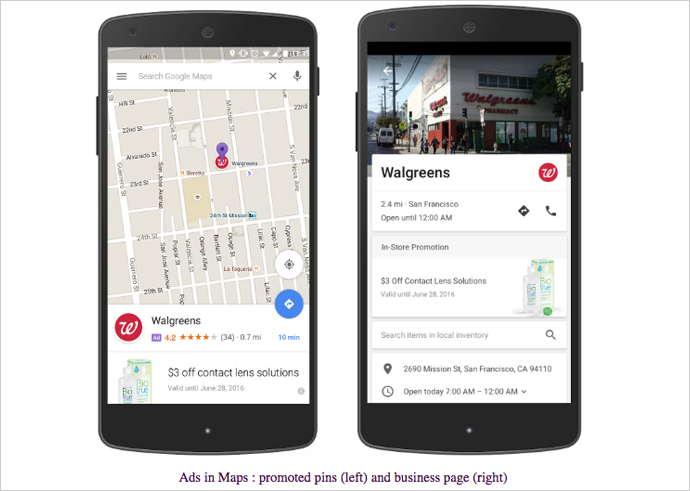
    Google introduces a new local search ads model that will allow a specific business to show up on Google Maps whenever an individual searches for a related product or a service. For instance, if a user searches for a ‘book store’, some of the prominent books stores in the area will appear on the map.

    Google adwords update @LogicserveDigi

    Expanded Text Ads

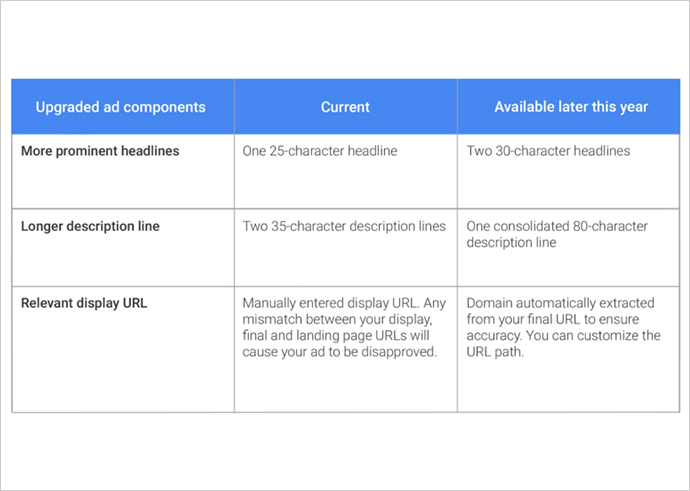
    Finally, Google increases its ad text limit. So, in case you had a lot to talk about your product but didn’t quite have enough space, now is the time to party. The ads will have two 30-character headlines, 80-character description and a URL with a customizable domain path.

    Google adwords new updates @LogicserveDigi

    Bid Adjustments based on the device-type

    By adjusting bids, you can keep a check on how much you spend and where your ad gets placed. Google now allows advertisers to set individual bids based on device-types. As a result, you can now opt to bid differently for different devices. Moreover, you will be able to set bid adjustments in the range of 100 to +900%.

    Have more information, please feel free to share below in the comments?

  • User Explorer from Google Analytics Get detailed insights on your website or app user at an individual level

    User Explorer from Google Analytics Get detailed insights on your website or app user at an individual level

    Google Analytics @LogicserveDigi

    If you are using any of the marketing automation platforms or customer analytics tools like Hubspot, Pardot, Marketo, Eloqua, Kissmetrics or Mixpanel, to know the individual user behaviour on your website or mobile app, you may now want to use Google Analytics’ latest feature called the ‘User Explorer’ report instead. As the name suggests, the report provides detailed insights into an individual user’s activity on your website or the mobile app, as against the aggregate user behaviour that Google Analytics used to provide so far.  This extremely useful feature from Google is now out on beta, and is available under the ‘Audience’ menu in the Google Analytics view of your website or mobile app.

    This feature will allow marketers to understand the entire user journey and the actions taken before reaching a desired outcome. It can also help them re-engage anonymous individual customers who have not converted, through existing marketing channels. Especially for the e-commerce sites, the report can provide post-purchase behaviour of an individual customer, like the frequency of return visits and purchases, thus enabling the e-commerce players to calculate an individual customer’s lifetime value.

    What can you get from the User Explorer report?

    Overall User Analysis

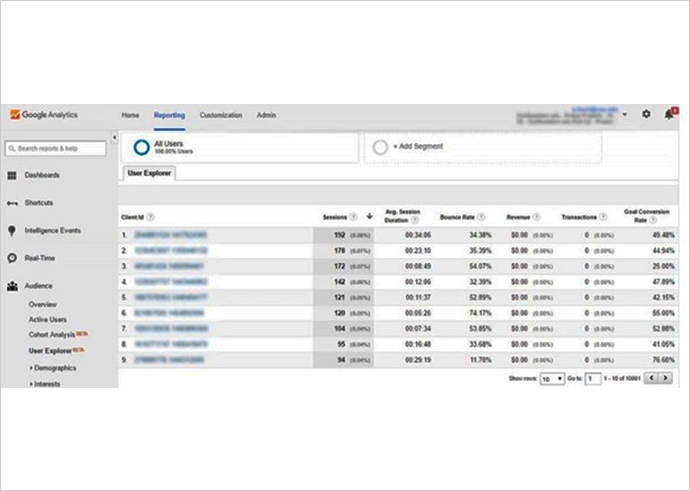
    To begin with, the default User Explorer page displays a list of client IDs collected from visitors’ devices and browsers with basic data, including count of sessions during the selected time period, average session duration, bounce rate, revenue, transactions and goal conversion rates. You can sort this list on each of these metrics, to answer questions like ‘who have visited the most often’, ‘who have spent the most time’, ‘who have had the highest no. of transactions’ or ‘who have the highest goal conversion rate’.

    user explorer google analytics @LogicserveDigi

    Multisession User Analysis

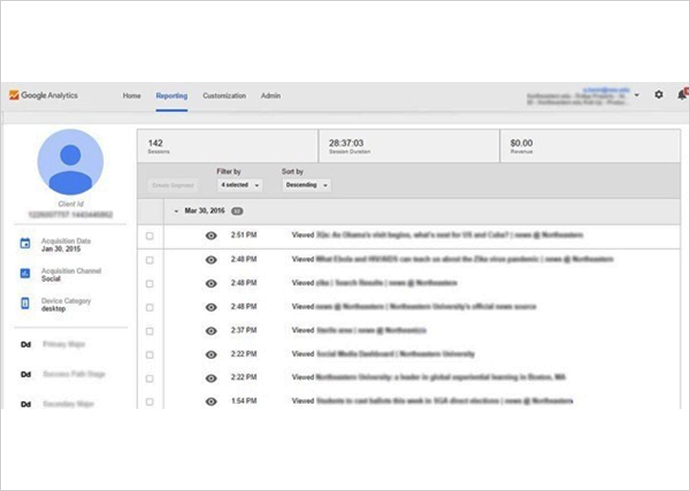
    This is where the feature adds significant value. Clicking on any of these client IDs provides the detailed analysis at an individual level, where the report displays a user’s activity in a timeline view, with key facts like the user’s acquisition date, acquisition channel, device type, and their custom dimensions. The user interactions in this view can be filtered by Pageview, Appview (available only in mobile app views), Goal, E-commerce or Event, and individual activities can be clicked for additional details.

    Google analytics news @LogicserveDigi

    The client IDs are randomly generated by Google Analytics, and thus, are completely anonymous. Though these IDs persist across multiple sessions, they change if the user changes the device or the browser to access your website or app. You can get cross-device and cross-browser user tracking, by enabling user authentication systems (like user logins) on your website or app.

    User Segmentation

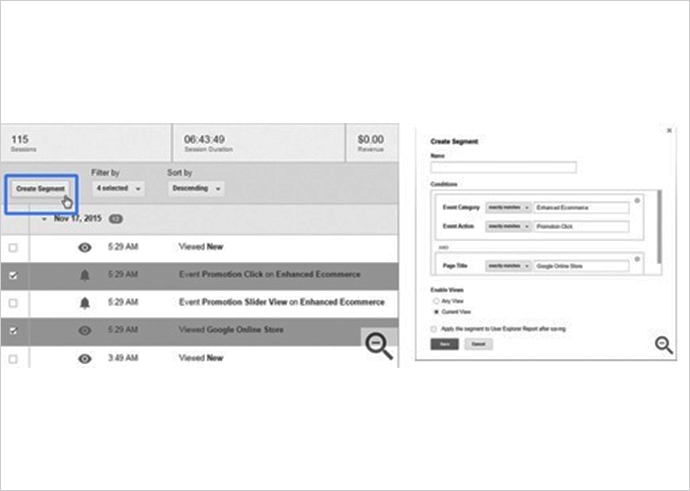
    You may be using Google Analytics user segments already, through Cohort Analysis, to study specific types of visitors, but User Explorer takes this one step further. By clicking on a combination of actions that a specific user engaged in (a certain page visit, an event triggered, specific value generated), you can create a user segment which, if applied to the entire report, will allow you to extract similar users in your audience. This will let you see how a particular user segment behaves across your site or app. You can also re-market specifically to customers of this segment.

    google analysitcs news @LogicserveDigi

    How to get the most out of your User Explorer report?

    To get the most out of this feature by Google Analytics, make sure you do the following:

    • Add “short of purchase” as a value to your goals to help you identify users close to being your customers
    • Filter out the staff and agency visits from your reports, using a filtered view
    • Create and use segments to understand different types of visitors: loyal fans, fast shoppers, international customers, anxious online shoppers, job seekers, information hunters, lowest price buyers
    • Add user authentication systems like user logins to your sites and apps to enable cross-device and cross-browser multi-session analysis


    You can imagine how useful this new feature from Google Analytics will be, right from identifying your most valuable customers, their behaviour before they reach a desired outcome, to cross-device user journeys in response to your marketing campaigns, thus knowing their effectiveness, to establishing best practices to re-market specific user segments. The User Explorer report can also help you trace inconsistencies in the UX and UI design of your website or app, based on the user experience, which can then be improved to drive higher conversions. All in all, the User Explorer report from Google Analytics can be your next starting point to build amazing experiences for your customers.