LS Staging

Category: Pay Per Click (PPC)

  • Google Signals – The New Cross Device Reporting Feature on Google Analytics

    Google Signals – The New Cross Device Reporting Feature on Google Analytics

    Google has rolled out a new analytics feature called as Google Signals. When you activate this feature, your Google analytics is further powered to display ads in cross device- eligible remarketing campaigns to audiences created on Google Analytics. Users who have turned on ads personalisation get to view these targeted ad messaging for better efficacy and outreach. This helps advertisers to better understand customer behaviour and preferences across multiple browsers and multiple devices.

    What are the changes you can expect on Google Analytics as an advertiser?

    Google Signals enhances the current advertising functionalities on Google Analytics to drive the following additional features too:

    • Remarketing with Google Analytics: Advertisers can now serve ads in Cross Device-eligible remarketing campaigns to Google users. It is important to note that this is available only for those users who have activated Ads Personalisation.
    • Demographics and Interests report: Google Analytics will also analyse extra data about users who have turned on Ads Personalisation to generate the demographics and interests reports.
    • Advertising Reporting Features: In addition to the different metrics tracked by the analytics platform, Google Analytics will now also analyse information about users who have activated Ads Personalisation. This will enable a better insight generation on ad performance.
    • Includes all existing Advertising Features: The update covers all present Advertising Features like Google Display Network impression reporting and remarketing, Remarketing Lists for Search Ads, and Display & Video 360 impression reporting and remarketing.

    How to turn on the Google Signals feature?

    The below steps allow you to activate the new feature

    • Login in using your Google Analytics credentials.
    • Tap on “GET STARTED” in the blue notification strip at the top of the page. Alternatively, you can traverse to Property column > Tracking info > Data Collection and follow the prompt in the blue dialog.
    • Click through the information and activation panels.
    • Read the information given on Google Signals, then tap “CONTINUE

    That’s it! These simple steps will help you turn on Google Signals.

    Why is this change needed?

    Google is already collecting a lot of data about user behaviour on an online property on multiple browsers and devices. As per the company announcement, the vast volume of data generated about users who have activated Ads Personalisation will come in handy in Google Signals. This data will help to look at the cross-device behaviour of the entire user base of an advertiser. This is enabled by the beta version of a new Cross-Device report that takes aggregated data on users who have turned on ads personalisation and generate behaviour models for an entire user base across multiple devices or browsers.

    The new Google Signals feature will undoubtedly ramp up the efficacy of cross-device advertising with helpful insights from Google Analytics. Advertisers will get aggregated data that can be used to predict behaviour for the entire user base and thus serve highly targeted ads.

    Interested to check out the new feature and activate Google Signals on your campaigns? Then read more about it on the official Google announcement page.

  • Revenue Boost Made Possible With These Innovative AdWords Strategies

    Revenue Boost Made Possible With These Innovative AdWords Strategies

    Although every digital venture is different from the other, they do share some common points of interest. Optimising sales, driving huge traffic, and generating high revenues is all that they wish for. It goes without saying that marketers are always striving hard to come up with new marketing methods and innovative advertising strategies, thus carving a distinctive niche in the digital arena. It would not be wrong to say that the competitiveness between brands is increasing with each passing day and marketers are continually looking forward to new innovations.

    What’s important?

    You have to get one thing straight, and that’s the need for creating innovative campaigns that help you make a difference. Even if you think that paid search strategies and PPC campaigns will fetch you qualified leads, you might go wrong. Everyone out there is putting their best efforts to captivate leads and turn them into potential consumers. If you wish to survive in this cut-throat competition, you will need to do something that works for your brand.

    Targeting the right leads

    Your venture’s popularity will depend on your efforts to capture highly qualified leads. Offering relevant updates and seamless experiences to target audiences will be critical to earning huge revenues. All you have to do is conceptualise, ideate, strategise and create personalised modes of paid marketing.

    Building a targeted and effective AdWords campaign will be the right thing to do. Since numerous business owners would be leveraging paid marketing modes, it’s high time to think differently and stand out from the rest of the crowd. Here are some ways to help you create innovative strategies with AdWords:

    1. Know your target group

    The business arena and professional landscape is filled with leads that have potential to be qualified customers. However, all of them aren’t the right resource for your venture. It is highly imperative to identify the target group and develop crystal clear idea of their needs. Once you are aware of what your customers want, carving targeted and specific strategies won’t be difficult.

    1. Leverage Geo-customizers

    Since you are relying on paid search, why not opt for geo-customizers. Personalisation is the key, and there’s no way you can ignore that. This particular feature will prepare and update your ad copies according to searcher’s interests. That’s quite beneficial for a business and there’s reliable stats to prove it. Geo-customizers boost CTR by a whopping 30%. That’s not the end of the story; the feature also brought down CPA rates by 50% and that too within a span of two weeks.

    1. Rely on social media

    When it comes to targeting potential audience and targeted visitors, there’s no denying that the role played by social media platforms is critical. With Twitter and Facebook’s support, you will have the opportunity to target a specific group of audience. Other than that, you can classify your consumer-base according to demographics thus making business promotions even more effective than ever.

    Revenue generation and uninhibited amounts of web traffic are essential for your dream enterprise. It is quite evident that you will only get that after creating personalised, customised, and dynamic paid campaigns. Identify your targeted leads and get going right now.

  • All You Need to Know About AdWords Notes and its Merits

    All You Need to Know About AdWords Notes and its Merits

    A couple of years ago, people had no idea how words could redefine business. With the digitisation of the world, anything seems to be possible. Words now govern how high you soar in terms of profits you make. Online presence is becoming a mandate to generate revenue these days. With this, advertising has experienced one of the biggest changes ever since its inception.

    A background about AdWords

    Google AdWords is nothing but an advanced extension of cookies. It is an online service developed by Google. It involves advertisers paying to display their brief advertising copies and product listings to users. All of this within the Google network.

    Earlier this year, Google announced that they were introducing a new feature to the AdWords interface namely Notes. The feature has now arrived and here is how you can get going with it. In case you are wondering how you can avail this feature, then this is what you need to know. Notes can be availed at an account, campaign, and ad group levels.

    How to use the new feature

    Quite like Google Analytics, notes are added by just clicking on a certain point on the performance chart. The moment you click on a point on the chart, you will get an option that reads, “Add Note”. Since you opt for it, it will pop in a window that will allow you to add the note you wish to add. The character limit in this feature is not mentioned.

    However, for what it is worth, there is enough space for you to get your message across. And that is pretty much the whole purpose of enabling the notes feature. The good thing about this feature is the ability to edit the date in case you have entered the wrong date accidentally. The window that pops out when you click the “Add Note” option allows you to do that.

    Advantages of AdWords Notes

    The merit of this feature primarily is that anyone with access to the AdWords account can view the note. How would the accessing the accounts know that you, or anyone for that matter, have left a note behind? Whenever you leave a note behind, a grey box below the chart comes up. This denotes the existence of a note on the chart. By clicking on this box, the note appears right where the person left the note on the chart. Not just that, but it also then gives you an option to add another note. It also provides an option to view all the notes that are added to the chart.

    To make things simpler, Google also gives you an option to “See all Notes”. This brings up a sidebar listing all the notes created on the account. You can filter this based on campaigns and group level notes. Each note is an individual card and the date on which it was added is displayed on the card.

    Adding notes to the chart increases communication and helps analyse charts better with your colleagues. This enables better judgement of the data at hand. This leads to devising better strategies. In turn, it could help you, when it comes to running a lucrative online ad campaign.

  • Google AdWords Responsive Search Ads Now Allows 3 Headlines

    Google AdWords Responsive Search Ads Now Allows 3 Headlines

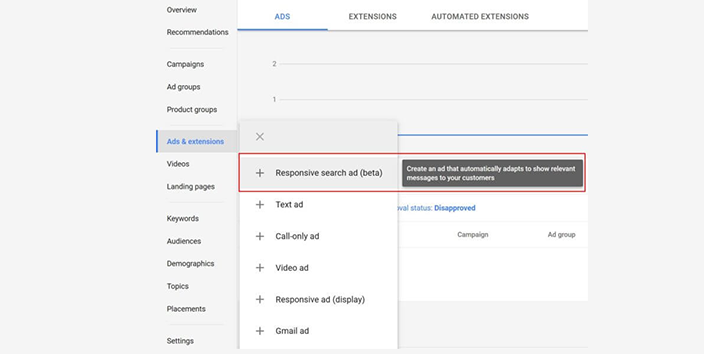
    The development team at Google AdWords seems to be coming up with new and exciting updates for its beta version of responsive test ads. In the most recent update, advertisers are now allowed to provide more than one headline for an ad. The new ad format is in sync with the proliferation of machine learning and hence offers more space for advertisers to build their headline.

    As many marketers would have seen – once they use the standard dynamic ads, they will start seeing recommended responsive ads built into their dynamic campaigns. With the dynamic nature, Google Machine Learning algorithm takes over to serve the most relevant ad likely to generate the best possible ROI on the advertising costs.

    Responsive ads are introduced to improve the overall efficacy of dynamic remarketing campaigns. It has the capability to automatically adjust to a banner ad or a dynamic text ad based on the available ad real estate.

    The changes in the new ad format

    As a part of Google initiative to let machine learning to optimise ads, it has added a slew of measures in place since last year. Be it getting rid of manual A/B testing, dynamic search ads, or automated ad rotation optimisation; there are quite a few initiatives taken by Google in this regard.

    The rationale behind multiple ads is simple – your group gets to participate in a higher volume of ad auctions. This is applicable when there are more options for the keywords to deliver the ads. Additionally, it means handing over more control from the humans to the AI-based computer systems. All these updates point to one key effect – manual A/B testing will no longer be as effective as it was before.

    The two key changes to the headlines in responsive ads are as below:

    1. Show a max of three headlines in place of the current two headlines

    2. Show a max of two descriptions (90 alphabets) in place of the current one description (max 80 alphabets) 

    Best practices for writing effective headlines

    1 – Advertisers can integrate a maximum of 15 headlines plus 4 descriptions. With this, advertisers need to add different flavours and varieties – all leading ultimately to the singular goal of achieving brand visibility

    2 – You need to provide different headlines and descriptions – such as varying between the headlines on product USP, value propositions, benefits, call to action, and features.

    3 – Remember to follow the current guidelines of writing headlines that are relevant to the keywords and having at least one keyword present in the headline

    4 – Use ‘pinning’ option when dealing with sensitive categories. Make sure to pin more than one headline and description to make the dynamic matching more effective.

    5 – Make use of the ad type column in the reporting metrics view. Under this, you can filter results for only responsive search ads. This will allow you to see the performance of the dynamic ads served by Google machine learning algorithm working in the background.

    What are your thoughts on the new updates to responsive ads on Google AdWords? Do write to us and let us know.

  • Simple ways to stay productive when the AdWords interface changes

    Simple ways to stay productive when the AdWords interface changes

    The recent change in the AdWords interface seems to be creating some ripples in the Pay-Per-Click (PPC) industry. Though it may aesthetically please some, it surely is not pleasant to PPC professionals who rely on it for their revenue generation goals.

    In order to achieve PPC optimisation, a software must adhere to two things always:

    1. It needs to save time
    2. And it needs to improve performance

    Years of experience in the PPC industry would render one the knowledge that different interfaces may be required by different account managers to achieve the goals mentioned above. To comprehend it in simpler terms, there is never one clear, distinct and precise solution to it all.

    Time is often the most crucial element out there in the world of PPC. Choosing the right tools then becomes essential for PPC professionals since it helps save time and ups the performance also.

    Here are some ways in which you can stay productive in the stir of changing interfaces.

    1. Opt for Quick win optimisations

    Perfection has always been the most sought-after virtue, and PPC professionals chase nothing else as much. One could spend hours trying to perfect an account, but the key lies in understanding that there are many aspects to perfecting an account. Devoting more than even five minutes per account could be a demanding task.

    What can be done about this then?

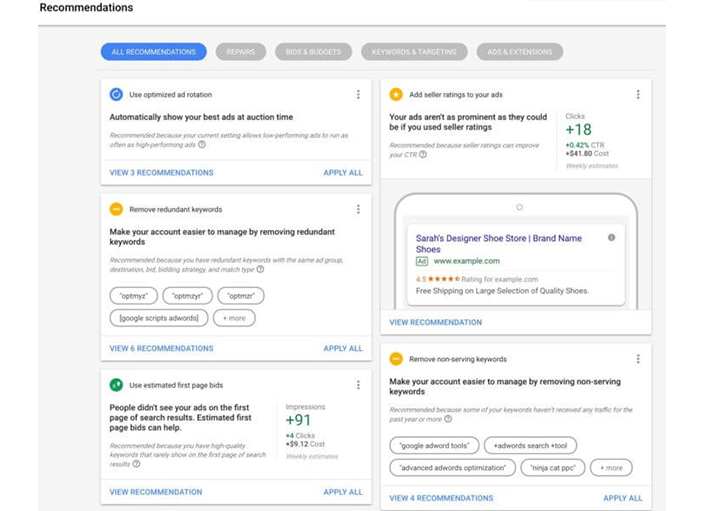
    Smaller bits done frequently does the job. Small improvements made regularly and frequently is what will reward you with better outcomes. When it comes to AdWords, a quick win could be tackling suggestions that come up in the Recommendations section. Optimisations are much focused. Instead of doing an in-depth fix-up, go for the ones that impact the most.

    1. One-click optimisations

    This can be useful when the PPC professional has time to spare. This is when going deeper and fixing a problem would be possible. Quick wins are good but when you deep dive on the basis of an approach backed by statistics, it can fix bigger and wider issues.

    In the AdWords world, this might come down to downloading many reports that consist of an endless array of data, combining them in spreadsheets and creating AdWords editor that is compatible with necessary changes.  Rather than pulling out perfect algorithms, deploying certain optimisations would save time and that is what is most important. It also leaves the final step in the hands of the users.

    1. Optimisation checklists

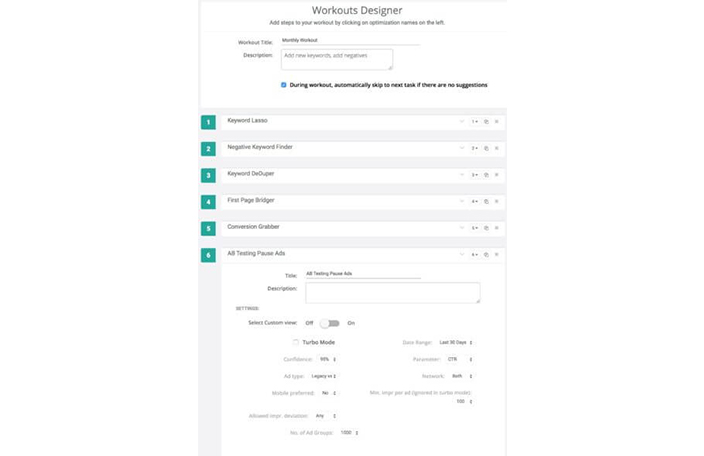
    While the above suggestions are time oriented, this one is not. There are several agencies who employ people with the sole motive of running through optimisation checklists. They could spend hours in AdWords, but sometimes even that may not be enough to yield satisfactory results.

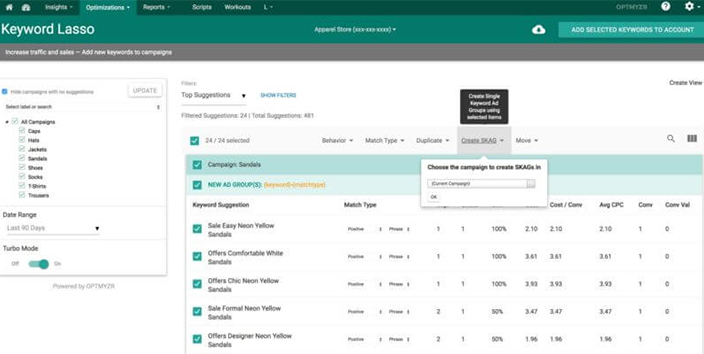
    By using third party software like Optmyzr, one could reap more out of optimisation as the software would be deeply integrated with PPC engines.

    1. AdWords on autopilot

    AdWords scripts make your dream of going to that long-awaited place you always wanted to visit a reality. Automation can be risky because building an algorithm that functions and acts on every nuance of the trade the way a human mind would is difficult. However, there are many PPC tasks that do not really need that final human approval.

    For such tasks, AdWords scripts are ideal. The task could be anything from mailing keywords, generating back-office reports or even stopping campaigns that depleted their budgets. AdWords script will efficiently manage the hassle.

    So when AdWords changes its interface, you’ve really got nothing much to worry about as it would never affect your productivity. When staying at the top of your game is the concern, playing smart and not hard is what pays off.

  • Google AMP team comes up with ‘Render On Idle’ feature

    Google AMP team comes up with ‘Render On Idle’ feature

    Businesses and publishers will welcome the new move by Google AMP team that has launched some new features recently. One such feature is the ‘Render on Idle’ feature. This will load ads faster and lead to higher ad impressions when the browser is in the idle mode. The ads would load 12 viewports in this feature as opposed to 3 in the past. This facilitates better visibility on the ads because they load earlier in the page load lifecycle.

    A look at AMP

    For the uninitiated, Google AMP is an open standard that favours mobile-centric internet browsing and ad serving. An AMP page will have faster page load on mobile devices. In 2016, this technique was also integrated into search engine ranking signals and thus, impacted the SEO fortunes of companies.

    Once the AMP page is created, you can serve ads using the <amp-ad> tag. When the type is DoubleClick or DFP ads, you can turn on the ‘render on idle’ feature and start serving ads even when no other content is being loaded.

    As an outcome, there is a marked increase in the number of impressions with a limited increase in clickable impressions and eventual clicks. This is expected to provide more useful analytics to publishers too. If you are a publisher using DoubleClick AMP Ad tag or any tag that uses FastFetch ad request and rendering, then you would see the tangible effect of this feature in play. Publishers who have used this feature reported a 13% increase in impressions and 0.5% increase in clicks and viewable queries.

    There are two scenarios that will not allow ‘Render on Idle’ to run (as these force delayed Fetch which doesn’t go with this feature):

    1 – Using remote.html

    Rectify this by using Real-Time Config. This facilitates integrations with other technology partners

    2 – Using ‘useSameDomainUntilDepracated’

    Rectify this by removing this attribute from the tags and instead use SafeFrame API

    With this feature, Google and AMP are making it easier for publishers to monetise their businesses and earn potentially more from their ads. If you are on the Delayed Fetch, then you need to move to Fast Fetch for the ‘Idle on Render’ feature to take place.

  • Google Chrome’s Ad Blocker is Now Live

    Google Chrome’s Ad Blocker is Now Live


    Content marketers and publishers must have been aware of the ad blocker feature Google had announced back in June 2017. In that announcement, Google had made clear that ads that don’t conform to the Better Ads Standards as mentioned by the Coalition for Better Ads, will be blocked by the browser from 2018. True to its word, Google has made this feature live from 15th Feb 2018 onwards.

    Specification of the blocker

    Annoying ads that make for poor browsing experience will be hit the hardest by this move. Videos with loud volumes, flashing ads, prestitial ads with a countdown, or ads that do not clearly show the exit/close button, are counted as particularly annoying by the coalition and will be the first to be impacted by the ad blocker implemented into the Chrome browser.

    How can publishers track this?

    Google Search Console has an Ad Experience Report available to track ad performance. In this, publishers see a ‘warning’ or ‘failing’ assessment from Google, based on these threshold values –

    • 7.5 percent of page views in the first 2 months of the program.
    • 5 percent in the next four months.
    • 2.5 percent thereafter.

    These define poor experiences that do not match the better ad standards.

    How it works on the user end?

    The Chrome browser’s ad filter will check if the page is a part of the site that is marked as ‘failing’ or no. If this is a ‘failing’ site page and has a URL pattern that matches a known list of such ad-related patterns, then the browser will prevent the loading of the ad on that page.

    When this happens, the user gets a message where he/she can select whether to keep the ad blocked or go ahead to view it. This message is placed on the address bar (for desktop) or the bottom of the screen (for Android mobiles).

    How will this move be received?

    From a user point of view, this move is definitely getting a big thumbs-up. Users were increasingly getting annoyed with pushy ads being served on web pages. It is no wonder that the adoption of ad blockers had increased to 28% for desktop internet users and 11.8% for smartphone users. Most of the ad experiences are terrible, and this ad blocker will seek to reverse some of the negative sentiments around the digital ad based ecosystem.

    For a genuine publisher too, this move will be good news. Instead of a blanket ban on all ads served, the move seeks to penalise only those ads that are truly annoying. This way, genuine ad publishers do not get hurt because of the actions of a few dishonest advertisers.

    But it is equally true that Google sells ads and will now play a gatekeeper’s role. There will be a question of “who will guard the guardian” when it comes to the ad formats and ad content owned by Google.

    Google has stated that the step will work towards one goal – i.e. to a world where ad blocking itself will no longer be needed. And this will happen only when all ads work seamlessly without annoying the site users. Whether this goal actually materialises, only time will tell.

  • 3 AdWords features you’re probably underutilising


    Most of Google’s revenue is from online ads they provide on their search engine. Google is basically a search engine, and hence their primary focus is to expand their user base more, so much so that everyone starts using Google search. Google, however, provides search results for free, which poses a question of revenue. This is where AdWords come in the picture. Google AdWords are most definitely one of Google’s primary, most important service that generates most of Google’s revenue.

    Millions of businesses have used AdWords, and continue using them today, to gain as much exposure as possible on the most significant search engine platform today. AdWords gives companies the freedom to manage their ad campaigns themselves and provide their own preferences for the ads. This feature has attracted a lot of business owners over the years and made AdWords the best medium for expanding the audience. However, people who have been using AdWords for a long time sometimes get stuck in their ways and miss out on attractive features Google keeps rolling out regularly. These features can give you many extra benefits, and you can use AdWords to their full extent. Here are some AdWords features that you should utilise to get the best out of your investment.

    1. Gmail Ads

    Gmail ads have been available to companies for a long time, but not many have opted for them. This is because ads on Gmail have to be seen in the promotions tab, and not many people check that section. This has caused Gmail ads not to sell as efficiently. However, Google has started dynamic retargeting of Gmail ads, which means users won’t be able to ignore Gmail ad placements completely.

    Gmail ads, when paired with attractive images and redirect buttons, can urge people to directly go to your site, which is a significant advantage, considering your ad will be standalone and not with other ads. Hence, people should start considering Gmail ads as a viable option for advertising.

    1. Variations

    Google AdWords has been a staple advertising medium for many companies and the number continues to grow. Many companies have used AdWords for a long time and are set in their traditional way of advertising. But now, with Google rolling out new features for AdWords, people can essentially utilise AdWords to their maximum potential. The new features rolled out by Google allow the users to try variations and Google will provide regular analysis of how your variations fared, which saves an enormous amount of time and at the same time allows you to understand how you can better your ad campaigns.

    1. Experiment With AdWords

    AdWords has millions of companies using it and most of them have been using the same ad marketing strategies since they started using AdWords. This is synonymous with running the same experiment for years at a stretch. Sure running the same ad campaign is helping your company, but experimenting can actually boost your business. There is always something to test, and it should be because that test might be your new strategy for ad campaigning and surge your website traffic.

    AdWords are a powerful tool by Google, and you should keep trying variations and using all the features provided by Google for AdWords in order to utilise it optimally.

  • Unpartial – the AI-powered Chrome extension to spot fake news

    Unpartial – the AI-powered Chrome extension to spot fake news

    The world is advancing fast in the field of Artificial Intelligence, and various tech giants such as Google and Microsoft come up with new frameworks and AI-powered devices which have made it possible to use the technology across multiple industry verticals.

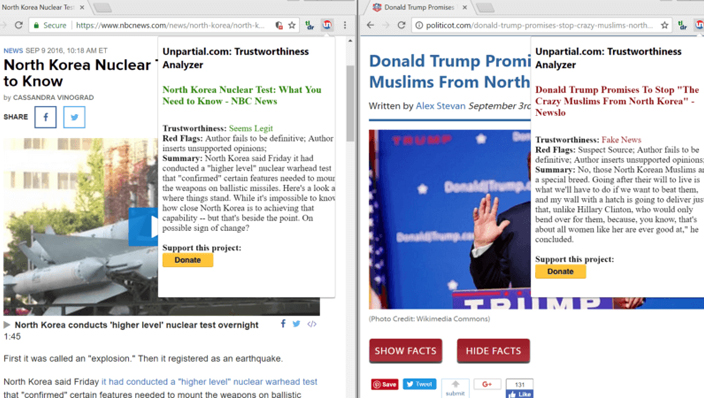
    This week, an AI company called Recognant, based in San Jose, California has released an extension for Chrome that informs users if the news they are viewing on the browser is fake. The AI tool is said to have a function which tests the ‘trustworthiness’ of an article or a story.  Recognant has named the AI tool ‘Unpartial’, and as said by the developers at Recognant, the primary purpose of Unpartial is to check the ‘trustworthiness’ of a story, ultimately telling if the story is fake or not.

    How does the AI work?

    The principal question that arises here is how does it judge whether a story is ‘trustworthy’ or not? Well, according to its developers, Unpartial doesn’t check the source or facts of the story but uses generated rules to check the internal validity of the given story. The tool can only work for articles which have more than three hundred words.

    When given an article, Unpartial checks it by cross-checking it with a variety of factors like checking the grammar, the volume of facts, and if the math makes sense. After passing the article through all the generated procedures, it gives its verdict of whether or not the article is false. The extension, if needed, can be accessed by clicking on the UN button on the Chrome toolbar. The ratings by Unpartial go from ‘Seems Legit’, which means the article is trustworthy, to ‘fake news’, which means fake story. The extension also dubs articles as ‘seems sketchy’ or ‘super shady’.

    How this extension delivers value?

    Recognant says that it focuses on making AI that is used mostly for NLP (Natural Language Processing) and the software they have developed have been used by multiple organisations like cancer research organisations, to collect knowledge on cancer and various ways to advance their research. It has also been used by several Non-Profit Organizations to find out which online ads are marketing human trafficking.

    Developers at Recognant developed Unpartial because they believed that misleading news and articles can have adverse effects on the society and can prove harmful as they provide wrong information about things, which lead people to believe in false theories. If a website presents false information about cancer treatment or AIDS virus, this will implant false knowledge in the reader’s mind, and that can be bad for people and those around them.

    Developers say that unlike IBM’s Watson, Unpartial is an AI called mind simulation, wherein the AI is programmed with an initial set of rules, and then goes on to test the article using the software’s generated rules.

    Hence, as compared to Watson, which uses neural nets, Unpartial proves to be more efficient in identifying the real stories from the false ones. This is because, in case of mind simulation, you can actually check why an article has been given a ‘false news’ tag by Unpartial. In short, this tool provides transparency, unlike neural net.

    What do we think?

    The accuracy of Unpartial is almost spot on, as it was tested by Recognant, by giving Unpartial a hundred thousand articles to go through and judge their authenticity, and the AI got the results correct 99 percent of the time.

    With about 1/4th of users sharing fake news (irrespective of whether they knew at that time or not), this extension is sure to curb the rising menace of fake news and give proper perspective to news as it should be shown online.

  • Take your PPC advertising to the next level with Artificial Intelligence

    Take your PPC advertising to the next level with Artificial Intelligence

    At a time when the world is raving about Apple’s Siri, Microsoft’s Cortana and Google Now, Is Artificial Intelligence all ready to take over the PPC world by storm?

    Let us see how machine learning will dominate the future of PPC and how the businesses can leverage from it.

    Machines will not ultimately take over the job of PPC professionals, but it will change their role, by automating processes. PPC can soon be a winning strategy for an organisation’s overall digital marketing programs. Below are some of the machine learning features from Adwords that can help you take that leap in your PPC advertising by being more strategic:

    1. Smart bidding: Google’s smart bidding is a machine based bidding with the ability to analyse voluminous data thus maximising conversions for your client campaigns. It comprises of smart bidding strategies such as Target CPA, Target ROAS, Max Conversions and Enhanced CPC. Under this method, Google can process a large amount of real-time data in a jiffy and analyse “signals” to get a clear understanding of your audience and how to convert them.

    However, you cannot expect results overnight with smart bidding; you need to give the system a considerable amount of time to learn, grow and optimise on the new strategies. Over time, you will notice efficiency in CPA and growth in volume.

    1. Smart display campaigns: Sit back and relax as Google’s Artificial intelligence completely controls your campaigns. All you need to do is mention your Target CPA and Budget; Google will do the rest!

    For example; A popular hotel search platform, Trivago used Smart display campaigns to reach audiences looking for travel packages around the world and reported an increase in conversions by 36%. They only provided creatives such as headlines like “Find Great Hotel Deals”, striking images of the places to travel, target CPA, a daily budget and Adwords did the rest for them.

    Credit Karma, a financial management website reported 37% higher conversions using Smart display campaigns and witnessed increased signups on their page.

    Hulu Japan, a subscription video service, used Smart display campaigns to increase their subscriber base and got a whopping 37% increased conversion rate.

    1. In-Market audiences: Looking for your favourite brand of perfume and it shows up right in front of you, does that feel great? Oh yes! This is exactly what this feature does. It helps you reach out to potential customers who are actively researching, browsing and seeking out for the products or services that you have to offer them. This feature helps you to target the right customer at the right time, just before they make that crucial decision to buy. Google classifies and connects you to potential customers based on their in-market behaviour and purchase intention.

    So why wait? Optimize machine learning to execute swiftly and strategise your marketing campaigns better. There are things which you can do but artificial intelligence can’t! Translate the insights available from machine learning and convert them into effective strategies for your business, to increase the impact of your digital marketing campaigns.