LS Staging

Category: Other SMO News

  • Reinforce Your Online Presence by Adhering To This App Permission Guide

    Reinforce Your Online Presence by Adhering To This App Permission Guide

    app permission guide @LogicserveDigi

    Hacking, phishing, and incidents of identity thefts have become a regular phenomenon not only for PCs but also for Android mobile devices. Almost every day we hear about hackers and cyber criminals hacking apps using high-tech hacking tools that affect countless people globally by exposing them to privacy and security risks.  In the month of May this year, more than 100 million LinkedIn passwords were hacked and sold by hackers.  Besides this, American e-commerce and cloud computing company Amazon.com suffered a serious security breach in July this year when a hacker claimed to have leaked the login credentials of 80,000 Kindle users.

    With so many advanced hacking tools used by powerful hackers, keeping oneself safe online seems to be an intimidating task. Malicious software created by cyber criminals constantly keeps an eye on our online activities via USB stick drives, Wi-Fi, and smartphones. Using social media apps may divulge your personal information to cyber criminals for malevolent activities. Thus, it becomes essential to monitor your social media accounts and integrated apps to ensure your personal data is not being used unnecessarily.

    App Permission– Its Significance

    Currently, smartphones have become the most preferred way of accessing the social media. All you need to do is install the social media app of your choice from Android Play Store. However, while installing an app from the Play Store, the app asks for your consent to view your location, contact list, browsing history, photos, and other vital information, known as ‘permissions’. You have the power to decide and manage which permission you want the social media app to access once you install it on your mobile device.

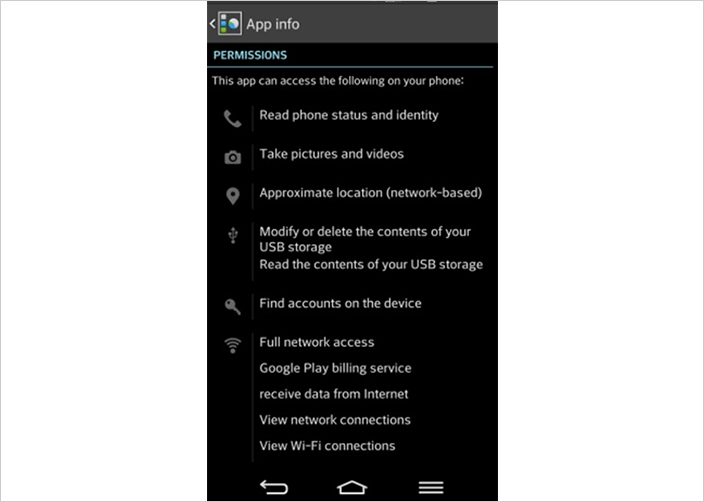
    However, since a majority of app users are ignorant about the importance of controlling app permissions, they end up clicking the “Agree” button blindly, without thinking of the hazardous consequences of the app accessing their contact list or web camera. Some of the third-party apps that you integrate your social media account with may even end up selling your personal details without your knowledge. If you are not cautious enough, you may pave way for those third party apps to hack your phone easily and use your personal data. In order to secure your online presence, it becomes crucial to know how app permissions function so that you can keep your online data safe and secure. Thus, before downloading an app on your mobile device, you should go through the app permissions without fail. One such example mentioned below is for Skype:

    skype access@LogicserveDigi

    Source: https://joyofandroid.com/how-to-get-complete-privacy-details-of-my-android-phone/

    How to Check For App Permissions?

    1. While installing a social media app, if the app asks for too much superfluous permission, it is advisable not to download the app. For example, Facebook stores a lot of information about you; such as– your location, age, relationships, likes, dislikes, and so on. This significant assortment of data can be accessed by apps connected to your Facebook account, for example, Instagram, Twitter, Flickr, and game apps. Thus, it is necessary to control the access of such data.

    2. If you have already installed social media apps on your phone that are used by you frequently, uninstalling and reinstalling each and every app may not be practically possible. Therefore, it is advisable to view the app permissions of the already installed apps. All you need to do is go to your phone’s settings and tap on your phone’s App Manager to view the list of social media apps you have downloaded on your device. By tapping on a specific app, you can view its details along with the permissions tab. Click on the permission tab to view the list of information that the app can access. While doing so, if you feel that any specific app is gaining unnecessary access to your personal data, you should uninstall the app immediately.
    android connections @LogicserveDigi

    Source: https://joyofandroid.com/how-to-get-complete-privacy-details-of-my-android-phone/

    1. In order to check your social media pages for privacy hazards and hazardous interconnections, it is highly recommended that you disable unnecessary app permissions by installing apps like MyPermission extension. This app allows you to keep or uninstall social media apps by monitoring your installed apps and checking the exact functions that have been permitted by you.

    Besides this, there are apps like App Ops, Privacy Guard and XPrivacy that grant only those permissions that a specific app is authorized to use by blocking all unessential app permissions sent by certain apps to your smartphone that have nothing to do with the key function of the app.

    It is very easy to use these apps. Go to your app list and tap any app to see the listed permissions the particular app can access and when it used the accessible permissions. Each permission granted by you has an ON and OFF on its right side. You can deactivate any unwanted permission you like. For example, you do not want Facebook to read and modify your contacts, tap Facebook and choose the OFF button for ‘Read and Modify Contacts’ tab.
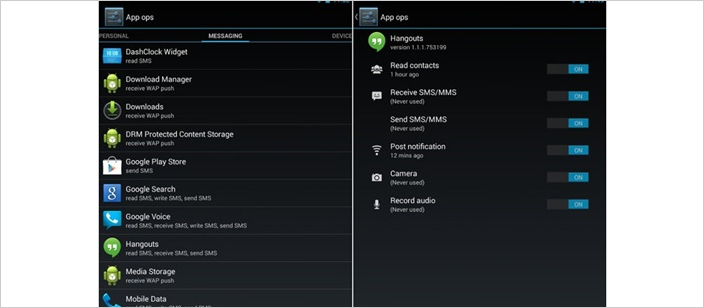
    apps view android @LogicserveDigi

    Source: https://thehackernews.com/2015/06/android-permission-manager.html

    Another platform that you can also check for app permission is your Twitter account. All you have to do is go into your apps section and check the ones you have given access to. You can revoke the access based on the usage of app, as shown below:
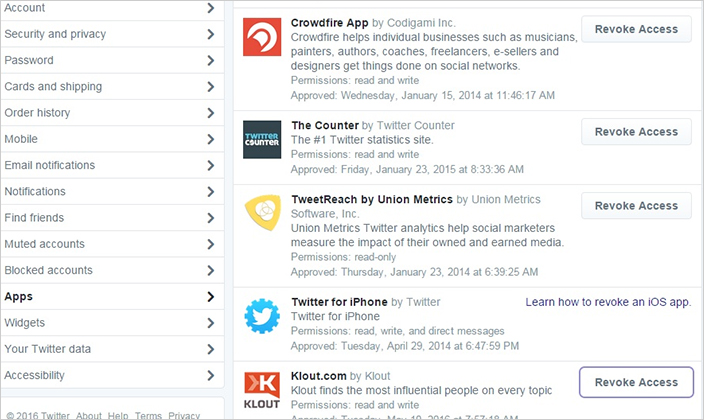
    twitter app access@LogicserveDigi

    How to Prevent Hackers from Hacking Your Personal Information?

    Your smartphone stores a huge amount of data by linking your Google account to your Facebook, Twitter, LinkedIn, Pinterest, Foursquare, and Instagram accounts. Granting access to a suspicious app can spell disaster as a cyber-criminal can steal, tamper with, or even sell your personal data for spreading malware. If you want to secure yourself from cyber-attacks, you need to be ever-vigilant by taking certain precautions. The few guidelines on app permissions cited below will help our readers stay safe from getting hacked.

    1. It is advisable to lock the social media apps used frequently by you. There are many third-party apps available for locking your apps using a password that is difficult for hackers to guess. Ideally, you should pick an alphanumeric password which is a combination of upper and lower case with numbers. Alternatively, you may pick an unusual sentence that you can easily memorize.
    2. You should refrain from using the same password for different accounts. That said, even a strong password can be hacked by powerful hackers. The best way to keep hackers at bay is to enable a two-factor authentication on your social media accounts. The two-factor authentication system asks you to enter a secret code sent to your smartphone as and when you log in from a new device or location.
    3. At times you may integrate different apps such as WordPress or Instagram to your Facebook or Twitter account. However, make sure you remove all the integrated apps that are no longer used by you. This can be done through the settings page of your social media account.
    4. You should never reveal your username or passwords unless you are fully confident about the authenticity of the website. You should also avoid clicking on suspicious links sent to you via emails from unknown people. Phishers often pose as a trustworthy company or a reputable individual to dupe people into giving away their personal information. Since such tricks are difficult to identify, people easily become the victims of such Phishing scams.

    By following the instructions mentioned above, you can secure your social media accounts as well as your phone from the fraudulent activities of hackers.  Every smartphone user should take measures to secure their private information from illicit access of hackers. By performing a screening procedure of each and every permission prior to installing any app and integrating them with your social media account, you can prevent malicious apps from accessing your personal information unnecessarily.

  • Has Twitter already replaced customer service executives to answer queries real time?

    Has Twitter already replaced customer service executives to answer queries real time?

    Customer-Service @LogicserveDigi               Source: Adweek.com

    Gone are the days when you stood in queue for hours waiting for your turn at the customer service desk hoping to have your problem solved. In fact, even long gone are the days when you wrote a brand’s customer service voicing your grievances, and waiting for sometimes weeks at end to hear from them. With the rise of Twitter, which was actually started solely with the purpose of information dissemination, the walls that separated celebrities and brands from their audience have been all but brought down.

    How did this happen?

    Open platform for communication

    Perhaps, the greatest up side to Twitter is how much of an open public platform it is. This in itself pushes a brand to maintain transparency and be conscious and discerning towards its followers. Think about it. What do you do when you’re stuck with something and Google doesn’t throw up too many solutions? You tweet it to the right people, even if that means directly tweeting to the brand! Why? Proceed to the next point.

    Faster dissemination of information and shorter attention spans

    With its character limit of just 140 characters and real time sharing and reporting of data, the rate at which communication takes place and information gets shared on Twitter is unprecedented.  This in turn has significantly reduced the attention spans of people as well as lowered patience levels. When your timeline is refreshed with content every three seconds, the idea of waiting for 48 hours for a response is borderline outrageous. Lagging behind on responses or non-responsiveness will only make a brand lose out in the digital clutter. Twitter is for people who like being on their toes, and tell the world about it all the time. If a brand wants to catch up this kind of audience, it needs to be on its toes too.

    This is the age of digital equity

    Word of mouth, now, happens through social media. Your clout is measured in the number of followers you have and how many retweets can you gather. Moreover, how people feel about a brand through its online presence and interaction dictates their choices, decisions and behavior offline.

    In fact, did you know that 67% users prefer contacting a brand through social media, while 33% of them do it via their phones? As a matter of fact, according to a study by Zendesk, 40% customers switched brands due to the brand’s reputation for better and faster customer service!

    This has not only changed the rate at which brands have to maintain communication with their followers, but also how do they communicate. For a brand to stand out and hit the right chord with its audience, it is mandatory that the brand first humanizes itself. Luckily, there are quite a lot of brands who have nailed this, and have set an excellent precedent for other brands and marketers to follow.

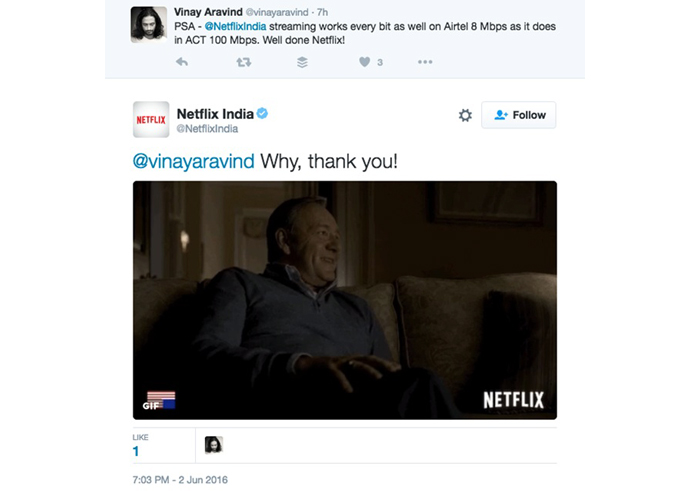
    Netflix India is one great example of quick and creative customer care:

    Netflix @LogicserveDigi

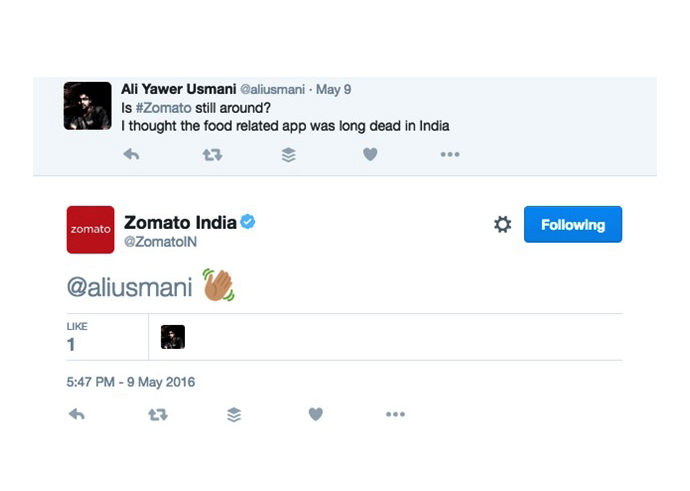
    As is Zomato India:

    Zomato @LogicserveDigi

    Zomato India @LogicserveDigi

    So, what are some of the best practices in nailing customer service through Twitter?

    • Set up a method or a format to follow: how will you tackle a customer? Will you direct the conversation to email or phone?
    • Be prompt! Remember, time is of the essence on Twitter. The more you delay, the more you allow your audience to stew in their grievances, which could only make your situation worse. Ideally, you should respond within 15 minutes. And if there’s a delay in finding a solution, then make sure you convey the same with a specific timeline. 53% users expect a brand to reply within an hour!
    • Personalize! Watch who you’re speaking to. Be the brand that cares. Preset, templatized tweets only add to a customer’s frustration and show a lackadaisical approach on your part. Address the customer by his/her first name, express empathy, and respond relevant answers instead of something generic.

    Zappos @LogicserveDigi

    • Have a dedicated handle strictly for customer care. If you’re a brand whose timeline is busy with a lot of content and activity, you might want to separate the customer care from this chaos. This way, all queries are channelized and your official handle doesn’t look loaded with complaints and queries!
    • Keep private information of customers private. If you have to ask for someone’s number or email id, make them DM your brand’s handle!

    And here are a few don’ts:

    • Never ignore negative feedback. Unless it’s something completely out of context, or someone who’s just trolling for thrills, make sure you own up to your mistakes if you’ve made any. Acknowledge grievances and take responsibility for your actions!
    • Definitely do not ever get into a verbal spat with a customer on social media. There’s no way that’s ever ending well!
    • Don’t make silly errors like a spelling mistake in someone’s name or a complete oversight of the customer’s basic problem.
    • Don’t forget to track your customer, so that they don’t have to repeat their problem to multiple people.

    Like this one:

    Vodafone @LogicserveDigi

    What are your thoughts on Twitter as a tool for customer care? Tell us!

  • Facebook’s 20% Ad Image text overlay rule, changed.

    Facebook’s 20% Ad Image text overlay rule, changed.

    As per a report in Social Media Today, the 20% Ad Image text overlay rule no longer applies post 22nd March’16. During the period when the rule was mandatory, Facebook had provided its users with a basic grid tool, which would allow them to keep a check on the text overlay.

    Without any information or notification, the rules have been quietly dropped. However, the changes are not rolled out for everyone yet. Facebook will gradually roll it out, post its testing. Now that the grid is gone, Facebook has provided a simple guide that points out the level of reach the ad will have, based on the text over the ad Image.  Hence, the users will have to make their own judgement based on Facebook’s feedback over the image reach.

    As per the new basic tool, there are four categories of text overlay that will give its users a clear idea of the post’s performance:

    •  Image text : OK
    • Image text : Low
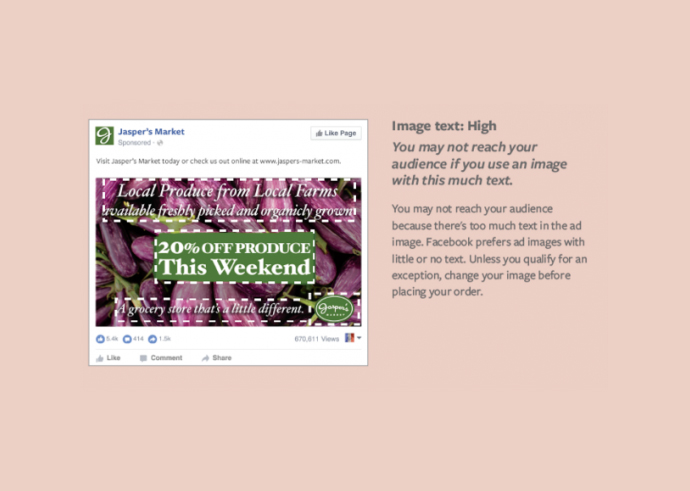
    • Image text : High
    • Image text : Medium

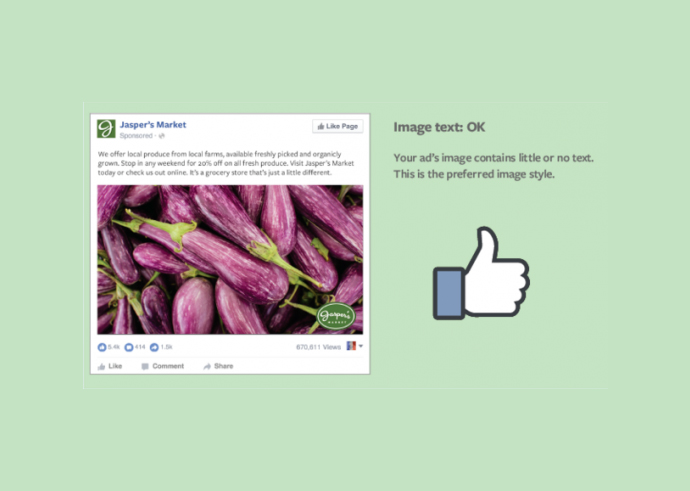
    Your image text is classed as OK, mostly if there are no text overlay, excluding the company logo.  As shown in the image below.

    Facebook image tool

    (img. courtesy : socialmediatoday)


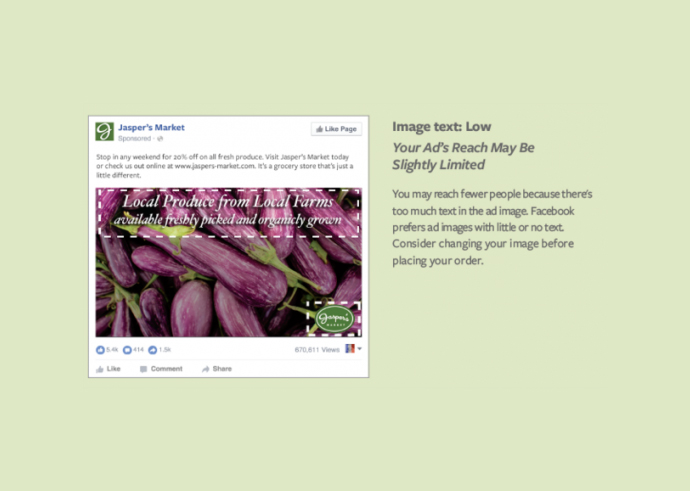
    Similarly, if it is classified as low, the reach may be further limited. Facebook cites too much of text as a reason for this.  Here is an example mentioned below:

    facebook features @LogicserveDigi

    (img. courtesy : socialmediatoday)

    Same is the case with medium classification. Facebook suggests that the reach will be comparatively lesser  than the images with no texts, as Facebook prefers limited or no next. It even urges the user to consider changing the image.

    facebook features @LogicserveDigi

    (img. courtesy : socialmediatoday)

    If your image is loaded with too many texts, then, Facebook might not consider publishing it, and urge the user to keep the text level minimum to qualify for the ad.

    facebook features @LogicserveDigi

    (img. courtesy : socialmediatoday)

    Here is a list of exceptions on the text that do not impact your ads.

    •  Movie posters, Book covers, Album covers etc.
    • Posters for various events such as Festivals, Comedy shows or sporting events
    • Product images where the whole product can be seen
    • Text-based business calligraphy, cartoon or comics etc.
    • App and game screenshots
    • Infographics or Legal texts


    So what does it consider as text?

    • Logos: Any text-based one is counted as text irrespective of its size
    • Watermarks and Numbers


  • Facebook Tests New Anti-Imposter Security Feature

    Facebook Tests New Anti-Imposter Security Feature

    What’s new Facebook?

    Facebook’s privacy and security has always been a hot topic of conflicting debates and discussions among the wise. With a user interface that allows your friends to see anything on your timeline, it can also unfortunately allow imposters to impersonate your profile, if you haven’t strengthened your privacy settings. For this very reason, Facebook is trying out a new feature that will help pick up fake profiles by sending an alert to the user to provide further legitimate information.

    This kind of security measure had risen out of the need to provide more safety to users from doppelgangers or cyber thieves that indulge in extortions of different kind with fake profiles.

    Facebook’s Head of Global Safety Antigone Davis spoke to Mashable about how important it was to entrench this feature. “We heard feedback prior to the roundtables and also at the roundtables that this was a point of concern for women,” Davis told Mashable. “And it’s a real point of concern for some women in certain regions of the world where it [impersonation] may have certain cultural or social ramifications.” He also mentioned how Facebook’s policy is contrary to any kind of harassment and that they will work towards making the community a safer hub for socializing and business.

    facebook feature

    How it does this new feature work?

    This added feature lets Facebook notify you of a suspicious profile and prompt you to provide personal information to verify its authenticity or allow you to identify its genuineness. Although the notification process is automated, flagged profiles are manually reviewed by the Facebook’s team. This particular feature has been in development since 2015 and now live in almost 75% countries of the world.

    Along with this new feature, Facebook is also testing new software that will raise the bar for security a tad bit higher. It is testing two new safety features: enabling users to report nonconsensual images and a photo scan feature.  There has been a ban on sharing explicit nonconsensual images on Facebook since early 2012, but the new feature being currently tested will make the reporting experience easier and uncomplicated. Under this feature, if a user reports nudity on Facebook, along with marking it as inappropriate, they will have an additional option of identifying themselves in the photo. Doing as such will surface connections to care groups for victims of social media abuse and support for legal alternatives, along with the rectification from the Facebook’s team on reporting profile violation?facebook features

    The latest photo checkup feature was quite similar to the the privacy dinoasaur, that prompts users to check their privacy settings. David told Mashable, that in spite of incorporating cartoons like the blue dianosaur and explanations in lucid lanaguge, some users especially from india and other countries do not always understand the privacy controls. For this very reason, Facebook lets users understand their privacy settings and this new feature by walking them through a step-by-step, easy to learn guide. This feature is now live in India, as well as countries in South America, southeast Asia and Africa.

    Reference : https://goo.gl/3JygT3

  • How to Write Social Media Posts?

    How to Write Social Media Posts?

    Social-Media posts tips @LogicserveDigi

    We are all aware of the kind of importance social media has. It can play a crucial role in boosting your online presence, however, you have to be sure that you write the posts in an apt manner. Here, we will talk of the same.

    Evoke A Response

    There are posts that are so structured that it calls for a response. Such posts are more likely to excite people to respond to the same. When people respond to your posts, it can spark off a chain reaction and it will help you gain a lot better following as well.

    So, try and come up with topics that will make your readers crave to participate in the conversation.

    Talk About Trending Events

    You are best advised to talk of the main trending events as these are the kind of events which people are most interested in talking about. Social media posts are all about driving the right kind of engagement. Trending topics are usually the ones people are most likely to have an opinion of. This will help you in keeping the ball rolling.

    Keep It Catchy

    No one wants to read a really long and boring post. When you are looking to write the best kind of social media posts, you should try and keep it catchy. There is a style of writing that helps the authors in connecting instantly with the readers. You should develop your writing to imbibe that tone. When your readers are attracted to the post and they find it to be interesting enough to read it till the end and even share their opinions as well, they are more likely to share it across different platforms. This is going to help you in promoting your visibility and even improving your search engine ranks as well.

    Have A Conclusion

    Trust us; no one wants to read a filler article that takes you nowhere. Your posts need to have some kind of definite conclusion. If there is absolutely no conclusion to the article and it is merely a rant, the odds are high that people are not going to like it. This is the reason you have to be sure that your article ends on some kind of conclusion.

    You need to have meaningful posts that either convey a point or make the reader ponder over something fruitful.

    These are some of the different points which you must kept in mind for the sake of making your social media posts engaging enough to attract readers. There is no point writing posts which are not read.

    Try and come up with an engaging title line which makes the readers excited enough to click the link so that they read the whole thing out. You can always talk of interesting things and your website too has a role to play.

    When you are following the above tips, you should be able to come up with the right kind of social media posts and updates that would serve your need in an apt manner.


    Previous Post: Google Brings Its Dart Programming Language to App Engine

  • What Nobody Will Tell You About Twitter Analytics

    The kind of launch and announcements which happened last month, I don’t think we have witnessed anything of this sort in last two years on social media analytics & insights front.

    Twitter native analytics open to all users, Pinterest analytics launch for business accounts and finally Instagram business tool announcement clearly suggest one thing that these big platforms are here to fill the need of much awaited marketers demand i.e. brand communication performance on these platform or as we know it popularly, insights.

    This also indicates how these platforms have changed gears to monetise their property aggressively. It highlights one important trend of recent times that how an image-driven engagement evokes a powerful emotional connections and response among users, growing active users of Pinterest and Instagram, a case in point.

     Dashboard:

    So what is the deal with Twitter’s newly launched analytics and their dashboard. Let’s decipher it.

    As soon we land on analytics.twitter.com through our personal or business handle, we are welcomed by a dashboard mixed with graphs, stats and different menu tabs on top.

    Twitter_Dashboard @LogicserveDigi

    Tweets:

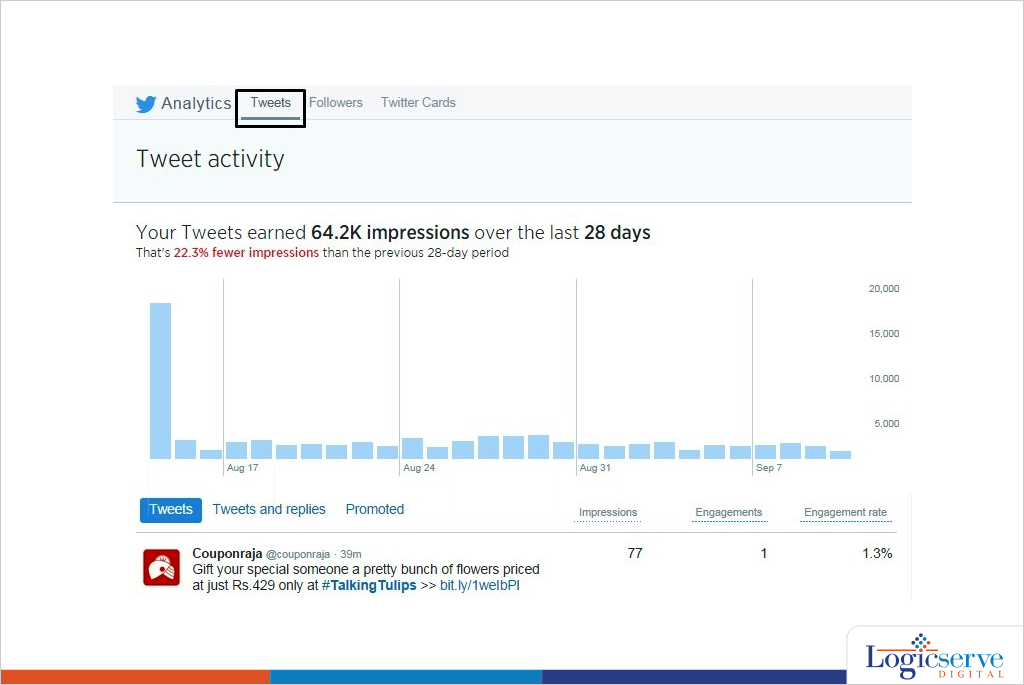
    The first option on top is Tweets which shows all the recent tweets with their Impressions, Engagements & Engagement rates.

    Tweets is further subdivided into ‘Tweets and replies’ & Promoted tweets (tweets used for paid campaign)

    Tweets---1 @LogicserveDigi

    Decoding Impressions & Engagement:

    Impressions is defined here as ‘Number of times users saw the Tweet on Twitter’, Engagement here is ‘Total number of times user has interacted with a tweet. This includes all clicks anywhere on the tweet (including hashtags, links, avatar, username and Tweet expansion), retweets, replies, follows and favorites. Engagement rate is the number of engagements divided by total no. of impressions.

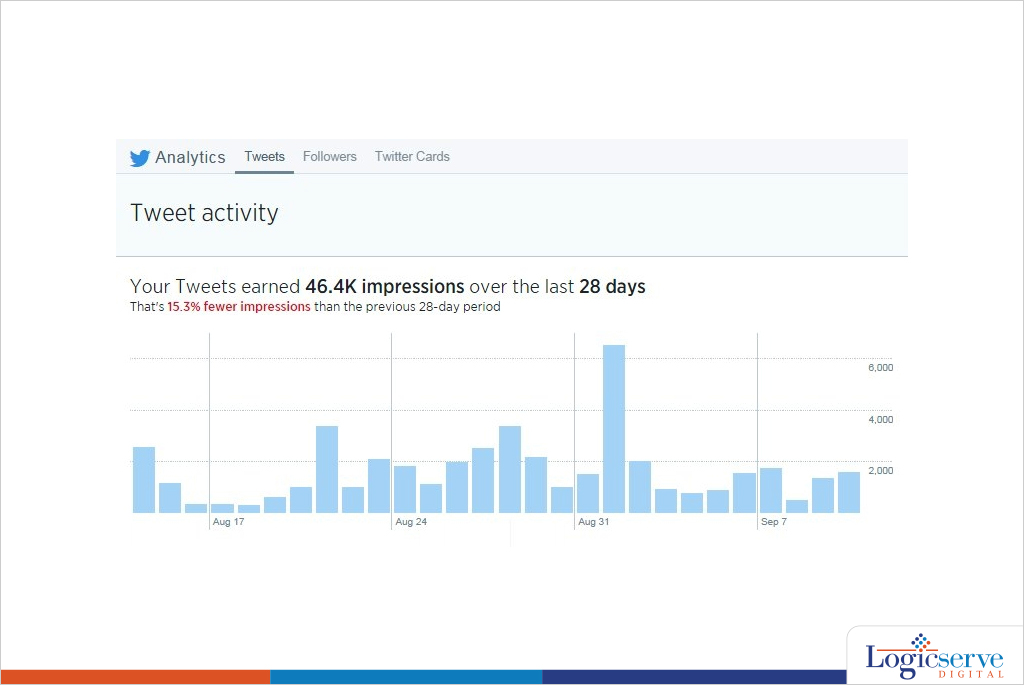
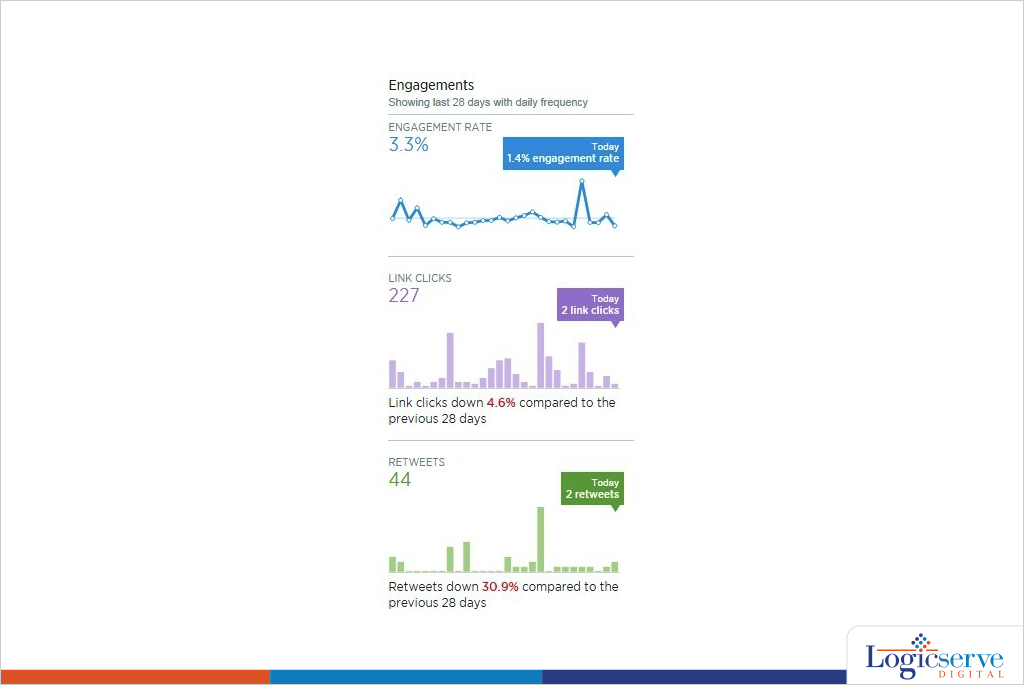
    The right hand side column showcases impressions, engagement rate, link clicks, retweets, favorites and replies calculating average over a period 28 days.

    28-days_average @LogicserveDigi

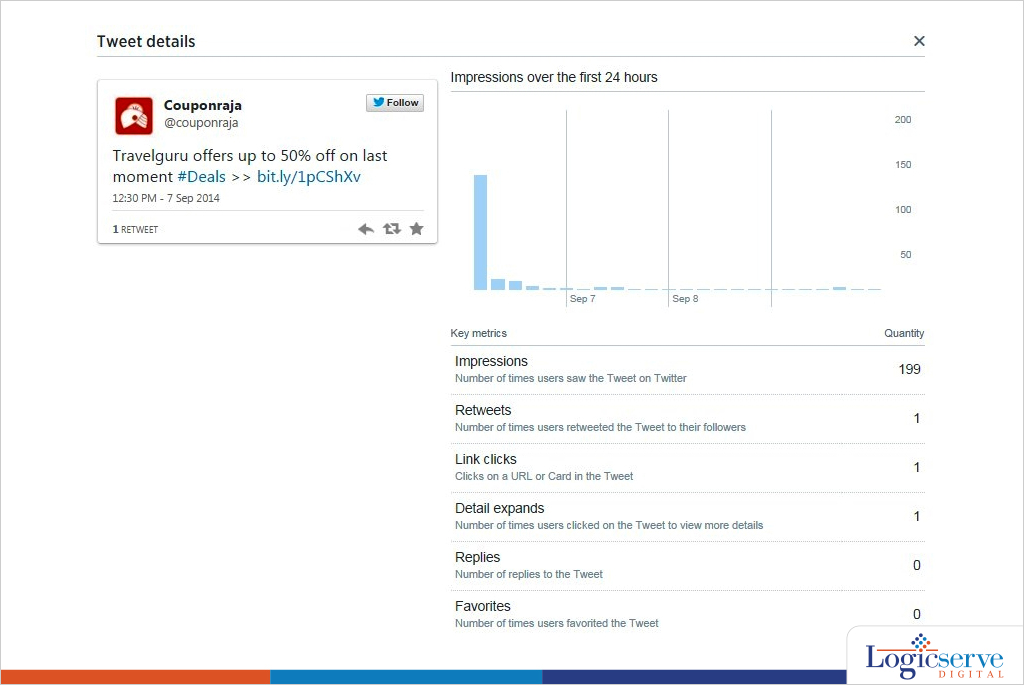
    One of the things in this dashboard which I really liked was when you click on the tweet data it throws up a pop-up info which dissects how the tweet has performed. It shows details like Impression graph, User Profile Clicks, Details Expand, ReTweets, Favorites & Replies.

    Tweet_details @LogicserveDigi


    The “Tweets” menu on the top also gives the insights on how to maximise the brand’s presence in the platform. Alongside it also plays a vital role whenever you create  your next Twitter strategy.

    Through this feature you can know :

    Best time to post your tweet: The no. of impressions could tell us, the most appropriate time to tweet.

    Content: Going by engagement rate we can differentiate a good content from a bad one. It would also tell which ‘type’ of content (image, text, video, link, vine) works better.

    Followers:

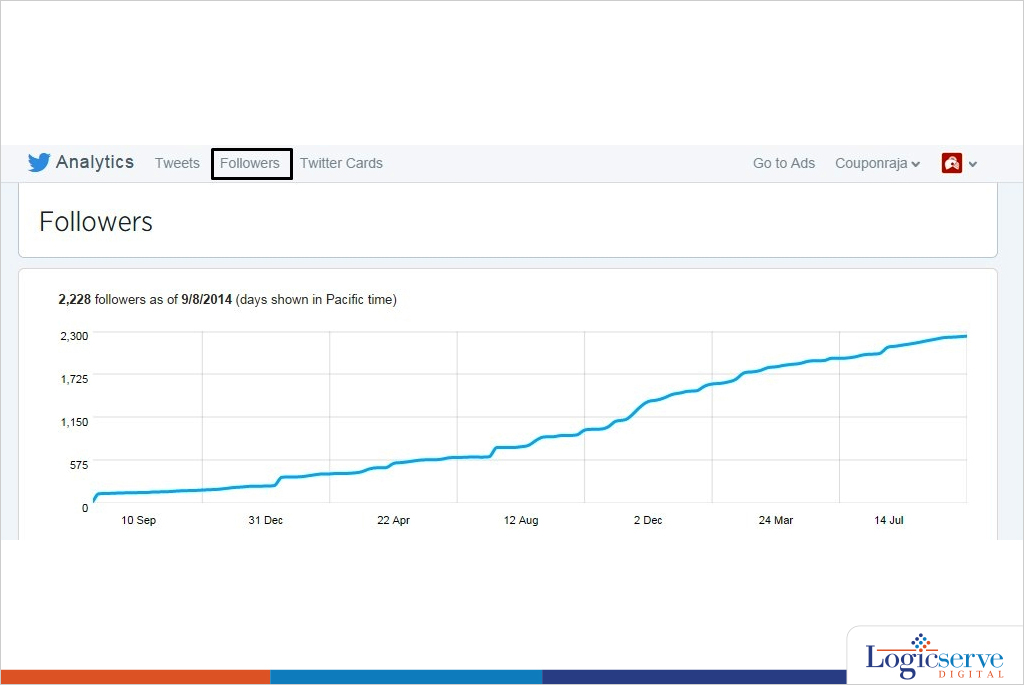
    Second option on top menu is Followers

    Followers-1 @LogicserveDigi

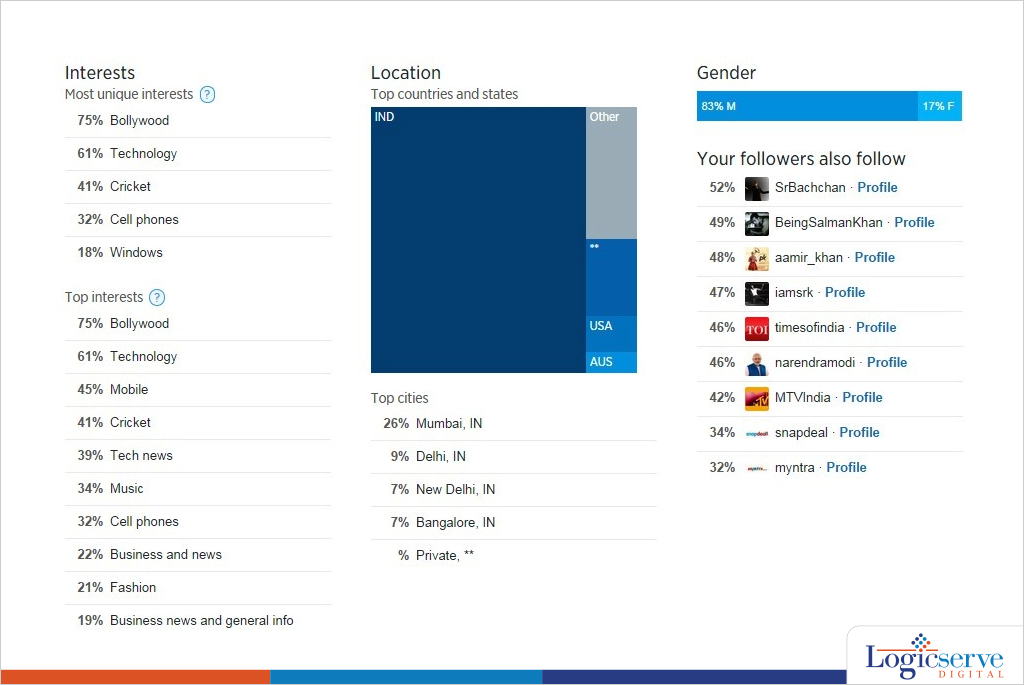
    Followers give a very good insight about the user base of the twitter handle.

    Some of the key things in these features:

    Graphs with followers gained over a period of two years.

    • Interests (The top 5 most unique interests of your followers)
    • Top 10 interests

    Location graph with top cities

    Gender Segregation

    • Top Profiles of users with ‘Your followers also follow’

    Followers-2 @LogicserveDigi

    Twitter Cards:

    This is the last option on top menu.

    Twitter card analytics feature is to track the paid promotion which includes URL Clicks, App Install Attempts data & Retweets.

    Overall, twitter analytics is by far one of the most simple & comprehensible dashboard. With Twitter ‘Buy’ button coming in picture this would be an integral to track transactions.


    Previous Post: Google Authorship May be Dead, But, You are Still Writing. Aren’t You?

  • Content Curation and Content Marketing

    Content Curation and Content Marketing

    Content marketing and curation @LogicserveDigi

    The rise in popularity of content marketing has also witnessed a concomitant increase in content curation. But content curation has to be done smartly. It’s not just about creating a blog post that has a bunch of links and auto-generated summaries. Ideally, it should be a blog post with mostly original content accompanied by curated links. These links must be present to acknowledge the source of the content. However, to get the most plaudits from the search engines, these links must point to high quality sites. Make sure that the post adds value to the reader. When the reader appreciates it, he will feel inclined to share it on social media and the quantity and frequency of shares across social networks is a factor in Google’s search rankings.

    A great content marketing plan in 2014 has to include a content curation strategy as well. After all, nobody can be omniscient. If you have got a great many people who look forward to your Facebook posts and tweets, you have to provide them with both great original content as well as great curated content. You might additionally syndicate some content. Only about a quarter of the content is curated according to research conducted by Curata. The curated content is typically distributed via shares on social media, shares on blogs, and shares via email newsletters. Most marketers share curated content via their favorite social media platforms. Blog posts are a great way to share curated content where you link to other content such as articles and opinions posted by others.

    Social media is by definition sort of an obsession with those who use it. If you want to use content curation as an integral part of your social media strategy, you have to be obsessive about social media just like your audience. People typically log in to their favorite social media platform multiple times in a day. So, to maintain a continuous contact with your audience, you have to post more than once daily on Facebook and Twitter. If you become irregular in posting content, then your audience will lose interest and stop depending on you to get them the content they love.

    You do not have all the time in the world to find great content. So, you need content curation tools that will save you time finding great content. Some great tools include Storify which lets you create a summary related to a single event or topic. For example, an expert might send out a series of tweets related to a single topic. You could Storify that series of tweets so that all the tweets are stored in a single Storified location. You can Storify an event or topic by including tweets, Facebook updates, pictures, videos and more.

    Similarly, with List.ly, you can create a list that includes text, images or video. You can take the help of your community to help curate a list for you. You can use Bundlepost to collate content based on your chosen keywords. You can then import this content into Hootsuite and deliver as per your schedule. Paper.li lets you create your own online newspaper. How cool is that! You choose what sources you want, and set filters on those sources and voila! A paper is produced which you can share via Twitter and so on. There are more tools out there that serve different needs.

    To summarize, content curation is a key weapon in the arsenal of a content marketer. What examples of content curation can you think of from the top of your head? What about Maria Popova and her Brain Pickings newsletter, Twitter feed, Facebook page and Google+ page? That’s a great example of how to make a success of content curation.

    Previous Post: SEO 2014 Vs. 2013 Trends

  • Factors for Content Customisation

    Factors for Content Customisation

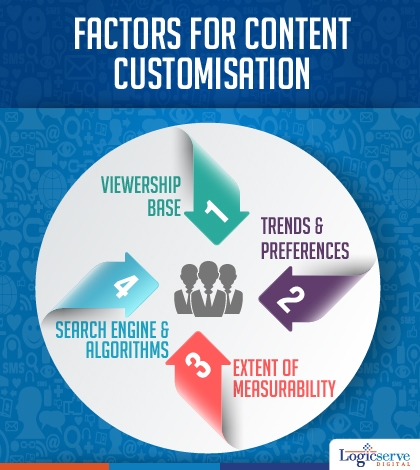
    Factors for content customisation @Logicserve Digi

    Keeping on par with the current digital marketing trends, content marketing is considered to be a relied upon channel to connect with the audiences in a great way. You too, must be judiciously posting Facebook posts along with blogs, articles, infographics and much more. But have you ever wondered how much it is really viewed, read and imbibed in by the readers or maybe they are getting lost in content overload which could be happening across your profile.

    With great efforts put in to develop quality content which needs to be read but prove useful to the audience, it becomes essential to strategize content as well as its marketing in depth for best results. We present a few key insightful pointers for guiding you across the content related strategies.

    Viewership Base – With in depth knowledge of your business and its nature, you need to arrive at list of content which could prove useful to your customers whilst they use/prefer/enjoy your products and services. Identifying the most preferred content from contextual, videos, forums, blogs and then developing them for use is what makes your brand more marketable and enhances its visibility.

    Bear in mind – The usability of the article is more important rather than have a keyword rich article

    Compareraja, one of our brands is a product and price comparison portal enjoying a tech friendly viewership base. It posts blogs highlighting the specifications and USP of latest mobiles, smartphones and tablets on a regular basis. This helps the user, in his research stage to finalise his choice about the product he wishes to purchase. Check it out at https://www.compareraja.com/blog/

    Viewership Trends and Preferences – You need to be very careful in choosing the right channel from the available ones as you proceed to distribute your content across them. As each channel has a niche membership base which is distinct. At the same time, you need to understand the fact that an individual has a channel specific profile and would view your content in a similar manner.

    Amongst the most popular channels we have today,

    1. Facebook is ideal for sharing creative images and experiences.
    2. Linkedin, a slightly formal and professional channel can be used for promoting corporate styled slideshows and presentations.
    3. Twitter is preferred for exchanging hot ideas and trends, ideal for announcing promos and deals which need to be shared instantly
    4. Google + allows an exchange of ideas and views to take place across its platform

    Extent of Measurability – To a certain extent, content marketing can be measured through Tweets, page views, number of downloads but when considered against the cost of generation content and its marketing, a set of specially set parameters could come handy in determining its effectiveness. Each of these aspects varies, depending on what you wish to measure. The same applies for other services you avail for your business’s promotion.

    Search Engines and their Algorithms – Keep track of current search algorithms and try to modify your content marketing strategies. With most of the search engines emphasizing on organic search results, the content should revolve around viewer friendly information. E.g Adding information about famous local cuisines or a famous dish of your restaurant.

    LogicSpeak:

    Customisation is the key to get any content strategy successful. One needs to understand the channels and the type of content that works for their audiences in each of these channels and their responses. As shared, the usability of the generated content, matters more than the keyword rich content.

    Previous Post: Using SEO For Enhancing Local Business

  • Prerequisites to get your Twitter Hashtag Trending

    Prerequisites to get your Twitter Hashtag Trending

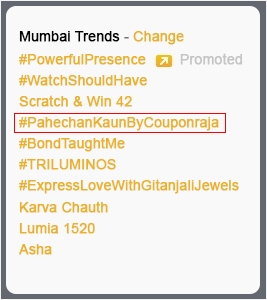
    Mumbai Trends @LogicserveDigi

    In today’s world social media forms an important aspect of everyday life. Seeing the popularity of Twitter, brands have taken  to this medium for active engagement with consumers. Hashtag is the most powerful tool of Twitter, that can be used for increasing brand engagement. One of the many ways to get your brand presence noticed is by having contest that have ‘trending hashtags’. The moment a contest trends, more followers actively engage with the brand and know about them.

    Before we get there, lets know that any word prefixed with the sign ‘#’ is a hashtag. Talking about Twitter Hashtag trends, Couponraja, an online coupon aggregator with 1020 plus follower base recently hosted Twitter contest #PehchanKaunByCouponraja which was trending across India and was well received. The followers have shared their joy in being a part of the contest.

    Over the period of time, it has embarked up on a host of engagement activities including couple of quizzes at regular intervals which are trendy and have been met with a tremendous response and engagement results.

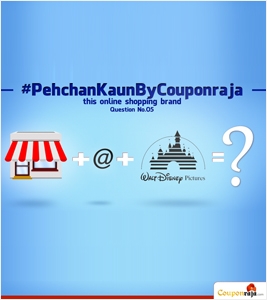
    In the #PehchanKaunByCouponraja Twitter contest followers had to identify/guess online merchants which were represented through graphics/ images. #PehchanKaunByCouponraja, was truly interesting enough to engage those interested in shopping and saving money.

    Here are a set of factors you should consider to get your twitter hashtag trending.

    1. Keeping the hashtag simple and easy to remember

    Though #PehchanKaunByCouponraja was hosted for a very short period of time, up to 500 tweets and retweets were recorded which can be considered a sizeable number considering the 1000+ follower base. In fact, hashtag #PehchanKaunByCouponraja was trending across India for a couple of hours of since the contest was opened.

    The hashtag was simple to remember and easy to use. This worked as a boosting factor and registered it easily in the minds of the followers.

    Throughout the contest, existing members were encouraged to share the hash tag within their group and as many tweets as possible where gathered. There were new followers who expressed their wish to participate in the contest and were allowed to do so.

    2. Innovative and eye catching content along with brain teasers

    Pehechan Kaun @LogicserveDigi

    The engaging part of the #PehchanKaunByCouponraja was the use of graphics and images to guess the most popular online merchants. Most of the followers loved the guessing game and tweeted in large number as they went about it. It was an activity which was preferred by the followers who are avid online shoppers and identified with the merchants quite easily.

    The catchy part of the content was the guess work required on online shopping merchants with whom they were already familiar and would have loved to shop with them if given a chance. With most of the Twitter followers quite active across other social media networks, instant sharing of this contest was accelerating enough to attract new participants to the #PehchanKaunByCouponraja

    3. Adding the right kind of incentive for engaging followers

    During the #PehchanKaunByCouponraja, followers were required to identify names of online merchants who were represented through trendy graphics and images, an activity which proved very interesting enough for them. Guessing the names of merchants and tweeting their names proved to be quite exciting for a change.

    #PehchanKaunByCouponraja gave away a couple of shopping vouchers free. What better engagement factor could be offered to the participants other than free vouchers for shopping online?

    4. Time zone of the participants

    Keeping in mind the young trendy and eager shopping enthusiasts’ follower base, the 12 noon to 6 pm time slot was taken for running the contest. By this time, most of the followers were quite well settled within their daily routine and able to devote a couple of minutes on off and on basis to the #PehchanKaunByCouponraja contest.

    LogicSpeak:

    In Twitter, it pays effectively to engage followers by choosing the most trending topics. This takes the ‘user-brand’ connectivity to the next level of engagement.

    Previous Post: Modernizing content with Google’s Hummingbird

  • Facebook Revamping Mobile Apps

    Facebook Revamping Mobile Apps

    Facebook revamping mobile apps

    Facebook’s latest launch of mobile app provides the businesses with a better chance to engage with the smart phone users. Through Facebook Mobile Apps, many brands now enjoy yet another valuable opportunity to retarget customers who otherwise have lost interest in the brand.

    This launch takes branding and retargeting to a whole new level and also throws light on the latest trend of launching apps without much of a thought process. According to a research by the mobile app analytics, after the initial launch the mobile app engagement drops to 24 percent in just three months and a further 4% by the end of 1st year.

    Facebook apps offer a high level consumer interaction with the brand. It gives marketers a well deserved chance of rekindling the relationship with their long lost consumers and also highlights the absence of a well crafted mobile marketing strategy in the present times.

    With such huge amount of money spent in the initial launches of these mobile apps, most of the mobile marketing apps lack a strong future mainly because of the “let’s build it, they will come in” approach. However, the Facebook mobile app is a sure shot opportunity for the customers for a better consumer engagement and re targeting.

    LogicSpeak:

    With better features and smooth navigation, Facebook mobile app is a good way for the brands to engage with customers and highlights the need of a well thought marketing strategy that is required for tapping the consumer base of smart phone users.

    Previous Post: How to understand the ‘Not Provided’ Traffic