LS Staging

Category: logic

  • Acquainting with the New Normal

    Acquainting with the New Normal

    A dynamic marketing strategy deserves more than just the orthodox tracking, thereby the new age marketer’s expectations are set high for getting a comprehensive view of their audience and having an effective engagement with them by optimally leveraging marketing tools. Designed to step up from traditional tracking, GA 4 gears you up for ML-based Analytics. Giving you a holistic perspective of your audience GA 4 ensures you are enabled with a bespoke marketing approach with wide integration possibilities.


    Here are the additions that GA 4 has come up with as compared with Universal GA:

    User-Centric Tracking:

    The most obvious difference between Google Analytics 4 (GA4) and Universal Analytics (UA) is their measurement model. UA would group data into sessions, which was the foundation of all reporting. A session is a group of user interactions/ hits with your website that take place within a given time frame.

    In Google Analytics 4 properties, every “user interaction”/ hit is an event; there is no distinction between them.  That means there won’t be a distinction between a simple pageview or something as complex as filling a lead form.

    Now, what that means to you is- Instead of seeing generalized data of a particular time frame, GA 4 makes it easy to zoom in on customer behaviour which can enable you to gain a full understanding of user preferences.


    Mobile + App View:

    In the past, if you wanted to measure your website then you would use GA, and if you wanted to measure your app then you would use Firebase or any app analytics tool like – Appsflyer or Branch.

    Therefore, there was no easy way to combine mobile app and website data for unified reporting.

    Therefore, considering the importance of tracking the user as he switches devices GA 4 enables you with a Unified view of the Web and App which collates the user journey of the Web and App together


    ML-Based Predictions:

    This is the most exciting feature of GA 4. GA 4 has MACHINE LEARNING at its core to enhance your marketing capabilities with its predictive metrics!

    You can expect GA 4 to predict the future behaviour of users like:

    The probable purchasers in the next 7 days

    The probable audience that would go inactive and churn.

    And based on this you can design your remarketing campaigns.

    GA 4 can also show you the revenue expected for the next 28 days

    These informed predictions become handy to create predictive audiences that you can market in precisely targeted campaigns.


    Free Integration with Big Query: 

    Now we all know that Big Query is a data warehouse that allows us to store and query data at very high speeds. Originally Big Query was only available to GA360 (paying) users, but now it’s accessible through GA4 for free. There are two things that Big Query brings to the table.

    1st is Unsampled Data:

    But with the addition of Big Query to GA 4, Sampling is naturally eliminated as the amount of data that can be collected is now unlimited.

    Also, having access to unsampled data ensures that you are taking your decisions on accurate data.


    2nd is the possibility of data export:

    In the Big Query data warehouse, you can upload your datasets not only from GA but from your Ad Platforms, your CRMs, and your POSs; Naturally, you will be having a Single view of your acquisition, Behaviour, and Conversion data.

    Now you can query the hit level of these data sets and find correlations between them by literally analysing terabytes of raw data on a granular level.


    Free Integration with the Google Ad Ecosystem:

    Google is by far the biggest Ad Ecosystem currently, comprising Google Ads, DV 360, SA360, Optimize, etc

    Although these ad platforms are powerful tools to analyse the acquisition and conversion numbers of users, they individually miss correlating the website behaviour with those numbers.

    That’s where GA 4’s integration with Google’s Ad Ecosystem helps you, it bridges this data gap by enabling you to have a better understanding of the behaviour of your traffic coming from each marketing channel.

    GMP Integration was previously only available to GA360 (paying) customers, however, it is now freely available in GA4 giving you a 360-degree view of channels.

    Therefore, in a way GA 4 is helping you to plan, measure and optimize media in one place rather than fishing on an individual platform level in a black box.


    Free Integration with Salesforce CRM:

    This integration as well was only available on GA 360 previously, but now it can be availed in the free version of GA 4 itself. The integration of GA 4 with CRM would give us two major Benefits:

    First, view the complete funnel with your conversion data of the offline medium joined to the online funnel.

    Secondly, it will let you know the influence of your online campaigns on your offline conversions, and additionally, you won’t be wasting your budget on the converted leads which previously were still not closed in GA.


    Flexible Interface


    One of the biggest changes is the interface. In Universal Analytics you had a lot of different readily available reports. But not all were relevant for the business cases at hand.

    In the new version, there’s more flexibility in building the report which you are interested in seeing depending on your specific use cases. Exploration section of the GA4 interface allows you to build custom reports and store or share them with relevant stakeholders.

    For instance, You can create your custom reports to understand overlap between the devices or the platform and analyse how users interact with your digital assets. You can customize your analyses even further with filters and segments to make sure you’re seeing exactly what you need.


    So, GA4 is certainly the most exciting update to Analytics and it will enable marketers to be more data driven with less technical complexity so that they have the edge in this era of Data Driven Decision Making.

     

  • GA 4 Set to be the Only Source of Truth – LS Digital

    GA 4 Set to be the Only Source of Truth – LS Digital

    The Nightmare of User Privacy:

    It’s no secret that we’re in the midst of a massive transition, and user privacy is at the forefront of everyone’s thoughts. Here is where Google Analytics 4 has made a significant technology leap that will alter the way businesses analyze their traffic.

    Foregoing are the grounds for this leap:

    • Regulatory changes throughout the world have increased the bar for user privacy.
    • Core technology like as cookies, on which measurement systems have relied on for years, are being changed by browsers and other platforms. Furthermore, end-users are expecting greater transparency and control over how their data is utilized.
    • At the same time, the amount of data created by a plethora of business touchpoints and platforms with which consumers engage continues to grow at an exponential rate.

    So, Obviously, A privacy centric ecosystem would be a ‘positive ‘for humanity, but for us digital marketers it is a ‘nightmare’
    Now while this Nightmare of User Privacy haunts us marketers, Google had already foreseen it and introduced ‘GA 4’ Two and half years ago considering User privacy as the center of vision.
    ————————————————————————————————————————

    About the new normal:

    GA 4 is designed to be a platform for everyone- including businesses with either a presence on web or app, for those having exposure on both app plus web, as well as for brands with a hybrid existence.

    The new Google Analytics 4 brings with it a vast spectrum of enriched capabilities:

    • Stiches your app and web data and provides a unified view.
    • Has Machine Learning at the core to give you predictions about target audience’s likelihood to purchase, churn, potential revenue, so that you are better prepared on what’s coming your way.
    • Enables enhanced marketing capabilities with its integration possibility with the entire ad ecosystem of Google (GMP suite).
    • Gives opportunity to query your data and have precision in reporting with the Big Query warehouse.
    • Can be integrated with Salesforce as well as Marketing Cloud
    • Designed to be future-proof even as stringent regulatory changes around the world and the rumored cookie-less culture try to create a gap in your data.
      ————————————————————————————————————————

    About the Migration:

    It is a known fact that GA 4 will take over the analytics’ reins on July 1, 2023, replacing Universal Analytics as a mandatory update for everyone. But wait! Here’s something you need to know: Your Universal Analytics data won’t be migrated to GA 4!
    Therefore, with the clock ticking to defined end date, it is justified to conclude that GA 4 is no longer an option, it’s a compulsion!
    And, like any other Machine Learning model the reporting accuracy of GA4 also depends on the data collected in it, thus the sooner you start the better the data repository.

    What does Google have to say about this?

    “We encourage you to make the switch to Google Analytics 4 as soon as possible to build the necessary historical data before Universal Analytics stops processing new hits.”

    Well, then what does Google recommend?

    “We strongly encourage you to make the switch to Google Analytics 4 as soon as possible. Doing so will allow you to build the necessary historical data and usage in the new experience, preparing you for continuity once Universal Analytics is no longer available.” Also, “Google Analytics 4 is fully equipped to support your measurement needs today and into the future. To take advantage of Google Analytics 4’s measurement continuity, automated insights about the customer journey, and easy activation to improve marketing ROI, finish setting up your GA 4 property today.”

  • Weekend Digital Media Round-Up: New Microsoft Feature to Run Ads, Apple Announces iPhone 14 Series, Twitter Adds WhatsApp & LinkedIn Sharing Buttons & More…

    Weekend Digital Media Round-Up: New Microsoft Feature to Run Ads, Apple Announces iPhone 14 Series, Twitter Adds WhatsApp & LinkedIn Sharing Buttons & More…

    1.New Microsoft feature lets you run ads on Google, Facebook, Instagram

    Microsoft just announced multi-platform, an all-in-one feature available in Smart Campaigns that lets you run ads in Microsoft, Google, Facebook, and Instagram all through the Microsoft interface. [Source: Search Engine Journal]

    2. Apple Has Just Announced The New iPhone 14 Series With Some Innovative Features

    The moment that many iPhone enthusiasts have been waiting for all year long has finally arrived. Tech giant Apple unveiled the new iPhone 14 and iPhone14 Pro with some innovative features worth a glance. [Source: Digital Information World]

    3. Twitter Adds WhatsApp & LinkedIn Sharing Buttons to Facilitate Broader Tweet Engagement

    Twitter can now spread tweets beyond its own platform via a new WhatsApp sharing button for users in India, along with a new LinkedIn sharing option, with a dedicated tweet presentation in the app. [Source: Social Media Today]

    4. Google is Rolling Out New Campaign & Ad Group Setup Columns

    Google is slowly rolling out new Setup columns on the marketing campaign and advert group ranges. This info should help advertisers identify issues in their campaigns and ad groups as well as quickly find images, keywords, and ads that need to be adjusted. [Source: Search Engine Land]

    5. Microsoft Launched 5 New Ad Products & Updates

    Debuting thirty-four new markets, additional import tools, and a Performance Max beta are just a few of Microsoft’s September product announcements. [Source: Search Engine Land]

    6. Instagram Takes a Step Back and Potentially Abandons Its In-Stream Shopping Program

    Instagram is removing its shopping page amid a move to drive more direct ad revenue and plans to refocus its e-commerce efforts towards advertising. [Source: Digital Information World]

    7. YouTube Provides New, Ad-Free Player for Classrooms, New In-Stream Courses for Educational Creators

    YouTube has today announced a new, dedicated YouTube Player for Education, which will enable educators to display YouTube content without ads via certain third-party platforms. [Source: Social Media Today]

    8. Google upgrades its Apple AirDrop competitor ‘Nearby Share’ and five other Android updates

    Google introduced a new feature for Android devices, including an upgrade to a self-share option that works like rival Apple’s AirDrop . [Source: Tech Crunch]

    9. Snap Launches First ‘Bitmoji Drop’ of Exclusive Digital Merchandise for Bitmoji Characters

    Snapchat’s still working on related initiatives, with the company announcing a new collaboration with musician J Balvin on its first ever ‘Bitmoji Drop’ of limited-edition digital Air Jordan 2 Balvin sneakers. [Source: Social Media Today]

    10. Reddit Launches Updated Feed Switching Process as Part of Broader UI Reassessment

    Reddit has announced a slight tweak in its UI, which will see the removal of separate feed tabs along the top of the main display. [Source: Social Media Today]


    ­­­­­­­­­­­­­­­­


  • How To Make Changes In Amazon Retail Contributions| Logicserve Digital

    How To Make Changes In Amazon Retail Contributions| Logicserve Digital

    How to Make Changes to Amazon Retail Contributions?

    According to reports, Amazon India has more than 100 million registered users.

    For any online seller, listing products on Amazon is an effective way to expand their reach.

    Although, Amazon has made the entire process of listing and selling efficient and hassle-free, there are some issues that sellers continue to struggle with.

    Listings with retail contributions and difficulties in making changes to such listings is one such known problem.

    What are Amazon Retail Contributions?

    When brand owners, manufacturers, distributors, and retailers sell products on Amazon through Vendor Central, the listing is known as “retail contribution.”

    What is Vendor Central? Vendor Central and Seller Central are two leading fulfilment options offered by Amazon. Take a look at what they mean-

    ●       Vendor Central

    When you sell your products through Vendor Central, you sell your products to Amazon and then Amazon resells them to the customers. This option is mostly used by first-party sellers such as distributors and manufacturers. With Vendor Central, product listing is managed by Amazon.

    ●       Seller Central

    If you’re selling your products on Amazon via Seller Central, you sell the products directly to the customers through the Amazon marketplace. Here, the account setup and maintenance are handled by the seller.

    Why Is It Difficult to Make Changes to Retail Contribution Listings?

    For sellers, it is very challenging to make changes to their retail contribution listings as the listings are created by Amazon and thus believed to be accurate. And while this is true in most instances, there are times where sellers might encounter an error in such listings.

    The easiest solution to this problem is to make the required changes through Vendor Central. But if you don’t have access to Vendor Central, the only way is to contact Seller Support and the process will mostly involve plenty of back and forth with the support team.

    How to Make Changes to Amazon Retail Contribution Listings Through Seller Support?

    In order to make changes to retail contributions, someone from Amazon’s retail team will have to override the listing. Here are some tips that can help you in this endeavour-

    • You’ll need adequate proof to support the listing changes. The proof can be linked to the product manufacturer’s website, photos, etc.
    • Include the collected proof in every ticket.
    • Don’t forget to regularly mention how the required changes are essential to offer a positive customer experience.
    • Ensure that the requested changes don’t violate Amazon India’s style guidelines.

    Making Changes to Amazon Retail Contribution Listings:

    While it is possible to make changes to retail contribution listings, you’ll have to be persistent and patient. You’ll also need adequate proof to support your request.

    As an Amazon seller, you already have many things to take care of. Why not consider a reputed digital marketing company that can handle your Amazon product listings and create a custom strategy to boost their visibility?

    As experienced marketer’s regularly work with Amazon sellers, they are well-versed with techniques that can boost your sales and generate more revenue. They can also handle common issues on your behalf so that you can entirely focus on your business and its growth.

  • 3 Ways to Use Data for Boosting Your Ecommerce Business

    3 Ways to Use Data for Boosting Your Ecommerce Business

    Ecommerce businesses are tirelessly searching for new ways to reach more people and improve customer experiences. But a powerful solution could possibly be available at their fingertips, and many are either unaware or don’t know how to leverage it.

    Data is steadily becoming the new frontier of competition and innovation in eCommerce.

    With 74 zettabytes of data generated by the end of 2021 (1 zettabyte=1 trillion gigabytes), there’s plenty of data that online stores can use to boost their business. Here are 3 effective ways to leverage data in eCommerce –

    1. Creating Buyer Personas

    According to a study by IBM, almost 90% of the marketers agree that personalized customers experiences are critical to their success. However, 80% of the consumers believe that the average brand fails to understand them as individuals. Creating buyer personas could help change the statistic.

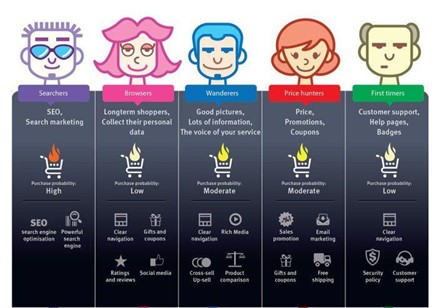
    Marketers can collect, compile, and analyse data from multiple sources and divide it into segments for creating buyer personas. These are comprehensive profiles of ideal customers to improve decision-making and ensure that marketing initiatives target every audience segment adequately.

    The buyer persona and journey map above offers an excellent overview of how online stores can approach this strategy to better understand their customers.

    1. Predicting New Trends

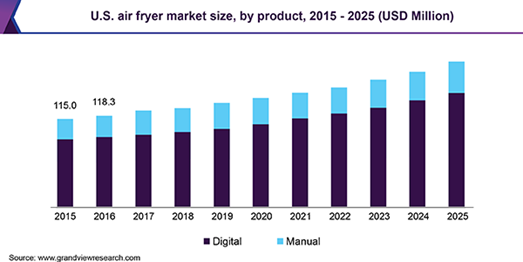
    Product trends change swiftly in the e-commerce world. For instance, while air fryers are currently selling like hotcakes, it might be something else in the near future. Knowing such trends in advance could be a gamechanger for any online retailer. And it is now possible to accurately predict “the next best product” with the help of demand forecasting solutions.

    These tools can identify trends and patterns in sales data to estimate future demand. It can enable online stores to maintain adequate stock levels, generate higher revenue, and gain a competitive edge. Short-term and long-term demand can be forecasted at a micro or macro level to predict the future and keep up with the changing trends.

    For instance, a simple demand forecast for air fryers suggests that their market size will continue to grow well into the future.

    1. Boost Customer Service

    Finding and converting new customers is challenging for smaller online stores. But after making the first purchase, their chances of doing it again are considerably higher. In other words, instead of selling your products to a new customer, you are 60%-70% more likely to sell to existing customers. And repeat customers are vital for any business as they spend up to 67% more than new customers.

    The quality of your customer service plays a critical role in boosting customer loyalty. Ecommerce businesses can collect an extensive range of data and build it into their CRM strategy to improve customer service and satisfaction. Some of the data points they can consider are-

    • Website cart abandonment rates, bounce rates, and conversion rates
    • Customer satisfaction survey results
    • Customer service response times
    • Overall social sentiment

     Leveraging Data in Ecommerce

    There are several ways for online stores to leverage data for improving their operations. Moreover, there’s also an extensive range of advanced analytics software and tools to help businesses make sense of their collected data. But as data now plays such a critical role in the eCommerce landscape, it’d be wise to trust only the experts.

    Experienced digital marketing professionals can help online stores explore the possibilities and create custom data-driven strategies that are equipped to deliver the best results.


  • Complete Guide to Robots.txt File and SEO Protocols

    Complete Guide to Robots.txt File and SEO Protocols

    A robots.txt file is basically a text file that webmasters create to instruct the search engine robots which URLs/pages to crawl on a website. This is used to improve the crawl budget for the website.

    What is a robots.txt file used for?

    A robots.txt file is used to manage crawler traffic to the site and usually to keep a file off Google, depending on the various file type:

    File Type Robots.txt effect
    Web Page Manages your website crawl budget

    Avoids crawling unimportant or similar pages on your site

    Pages will still get indexed in search results with no description

    Note – If other pages link to your page with descriptive anchor text, Google could still index the page without visiting.

    Digital Assets Prevents image, video, and audio files from appearing in Google search results

    This will not prevent other pages or users from linking to your image, video, or audio file.

    Robots.txt file limitations:

    Depending on your goals, consider other mechanisms to ensure your URLs are not findable on the web.

    • txt directives may not be supported by all search engines
    • Search engine crawlers may interpret syntax differently.
    • A page that is disallowed in robots.txt can still be indexed if linked to other sites.

    Steps to create a perfect Robots.txt file:

    A robots.txt file should be added at the end of any root domain. For instance, if the site URL is www.abc.com, the robots.txt file lives at www.abc.com/robots.txt. robots.txt is a plain text file that follows the Robots Exclusion Standard consisting of one or more rules. This rule allows or blocks access for a mentioned search engine crawler to a specified file path in that website. Unless the rules are specified in the robots.txt file, all files on the site are allowed for crawling.

    Simple example for robots.txt with few rules:

    User-agent: Googlebot
    Disallow: /nogooglebot/
    User-agent: *
    Allow: /

    Sitemap: http://www.abc.com/sitemap.xml

    This file means:

    1. Googlebot, i.e., the user agent, cannot crawl any URL that starts with abc.com/nogooglebot/.
    2. All other user agents can crawl the entire site. By default, other user agents are allowed to crawl the entire website even if this rule isn’t added.
    3. The site’s sitemap file is located at http://www.abc.com/sitemap.xml

    Formats and Location Rules:

    •  The file name must be robots.txt
    •  A site can have only one robots.txt file
    • txt file needs to be placed at the root of the website host to which it applies. For instance, considering the URL is http://www.abc.com/robots.txt. It cannot be placed in a subdirectory, i.e. http://www.abc.com/page/robots.txt
    • This file can be applied to
    • a subdomain (http://web.abc.com/robots.txt) or on
    • non-standard ports (http://www.abc.com:8181/robots.txt)
    • Google may ignore characters that are not part of the UTF-8 range, potentially rendering robots.txt rules invalid.
    • Adding rules to the robots.txt file

    Instructions should be added for search engine crawlers on which parts of your site they can crawl. Check on these guidelines when adding rules to your robots.txt file:

    • A robots.txt file consists of one or more groups
    • Each group consists of multiple guidelines or instructions, one directive per line. Each group begins with a User-agent line specifying the target of the groups. For example:

    User-agent: *
    Allow: /
    Disallow: /search/

    • A group gives the following information:
    • Who the group applies to (the user agent)
    • Which directories or files that user agents can access

    Which directories or files that user agent cannot access

    • Search engine crawlers process groups from top to bottom
    • By default, the user agent can crawl any page or directory not blocked by a disallow rule
    • Rules are case-sensitive. For example, disallow: /login.asp applies to https://www.abc.com/login.asp, but not https://www.abc.com/LOGIN.asp

    The # character marks the starting of a comment
    Google’s crawlers support the subsequent directives in robots.txt files:
    User-agent:

    Each search engine must identify itself with a User-agent. This defines the start of a group of directives. Usage of an asterisk (*) matches all search engine crawlers except for the different AdsBot crawlers, which must be named explicitly.

    For example:
    # Example 1: Block all but AdsBot crawlers
    User-agent: *
    Disallow: /

    # Example 2: Block only Googlebot
    User-agent: Googlebot
    Disallow: /

    # Example 3: Block Googlebot and Adsbot
    User-agent: Googlebot
    User-agent: AdsBot-Google
    Disallow: /

    disallow:
    At least one or more disallow entries per rule. A directory or page to the root domain that you do not want the user agent to crawl. If a robot’s rule refers to a URL, it must be the entire URL path as visible in the browser. If it refers to a directory, it must start with a / character and end with the / mark. For example:

    #Disallow: Page and directory

    User-agent: *
    Disallow: /login.html
    Disallow: /search/
    allow:

    At least one or more allow entries per rule. A directory or page to the root domain may be crawled by the user agent just mentioned. Allow rule is used to override a disallow directive to allow crawling of a subdirectory or page in a disallowed directory.

    For a single page, specify the entire URL path. To add a directory, end the rule with a forward slash ‘/’ mark.

    For example:

    #Allow: Page and directory, and override
    User-agent: *
    Allow: /login.html
    Allow: /loan/
    Disallow: /search/
    Allow: /search/

    sitemap:

    One or more xml sitemaps can be declared in robots.txt. Sitemaps are an effective way to indicate which content Google should crawl, as opposed to which content it can or cannot crawl. For example:

    Sitemap: https://www.abc.com/sitemap-images.xml

    Sitemap: https://www.abc.com/sitemap-index.xml

    Upload the robots.txt file

    Once the robots.txt file is created, you can make it available for web crawlers. Contact your hosting company to upload the file as it depends on your site and server architecture.

    Test robots.txt markup

    Test whether your uploaded robots.txt file is publicly accessible, open the browsing window and navigate to the location https://www.abc.com/robots.txt

    Google offers testing robots.txt in Search Console. You can only use this tool for robots.txt files that are already accessible on your site.

    Submit robots.txt file to Google

    Google’s crawlers certainly find and start using your robots.txt file once uploaded to the domain root folder. No action is required here.

    In case you update the robots.txt file, it is essential that you refresh Google’s cached copy.

    Useful robots.txt rules

    Here are a few common useful robots.txt rules:

    Useful Rules Code Comment
    Disallow crawling of the entire website User-agent: *

    Disallow: /

    URLs from the website may still be indexed, even if they have not been crawled.
    Disallow crawling of an entire site, but allow Mediapartners-Google User-agent: *

    Disallow: /


    User-agent: Mediapartners-Google

    Allow: /

    Hides your pages from search results.

    Mediapartners-Google web crawlers can still examine them to decide which ads to show visitors on your site.

    Disallow crawling of a directory and its contents User-agent: *

    Disallow: /search/

    Disallow: /about-us/

    Disallow: /about-us/archive/

    Add a forward slash to the directory name to disallow the crawling of a whole directory.

    The disallowed string may appear anywhere in the URL path,

    so, Disallow: /about-us/ matches both

    https://abc.com/about-us/

    https://abc.com/why-us/other/about-us/

    Allow access to a single crawler User-agent: Googlebot-news

    Allow: /


    User-agent: *

    Disallow: /

    Only googlebot-news can crawl the entire site
    Allow access to all except for a single crawler User-agent: Unnecessarybot

    Disallow: /


    User-agent: *

    Allow: /

    All bots can crawl the site except for Unnecessarybot
    Disallow crawling of a single web page User-agent: *

    Disallow: /login_file.html

    Bots can crawl all web pages on your site, except for the login_file.html page
    Disallow crawling of files from a specific file type User-agent: Googlebot

    Disallow: /*.gif$


    User-agent: *

    Disallow: /*loan/

    Adding * prior to the string/file extension will disallow files/paths containing a specific string or file type


    Disallow for crawling all .gif files

    Block all images on your site from Google Images User-agent: Googlebot-Image

    Disallow: /

    Google cannot index images and videos without crawling them
    Block a specific image from Google Images User-agent: Googlebot-Image

    Disallow: /images/logo.jpg

    This will disallow the logo.jpg file to be crawled
    Use $ to match URLs that end with a specific string User-agent: Googlebot

    Disallow: /*.pdf$

    This will disallow all pdf files from crawling


    Learn about how Google interprets robots.txt specifications in the coming chapters for robots.

  • 3 Reasons to Add Social Commerce to Your Marketing Mix

    3 Reasons to Add Social Commerce to Your Marketing Mix

    The digital revolution has had a significant impact on almost all aspects of our lives, including how we work, sleep, eat, and interact with each other. According to a report, Indians spend around 156 minutes scrolling through popular social networking platforms in a day, on average.

    Brands and online stores can leverage the massive popularity of these platforms by adding social commerce to their marketing mix.

    What is Social Commerce?

    In simple words, social commerce brings the functionality of an e-commerce portal to a social networking platform. It turns social platforms like Facebook, Instagram, Pinterest, and Twitter into a vehicle for promoting and selling products and services.

    Why Social Commerce?

    3 reasons why businesses should consider social commerce are discussed below-

    1. Drive More Engagement

    Social networking platforms allow brands to not just advertise and sell but also engage with customers. People can comment, like, share, or tag their friends on your product listings and you can respond to them. This helps create a stronger two-way communication channel that is often missing when using traditional e-commerce solutions.

    Brands can also use personalized ads and regularly post engaging content like videos, polls, contests, user-generated content (UGC), etc., to engage with the customers on a more personal level on social platforms.

    2. Customer Journey Optimization

    In a typical online transaction, a customer clicks on your ad, gets redirected to your online store, chooses the product, and enters the payment details before finally making the purchase. Even if you are receiving web traffic from search results, the journey is more or less the same. The entire process is pretty long and filled with distractions.

    Social commerce can drastically shorten the customer journey. For instance, Facebook allows page owners to create a shop section with product/service listings. You can enable the ‘Message to buy’ option on your Facebook Shop to allow customers to directly ask questions to you through Facebook Messages and arrange purchases without ever visiting your website or online store.

    3. Builds Deeper Trust

    According to a report by The Consumer Goods Forum, 70% of the consumers are interested in knowing more about the health, social, environmental, and safety impact of the products they purchase. Social commerce platforms are excellent places to let consumers know more about your brand, products/services, and the people running it.

    It helps improve brand awareness and builds deeper trust with the audience. With social commerce, people can view and purchase your products/services on a platform where they are already following you and engaging with you. This could also lead to improved sales and revenue. 

    Social Commerce to Establish a Strong Brand

    Social commerce is one of the most effective e-commerce solutions as it helps you build brand awareness while also earning direct conversions. It can be an excellent addition to any marketing strategy if the end goal is to improve engagement, shorten customer journey, build trust and improve sales.

    Brands can rely on reputable digital marketing companies to strengthen their social presence and establish an online store on leading social platforms.

  • Weekend Digital Media Round-Up: Google’s Platform For Creators, Facebook’s Tools For Businesses, Instagram’s Demographic Insights & more…

    Weekend Digital Media Round-Up: Google’s Platform For Creators, Facebook’s Tools For Businesses, Instagram’s Demographic Insights & more…

    1.Google Launches ‘Google for Creators’ Platform to Provide Guidance on Digital Content Strategies

    Google’s looking to play a bigger role in fuelling the burgeoning creator economy with a new platform designed to help creators maximize their efforts. [Source: Social Media Today]

    2. Facebook Launches Audio & Video Calls For Businesses

    Facebook is rolling out a series of updates targeted at small businesses, including audio & video calls in Messenger, live audio rooms, and more. [Source: Search Engine Journal]

    3. Instagram Adds More Demographic Insights For Businesses

    Instagram Insights now provides key demographic information about a business’s engaged including top cities, top countries, top age ranges, and more. [Source: Search Engine Journal]

    4. Snapchat Launches New AR Content Studio to Help Brands Develop Innovative AR Campaigns

    Snap Inc. is looking to help more brands take the leap into AR campaigns with the launch of a new creative studio for AR, called Arcadia. [Source: Social Media Today]

    5. Google Bowling: Tool Saves Advertisers from 3-strike Suspension

    New Google tool called Bowling finds and removes ads that violate Ads Policy to help advertisers avoid account suspension from 3-strikes policy enforcement. [Source: Search Engine Journal]

    6. Facebook Outlines Coming Ad Measurement and Targeting Changes to Offset ATT Impacts

    Facebook has outlined its latest range of updates and changes designed to help marketers maximize their campaigns. [Source: Social Media Today]

    7. YouTube SEO: Auto Chapters Now A Source Of Metadata For Search

    YouTube is now using automatically generated chapters as a source of metadata in search. Previously only manually defined chapters were used when ranking search results. [Source: Search Engine Journal]

    8. Instagram Adds Collaboration Options for Feed Posts and Reels, New Music Engagement Features

    Instagram has added a new way for users to collaborate on feed posts and Reels, while it’s also adding some new music-focused, AR-aligned features. [Source: Social Media Today]

    9. YouTube Announces Live Shopping and CTV Product Updates

    YouTube has announced a new series of live-stream shopping events and has also announced new CTV product updates. [Source: Search Engine Journal]

    10. Instagram Will Enable Users to Upload Photos and Videos via Desktop

    Instagram has announced that its adding image and video posting functionality from the desktop version of the platform. [Source: Social Media Today]

  • Weekend Digital Media Round-Up: Google’s New Ad Tools, Twitter’s Automated Captions, LinkedIn New Features to Company Page & more…

    Weekend Digital Media Round-Up: Google’s New Ad Tools, Twitter’s Automated Captions, LinkedIn New Features to Company Page & more…

    1.Google Adds New Ad Tools for Retailers Ahead of the Holiday Push

    Google has announced some new ad options for retailers ahead of the coming holiday season, aiming to help retailers make the most of their connection opportunities. [Source: Social Media Today]

    2. Twitter to Add Automated Captions to Audio and Video

    Twitter is working on adding automated captions to audio and video as part of a larger effort to make the platform more accessible. [Source: Search Engine Journal]

    3. LinkedIn Adds 3 New Features to Company Pages

    LinkedIn is adding new features to company pages to address challenges created by the pandemic and resulting shift toward remote working. [Source: Search Engine Journal]

    4. Google Images is making it easier to license photo rights

    Google is rolling out an update to Google Images designed to make it easier to license photographs or pictures that are covered by copyright. [Source: The Verge]

    5. Pinterest Tests Product Ratings, “Best Seller” Labels, More

    Pinterest is currently testing a number of new shopping features designed to draw more attention to products pins aiming to lead to more sales for retailers. [Source: Search Engine Journal]

    6. AdSense Deleting Reporting Data – Will Show Last 3 Years

    Google is removing historical reporting data older than three years in order to improve accuracy, speed and usability of the reports. [Source: Search Engine Journal]

    7. Google Ads to limit Search Terms reporting, citing privacy

    Google has begun alerting advertisers that it will soon stop showing search queries that triggered their ads when there is not “significant” data. [Source: Search Engine Land]

    8. Microsoft Ads Rolls Out Redesign of Management Interface

    Microsoft Ads is finally rolling out a redesign of its interface which will be appearing in accounts over the next several weeks. [Source: Search Engine Journal]

    9. Twitter Adds Example Tweets to Selected Trends in Order to Provide More Context

    Twitter has launched a new test which will see it display example tweets alongside trending topics in its lists, which will provide more context as to why that topic is trending. [Source: Social Media Today]

    10. Google Announces Home Activities Rich Results

    Google has announced a new Rich Result that corresponds to home activity events. These results will appear when an appropriate search query triggers. [Source: Search Engine Journal]

  • Weekend Digital Media Round-up: Google Search Console’s URL Tool, Facebook’s Expanded In-Stream Ads, Snapchat’s New AR Campaigns and more…

    Weekend Digital Media Round-up: Google Search Console’s URL Tool, Facebook’s Expanded In-Stream Ads, Snapchat’s New AR Campaigns and more…

    1. Google Search Console Adds Copy URL Button

    Google’s official announced a small improvement to Google Search Console. Users can now hover over a URL and click an tool-tip style icon to copy the URL to the clipboard. [Source: Search Engine Journal]

    2. Facebook Expands Test for In-Stream Ads on Live

    Facebook is expanding its test of in-stream ads in Facebook Live to more verticals, including “pre-vetted entertainment, news and sports partners,” the company announced. [Source: Marketing Land]

    3. Snapchat Taps into the Rising Popularity of Its Snap Camera for New AR Campaigns

    The usage of its Snap Camera webcam add-on rising amid the COVID-19 lockdowns, Snapchat’s working with a range of brands on new, integrated AR campaigns within the tool. [Source: Social Media Today]

    4. YouTube’s Running a New Test That Will Provide More Info on Products Featured in a Video

    YouTube is testing out a new ‘Products in this Video’ tool, which will provide more context on the specific products that are featured within a YouTube clip. [Source: Social Media Today]

    5. Microsoft Advertising adds cookie-based experiment option

    Cookie-based experiments are now available on Microsoft Advertising. On selection, customers will only be shown ads from either their experiment or their original campaign when they search. [Source: Search Engine Land]

    6. Facebook Moves to Expand its eCommerce Presence in India via WhatsApp Shopping Integration

    Facebook post purchasing 10% stake in Jio India is now tapping eCommerce division of Jio by testing an ordering system on WhatsApp, which enables users to order common grocery items within the messaging app. [Source: Social Media Today]

    7. Snap Launches First Commercial Option on Snapchat Shows

    Snapchat is adding a new option for advertisers called “First Commercial.” This offering lets advertisers specify being the first ad a user sees that day in their first Snap show session. [Source: Search Engine Journal]

    8. Instagram Publishes New Guide to Help Businesses Make Best Use of the Platform Amid COVID-19

    Instagram has published a new COVID-19 playbook for businesses, which outlines a range of ways in which brands and marketers can make best use of the platform’s various tools. [Source: Social Media Today]

    9. Shopify launches Shop, a new mobile app

    The app is actually an update and rebrand of Arrive, an app for tracking packages from Shopify merchants and other retailers, which the company says has been used by 16 million consumers. [Source: TechCruch]

    10. LinkedIn’s Testing New Link Preview Presentation Option

    LinkedIn is experimenting with some new link preview presentation formats, which could have implications for the visuals that you use when posting to the platform. [Source: Social Media Today]