LS Staging

Category: Keyword Research/Google Adwords

  • How to avoid wastage in AdWords campaigns?

    Have you ever wondered that the money you put in for your campaigns is rightly allocated & optimized? Users are happy to know that their ads have worked well and got them a proper return of investments, but there is a certain amount that got wasted. Have the following questions struck you after the completion of the campaign?

    • Are the results you got from the campaign, the best ones received as compared to the benchmarks?
    • Are you properly optimizing every rupee you spend for every click or impression?
    • Where does the rest of the wasted money go?

    Did you know? AdWords is one of the most used ad platforms for digital marketing and the amount of money wasted on campaigns is also too much.

    With AdWords, there is no earning potential ceiling. Before getting your campaign started, it is important to understand the effectiveness of the strategy. When a campaign is not well managed, then it can create more loss to the money that you have invested. It is also important to execute the plan well and keep monitoring it to understand the proper allocation of money.

    ld_adwords

    You need to consider the following pointers before starting your campaign to avoid wastage:

    1. Group the keywords properly

    Keyword targeting is the most crucial part of AdWords targeting. Getting the right keywords for the success of your campaign is critical. Also, remember that if you have a product and content campaign, then both the set of ad campaigns should be done separately. Remember to break the ads and different keywords in different ad groups. These Ad groups are seen as folders that hold valuable ad files and information.

    1. Check for Negative Targeting

    Always check your ads, because they go into negative targeting. This is the biggest factor that brings out wastage from your ad campaign. Google gets paid even if your ad is shown for irrelevant keywords (which you definitely may not want to appear for). For example, if you are selling clothes and show your ads to people, but you don’t want people to look for free clothes. “Free” then becomes your negative keyword targeting, and you waste your money showing ads to people seeking free clothes.

    Refining of Search Terms at regular intervals is recommended. You can find plenty of Negative Terms from your Search Query Report.

    1. Track your data efficiently

    When you track conversions in AdWords, you get to see which campaign, device, network and keywords are driving conversions for your account. It is recommended to keep tabs on all these segments and ensure that you are bidding on the right keywords and showing your ads on the right networks and devices.

    1. Bid on your brand

    If you don’t then, other brands are doing it for you. It is true that you will rank above others organically without paying, but competitors who are paying money for your brand name will be placed above your search. Also, when you are bidding on your brand terms, it ensures that you are appearing twice in Google Search Results i.e. Paid and Organic. Hence, chances of user coming to your website increases.

    1. Test your ad positions

    When you set up the ad, always remember to test various positions. These positions will help you with ranks and ad performances. You need to raise your bids if you are not seen in the first page of Google. Always, remember to monitor your ads and make necessary amendments in your campaigns to avoid wastage.
  • Google announces better evaluation tools for your Adwords Account

    Google announces better evaluation tools for your Adwords Account

    evaluation-tools-for-your-adwords-account_cover-image @LogicserveDigi

    There is a new feature waiting for you in your Adwords account. Google made an announcement recently about the new additions and features in your Adwords account. Campaign groups and performance targets are envisioned keeping in the mind the futuristic path of digital advertisement. These features make it easier to track and estimate the growth of your marketing campaigns.

    They made this announcement on their AdWords blog mentioning that these two unique features help to track the performance, performance targets and record the campaign groups. Jon Diorio (Google Team) on Google+, excitedly informed at the launch that if users want to reduce the time and energy they use, to monitor and track performance by the campaign goals, then this feature is the best suitable for them.

    Everything you need to know about a Campaign Group

    • The Campaign Group Feature allows users to group up all Google ad campaigns together.
    • This can be set for all types of ad campaigns including search, shopping, display and YouTube.
    • This feature makes it easier to track and improve your ad campaigns time to time by the progress it shows.
    • The vision of Google by implementing this feature is to help all marketers to track marketing arenas across the network of ad prospects by the medium of grouping.
    • An example provided by Google included the ‘Holiday Launch’ campaign in which you could easily link the YouTube campaign statistics to the e-commerce and other search ads.
    • The Campaign Groups is a strictly monitoring feature and at this point, it does not include any management feature.


    google_adwords_introduction @LogicserveDigi

    Campaign Groups are accessible and situated on the left sidebar of the AdWords. The setup of campaign groups are quite simple, and it is possible to set several groups with distinctive targets.  After users add various campaigns to a particular group, they can monitor the performance on clicks, conversions, goals and other specific targets set like total expenditure, total conversions, total clicks and average CPA or CPC.

    Campaign Groups are accessible and situated on the left sidebar of the AdWords. The setup of campaign groups are quite simple, and it is possible to set several groups with distinctive targets.  After users add various campaigns to a particular group, they can monitor the performance on clicks, conversions, goals and other specific targets set like total expenditure, total conversions, total clicks and average CPA or CPC.

    Everything you need to know about Performance Targets

    • This new feature of performance targets provides a push to your ability and performance of the AdWord campaign
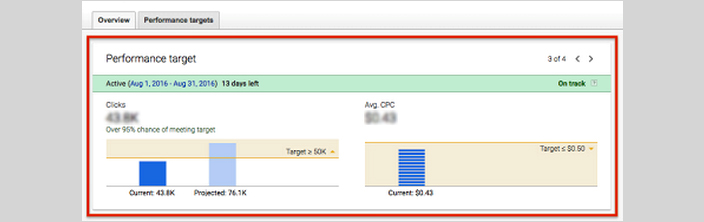
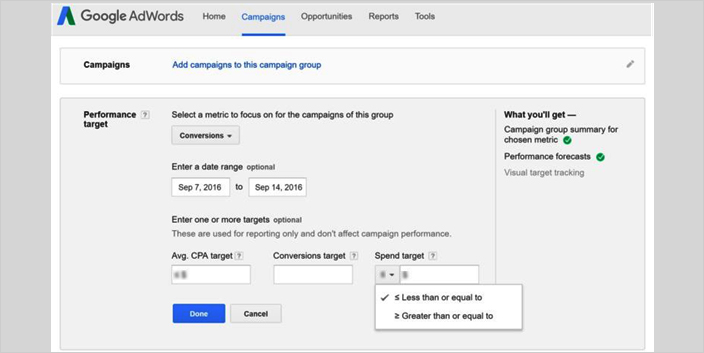
    • This new feature sets goals for the campaign and tracks all the clicks and conversions for the campaign group.
    • After combining performance targets with campaign groups, you set targets, clicks and conversions for Google’s network of market platforms.
    • The Product Manager of Google Adwords, Jon Diorio mentioned in his interview that with this new feature you can get to know the clicks or conversions along with the budget and the CPA or CPC you want to maintain.
    • With this, you can get to know how your campaign group is performing automatically in a single view.
    • Will be shown against the goals and performance that will be achieved at the end of the campaign period.

    performance_target @LogicserveDigi

    LogicSpeak: However, this feature won’t hamper the way Google serves ads to various users but will help to optimise campaigns by providing better evaluation tools.

  • What you need to know about AdWords?

    What you need to know about AdWords?

    Google Adwords @LogicserveDigi

    Working with AdWords will take you ahead in the race to rope in huge volumes of profits. Google AdWords is basically an advertising system of the Google where in the advertisers put bids on specific keywords so that their clickable ads appear higher in the hierarchy of Google’s search results. We all desire to reach the potential customer as fast as possible, but doing so involves a lot of strategic planning. With Google AdWords there is augmentation in website traffic, this enhances your prospects of tapping real customers.

    In the online business, there are basically just three kinds of keywords which a consumer enters into a search engine when he or she is searching for something online for purchase. They conduct a research first, and then they compare the products which are available in the market. Finally when they gather little information as regards the product they do a search with intention of buying the product. For instance, if a consumer is keen on buying a Bluetooth wireless headset, first of all he will want to do a little research about the same. He might type in the search engine words such as headset or wireless headset. In this process he will get to know about different kinds of headsets which are available in the market and he can make up his mind as to which he would want to go in for.

    The next step is doing a comparative study. He will read reviews of different brands which offer headsets such as in this case like Bose or Dre etc. Finally when he is convinced as which headset he would want to buy, he will type buyer’s keyword in the search engine. A buyer’s keyword encompasses specific details such as brand name, color, model, size or make of a particular product in question.

    It is prudent to bid on buyers’ keyword because this will lead to direct sales. A consumer enters this keyword only when he is 100%sure of purchase. Bidding on generic keywords will not augment the sales of your brand. For expense conscious bidding, it is advisable to go for cost-per-click (CPC) bidding as in this you have to pay when someone clicks on your ad. This will put a limit on your budget.

    Another valuable factor to be borne in mind as regards AdWords is to opt for dynamic keyword insertion.You do not have to write whole lot of ads, rather you can use a shortcut by putting {keyword} in ad. This can be applied in wide array of ways:

    • The headline
    • Display URL
    • The description lines
    • Destination URL

    LogicSpeak:

    It is actually not possible to create mobile only campaigns as desktop can never be excluded from the league of searches. So you cannot just cater to your mobile specific audience only.

    Previous Post: Mobile Ecosystem and Statistics

  • What exactly goes on in the ‘not provided’ keyword section?

    What exactly goes on in the ‘not provided’ keyword section?

    'not provided' keywords

    Google had announced back in Oct 2011 that it is taking steps which would not give out the information of the keywords being used to reach a particular site, for users who will use Google Search in the logged-in mode. This was bad for SEO, but then in Sept 23, Google did something even worse. It made all the keywords secret! Irrespective of the fact if the searcher is logged in or not, Google will not give out the keywords. So what exactly is ‘not provided’ keyword section? Let us go into the depth of the situation.

    What and Why

    First of all, this step is a measure directed towards better privacy of the searcher. When someone enters Google.com, they are directed to the https version of their country’s domain. If you have observed how Google directs you to the search results’ website, you would have seen that it doesn’t give the link of the website directly. When you click a result, it is directed via Google. So, Google has the full control over whether to give out or not give out the keyword to the sites to which the traffic is directed.

    This is good from a privacy point of view. Google’s primary aim has always been to deliver the best search results to its users. The placement of ‘Sign In’ on the upper right hand corner, is a clear indication that Google wants you to use all its services together. So, giving out the information as to which keywords searchers used to get their sites, is irrelevant as far as Google is concerned.

    Effect on SEO

    As far as SEO strategies go, you would be severely paralyzed since you wouldn’t know how user found your site i.e. which keyword was used to come to site. Modulating your campaign would be tough if you cannot check the traffic stats to know which one of them is paying off more. You would get the keyword data, from the traffic directed from other search engines. So, you would have to make do with a tiny amount of information.

    What’s the way around

    You can still monitor your traffic but the problem is you don’t know how they got there. There are some indirect methods:

    • Analyze in which page the users land the most. This would help you know what they were looking for.

    • Get the on-site data to know what exactly the searchers are looking for, once they reach your site.

    • AdWords are the only strategy to know if some keyword is really working or not. Google has no restriction on data regarding the traffic directed via the paid AdWords.

    LogicSpeak:

    ‘Not Specified’ keywords have now become a 100% reality. You have to devise more and more indirect techniques to know what sort of traffic you are getting. For the time being, there are other search engines which will give out the keyword information. But sooner or later, these will take the same stance as Google. So, better prepare yourself for a keyword blind SEO campaign!

    Previous Post: How to create an effective social media campaign