LS Staging

Category: Google Analytics

  • Google Analytics Updated with 4 New Powerful Features for Marketers

    Google Analytics Updated with 4 New Powerful Features for Marketers

    Google introduced the App + Web property for its analytics platform in 2019. This property combined the app and web data to provide unified reporting and analysis. The reports generated by this property uses a common set of metrics and dimensions for seamless integration of app and web data.

    While the App + Web property made it easier for the marketers to track their app and web data from a single dashboard, accessing detailed customer information and insights continued to be a hassle. The recent October 2020 Google Analytics update has introduced four new features to help marketers get detailed insights for making smarter decisions.

    Take a look at what these four new features are-

    1. Smarter Insights Using ML

    The machine learning models of Google can now alert marketers about the changing data trends. In other words, Google Analytics can now make use of the website data for identifying products that are in high demand as per the customer needs. With this feature, it will be easier for marketers to take measures and predict future actions of the consumers proactively.

    For instance, the new feature can calculate Churn Probability. This can help marketers by enabling them to focus on customers with a higher purchase probability. In the current scenario where businesses are cutting their marketing budgets, investing in customers who are more likely to make a purchase can help generate more sales even with a limited budget.

    2. Deep Google Ads Integration

    Google Analytics now has improved integration with Google Ads for more efficient cross-platform decision-making. For instance, marketers can now create custom audiences and deliver more helpful and relevant experiences to them every time they engage with their business.

    The improved integration provides marketers a better overall view of their marketing efforts, including Google Search, YouTube video views, email, social media, and other paid Google and non-Google channels.

    3. Customer-Centric Data Measurement

    The majority of the data measurements done by Google Analytics are based on the devices and platforms used by the customers. The recent update has a more customer-centric data measurement approach. It uses unique Google signals and multiple identity spaces for improved ad personalization.

    With this update, it is now possible for the marketers to know if a particular customer discovered their business through a web ad and then completed the purchase through their mobile app. In the longer run, this will provide marketers a holistic view of the entire customer journey and how the customers interact with their business.

    4. Improved Data Controls

    Even the data controls have been considerably changed to make them more granular. This is done to enable marketers to have improved control over how they want to manage and retain the collected customer data. This flexibility can be valuable for advertising as marketers can now decide whether or not they want to use customer data for optimizing ads.

    The current internet trend suggests that cookies or identifiers might get severely limited in the future. With improved data controls, it will be easier for the marketer to adapt to such changes in the future.

    Using the New Google Analytics Features

    The App + Web property, which is now known as Google Analytics 4 property, is already updated with these new features by default.

    Along with the existing properties, marketers can create a Google Analytics 4 property to access these four new features and future updates.

  • Everything That You Need to Know About Google Analytics Data Privacy Update

    Everything That You Need to Know About Google Analytics Data Privacy Update

    Google analytics has been a revolutionary tool to gain insights about user interaction with your website. The insights offered by Google analytics has motivated countless websites to revamp their content and layout, to form a better connection with the visitors.

    However, the analytics service has found itself in one or another controversy over the years, as the data privacy movement gains ground. This has found Google many times, failing to comply with data protection regulations like the General Data Protection Regulation (GDPR) or the California Consumer Privacy Act (CCPA). In a bid to comply with such regulations, Google introduced new updates to meet the regulations at par with the regulations in their latest announcement. This announcement is especially useful to businesses getting traffic from European countries and California.

    With this new update, marketers can now do the following to become more compliant with the GDPR or CCPA regulations;

    1. Disable Analytics Data Collection (from Web or App)
    2. Disable collection of Advertising Data (from Web or App)
    3. Disable Advertising Personalisation (from App and Web)

    Let’s examine the impact of these updates closely.

    Existing Compliant Features and Tools

    Google analytics reminded their users about settings available in their tools that make them GDPR compliant. The users were reminded to make optimal use of facilities like anonymizing IP, privacy controls, data sharing settings, and other features already available with them.

    More Authority Over Data

    The users now have much more authority on what to do with the data generated. The new data retention feature empowers you to decide for how long the individual Google Analytics data is stored until it is automatically deleted. By default, the data will get deleted after a period of 26 months.

    Also, Google Analytics now lets you delete the data of a user if they explicitly ask to delete their information.

    Updated Data Processing Terms

    Data processing terms provide you insights about how the data will be processed and with whom the data will be shared. Google has made considerable changes in its data processing terms to better accommodate European users as per GDPR standards. The updated document secures data privacy and highlights the responsibility of the users to intimate and seek consent from the visitors about the sharing of their data.

    GDPR-compliant Privacy Policy

    Google has made newer additions in its standard contract representing Google Analytics and Google Analytics Firebase as a ‘data processor’. This move is compliant to new norms established by the GDPR. However, the service becomes a ‘shared controller of data’ if you authorize Google Analytics to share your user data with Google Ads.

    While some of these updates make the data collection system a little simpler, some make it a bit more complex for the users to execute. The data deletion mechanism, although empowers the visitors, turns the matter more complex for marketers. Since you can not delete the data for a single user, you need to deploy Google Analytics User Deletion API in your code to delete the data of an individual visitor.

    Long Way to Go

    The introduction of a newer update takes Google Analytics a few steps forward towards compliances set up by GDPR. However, the analytics service still has a long road to cover. Google uses visitor’s data from Google Analytics to make their services better. This can be seen as a privacy breach by many. Also, the agreement between IAB Europe and Google takes the data consent system in the right direction. However, it still misses establishing any reliable framework for handling analytics data.

  • The Starter’s Guide to Using Google Data Studio

    The Starter’s Guide to Using Google Data Studio

    What is the Google Data Studio?

    It’s a free data visualization tool from Google. Launched in beta mode in 2016, it came out of the beta stage in October 2018. The simple drag-and-drop interface makes it easy to create complex charts and reports, without the need for any technical know-how.

    Using the Google Data Studio, you can create interactive and engaging data reports. The most significant benefit of Google Data Studio is that it lets you pull in data for reports from various sources like Google Ads, Google Sheets, Google Analytics, Google Search Console, MySQL, YouTube and more.

    The Google Data Studio lets you visualize your data in various forms – graphs, charts, pivot tables, bar graphs, pie charts, heat maps, scatter charts, scorecards, geo maps, and more. Additionally, you can customize the report in several ways. Change shapes, background colours, fonts, add logos/images, object properties and more.

    In simple words, the Google Data Studio is a powerful business intelligence tool that connects all your separate business data sources to create beautiful, interactive reports.

    Why use it?

    • It’s free
    • It is intuitive and easy to use
    • Easy to create customized reports
    • A great visual tool for data analytics
    • Easy to connect with other Google suite products
    • Easy to share and collaborate
    • Reliability, trust, and scalability of Google

    A Quick Tutorial to Getting Started with Google Data Studio

    Step 1: Login to Google Data Studio

    Start by clicking on datastudio.google.com. Login using the Google account you use for Google Analytics. The interface of Google Data Studio is similar to other Google tools like Google Drive. The data studio will store only documents created using it. The data is divided into two formats:

    • Reports and
    • Data sources

    Step 2: Create a Report

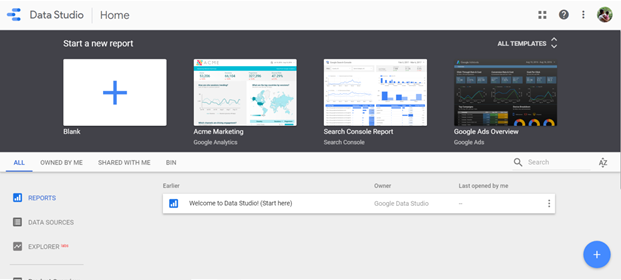
    In the reports tab, click on the “+” button at the top left or bottom right. This opens a blank report. You can also make use of the various available templates that pull in data from the Search Console, Google Analytics, Google Sheets, Google Ads, or Google BigQuery.

    Image via Google Data Studio

    Step 3: Connect Data

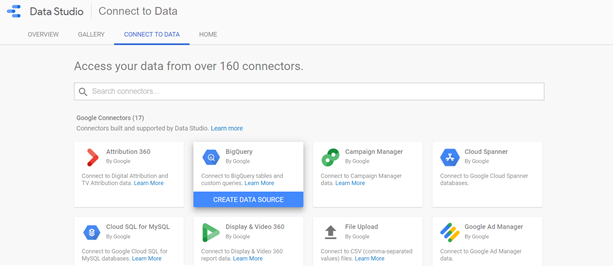
    To load data from a source, click on the Data Sources tab, and choose, “Create New Data Source,” or click on “Connect to Data,” option at the bottom. You can pull in data from over 160 connectors – 17 Google Connectors and over 135 Partner Connectors.

    Image via Google Data Studio

    Once you have chosen the preferred data source, you need to connect the Data Studio to the Google Analytics account. Next, select account ?Property ? View. This opens a spreadsheet of metrics or fields. Click on the “Add to Report” button at the top-right corner of the screen, to integrate data from your chosen data source to report. You can also add data from multiple data sources.

    Step 4 – Customize the Report

    The report is a blank grid that you can add several types of visualizations. Google Data Studio lets you customize the theme and layout of the report.

    You can visualize data in various forms – bar charts, pie charts, combo charts, bullet charts, scatter charts and more. Additionally, you can also add images, shapes, and text to the report. Once you have chosen the visualization, drag it to its preferred size and release it on your report. Your data visualization appears on the chart immediately.

    Use the right-hand sidebar of the report to edit your visualization. You can change the date range, metrics, dimensions, data source, sort data, filter and more.

    Data Analysis and Presentation Made Easy with Google Data Studio

    With Google Data Studio, it’s quite easy to configure and present your data in various ways. It makes it easy to analyze and extract insights from your data, thereby helping you enhance the efficiency and usage of your data.

    Here’s a recap of all that you can do with Google Data Studio:

    • Visualize data using customized charts and tables
    • Make reports using data from a variety of sources
    • Share your insights with your team, your clients and others
    • Collaborate on report creation with the rest of your team
    • Speed up the report creation process using in-built templates