LS Staging

Category: Digital Marketing

  • The Starter’s Guide to Using Google Data Studio

    The Starter’s Guide to Using Google Data Studio

    What is the Google Data Studio?

    It’s a free data visualization tool from Google. Launched in beta mode in 2016, it came out of the beta stage in October 2018. The simple drag-and-drop interface makes it easy to create complex charts and reports, without the need for any technical know-how.

    Using the Google Data Studio, you can create interactive and engaging data reports. The most significant benefit of Google Data Studio is that it lets you pull in data for reports from various sources like Google Ads, Google Sheets, Google Analytics, Google Search Console, MySQL, YouTube and more.

    The Google Data Studio lets you visualize your data in various forms – graphs, charts, pivot tables, bar graphs, pie charts, heat maps, scatter charts, scorecards, geo maps, and more. Additionally, you can customize the report in several ways. Change shapes, background colours, fonts, add logos/images, object properties and more.

    In simple words, the Google Data Studio is a powerful business intelligence tool that connects all your separate business data sources to create beautiful, interactive reports.

    Why use it?

    • It’s free
    • It is intuitive and easy to use
    • Easy to create customized reports
    • A great visual tool for data analytics
    • Easy to connect with other Google suite products
    • Easy to share and collaborate
    • Reliability, trust, and scalability of Google

    A Quick Tutorial to Getting Started with Google Data Studio

    Step 1: Login to Google Data Studio

    Start by clicking on datastudio.google.com. Login using the Google account you use for Google Analytics. The interface of Google Data Studio is similar to other Google tools like Google Drive. The data studio will store only documents created using it. The data is divided into two formats:

    • Reports and
    • Data sources

    Step 2: Create a Report

    In the reports tab, click on the “+” button at the top left or bottom right. This opens a blank report. You can also make use of the various available templates that pull in data from the Search Console, Google Analytics, Google Sheets, Google Ads, or Google BigQuery.
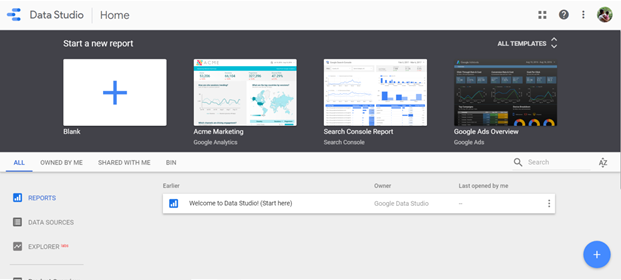
    Image via Google Data Studio

    Step 3: Connect Data

    To load data from a source, click on the Data Sources tab, and choose, “Create New Data Source,” or click on “Connect to Data,” option at the bottom. You can pull in data from over 160 connectors – 17 Google Connectors and over 135 Partner Connectors.
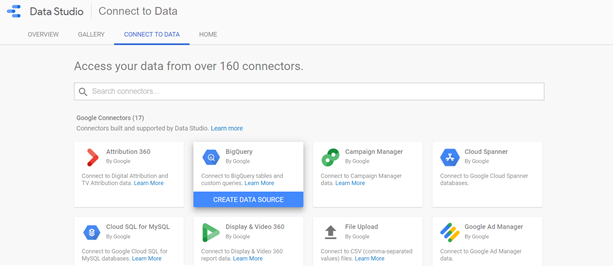
    Image via Google Data Studio

    Once you have chosen the preferred data source, you need to connect the Data Studio to the Google Analytics account. Next, select account ?Property ? View. This opens a spreadsheet of metrics or fields. Click on the “Add to Report” button at the top-right corner of the screen, to integrate data from your chosen data source to report. You can also add data from multiple data sources.

    Step 4 – Customize the Report

    The report is a blank grid that you can add several types of visualizations. Google Data Studio lets you customize the theme and layout of the report.

    You can visualize data in various forms – bar charts, pie charts, combo charts, bullet charts, scatter charts and more. Additionally, you can also add images, shapes, and text to the report. Once you have chosen the visualization, drag it to its preferred size and release it on your report. Your data visualization appears on the chart immediately.

    Use the right-hand sidebar of the report to edit your visualization. You can change the date range, metrics, dimensions, data source, sort data, filter and more.

    Data Analysis and Presentation Made Easy with Google Data Studio

    With Google Data Studio, it’s quite easy to configure and present your data in various ways. It makes it easy to analyze and extract insights from your data, thereby helping you enhance the efficiency and usage of your data.

    Here’s a recap of all that you can do with Google Data Studio:

    • Visualize data using customized charts and tables
    • Make reports using data from a variety of sources
    • Share your insights with your team, your clients and others
    • Collaborate on report creation with the rest of your team
    • Speed up the report creation process using in-built templates
  • Survey: How likely are you to use the recently launched YouTube Music app?

    How likely are you to use the recently launched YouTube Music app?

    Here’s a look at last week’s results where we asked users what makes the marketing for Avengers: Endgame so effective?

    The results are interesting as you can see in the chart above.

    • If we go with what the numbers speak, about 57% of people believe that speculative content, popularity of #Avengers on social media and nostalgic feeling of previous films have contributed in making the film effective
    • 16% of people believe that the #Avengers created a lot of buzz on social media for the movie
    • Marketers can create a 360-degree approach where digital can play a key role in creating excitement and buzz around movie launches


  • The Future of Email Marketing is not Just Mobile-First but Interactive too

    The Future of Email Marketing is not Just Mobile-First but Interactive too

    It’s no surprise that in 2019, the time spent on mobile devices has increased significantly as compared to desktops and laptops. As a business owner, if you aren’t convinced yet of mobile-friendly email design, here are some compelling statistics to persuade you.

    • The global Email Benchmark Report of 2018 reveals that nearly 56% of all emails are now accessed through the mobile device.
    • A study by Deloitte states that an average mobile user checks his/her phone 47 times in a single day. The number jumps even higher to 75, for people between the ages 18 to 24.
    • Another study by Dscout reveals that smartphone users interact (clicks, swipes, taps, type, etc.) with their mobile devices 2617 times a day! That’s a massive amount of screen time.

    It’s no surprise that mobile-first is no longer an option but a mandatory choice. What more, businesses that don’t adopt a mobile-friendly design don’t just miss out on sales, but lose out on valuable customers. A market study conducted by Litmus and Fluent revealed that nearly 45% of customers unsubscribe from promotional emails if the emails don’t display properly on their smartphone. And, once a user is gone, it’s a huge challenge to get them to re-subscribe.

    Now, that you’ve understood the critical importance of keeping your emails mobile-friendly, here are some best practices to follow.

    1. Keep the Mails Short

    102 – This number should be engraved in your mind. If an email is more than 102kb, then Gmail will clip it and ask users to download the rest. Users are unlikely to read a message that isn’t downloaded in full. They would consider it as spam, broken or simply delete it.

    Mobile browsing is all about convenience and speed. When you make users take an extra step, they are likely to feel annoyed. Thus, keep your emails light and crisp.

    2. Single Column Triumphs

    Single column layouts are the best ways to present content for mobile devices. When you use more than a single column, users will have to adjust their screen settings to read the mail completely. As mentioned above, this needs users to put in extra efforts.

    Also, remember that most readers browse emails on the go – while commuting to work, walking to lunch, etc. When you use single columns, it’s easy for readers to browse emails single-handedly using their thumbs alone, thereby increasing potential engagement.

    3. Remember you are Aiming for Taps and Not Clicks

    While this is obvious, most email designers miss out on this crucial element. While designing CTA buttons, make sure that it has sufficient space to make it easy for users to tap on it. Avoid placing several options right next to each other. Provide some breathing room for users to avoid frustration, and avoid tapping on wrong links.

    4. Time your Emails Right

    A general rule of thumb to follow here is – make sure your emails follow the sun. Instead of sending your emails at the same time to all your recipients, schedule emails according to varying time zones.

    You don’t want your users to be woken up by the annoying buzz of an incoming email. Also, you don’t want your emails to get lost in inboxes, by the time your user checks their mail. Track data to find the best time to send emails and schedule emails accordingly.

    5. Enlarge Fonts and Make CTA Prominent

    Small text that can be read on desktops is not easily read on tiny mobile screens. Hence, ensure that you use fonts larger than that you use for traditional fonts. Another trick here is to highlight the key parts of the message with larger fonts to help capture user attention.

    Finally, you want your readers to take certain action after reading your emails. So, make sure to keep CTAs prominent. Use large, thumb-tappable buttons that are easy to spot and easy to tap on.

    The Future is Mobile

    The recent announcement of  AMP for emails from Google has got digital marketers excited. The AMP offers rich features and enriching experiences for the inbox. Right now, Gmail is the only inbox where users can receive AMP messages, with interactive experiences. However, it’s sure to come to other inboxes in the next few months.

    The future is mobile, and it’s getting interactive. Mobile email designers should up their game to stand out.

  • Customer Acquisition Vs. Customer Retention – 5 Best Practices to Increase Revenues

    Customer Acquisition Vs. Customer Retention – 5 Best Practices to Increase Revenues

    One of the most heavily debated issues in marketing circles is – customer acquisition vs customer retention. Here, we discuss the acquisition vs retention to help you choose the right approach for your business.

    The Growth Equation

    To fully understand acquisition (getting new customers) versus retention (getting old customers to come back and build loyalty), you need to understand your brand’s growth and revenues.

    Here’s an equation to compute that:

    Monthly Growth Revenue = (No. of new customers acquired in a month * Average spend for each new customer) + (No. of returning customers in a month * Average spend for each returning customer) + (No. of resurrected customers in a month * Average spend for each resurrected customer)

    You need to understand this growth equation to decide, which category of customers matter the most for your business. Here are some best practices to help you make the most of customer acquisition and retention.

    1. Identify what “Customer” means to your Business

    Very often, businesses overlook the crucial step of defining what customers mean to their business and how to translate it to set the goals of their search campaigns. The definition of a customer varies from business to business. For instance, some enterprises define customers as someone who purchased in the last month, while others define customers as visitors who bought at some point.

    For example, two customers purchased from you in the last month. One customer searches for your product using your brand name, while the other customer searches using a generic term. So, should you treat both these customers similarly or use different marketing strategies to acquire them? These are some aspects to consider while defining customers.

    2. Understand the Purchase Path of Customers

    To understand whether the amount you spend on acquiring or retaining a customer is worth it, you need to know your customer’s purchase path. Only when you are aware of their purchase pattern, you can justify the heightened costs of acquiring the customer.

    Remember that most customers interact with your brand using multiple channels like – direct, search, email, affiliates and more. So, it’s essential to have a multi-channel attribution model to monitor and track performance across channels.

    3. Create Tailored Campaigns to Support Different Audience Segments

    Once you have identified your customers and tracked their purchase paths, segment your ad campaigns for each category of customers. Use features like RLSAs (Remarketing Lists for Search Ads) and Customer Match, etc.

    Here are a few examples of how you can segregate audiences:

    • New and un-cookied customers (prospects) – This list consists of audiences who are un-cookied and have never purchased from you ever before.
    • New and cookied customers – This list includes customers who have visited your site, but have not made a purchase with you in forever or within a specific period, say in the last 180 days.
    • Returning customers – This includes audiences who have purchased within the last 180 days or so.

    You can also further divide customers into dormant, high-value, high lifetime value, first-time buyers and so on.

    4. Define Unique Goals for each Audience Segment

    Once you have segregated audiences, the next step is to assign a goal for each audience bucket. The goal should be aligned with the campaign. Also, remember that there is a direct relationship between customer return and revenue. If you are solely focused on returning customers, then the return revenue will be restricted.

    Generally, it costs more to acquire new customers than to retain existing customers. It costs 5x more to acquire new customers than to retain existing ones, according to a market survey.

    5. Track KPIs for Success

    Here are a few questions you must ask yourself as you evaluate your marketing campaigns: are we hitting return goals? Are new customers similar to your ideal customer profile? Are you increasing the total number of new customers acquired, while boosting profit levels? Have you managed to reduce the cost of returning customers? And so on.

    Which one to Focus – Customer Acquisition vs Customer Retention?

    It all depends on your growth equation. You must consider available resources, time and goals and decide what is best for your business. Remember that while it may make sense to focus on customer retention now, a few months down the line, once you have stabilized existing customer relationships, you may shift your focus to customer acquisition.

    Finally, to build a profitable business, you must focus on both and make incremental tweaks to your marketing strategies every few months, depending on available data.

  • DOOH Advertising all set to emerge as a huge influencing factor in 2019 and beyond

    DOOH Advertising all set to emerge as a huge influencing factor in 2019 and beyond

    Online advertising is a huge influencing factor, yet big brands when they want to announce new product launches or introduce new campaigns, still make use of digital out-of-home billboards.

    Here are a few examples to illustrate the continuing relevance of digital out-of-home (DOOH) billboards in the era of online ads. Alex O’Hanian, the co-founder of Reddit, announced in mid-2018 that Reddit had made a significant investment in AdQuick, a digital billboard company. Similarly, Netflix purchased substantial assets from a popular billboard company in LA in 2018.

    What is DOOH?

    Digital Out-of-Home advertising refers to any visual advertising media found outside the audience’s home. This includes digital billboards on streets, digital signs displayed on bus shelter, airport transit areas, train stations and more.

    Some of the biggest brands including Apple, Amazon, Coca-Cola, HBO, McDonalds and several others, regularly spend on DOOH campaigns. A recent example is Apple’s “Shot on an iPhone” campaign. The campaign invited iPhone users to send in creative photos clicked on their mobiles. The best ones were displayed on static and digital billboards across the country.

    Here, we illustrate the increasing relevance of DOOH in 2019:

    DOOH presents a giant canvas for the digital generation

    Outdoor DOOH screens are now seen as an extension of the social media marketing. Social media feeds are increasingly cluttered, and brands lose their prominence amidst all the noise. This is why, by displaying curated Instagram posts on giant digital screens located outside prominent gathering spaces like concerts, sports events, it morphs into an appealing and attractive canvas for the modern day generation Z.

    Additionally, brands can improve user engagement by displaying selected posts from users. This is highly effective, as users feel that this is a great way to engage with the brand’s culture.

    DOOH offers a connected screen on for all surface

    With 5G expected to be rolled out in 2019, advertisers believe that it will now be possible to convert any flat surface into a connected screen. For example, Vengo digital signage-focused vending machine machines operator is using the screens on vending machines to display ads that are unrelated to what the vending machine offers. Advertisers are using DOOH to engage with customers in unique locations like gyms, office buildings and more.

    DOOH is becoming more audience-centric

    Just like the traditional TV commercials, DOOH is not becoming more audience specific. Take the example of the campaign for JetBlue, run by OUTFRONT. The campaign included real-time flight schedule data and real-time traffic, which was displayed on digital billboards at Time Square, NYC. These ads were customised based on third-party data.

    Additionally, advertisers are also customising DOOH ad-run times based on DOOH locations. For instance, ads displayed on DOOH screens on NYC subway platforms run for an average of four to eight minutes. This is the average time between two subway trains and audiences are likely to spend this waiting time watching DOOH screens on the platform.

    DOOH screens have also evolved to include geo-fencing. This enables mobile devices within the target location to be coordinated along with the bigger displays. This is a way for advertisers to pinpoint audiences when they complete a purchase.

    The rise of viewing sheds and interactive DOOH ad campaigns

    Place Exchange, a DOOH exchange firm recently launched “viewing sheds,” around DOOH screens, using third-party data. This way, advertisers can identify accurately whether mobile devices in the nearby location visit a particular website after seeing the ads promoted on the giant screens.

    SurveyMonkey recently ran a DOOH campaign which was displayed in Times Square. The giant screens displayed images of four influential celebrities, Serena Willams, Arianna Huffington, Jeff Weiner, and Draymond Green. The ads invited opinions from audiences. Viewers nearby could take part in an online survey, by scanning the QR codes displayed near the massive screens.

    DOOH has evolved into more than digital billboards

    The Era of DOOH advertising is just beginning. With newer technologies like AR and more, DOOH advertising is all set to become the talk of the town. According to the IAB (Interactive Advertising Bureau), DOOH advertising in the US reached a record high of $7.4 billion in 2018.

    With endless screens, innovative displays and creative ad campaigns DOOH will become a huge influencing factor in this era of digital advertising.

  • The Adobe Experience Platform Goes Global

    The Adobe Experience Platform Goes Global

    Adobe recently announced the global availability of Adobe Experience Platform, proclaimed as the industry’s first platform dedicated for customer experience management. An open, cloud-hosted, extensible platform, the Adobe Experience aims to provide enterprises with real-time customer data using advanced technologies like AI and machine learning.

    In its announcement, Adobe also revealed that some of the biggest brands in the world including Verizon Wireless, The Home Depot, Best Buy, and Sony Interactive Environment are already using the Beta version of this new platform.

    What does Adobe Experience Platform offer?

    It’s a complete infrastructure that aims to provide marketers with all the tools required for delivering the best customer experience. Not to be confused with the existing Adobe Experience Manager, a stand-alone tool that is part of the Adobe Marketing Cloud. According to information released by Adobe, the Adobe Experience Platform is intended to work with other existing Adobe tools like the Analytics Cloud, Commerce Cloud, Marketing Cloud, and Advertising Cloud.

    Adobe believes that meeting the data challenges of today requires a cloud-based architecture with real-time customer data powered by machine learning and AI. Adobe Experience Platform is built for capturing, processing and acting on data in real-time, thereby providing enterprises with the ability to deliver relevant and rich experiences to customers, as stated by Abhay Parasnis, the CTO and Executive Vice President of Adobe.

    Highlights of the Adobe Experience Platform:

    • Massive and rich data pipeline – The Adobe Experience Platform can read data from multiple sources across global networks, thereby updating customer profile in real-time. Users can choose from more than 50 customer experience schemas to represent the data.
    • Compliance with Data Regulations and Policies – The platform also contains a set of tools that ensure data compliance in accordance with all latest regulations and policies like the GDPR. Additionally, since the platform is open, business IT teams can add customised data policies on top of the existing policies in the platform.
    • Real-time Personalisation – The Adobe Experience Platform powers the CDP (Customer Data Platform), which helps to leverage data to activate real-time customer profiles across channels. This helps in intelligent segmentation of customers and enhance the overall customer experience. Businesses can use the Adobe Sensei AI to transform these insights into results.
    • Intelligent decisions which translate to real-time actions – By using the Adobe Experience Platform, businesses can power their customer intelligence journey using the Adobe Sensei (the AI tool from Adobe).
    • Adobe Sensei – The AI services of this platform helps brands deliver consistent customer experiences on the right channels at the right time.
    • Open – The Adobe Experience is an open platform and is powered by a common semantic data model. As part of the Open Data Initiative announced by the three big brands in the industry, the Adobe XDM can be integrated with SAP’s CDM and Microsoft’s CDM.
    • Other Features – Apart from these main features, Adobe has several other features under the hood including view-through data in Analytics, an extension of first-party data into social platforms, Audience Manager and more.

    What’s the Impact of this Release?

    Adobe is one of the dominant players in the corporate enterprise systems space. And recently, Adobe acquired two popular platforms – Magento and Marketo. With this release, it looks like Adobe has ambitious plans to emerge as the number one ecosystem for enterprises.

  • WhatsApp Business App Introduces New Features to Desktop and Web Platforms on Its First Anniversary

    WhatsApp Business App Introduces New Features to Desktop and Web Platforms on Its First Anniversary

    While Facebook Messenger holds the coveted title for the most popular messaging app in the US and a few other countries, WhatsApp is the most popular messaging app in the world. With over 1.5 billion active users, WhatsApp is the most preferred messaging app in Great Britain, South Asia, South America, and Africa.

    The problem for Facebook, the parent organisation of WhatsApp, is that it’s harder to monetise on the popularity of this app. Facebook is known to earn ad revenues from its other popular platforms – Facebook and Instagram. However, messaging is not easy to monetise. After all, users of WhatsApp aren’t likely to prefer feed-style ads in their private messaging conversations.

    The launch of WhatsApp Business

    Facebook introduced WhatsApp Business last year in an attempt to monetise the popular messaging app. The WhatsApp business version has various tools and features that make it easy for small and medium businesses to interact with existing and potential customers. These tools make it easy to sort, respond and automate message replies.

    Image via Google Play

    Launched early last year, the WhatsApp Business app is free and is available for download for Android. In a recent post on its blog, WhatsApp revealed that there are over five million businesses all over the world, using WhatsApp Business.

    To celebrate the first anniversary of the launch of the Business app, WhatsApp has rolled out several new features, specifically for the desktop and web versions of the app.

    Here’s a list of the new features:

    – Quick Replies: As the name implies, these are quick replies to common questions asked by your customers. To send an immediate response, tap the “/” symbol on your keyboard, select from a set of predefined quick replies and click send.

    This is of great assistance to businesses as most customers have similar queries. For instance, if you run an apparel brand, instead of typing sizing specifications to each customer, you can use this shortcut.

    – Labels: For easy organisation. You can now organise your chats and contacts with names, so it’s easy for you to retrieve them again when needed.

    – Chat List Filtering: This provides an easier way to manage chats using filters. Some of the top-used filters include groups, unread messages, broadcast lists and so on. This helps you to pick out and respond to particular chats efficiently.

    WhatsApp states that the availability of these features on desktops and web platforms will make it easy for businesses to reply and respond to their customers, rather than using the limited space of a mobile device.

    Why these changes matter for businesses?

    As you can see, WhatsApp is putting in a lot of efforts to appeal to business users. With more and more businesses including WhatsApp as a preferred mode of communication, these new features make it easy for enterprises to streamline customer communications from a desktop or laptop.

    The best part – WhatsApp Business is entirely free to use, just like the regular WhatsApp Messenger app. Other tools like Greeting messages, away messages, and auto-replies are only available on WhatsApp Business and not the regular WhatsApp Messenger app.

  • Customer-Centric Marketing – The Need of the Hour for B2B Businesses in 2019 & Beyond

    Customer-Centric Marketing – The Need of the Hour for B2B Businesses in 2019 & Beyond

    If you think that “customer centricity” doesn’t matter for B2B businesses, then you are missing out on crucial opportunities for growth and development. Here are a few reports that reinforce this point:

    With that said, only 12% of B2B marketers consider themselves as “effective” in delivering a compelling customer experience.

    Why should B2B businesses migrate to a customer-centric approach?

    In today’s digital world, customer experience is crucial. The B2B landscape is rapidly changing. Apart from product price and quality, B2B customers are looking for enhanced CX (Customer Experience). With increasing competition in the B2B market space, today’s customers are likely to shift their loyalties if they don’t get the service they require.  

    Here are a few points to keep in mind to deliver customer-centric marketing in B2B

    1. Know Your Buyers

    To provide your customers with enhanced and quality customer experience, you should first understand who you are working with. The sad truth is that today’s B2B customers are hesitant to interact with B2B salespersons.  

    As per a Forrester report, 59% of B2B buyers state that they prefer conducting sales research online, instead of dealing with a sales rep. This is because they feel that the reps are more likely to push their own agenda, instead of trying to solve the customer’s problems.

    Hence, it’s imperative that you understand the unique needs of each B2B buyer to offer them an enhanced CX. Make use of the latest data analysis tools to know more about your customers. Learn the critical factors like – the industry of the customer, their geographic focus, their point in the sales funnel, and what problems are they looking to solve.

    By understanding your customer’s goals and objectives, you are likely to provide a successful customer experience that delivers and converts.  

    2. Build a Customer-Centric Vision from Top-down

    You can score on CX at all points of customer interaction. Right from initial sales calls to delivering the product, everything is part of the customer experience.Create a customer-centric approach for your entire business. Every interaction the customer has with your business should be positive and make them feel valued.

    Excellent customer experience doesn’t happen by accident. It’s intentional and takes effort. Empower your employees to deliver an enhanced customer experience at all interactions with the customer.

    3. Deliver Personalised Experiences

    Just like B2C customers don’t want to be sold the same thing like everyone else, B2B customers hate businesses that push “one-size-fits-all” solutions.With increased competition in the B2B market space, an easy but efficient way for your B2B business to stand out is by – offering personalised services.

    Personalisation should occur at all stages in the customer journey. From establishing customer information to offering them the best product recommendations, customisation must be at the focus at all times.

    4. Embrace New Technology

    Today’s B2B customers are highly tech-savvy and roughly more than 73% of B2B buyers today are millennials or digital natives who start their company’s purchase by searching the internet. It’s essential for B2B businesses to modernise their marketing by using the latest technologies like AI, machine learning, big data and more. This helps you gain a competitive advantage over your peers.

    Using chatbots to interact with customers is a great way to ensure that customers receive the relevant and required information instantly. Work on building your database to offer customers tailored product and service recommendations.

    The possibilities of integrating new technologies in B2B marketing to deliver customer-centric experiences are endless. Keep a pulse on new technology and stay ahead of the curve.  

    5. Offer a Consistent Experience

    The backbone of delivering a delightful B2B customer experience is consistency. Consistency is not repeating the same thing over and over again in all your marketing campaigns. Instead, consistency is about delivering a uniform CX at every point in the customer journey. Consistency helps B2B customers recognise and connect with your brand.

    It’s Time for B2B Marketers to BecomeCustomer-Centric

    B2B marketing today is at crossroads and is rapidly evolving. As a B2B business, it’s essential that you take the right steps on delivering positive customer experience, and focus on becoming a customer-centric organisation, to stay ahead of the curve in 2019 and beyond.

  • Google is Pulling the Plug on the Not-So-Popular Small Business Community Message Board

    Google is Pulling the Plug on the Not-So-Popular Small Business Community Message Board

    Last year, Google announced that it was shutting down Google Plus, the social network from the search engine giant by the end of August this year. Following this announcement, Google recently shared another closure message.

    The Small Business Community Message board will be discontinued and become inactive after 16th January 2019. This announcement was made public in an official release from Google on 2nd Jan.

    Google in the announcement expressed their gratitude to members for being a part of this community board. It also stated that it was a great journey, and their insights, tips, and enthusiasm shared by members over the years was the reason for the great journey.

    What is the Small Business Community from Google?

    As the product name implies, it was a virtual space where small business owners could interact with other small business owners. They could share information, tips,insights with each other, while also organising meet-ups using the platform.

    If you are hearing about this platform for the first time, then it’s because that the small business community wasn’t available globally. It was restricted to users from just a few cities in the US.

    The project never made it out of the Beta stage since its launch in 2014. Since the project never found many active users, since the beginning, it’s possible that Google didn’t expand it beyond the Beta stage and the pilot cities.  

    What does the Small Business Community from Google Do?

    Initially, the Small Business Community was set up as a community within Google Plus. It’s an open-to-all platform, and you could join it using a Google account. Once on the platform, you could connect and interact with other small business owners in your area.

    Initially, the community had over 8000 members and offered daily inspirational posts and tips, relevant to small businesses. Weekly training sessions, Hangouts with a team of trusted advisors from Google offering digital expertise for small businesses was initially offered.

    Additionally, the platform also offered Helpouts. These are one-on-one video calls that helped small business owners connect with experts. The Helpouts offered assistance on a wide array of topics ranging from – bookkeeping, QuickBooks,website reviews, WordPress, YouTube strategies, and more.

    Some Helpouts were free, whereas, for others, users had to pay a consultation fee to the expert. Small business owners could check qualifications, reviews, and expertise of the expert before choosing them. Additionally, users could quickly see when an expert was available, thereby making it easy to schedule a session. 

    What’s the Current State of the Community?

    The Small Business Community from Google currently doesn’t have many active users. Other than a few comments regarding the closing post, there isn’t much activity in the community.

    What does this mean for Google?

    The shutting down of the Small Business Community drives another nail into Google’s attempts to make it big in the social world. The other notable closure is Google+, which is scheduled to be officially pulled down a few months later.  

    Why was it shut down?

    With the increase in social networks like LinkedIn, Facebook and others, today small business owners can instantly connect and interact with other small business owners, using these platforms. The failure of the Small Business Community from Google to provide an innovative and unique solution for addressing the specific challenges of small business owners is likely the reason for it from not gaining popularity.

  • New Auto Spam Detection Feature from Google Keeps Your Mobile Text Inbox Spam-free

    New Auto Spam Detection Feature from Google Keeps Your Mobile Text Inbox Spam-free

    No one loves to hear the notification of an incoming text message, only to find that it’s yet another spam message. There are indeed apps that offer you protection from spam on your Android mobile phones.

    Now, Google is unveiling a feature that offers inbuilt spam protection for your Android messages. After six months of working on the feature, Google has started rolling out the spam protection feature for Messages for its Android users. A few Android users noted that they saw a new prompt with the message, “New! Spam Protection,” as soon as they open the Messages inbox on their phones.  

    Automatic Spam Detection from Google

    It was rumoured for a while now that Google has been working on an “automatic spam detection feature” for Messages (earlier known as Android Messages). This rumour got traction when a support page for the feature was released along with version 3.6 of the Dark Theme a few months back.

    How Does this New Feature Work?

    Earlier, it was possible only to manually block spam messages, just after you receive a message from a spammer. Blocking a spammer meant they could no longer send you a text message. With, automatic spam protection, your messages feature blocks spam directly, with no feedback from the user.

    Image source: Xda-developers

    When this feature is enabled, information about the received message is sent to Google. Google, then uses this information to block spam from your mobile inbox in the future.

    If you are worried about privacy, Google assures you that it doesn’t track any personal information like your phone number or even the content of the message. What it tracks is statistical data to detect whether the incoming message has commonalities with other spam messages. It then uses this info to identify whether a particular message is spam or not.

    Even, when this new feature debuts, you will still be able to block spam messages manually.

    Is this Feature Available for All?

    Right now, it appears that this feature is rolling out using a server-side switch in a phased manner. Users, who have this feature, will notice the above “prompt message” as soon as they open the Messages app.

    When you click on “Learn More” on the above prompt, you can see statements from Google assuring that it doesn’t monitor the content of your message. The search giant only collects information about spam messages, so that it can improve its ability to detect spam in the future.  

    Can you Turn off Auto-Spam Detection?

    To disable/enable the Spam Protection feature, head to the Advanced section of your mobile settings.  

    What to do, if you don’t have this Feature Yet?

    Since this is a server-side roll out, there’s nothing you can do. Most users will get this feature in the next few days or weeks.  

    Google’s Move to Minimise “Android”

    Google has always maintained that the Messages app is the primary form of communication for its users. Recently, Google announced that it’s shifting the Messages web app from Android.com to Google.com. Also, Google changed the name of the ‘Android Message’ app to ‘Message’. Experts see these moves by the search giant to reduce the use of the term “Android” among its vast user base.