LS Staging

Category: Digital Advertising

  • News:Chinese investors pour funds into the Indian digital start-ups

    News:Chinese investors pour funds into the Indian digital start-ups

    China invests in India's digital startups @LogicserveDigi

    For many years, Investment from China was only 0.47% ($1.2 billion) of the total FDI inflow in India between the years 2000-2015. The investment flow from China remained a hostage to the security concerns though it was one of the India’s largest trading partners in 2008 surpassing the US.

    However, looking at the recent announcements, there is a complete overhaul in this situation. Wanda, the largest commercial real estate developers in China, announced $10 billion worth investment in Haryana. The largest carmaker in China, SAIC Motor, has proposed to purchase the GM’s Gujarat facility. Around 100 SME’s in China have pledged investments worth $1 billion.

    At the start of the New Year, Ctrip, China’s online travel company took a strategic stake in Baidu and Makemytrip, also unveiling their talks with several India start-ups for funding.

    Frank Hancock, the managing director at Barclays said that the Chinese internet companies have acknowledged the high potential the digital start-ups in India has and there is quite likeness in the experiences and learning curves.

    China’s investment in India is estimated to be $5 – $10 billion in 2015-2018. From 1st January 2015 to 22nd January 2016, Asian investors shortlisted 48 Indian start-ups to provide financial support. 22 companies from countries that include South Korea, Japan, Taiwan, Singapore, Malaysia, and China partook in the round of funding of $3.4 billion worth during this time. The major Chinese investors include Alibaba, Wanda, Baidu, SAIC, Tencent Holdings and SAFE.

    Reference: https://goo.gl/gUu6NL

  • Can Ads talk to you?

    Can Ads talk to you?

    Well with the recent twitter announcement, it seems like we’ve stepped into the year of greater user experience and brand engagement. Twitter newly introduced a concept called as the conversational ads which aims to surge the brand presence a notch higher. These promoted tweets in a new avatar emphasize mainly on customer engagement with modified hashtags to create a significant brand presence. These conversational ads, pioneered by twitter, encourage a dialogue between the consumer and a company to help strengthen their brand presence.

    With these ads, brands can conduct a poll with two different answers to choose from, each of them integrated with customizable hashtags and a call-to-action button for a greater user engagement.

    Now there is much more to scrolling down on ads and just ignoring it. This feature lets you engage, share and promote ads. A simple tap on the call to action button will open up a tweet composer which will include the pre-populated brand message along with the hashtag buttons.

    Twitter conversation

    Customers can now modify these messages with their own words and tweet it out to their followers thus promoting a particular brand.

    Twitter conversation ads

    ‘As a thank you, the consumer then receives a message from the brand for having engaged with the Tweet,’ explained Bragdon.

    Twitter conversational ads

    The final step of the interactive ad appears to the user on their timelines, which will be incorporated with the brands original photo or video along with the user’s personalised message.

    Twitter conversation ad

    Positive outcomes:

    Andrew Bragdon, Twitter’s Revenue Product Manager shares their beta partner’s experiences on using conversational ads.

    “As one of the first global brands to use Twitter’s new conversational ad unit, we’re excited by the opportunity to initiate more meaningful conversation. To stay ahead of the curve, it’s important to continuously evolve our social media engagement strategies to help our fans get closer to the Samsung Canada brand.”

    Twitter conversational ad

    Mark Childs CMO, Samsung Electronics Canada

    Twitter teams up with Lifetime to test the creative conversational video ad unit for an upcoming premiere.

    “We are thrilled to join forces with Twitter as a partner to launch the conversational video tool for the upcoming premiere of our new series, ‘Pitch Slapped’ on January 5th. The Tweet features voting buttons encouraging fans to engage with our creative and is a perfect match for this campaign.”

    Marissa VinciGuerra, Director of Social Strategy for Lifetime

    Twitter conversational ads

    These ads are being made available for certain advertisers in a beta and twitter invites everyone to try it out soon.

  • TARGET INTERESTED VIEWERS WITH GOOGLE’S TRUEVIEW CHOICE-BASED VIDEO AD FORMAT

    How many times have you started a video on YouTube and come across an ad at the beginning that you would rather skip than watch? Or you would rather watch than skip? If you have ever wondered how this works, then your answer is ‘TrueView’.

    What is TrueView?

    TrueView is essentially a cost-per-view (CPV) ad format, which was designed and built by Google five years ago, as an intelligent means to make the user’s choice the center point of brand advertising. The choice-based ad format works on Google’s YouTube service, a plethora of apps, and even the web.

    TrueView is a great value-for-money service as advertisers only need to pay for actual views by users, rather than the ad’s simple existence. A highly popular ad option on YouTube, TrueView accounts for more than 85% of all the in-stream ads on the video streaming site.

    All those marketing agencies and individual marketers looking to use the TrueView choice-based video ad format on a cost-per-view (CPV) basis can now do so through DoubleClick Bid Manager. Up until now, TrueView was available exclusively with AdWords.

    If Google decides to make the service available to everyone, it will be beneficial to all the advertisers as they still get 5 extra seconds of brand visibility even if the viewer decides to skip the advertisement. Another reason TrueView is appealing to brands is that when viewers actively choose to watch these advertisements, it shows a higher level of intent on their part, rather than assuming that they were forced to watch the ads.

    TrueView ads are available in two further formats:

    1. True View In-stream ads

    In-stream ads play either before or during the YouTube partner video, which the viewers can choose to watch or opt out of after 5 seconds.

    in stream

    1. TrueView in-display ads

    In-display ads, on the other hand, play next to the YouTube videos, YouTube search results, and on the targeted websites by means of Google Display Network.

    in display

    In-stream video ads

    With in-stream video ads, the viewer has the option to opt out i.e. skip the ad after 5 seconds. These ads appear on YouTube pages as well as on pages from video partners. The brand is charged when the viewer watches the complete duration of the video, or 30 seconds of it, or engages by liking it or any other means, whichever comes first. The duration of in-stream ads should not be more than 3 minutes; for ads that cannot be skipped, the duration must be less than 15 seconds.

    Streaming

    In-display video ads

    These videos have no maximum length. These videos appear on YouTube related videos, as part of YouTube search results, as a YouTube overlay, or on the partner sites. When the viewer clicks on the thumbnail to view the video, only then the brand is charged for the ad view. The ad appears depending on its size, format, and the formats that publishing websites support.

    Display

    Creative Optimization

    Simply creating an ad does not guarantee better brand recognition or reach. You need to creatively optimize your ads to appeal to more viewers. You can creatively optimize your ad in the following ways:

    • Create shorter advertisements as the attention span of the viewers is becoming increasingly shorter. For example, if you can communicate your message in 15 seconds instead of 20, edit the ad.
    • Creating multiple ads for the same brand campaign will better the chances of connecting to different audiences.
    • You can change or modify the introduction, call-to-actions, from ad to ad to change viewer behaviour.
    • Make your CTA unambiguous so that viewers can easily engage with the brand.
    • Use fonts, colours, and design that complement your brand’s identity.

    Link YouTube Channel to the Advertiser Account

    Once you link the particular YouTube channel with the advertiser account, you gain access to more helpful features like CTA overlays, view video statistics, view engagement statistics, and create remarketing lists in Bid Manager, the advertiser’s account.

    How to link the YouTube Channel?

    The advertiser is provided a link to access the YouTube channel which allows the advertiser to view the CTAs, engagement stats, etc. However, linking a YouTube channel to advertiser’s account does not give the advertiser the privilege to add, remove, or modify videos on YouTube.

    Video Remarketing

    Once you link your YouTube account and AdWords account, you can take your viewers’ activity into account to create specific lists to better retarget your video ads. These lists can be based on the ways viewers interact with the videos. For example, behaviours such as viewing your video, liking the video, or subscribing to your channel.

    Now that you know how to target the interested viewers with TrueView’s choice-based video ad format, let’s look at the key takeaways:

    Key Takeaways:

    • TrueView will lead to better service, traffic, assessment, and reporting across your video promotions
    • Astute judgment in targeting and ad optimization
    • Assured brand protection from fraud
  • Google Smart Goals for ‘Smart’ optimisation of your Adwords

    Is there any way businesses can identify premier quality visits to their online websites and at the same time optimise them? Yes, there is a ‘SMART’ way! Smart Goals, powered by Google Analytics, can help you to measure not only conversions but also optimise the Adwords campaign. If you are an advertiser or analytics user these Smart Goals are sure to give you an edge over the competitors. This new Google Analytics feature effortlessly nurtures your bids, ads, and websites.

    What are Smart Goals? Let’s take a closer look!

    Smart Goals, is a smart way to gauge the performance of your website with the help of metrics which traces the high quality visits that have high probability to convert. These metrics consider various signals while assessing the smart goals, such as session duration of the user, pages per session, type of browser used, type of device used etc. Thus, configuring the goals rightly enables Google to provide crucial information, such as the conversion rate of your application or website and also overall number of conversions. So, here is the step-by-step guide on how Smart Goals work:

    A step-by-step guide on how Smart Goals work

    1. By using machine learning, Smart Goals analyses loads of signals to determine which signals have high probability to get converted on your website.
    2. Each quality visit is allotted a score. The best visit is then translated into smart goals.
    3. A threshold is established to determine the ‘best’ visits by picking up about 5% of the traffic coming to the website through Adwords.
    4. Once the threshold is established, the Smart Goal feature is enabled on the website to trace website visits, and also ties it up to the other channels of traffic sources, other than Adwords.
    5. You can effortlessly import the Smart Goals into Adwords once they are enabled in Google Analytics.

    Things to remember before using Smart Goals

    Smart Goals not only help you to optimise your ad campaigns but also help them convert the visits into potential leads and customers. However, before you go further, there are certain requirements you need to fulfil to activate Smart Goals that are listed below:

    • Adwords account and Google Analytics account should be linked
    • Before you set up Smart Goals, ensure at least 1000 clicks to the selected Google Analytics account is sent from the linked Adwords account in the past 30 days
    • No more than 1 million hits per day are received by the reporting view
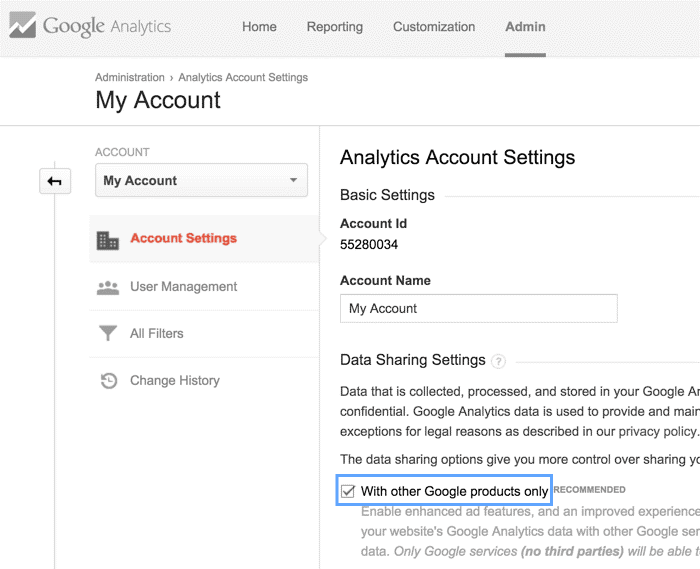
    • Make sure the Google Analytics ‘Data Sharing’ setting – ‘Google Products and Services’ is turned on

    Step-by-step guide to enable Data Sharing

    Once the above given requirements are fulfilled we can move ahead and enable the Data Sharing.

    Smart Goals


    • Login to the Google Analytics
    • Decide on which analytics account you want to enable Data Sharing and navigate to that account
    • Select ‘Account settings’ in the Account column
    • Tick ‘With other Google products only’ check box under Data Sharing settings


    3 Simple Steps to work with Smart Goals

    Now that we have enabled the Data Sharing let’s see how we can enable the Smart Goals.

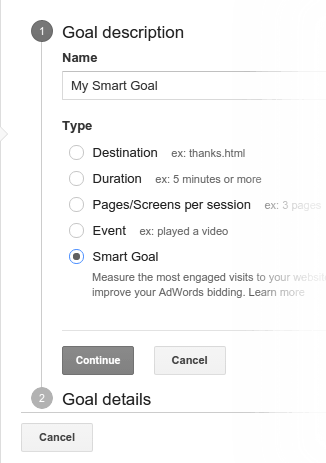
    Step 1: Enable Smart Goals

    • Login to Google Analytics
    • Select the Admin Tab

    Smart Goals

    • Click on Goals > Select Smart Goals
    • Give a name to your Smart Goal and Save

    Smart Goals

    Note: If you select an Industry category, the Goal description might appear different than what is shown in the image above. So, kindly ignore it and click on Smart Goals.


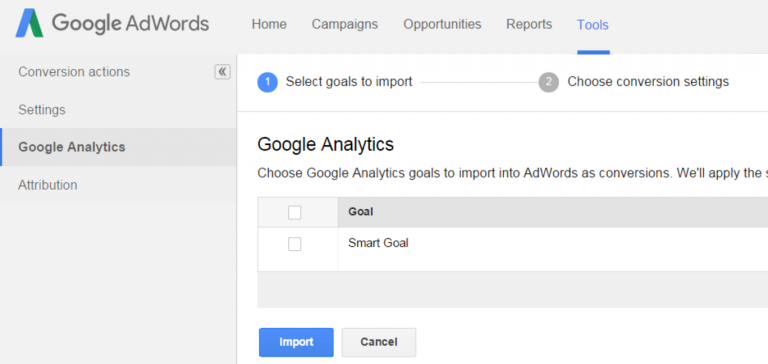
    Step 2: Import Smart Goals to AdWords

    In order to optimise the Google AdWords performance, it is essential to import them into AdWords. Follow these basic steps to do so:

    Smart Goals

    • Link the Google Analytics and AdWords accounts
    • Once linked, wait for 30 minutes to get the imports
    • Sign in to AdWords account
    • Click on the Tools Tab > select Conversions
    • Go to the left hand menu and click on Google Analytics
    • Check the boxes you wish to import. Click continue
    • The next page will display the settings that apply to the goals you selected. Click on import goals
    • Click Close to if you have completed the process or click Import more to import more goals

    Step 3: Use Smart Goals to optimise AdWords

    Once the Smart Goals are imported let them amass data for a few weeks. The first step to start using Smart Goals is to calculate Cost Per Acquisition (CPA). Simply divide the expenditure of the ads by number of Smart Goals completed.

    Let’s take an example:

    Your expenditure in Adwords in past 2 weeks = $2700

    Number of Smart Goal conversions = 90

    Therefore, the average CPA = $2700/90 = $30

    So the average cost for acquiring a session having high probability to convert is $30. In this case, you should set your CPA target to be $30 in the AdWords.

    Note: To optimise AdWords, Google also recommends you to use a flexible automated bidding strategy, called as Target CPA bidding and if you wish to manage the bid by yourself use manual CPC bidding.


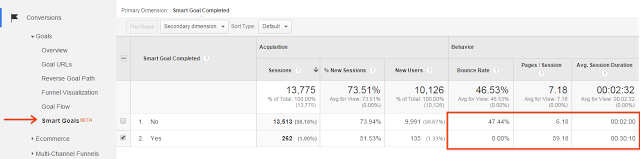
    How to see Smart Goals perform?

    To see how the Smart Goals are performing, you need to check the Smart Goals report. It helps you to distinguish between the Smart Goals Traffic and the other traffic. To generate the report go to Conversions> Goals> Smart Goals report.

    Smart Goals Limitations

    Though these Smart Goals turn out to be useful for the advertiser, they have their own limitations. They are listed as follows:

    • You cannot customise or configure them
    • They can take up only one of the available 20 slots
    • You can only have one Smart Goal per view
    • They are unavailable for views that get 1 million + visits per day
    • In AdWords, they don’t support VTCs (View Through Conversations) or cross-device conversions

    Well, all said and done, these smart goals are yet not completely rolled out for all the analytics users or advertisers. However, you can expect it to be gradually made available for all the users.


  • PRWEB – ENABLING MORE VISIBILITY TO BUSINESSES AND BRANDS!

    Everyday millions of people search online for brands and businesses. PRWeb’s focus is predominantly online visibility. PRWeb ensures that a brand’s news gets straight to the search engines, like Google, Yahoo and Bing with its search engine friendly releases. Which means brands and organisation gain more online visibility and can be found on the web more easily.

    With PRWeb, a marketer can drive traffic, generate sales, gain publicity, and get more brand visibility with ease and simplicity.

    What is PRWeb?

    In simple words, PRWeb is an online Press Release distribution service provider, which promotes business through press releases. PRWeb offers various press release packages, enabling brands and organisations of all sizes to increase the visibility of their news, reach new audiences, stand out in search, and drive traffic to their websites.

    PR Web distributes news via a variety of News sites, including Fox News Networks, CNN Money, HPC Wire, and national outlets like Associated Press and their affiliates. With PRWeb a marketer can target specific sites, based on industry verticals.

    What are the Targeting options available in PRWeb?

    PRWeb has a Media Digest, which is essentially a list of media outlets. A marketer has the option of choosing from multiple categories within its Media Digest. These categories is segmented as Information Technology, Hospitality and Travel, Health and Medical Digests, Business News Digests etc which helps in targeting. A marketer has the choice of targeting on a regional basis, which is essential if target audience is narrow. This helps a marketer achieve relevancy, quality, and reaching desired audience.

    PRweb regional coverage

    How to setup PRWeb?

    Setting up PRWeb is too easy. PRWeb provides the option of creating an account for free and a marketer can begin his PRWeb journey from there.

    Step 1

    Create an account for free.

    Create a prweb account

    Step 2

    Once the account is created, a marketer will be directed to the home page of their account. To create a press release, a marketer needs to click on the Create Release button.

    PRweb account creation

    Step 3

    Once clicking on the Create Release button, a marketer has to select from the package.

    Step 4

    Once a package is select and the Press Release is released, a marketer can analyze the release. PRWeb offers the following monitoring features:

    • Release Interaction
    • No Of clicks
    • Social Engagement
    • Major Online pickups in search engines such as Google and Yahoo

    PRweb account creation steps

    What are the type of Press Release packages available?

    A marketer can access to an array of packages, namely Basic, Standard, Advanced, Premium and Business. Depending upon the campaign requirement, a marketer can select the requisite package and once the payment is made the targeting options can be set. Once the targeting options are set, the Press Release can be syndicated and released. A marketer has the option of choosing add on services, if any, like SEO Optimization, Press Release writing, Press Release formatting etc.

    PRweb account creation stepsPress releases are still relevant and work really well for a marketer. A marketer can get the most out of a press release and by utilising a handy tool such as PRWeb, a marketer stands a chance to get a lot of visitors. What’s more, by including links in the submitted press releases a marketer can acquire more backlink, which comes in handy in the SEO campaigns.

  • TWITTER ADS: THE ADVERTISING PLATFORM THAT’S TRENDING IN THE DIGITAL SPACE!

    Earlier this year, Twitter, the world’s favourite microblogging site, announced that it is opening its Self-service advertising platforms across the globe. While major brands were able to buy ads around the world from Twitter; this marks the first time that advertisers from India and other major markets can purchase targeted ads from Twitter.

    What are the types of Twitter Ads?

    Twitter is home to more than 320 million active monthly users and drives more than a billion unique visits monthly to sites with embedded Tweets. Making Twitter one of the favourite and rich marketing platforms for brands.

    Although Twitter has been around for more than nine years, most of the advertising products offered by Twitter is relatively young. Although most of the advertising products focused on primarily on brand awareness, Twitter began offering more action-oriented, ROI focused products recently. Twitter, recently, introduced its self-service advertising platform in India.

    Type of Twitter Ads:

    Types of twitter ad

    By opting to do a Tweet engagement ad, an advertiser can reach more people and drive conversation in and around their brand.

    1. Followers

    By opting for a Follower ad, an advertiser can grow the brands Twitter community.

    1. Website clicks/conversions

    With a website clicks / conversions ad, an advertiser can redirect traffic to the brand’s website to perform an action, such as a purchase or sign up, etc.

    1. App installs/engagement

    By opting for an app installs / engagement ad, an advertiser can persuade people to install or engage with a mobile app.

    1. Leads on Twitter

    By opting for a lead generation ad, an advertiser can collect emails addresses from people who express interest in the brand.


    What are the benefits of Twitter Ads?


    Twitter AdsBenefits of twitter

    How to create Twitter Ads?

    Setting up a Twitter Ad campaign is really simple. Follow these simple steps to create a Twitter Ad:

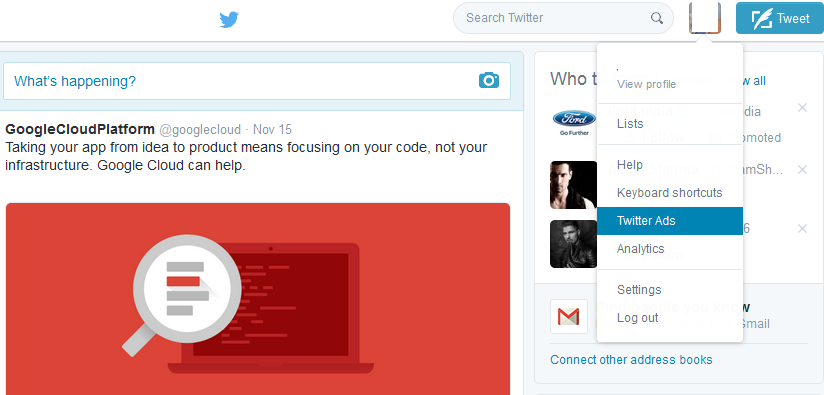
    Step 1 – Log into your Twitter account

    Create Twitter Ad Step 1

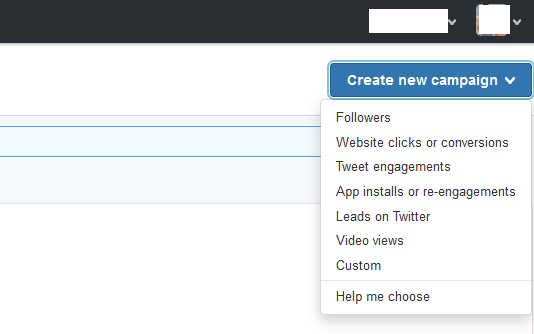
    Step 2 – Select your business objective

    Create Twitter Ad Step 2

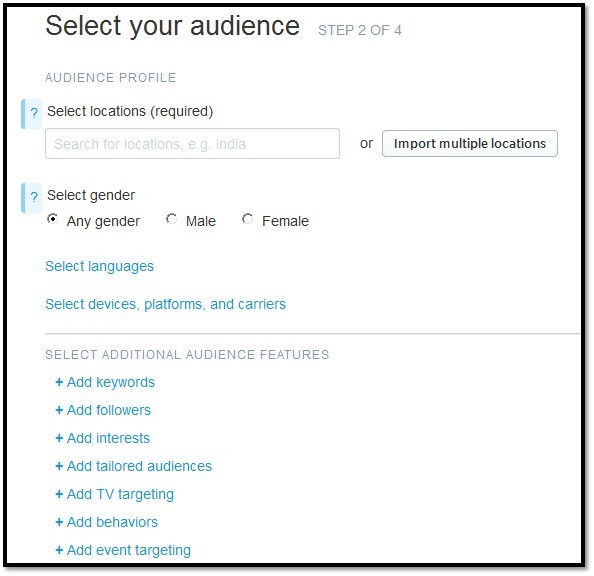
    Step 3 – Choose your target audience

    Create Twitter Ad Step 3

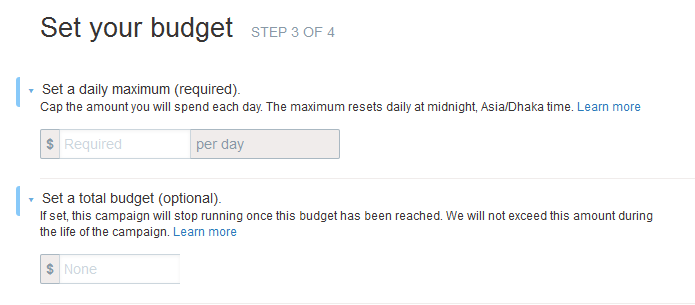
    Step 4 – Set a budget and pay for what works

    Create Twitter Ad Step 4

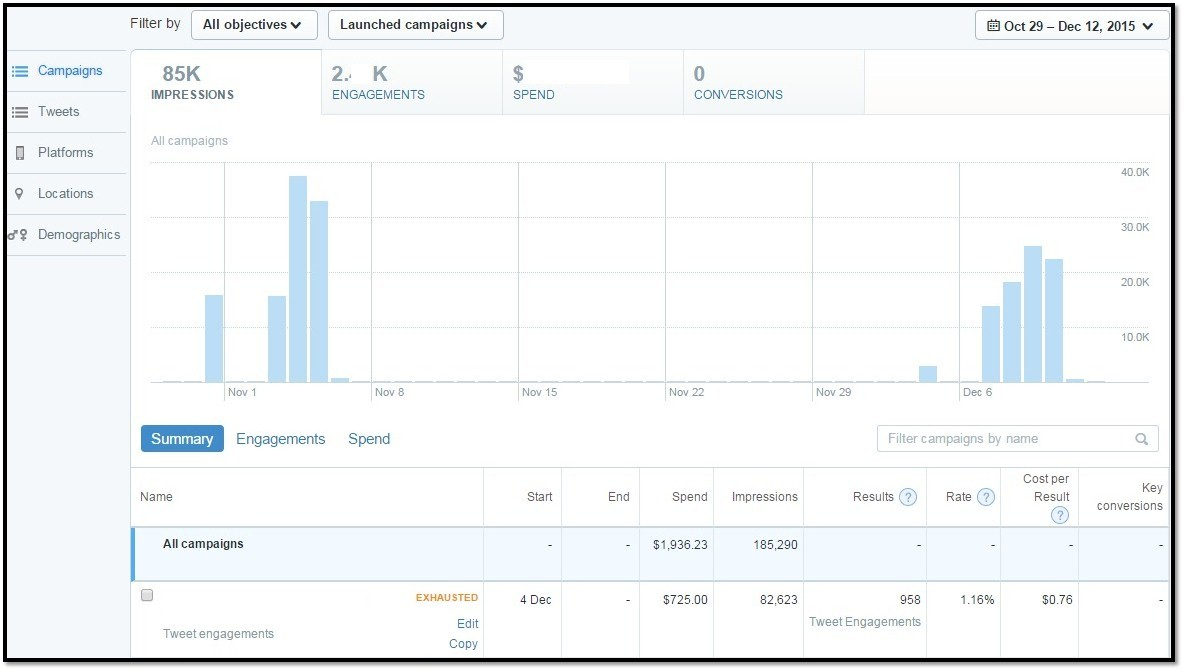
    Step 5 – Measure and optimize your results

    Create Twitter Ad Step 5

    What are the targeting options in Twitter Ad?

    Twitter Targetting audience

    Twitter Ads Takeaway:

    • Connect with your customers
    • Reach potential customers
    • Gain more followers
    • Measure results in real time


  • CUSTOMER MATCH: BRINGING BRANDS CLOSER TO THEIR CUSTOMERS!

    Digital innovations are changing the way we interact with one another. This has also had an impact on the way consumers and brands interact with each other. Today for a brand to succeed and, more importantly, to stay relevant with its target consumer, the brand communication needs to have immediacy. While brands are finding multiple ways to reach their target audience and owned audience through various platforms. Google is providing advertisers one more avenue to reach their audience with its Customer Match.

    What is Customer Match?

    Google’s Customer Match is a new product that can help advertisers reach their existing customers – like those who have signed up for a newsletter or have purchased a product – in a very relevant and immediate manner.

    Customer Match helps a brand reach their high-value consumers on Google Search, YouTube, and Gmail. All an advertiser has to do is upload a list of email addresses to the AdWords platform, which then will be matched to signed-in users on Google. An Advertiser can then build campaigns and ads that are designed specifically to reach these audiences.

    Customer match

    Upload Email Addresses: An advertiser can upload a list of email ids in AdWords under the ‘Audiences’ tab through Customer Match.

    Verify Emails with Google: Each of the list that is uploaded on Customer Match, Google matches the email addresses with the users’ primary Google account email address.

    Similar Audiences for YouTube and Gmail: An advertiser can generate similar audiences based on the customer data uploaded on the platform. This is generated automatically if the uploaded list meets the minimum eligibility criteria. An advertiser can target a similar audience the same way they would target a remarketing list.


    How Customer Match works?

    For a brand to reach its existing consumers Customer Match is a really easy and effective way. What’s more, you can target users who are similar to those in your database by opting for ‘Generate Similar Audience’ in Customer Match.

    Here’s how Customer Match works:

    Customer match process

    For instance, let’s suppose if the brand is into Hospitality industry. A user, who is in the brand’s loyalty program, googles ‘Round Trip to Munnar’ that is precisely when the brand can reach them with their message. The user can be shown a relevant PPC ad that could remind them of their membership and prompt them to redeem loyalty points. The ad copy could say that ‘Redeem Your Loyalty Points and Avail Further Discounts for Stays at Munnar!’ right when they are planning their trip. And that too on any devices. The brand can then follow it up by showing videos about their hotels on YouTube or use GSP to promote while they are on Gmail.

    How to upload an email list on Customer Match?

    Step 1

    Click Shared library / Audiences / +Remarketing list and choose Customer emails.

    Remarketing

    Step 2

    An advertiser can segment the audiences* and reach them with a higher level of precision by creating Custom Combinations. So as to attain their campaign objective, an advertiser can choose to form a customised audience list. The customised audience list can be created by using the following targeting options:

    • any of these audiences
    • each of these audiences
    • none of these audiences

    This enables an advertiser to display specific ads to users who have signed up for a newsletter but didn’t bought anything.

    How to create a list

    *Here ‘Audience’ stands for ‘List of Emails’

    Step 3

    Once an advertiser selects the audience they want to target, they have to select “Upload Customer Email Addresses”. To upload a customer email address list, an advertiser has to meet the following requirements:

    • The file with the list email addresses has to be in .CSV format.
    • The file size can’t exceed 17 MB.
    • The email addresses being uploaded should be acquired in a first-party context – that is, the email addresses must have been shared directly with the advertiser, with explicit consent.
    • The advertiser has to use a ‘SHA256 algorithm’ on the list of emails, which is standard for one-way hashing.

    Email Marketing

    For a detailed instruction on how to upload an email list on Customer Match, click here.

    Key Takeaways:

    • Engage with customers: Connect with the customers on a personal level.
    • Deliver personalised offers: Deliver personalised offers when customer need it the most.
    • Bring customers back: Target lapsed customers or contacts and bring them back.
    • Exclude existing customers: Target prospective customers with offers while excluding existing customers.
    • Increase engagement: Engage with your audience when they need you the most.

    The most efficient way to utilise Customer Match is by segregating the target audience well and uploading the audience list there by enhancing the scope of personalisation to a higher level.

    Why AdWords Customer Match is so exciting?

    Customer Match is considered to be the most exciting update to Google AdWords. Customer Match allows advertisers to target prospects more proficiently and connect with existing customers more engagingly.

    Customer Match enables a brand to be at the right place, with the correct message, and at the exact moment when a consumer needs it the most. Thus, giving a brand the capability to delight their most loyal consumer when it truly matters to them. With Customer Match, a brand stays relevant and reliable to its most valuable customers at all times.

  • GOOGLE REVOLUTIONISES EMAIL MARKETING WITH GMAIL ADS

    Over the years, email has become an integral part of our everyday life. Be it staying in touch with family and friends to getting updates from favourite brands, Email plays a huge role today. Brands have constantly sought ways to utilise this medium to reach out to their audience. Google’s Gmail Ads is the most recent platform that will give brands the much needed edge when it comes to Email Marketing.

    What are Gmail Ads?

    Gmail Ads, formerly known as Gmail Sponsored Promotion, is a type of online advertising within the Google AdWords platform. In case you haven’t seen Gmail Ads, you can find them at the top of the Promotions tab in your personal Gmail inbox. Gmail Ads are highly-targeted promotions wherein the campaigns are conducted based on a user’s recent email behaviour and online purchase.
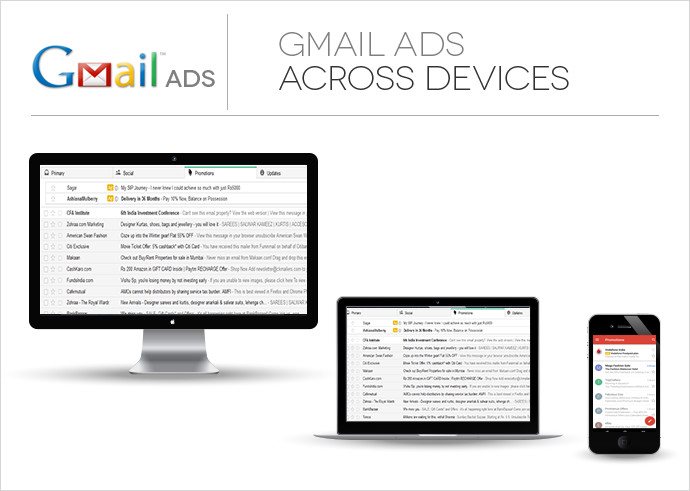
    Gmail Ads

    For instance, if a user has booked a travel ticket to Goa, they will receive a holiday purchase receipt in their inbox. An hotelier or a resort based in Goa can target this user by displaying ads in their inbox the next time the user logs into his email.

    When a user clicks on a Gmail Ads, the advertiser is charged for the click and the user is shown an expanded ad, which redirects the visitor to a landing page, just like a regular Pay Per Click ad. Like Facebook Ads or Google Display Network, an advertiser can concentrate their advertising efforts targeting only those users who they deem most likely to be interested in their product.

    How to Create a Gmail Ads Campaign?

    From a purely technical point of view, Gmail Ads are same as Display campaign. An advertiser familiar with Google Display Network would find it really easy to setup a Gmail Ads campaign. The first step is to setup a Display Network Only campaign.

    Gmail Ads campaign shares the exact targeting options as any Display Campaign. The key differentiators that make an ad group a ‘Gmail Ads’ one are:

    1. An advertiser has to opt for managed placement: mail.google.com.
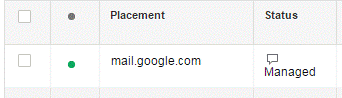
    remarketing      2. An advertiser has to use Gmail Ads specific creative units.

    3. Gmail Ads offers a few unique reporting columns which are specific to the platform. These include reporting on the number of saves and forwards. An advertiser can acquire these indicators from the ‘Gmail Ads’ set of columns.
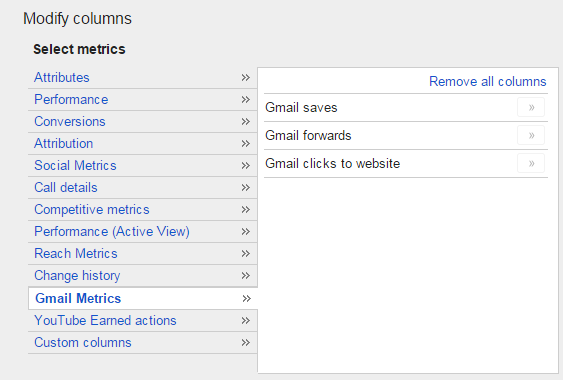
    gmails ads

    What are the Targeting Methods in Gmail Ads?

    An advertiser who is familiar with Google Display Network will find that Gmail Ads offer targeting options which are similar to GDN. The key highlight here is that Gmail Ads targeting allows you to make specific strategies to combat competitor brands. An advertiser can form specific strategies based on particular keywords for niche products.

    Targeting options available in Gmail Ads:
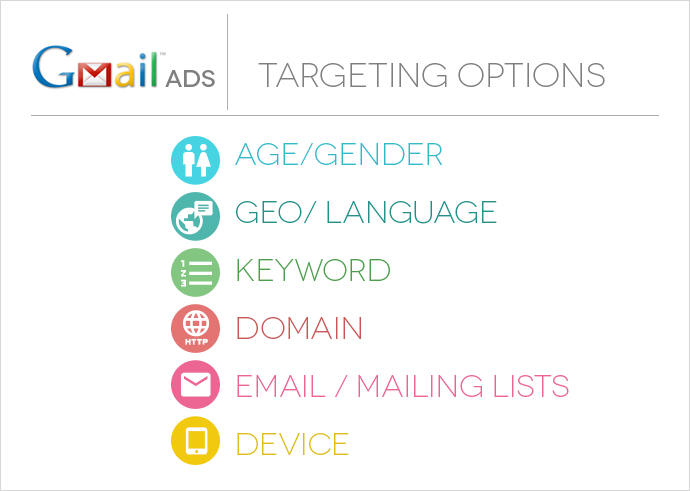
    Gmail Targeting options

    How To Create an ad unit for Gmail Ads campaign?

    For creating the ad unit for Gmail Ads campaign, an advertiser has to go to the “Ads” tab within the ad group. Click on the “+Ads” button and go to “Ad Gallery” and select “Gmail Ads.”

    Points to Note When Creating an ad unit in Gmail Ads

    1. An advertiser has to name their ad, so as to identify it in AdWords
    2. An advertiser has to add a display and destination URL
    3. A brand logo, not larger than 144px x 144px
    4. The brand name, not more than 16 characters
    5. A subject line for the email, maximum 25 characters
    6. A description or ad text, maximum 100 characters,
    7. An expanded ad unit image, not larger than 650 X 650.

    The most frequently used template is the single clickable image, which allows an advertiser to use a single image and call to action, however an advertiser can experiment based on their campaign requirement. An advertiser is offered the following Gmail Ads templates that they can choose from:
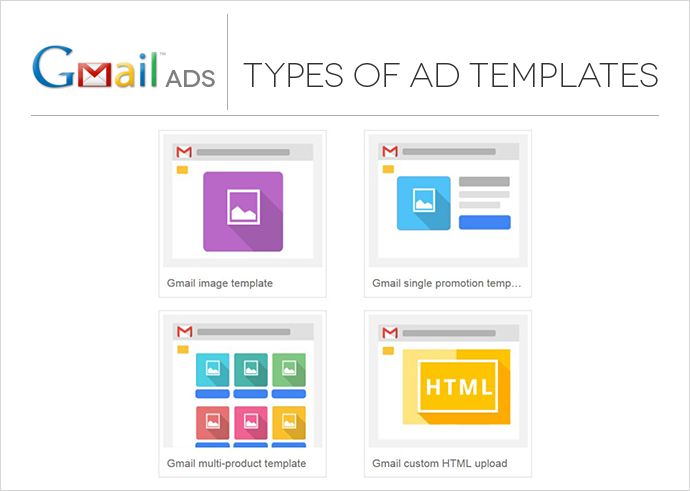
    Gmail Ads

    How does a typical Gmail Ad appear on screen?

    A typical Gmail Ad unit consists of two parts – A teaser Ad and An Expanded Ad Unit. The teaser creates the initial interest amongst the user. Once the user clicks the teaser, the fully expanded ad, which looks like an email, is served.
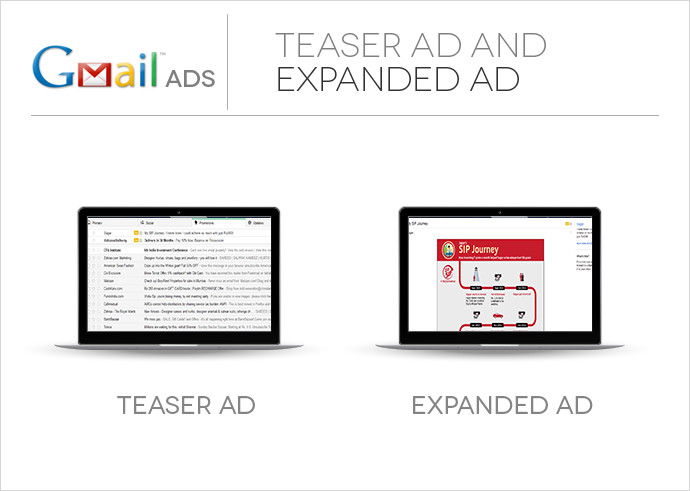
    Teaser and expanded AD

    A Gmail Ad teaser has a 25 Character headline field and a 100 character body text field. The advertiser can add a 144px X 144px image along with a ‘Company Name’ field. These will be displayed on the left hand side of the ad.

    The expanded ad unit, which is displayed once the user clicks open the teaser ad, expands into the email area of Gmail. The expanded ad is not more than 650px X 650px. The expanded ad can feature static images, text, links, and embedded YouTube Videos and lead forms within the campaign creative.

    The advertiser is charged on a CPC basis when a user clicks on the teaser to open the expanded ad. The expanded ads offer call to action that can drive traffic to the advertiser’s website. No additional costs are levied if a user visits the advertised landing page or takes an action within the expanded ad.


    Key Takeaways:

    • Optimum Delivery: Show ads only 10x per user within a 30-day period until they open or dismiss it.
    • Effective Formats: See an open rate of up to 3.5% on average.
    • Engaging Ads: Make ads engaging with images and lead forms.
    • Better Performance: At-par, if not better, performance compared to other display placements.
    • Additional Matrix: Gmail Ads lead to thousands of “saves” and “forwards” that can’t be measured by traditional search and display advertising campaigns.
    • Higher Open Rate: Gmail Ads usually have a higher open rate; primarily due to teaser ads being placed in a premium position (top of the mail box) leading to higher opens of the teaser ads.

    The higher open rate, due to the premium position of the teaser ad, results in a lot of money being spent behind opens and eventually, if people don’t click to go to the website, the cost per website click becomes very high. That being said, the value proposition that Gmail Ads offer is that it is an ideal platform for branding and provides greater exposure thanks to the big canvas.

    Gmail Ads is a really great platform that can help an advertiser generate awareness amongst their target audience. While at the same it is also a great platform that drives conversions, as well. Gmail Ads have become an integral part of AdWords add to it the fact that they are cost-effective, an advertiser has a platform that is efficient and perfect to experiment on. Although, to create a successful Gmail Ad campaign, thoughtful planning and strategy is required at the core and creatives that are really engaging and out of the box.

     

  • INSTAGRAM ADS – The IN Thing in Advertising

    Instagram, world’s favourite photo-sharing app, has opened its door for advertisers to promote their products on its platform across thirty countries. Instagram ads are displayed as a regular Instagram image or video. But the ads can be identified by a user thanks to the ‘Sponsored’ mark present on the right-hand side corner of the photo.

    WHAT ARE THE TYPES OF AUDIENCES ON INSTAGRAM?

    With Instagram being one of the largest interactive advertising platform on mobile, Instagram Ads have tremendous potential.

    • Instagram is a community of 400 million users.
    • 75% of this 400 million users reside outside the US.
    • Of the 100 million new users to join Instagram, 50% reside in Europe and Asia.

    Recently Nielsen conducted a study for Instagram which revealed interesting statistics about the platform. The key motive behind an incisive study as this was to attract advertisers to the platform. Below are some of the insights gained from this India-centric study:

    • Instagram’s monthly active user base in India has doubled over the past year.
    • 90% Instagram users are under 30
    • 18-24 the age bracket of active Instagram profiles
    • Avid travellers – more than 50% took at least 4 vacations in the past year!
    • Brand Conscious – More than 50% users bought from brands they followed on Instagram!
    • Key Interests – Instagram users’ key interests include music, travel, food, photography, technology, fashion, and sports.

    CAN INSTAGRAM AND FACEBOOK PAGE BE LINKED?

    Being a Facebook service, the Instagram and Facebook Pages can be linked. To create and run ads on Instagram, an advertiser doesn’t require a Business Manager Account. But in case an advertiser wants to interact with audience through comments, the Instagram account needs to be added to the Business Manager or on the page settings.


    WHAT ARE THE AD FORMATS AVAILABLE ON INSTAGRAM?

    Instagram offers an advertiser three distinct formats to advertise on, which are namely –

    PHOTO ADS

    Image Source : Google images
    Image Source : Google images


    VIDEO ADS

    Video Ads Instagram
    Image Source : Facebook Ads Guide


    CAROUSEL ADS

    Image Source : Google images
    Image Source : Google images


    Instagram, renowned for its strict criteria towards user posts, has been very lenient towards advertisers:

    • A user can upload only a 15 second videos on Instagram, but a video posted by an advertiser can be as long as 30 seconds.
    • A regular user is barred from adding external links on the platform while an advertiser has the liberty to choose from five different varieties of ‘CTAs’ to drive action.


    WHY ADVERTISE ON INSTAGRAM?

    • THE EARLY-ADOPTER EDGE

    As an early-adopter of the technology, you can leverage the novelty and uniqueness of the platform and gain an edge over the competitors. Being an early-adopter of a new technology gives the advertiser an edge over the competition.

    • A CACHE OF ENGAGED AUDIENCE

    Instagram offers a digital marketer a really engaged and passionate audience, who can be targeted precisely. Instagram Ads’ targeting is based on Facebook’s targeting data. Which means that a digital marketer can use custom audiences, interest based targeting, demographics, etc., to find the perfect audience on Instagram.


    WHAT IS THE FUTURE OF INSTAGRAM ADS?

    Instagram is here to stay, at least for the foreseeable future, as it is one of Facebook’s first billion dollar acquisitions to start earning revenue. Add to it the fact that Instagram Ads offers an advertiser incredible reach into a particular set of demographics, thus securing the future of Instagram Ads as a reliable advertising platform.

    With Instagram Ads gaining momentum in the digital ad space, industry analysts have started predicting the amount of revenue it would generate in the near future. The platform is expected to generate as much as $1 Billion in the next three to four years, while on the other hand the expected revenue of the current year is projected to be $595 million.

    In conclusion, Instagram Ads offer incredible opportunities to a digital marketer and makes the digital advertising space more robust and exciting.

  • REAL-TIME BIDDING: The Technology That’s Transforming The Digital Landscape in Real-Time

    The thing about us marketers is that every new-thing-on-the-block becomes part of our everyday vocabulary. Real-Time Bidding is the latest addition to the digital lexicon. But if asked what Real-Time Bidding is, blank stares are usually the answers. Here you will find a detailed explanation about what Real-Time Bidding is, and how useful the tool is to a digital marketer.

    What Is Real-Time Bidding?

    Real-Time Bidding (RTB) is a technology that Demand-side Platforms use to determine which impressions are most relevant to users when they visit a web page. This is based on targeting data such as location, demographics, and more.

    RTB represents the process of evaluating and bidding online for an ad impression in real time. Here real time means the mere seconds it takes for a webpage to load. Yes, it is that instantaneous. Due to the instantaneous nature of the process, RTB has become analogous to the Stock Exchange.

    How Does Real-Time Bidding Work?

    RTB goes beyond traditional forms of advertising when it comes to functionality. In the traditional model, the seller and buyer trade large number of ad inventory at a stable price, while with RTB, the exchange of ad inventory on the platform is on an impression-by-impressio/n basis. The entire process of how exactly RTB works is illustrated below:

    The Real-Time Bidding Process –

    Real Time Bidding Process

    Real-Time Bidding process
    Real-Time Bidding process


    What Types Of Creatives Are Compatible In Real-Time Bidding?

    Real-Time Bidding offers incredible opportunities for a digital marketer to create robust campaigns as it supports a total of seven creative formats and platform. These formats are distinct and extremely flexible. The complete list of Compatible Creatives are –

    • Image
    • Mobile
    • HTML5
    • Rich Media
    • Video
    • FBX
    • Dynamic Creatives

    What Are The Types of Ad Exchanges Available In Real-Time Bidding?

    RTB offers a digital marketer access to a host of top-tier inventory across screens and formats, and the real-time insights to measure the success of the buy. The prominent inventories available on RTB include Double Click Exchange, Right Media, Rubicon, AppNexus, Pubmatic, ContextWeb, Casale, and OpenX.


    What Are The Types of Targeting Options Available In Real-Time Bidding?

    As a digital marketer, RTB helps one understand the audience with real-time data and uniform insights. RTB offers unified and open platform that allows a digital marketer to shape and segregate audience data from multiple sources.

    A digital marketer can target the audience on the following criteria:

    • Frequency (number of times an Ad should be shown)
    • Ad Format (Types of Ad)
    • Site Category (Subsection of a single website)
    • Website (Apps and URL)
    • Creative (Creative Sizes)
    • Day of Week
    • Time of Day
    • Ad Exchange
    • Geography
    • Browser Type (Example: Mozilla, Safari, Chrome, etc.)
    • Operating System (Example: Android, iOS, Windows, Linux)
    • Devices

    So, why is Real-Time Bidding good for advertisers?

    RTB gives you a host of inventories across a range of sites. These inventories which can be easily accessed with the help of ad exchanges. While at the same enabling the adviser to handpick only those impressions that they deem valuable. This also ensures that the brand being advertised gets better exposure and reach the right audience.

    RTB Takeaways:

    • Unprecedented level of efficiency
    • Better Exposure for the Brand
    • Cheaper than direct buys
    • Larger Inventory base
    • Increases website traffic
    • Assists in conversion


    What is the future of Real-Time Bidding?

    The varied possibilities that RTB presents has propelled it as one of the most preferred modes of digital advertising. In the last few years, RTB has been embraced by digital marketers across the globe and RTB is expected to grow further in the next few years. According to a report published by the International Data Corporation the RTB spends is expected to reach 20.8 Billion by 2017.

    As Real-Time Bidding continues to grow, the chances of gaining valuable insights regarding the audience will continue to grow as well. For an advertiser, RTB’s impression-by-impression mode allows them to execute better strategies with regards to customer segmentation while staying within the budget. For a digital marketer, the seamless interaction between the campaign, site, and user information ensures a higher success ratio.

    Keeping all these things in mind, one can say with certainty that the addition of RTB into our ever-changing digital environment isn’t fleeting matter; RTB is here to stay and is testament of the dynamic and exhilarating future that digital advertising industry will have!